
How to start a cold email: 7 opener frameworks tested
Match the opener to your list: pattern interrupt or question openers for cold lists, referral or observation openers for warm lists, and statistic openers for l
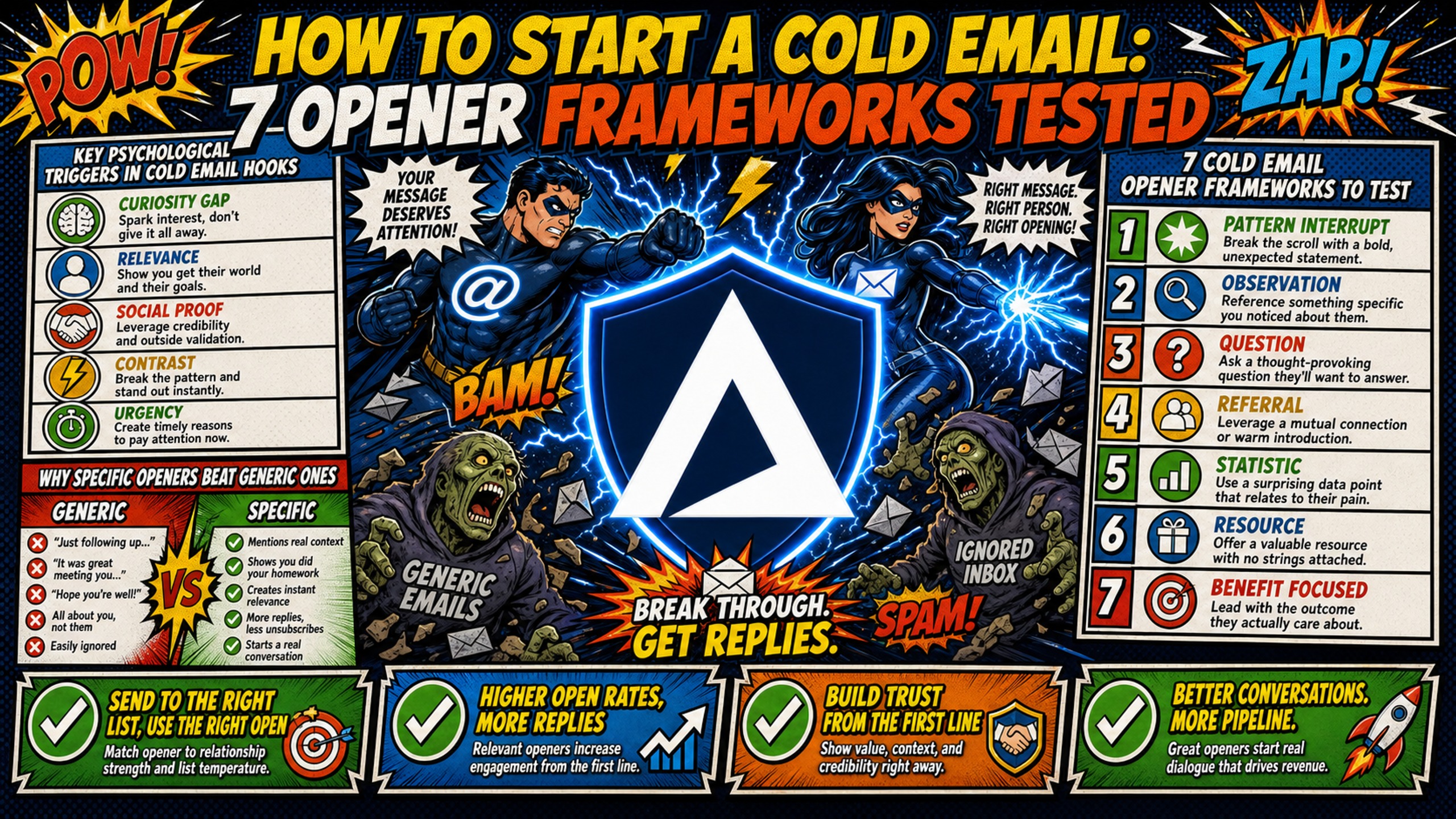
TL;DR: Match the opener to your list: pattern interrupt or question openers for cold lists, referral or observation openers for warm lists, and statistic openers for large segments where you have credible data (compliments need specific, verifiable praise, and direct asks need an exceptionally clear offer). Test two openers at a time by changing only the first line, sending 1,150 to 3,200 emails per variant depending on your baseline rate, and running for at least 5 business days. Judge the winner on positive reply rate, not opens. Before any test, confirm SPF, DKIM, and DMARC pass and your domains are warmed, because poor deliverability makes copy results meaningless.
A cold email opener gets a few seconds of attention before the prospect decides whether to keep reading. The opener gets most of the effort, but authentication and sender reputation decide whether it reaches the inbox.
This playbook covers seven opener frameworks, the type of list each one suits, and how to test them against each other so your own reply data picks the winner. It closes with the infrastructure checks to run before any test, so deliverability problems don't skew your results.
Key psychological triggers in cold email hooks
Busy executives tend to skim and skip sales emails, so the first line has to earn a few more seconds. For a deeper look at why first lines work, see Inframail's guide to email opener psychology.
Why specific openers beat generic ones
The best cold email opener frameworks interrupt expected patterns. Generic openers signal mass blasting, while specific ones signal research and demonstrate understanding of the prospect's industry challenges. The distinction is not aesthetic, it is what breaks the skip reflex long enough to earn attention.
Curiosity-driven openers like "Quick question about your sales process at [Company Name]" engage prospects through genuine inquiry rather than immediate pitch, reducing the defensive response that kills reply rates.
7 cold email opener frameworks to test
Each framework below includes the psychological trigger, an example opener, when to use it, and how to test it. Results vary by industry, list quality, and campaign structure.
For each framework, change only the first line, send the number of emails per variant shown in the sample size table for your baseline reply rate (at least 1,150), and compare positive reply rate.
1. Pattern interrupt openers
Psychological trigger: This opener bypasses conditioned behavior: executives skip sales emails reflexively, and leading with something specific and unexpected breaks that reflex long enough to earn a second read.
Example: "Not a pitch. One fact about [Company]'s [workflow] that most [Industry] teams miss: [specific finding]."
When to use: Cold lists where prospects skip sales emails on reflex. Works best when the opening angle is specific to the prospect's situation.
In Gangly's study, a short pattern-interrupt question asking who owns a specific workflow lifted reply rate 1.8x.
How to test it: Pair it against a question opener on the same cold segment.
2. Observation openers
Psychological trigger: A specific observation about the prospect's recent activity signals research, telling the reader you have done work before reaching out and separating this email from generic outreach.
Example: "Saw your team just launched [Product X]. Most companies in [Industry] struggle with [Specific Challenge] during launch."
When to use: When you have verifiable, recent information about the prospect's company. Requires list enrichment or manual research.
In Gangly's study of 500 B2B cold emails sent in Q1 2026, openers that referenced a specific recent signal lifted reply rate 3.1x over generic openers. Gangly's study is small (500 emails across 50 reps), so treat these multipliers as directional.
Hunter's State of Email Outreach report found that emails with two custom attributes averaged a 56% higher reply rate than non-personalized emails (5.6% vs 3.6%).
How to test it: Pair it against a referral opener on a warm segment. Inframail's breakdown of personalized vs generic email openers compares the two in more detail.
3. Question openers
Psychological trigger: This opener works through curiosity: "Quick question about your sales process at [Company Name]" engages prospects through inquiry rather than pitch, and invites a reply without asking for a meeting.
Example: "How are you currently handling [Specific Process] at [Company]?"
When to use: When targeting a specific role with a known pain point. The question must be specific enough to show you understand their world.
How to test it: Pair it against a pattern interrupt opener on the same cold segment.
4. Compliment openers
Psychological trigger: A compliment tied to something specific the prospect did creates goodwill and shows research.
Example: "Your team's [Specific Project] write-up covered [specific detail], which most [Industry] teams skip."
When to use: When the compliment is specific and verifiable. Generic praise like "Love what you're doing" typically signals low effort and reduces credibility.
How to test it: Pair it against an observation opener on a warm segment.
5. Referral openers
Psychological trigger: This opener works through social proof: "[Mutual Connection] mentioned you were the expert on [Topic]" borrows credibility from an existing relationship and gives the prospect a reason to reply beyond your pitch.
Example: "[Name] at [Company] suggested I reach out about [Specific Topic]."
When to use: Only when the referral is real. Fabricated referrals destroy trust, and putting one in the subject line can breach the CAN-SPAM Act's ban on deceptive subject lines.
In Gangly's study, a mutual-context line lifted reply rate 2.4x when the connection was real and recent.
How to test it: Pair it against an observation opener on a warm segment.
6. Statistic openers
Psychological trigger: This opener works through data-driven relevance, leading with a specific, verifiable statistic about the prospect's industry or company.
Example: "Companies in [Industry] lose an average of [$X] per year to [Specific Problem]. Is that tracking with your experience at [Company]?"
When to use: When you have credible, recent data. The statistic must be specific enough to be interesting but not so niche that it feels irrelevant.
How to test it: Pair it against a question opener on a large list segment.
7. Direct ask openers
Psychological trigger: This opener works through transparency: it skips the hook and states the ask directly.
Example: "I help [Industry] companies reduce [Specific Cost] by 20-30%. Worth a 10-minute call?"
When to use: When targeting decision-makers who receive high email volume and value directness. Works best with warm lists or when your value proposition is exceptionally clear.
How to test it: Pair it against a pattern interrupt opener on a warm segment targeting high-volume decision-makers.
Cold email reply rate benchmarks
Reply rates vary significantly by industry, list quality, and campaign structure, making it difficult to isolate pure opener performance. The benchmarks below come from Hunter, Woodpecker and Cleverly data covering 2024-2025 campaigns, while framework-specific performance depends heavily on audience fit.
Hunter's analysis of 31 million cold emails sent in 2025 puts the average sequence reply rate at 4.5%, up from 4.1% in its previous report. Hunter links lower open rates to Gmail and Outlook tightening their spam filters. Campaigns built around tight segments (≤50 recipients), genuine personalization (≥2 custom attributes), and structured follow-ups (3 messages) achieve measurably higher reply rates.
Reply rate benchmarks by industry and list quality
Legal services leads all industries with up to a 10% reply rate, while SaaS and software sit often sit under 2%, according to Cleverly's cold email benchmarks.
The average cold email sequence reply rate is 4.5%, meaning for every 1,000 recipients that received a cold email in 2025, only 45 replied, according to Hunter's State of Email Outreach report (measured per recipient across the whole sequence).
List hygiene matters too. Woodpecker's benchmark data shows campaigns kept under a 2% bounce rate get about 60% more replies than campaigns bouncing over 20%. The opener framework matters, but list quality matters more. For role and industry breakdowns, see Inframail's cold email reply rate benchmarks for 2026.
Interpreting your test data results
A difference in reply rate between two openers is meaningful only if your sample size is large enough to rule out random variance. With 500 emails per variant, the difference between 12 replies (2.4%) and 8 replies (1.6%) does not reach statistical significance, so you cannot conclude the first opener performs better.
How to start a cold email: choosing your first opener framework
The right framework depends on your campaign context, not on which one sounds cleverest. Start with the framework that matches your list quality and available research time.
Choosing openers for cold lists
For completely cold lists with no prior engagement, start with pattern interrupt (Framework 1) or question openers (Framework 3). Both require minimal research and suit lists where you have limited information about the prospect.
Choosing openers for warm lists
For warm lists (prospects who have engaged with your content, attended a webinar, or been referred), start with referral (Framework 5) or observation openers (Framework 2). Compliment openers (Framework 4) can also work on warm lists if the compliment is specific and verifiable.
Scaling openers for large email lists
For large lists (10,000+ prospects), no single opener framework scales on its own. Hunter's 2025 data recommends splitting large lists into segments of 50 or fewer recipients, with bespoke copy for each segment, rather than applying one opener framework across the full list. Observation and referral openers may produce higher reply rates but require list enrichment or manual research that does not always scale economically.
"InfraMail makes it remarkably easy to purchase domains, configure them correctly, create inboxes, and initiate warm-up immediately. The level of automation is exceptional and clearly designed for serious operators." - Verified user review of Inframail
Steps to map your cold email experiments
Testing openers requires a structured approach. The roadmap below assumes you are starting from zero and need to identify which framework works best for your audience.
Standardizing cold email tests
Testing openers requires isolating variables. A meaningful test changes one element (the opener) while keeping everything else constant, and measures positive reply rate rather than opens. Informal tests often change multiple elements at once and draw conclusions from insufficient sample sizes.
Standardization means defining your test parameters before you send: which opener framework, which audience segment, which call-to-action, and which success metric. Without this discipline, you cannot tell whether a low reply rate comes from weak copy or poor deliverability.
Sample size requirements per test
The table below shows minimum sample sizes for detecting a 2 percentage point lift at 95% confidence (two-sided) and 80% power, calculated using the standard two-proportion z-test formula.
| Baseline reply rate | Target reply rate | Emails per variant |
|---|---|---|
| 2% | 4% | ~1,150 |
| 4% | 6% | ~1,860 |
| 6% | 8% | ~2,550 |
| 8% | 10% | ~3,200 |
All rows assume one variable tested (the opener), all else held constant, a 2 percentage point absolute lift target, 95% two-sided confidence, and 80% statistical power. Read the table using your baseline positive reply rate, since that is the metric you are judging.
Required sample sizes grow as baseline rates rise because higher proportions have greater natural variance. Treat all figures as starting points rather than fixed requirements.
Week 1: Setting your opener test baseline
- Choose two frameworks to test: Pick pattern interrupt and question if you are starting cold. Pick referral and observation if you have warm lists or enrichment data.
- Define your success metric: Positive reply rate is the only success metric for opener testing. Log all replies, but count only positive ones ("tell me more," "interested," requests for a call) when comparing variants. Open rates are useful for diagnosing deliverability issues but do not predict meetings booked.
- Segment your list: Split your list randomly into two groups large enough to match the sample size table (at least 1,150 each). Ensure both groups have similar job titles, company sizes, and industries.
- Verify DNS configuration: Before sending a single test email, confirm that SPF, DKIM, and DMARC records are configured correctly and passing validation checks at mail-tester.com or similar diagnostics tools.
Weeks 2-3: Validating your first email opener
- Send test emails: Send each opener variant to its assigned segment. Keep everything else constant: same subject line formula, same email body, same call-to-action, same sending time.
- Monitor deliverability: Check inbox placement rate daily. If either variant shows a sudden drop in inbox placement, pause the test and diagnose the issue before drawing conclusions about copy performance.
- Track replies: Log every reply, positive or negative. Negative replies ("Not interested") are worth tracking separately because a spike in negative replies can indicate targeting problems, but they do not count toward opener performance.
- Run the full test: Complete the full test duration you set before launching.
Week 4+: Optimizing top-performing openers
- Analyze results: Calculate positive reply rate for each variant. If one opener produced a statistically significant higher reply rate (95% confidence), that becomes your new baseline. If neither variant wins at 95% confidence, keep the current opener and test a more different challenger.
- Test a new challenger: Introduce a third opener framework and test it against your Weeks 2-3 winner. Use the same sample size and test duration.
- Document learnings: Record which frameworks work for which audience segments. For example, your data might show pattern interrupts winning with C-level executives and question openers winning with mid-level managers.
- Scale the winner: Once you have identified a winning opener for a specific segment, roll it out across segments with the same profile, keeping copy specific to each segment. Continue testing new frameworks in parallel to avoid fatigue.
Campaign launch checklist
Use this checklist before sending any opener test. Copy it into your campaign planning document and verify each item.
Domain health (verify 48 hours before launch):
- SPF record configured and passing (check with mail-tester.com or MXToolbox)
- DKIM signature present and validated
- DMARC policy published (quarantine or reject)
- Domain has completed 14-day warmup schedule (see whether you need a separate warmup tool)
- Blacklist check clean across Spamhaus, Spamcop, and Barracuda
Sequence structure (verify 24 hours before launch):
- Opener (first line) isolated as single test variable
- Email body and CTA identical across all variants
- Unsubscribe link present and functional
- Personalization tokens tested with sample data
Test parameters (verify before first send):
- Minimum emails per variant matched to the sample size table (at least 1,150)
- Minimum send volume per variant matched to the sample size table
- Reply tracking configured in sending platform
- Segment split confirmed as random distribution
Critical errors when evaluating email hooks
Most opener tests fail because of methodological errors, not because the frameworks do not work. The mistakes below invalidate results and waste time. For mistakes in the opener copy itself, see Inframail's list of cold email opener mistakes that kill reply rates.
Isolating variables for clearer results
Testing two openers with different subject lines, different email bodies, and different calls-to-action tells you nothing about which opener works. You have changed four variables at once. A valid test changes one element (the opener) and holds everything else constant.
Keep the subject line, body copy, and CTA identical across both variants. If you want to test subject lines, run a separate test.
Setting a minimum test duration
How long a test runs depends on your sending volume, not your reply rate. Divide the emails needed per variant by the number each variant sends per day, and run for at least 5 business days so both variants see the same mix of weekdays.
Set your minimum run length before you start and commit to running the full test regardless of early results. If you check results daily and stop when one variant pulls ahead, you are introducing confirmation bias.
The cost of poor domain health
No opener framework can overcome poor domain health. If your SPF, DKIM, or DMARC records are misconfigured, mailbox providers are likely to filter your emails to spam before the prospect ever sees your opener. SPF verifies that the email comes from an authorized server, while DKIM verifies the email's integrity and authenticity using digital signatures.
Manual DNS configuration across multiple registrars consumes hours that campaign managers should spend testing openers.
Blacklist incidents surface with little advance warning and kill reply rates for active campaigns. Inframail's deliverability monitoring tracks domain and IP health with automated blacklist monitoring and auto-submits delisting requests when domains are flagged, achieving a 68.3% delisting success rate within 48 hours.
Shared IP infrastructure creates uncontrolled blacklist risk when other users on the same IP send spam or hit complaint thresholds.
Ready to test openers on solid infrastructure?
Inframail is the flat-rate Microsoft email infrastructure provider built for agencies running 50-200 cold email domains. For campaign managers running opener tests, clean infrastructure means results reflect copy performance, not deliverability problems. It automates SPF/DKIM/DMARC configuration, provisions dedicated IPs (1 on Unlimited Plan, 3 on Agency Pack), and has a 98%+ deliverability rate, with a 68.3% blacklist delisting success rate within 48 hours. The platform fee is $147/month flat, regardless of inbox count.
For 50 inboxes, Google Workspace Business Starter costs $420/month at $8.40 per seat on the Flexible Plan. Inframail's platform fee is $147/month flat. Savings: $273/month, or $3,276 annually. Domain costs ($5 to $16 per domain per year) and warmup tools (typically $15 to $50 per inbox per month) apply on both sides and are not included in this comparison.
In this case study video, watch how Inframail helped a client scale cold email more cheaply and quickly while focusing on inbox placement, support sending volumes of up to 15,000 emails per day, and collect about $18,000 from three paid-in-full sales within the first 35 days.
Sign up to Inframail and get started today.
FAQs
How long should I test each cold email opener framework?
Divide the emails needed per variant (from the sample size table) by the number each variant sends per day to calculate your minimum run length. Run for at least 5 business days so both variants see the same mix of weekdays. Track positive replies only when comparing variants.
What's a good reply rate for cold email?
The average cold email sequence reply rate is 4.5% in 2025, according to Hunter's State of Email Outreach report.
Can I combine multiple opener frameworks in one email?
No. Combining frameworks (for example, starting with a compliment and then asking a question) can dilute focus and makes it harder to understand which element drove the reply. Test one framework at a time.
How do I know if deliverability is skewing my opener test?
Run a seed-list inbox placement test rather than relying on a spam score. Inframail's spam diagnostics guide rates 80-100% inbox placement on a seed test as ready to send. For context, Validity's 2025 Email Deliverability Benchmark found that one in six legitimate marketing emails fails to reach the inbox, a global inbox placement rate of 83.5%. If placement drops, pause the campaign and verify your SPF, DKIM, and DMARC records before resuming or testing new openers.
Key terms glossary
Pattern interrupt: A cold email opener that breaks the prospect's skip reflex by opening with something specific and unexpected rather than a recognizable pitch structure. Works by violating the patterns prospects have been conditioned to skip.
Reply rate: The percentage of delivered emails that receive a reply, calculated as (replies / emails delivered) × 100. Hunter's State of Email Outreach report puts the per-recipient average at 4.5% in 2025, measured across the whole sequence. Use positive reply rate (replies requesting a call or more information) as your opener test success metric, not total reply rate.
A/B test: A controlled experiment that compares two variants (A and B) by changing one variable while holding all others constant. Requires enough emails per variant to detect a meaningful lift. Detecting a 2 percentage point lift at 95% confidence and 80% power requires approximately 1,150 to 3,200 emails per variant depending on your baseline reply rate, as shown in the sample size table. Run each test for at least 5 business days so both variants see the same mix of weekdays.
Statistical significance: A result is statistically significant at 95% confidence when a difference this large or larger would occur less than 5% of the time if the two variants performed the same.