
Subject line for touching base email: 20 casual business examples
Generic "touching base" subject lines drive high delete-without-open rates, which email service providers read as a signal that your domain sends unwanted conte
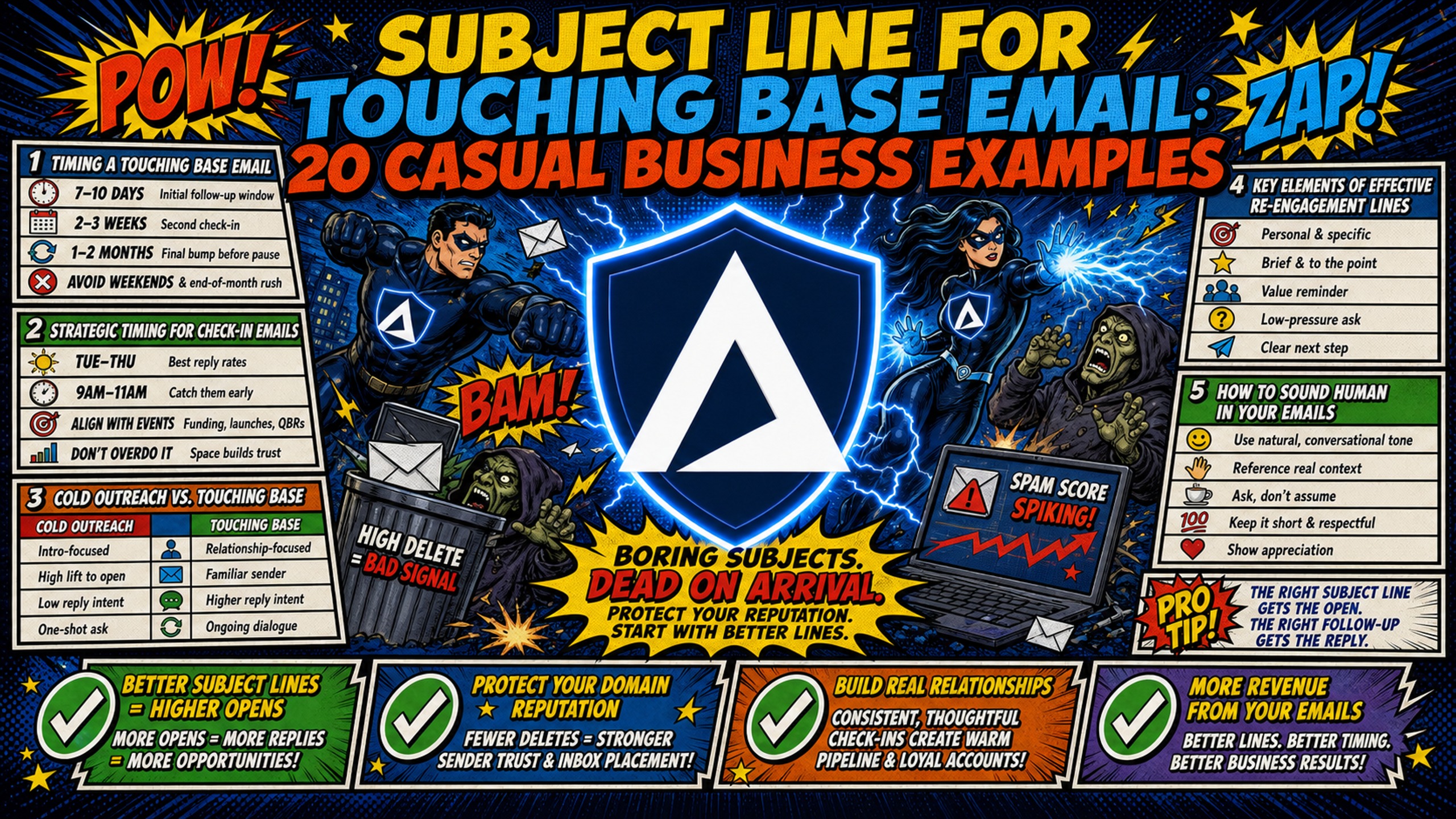
TL;DR: Generic "touching base" subject lines drive high delete-without-open rates, which email service providers read as a signal that your domain sends unwanted content, and mobile clients cut subject lines off at as few as 33 characters, so vague copy gets penalized before the recipient even reads it. Campaigns using specific, context-driven personalization beyond a first name consistently outperform generic check-in templates in reply rate. For agencies running 50+ domains, pairing high-engagement copy with Inframail's $129/month flat-rate infrastructure saves $187-257/month in infrastructure spend versus Google Workspace at 50 inboxes. "Touching base" is not just lazy copywriting. It is a technical risk.
Timing a touching base email
The sections below cover the scenarios and timing windows where check-in emails are most effective.
Strategic timing for check-in emails
Touching base emails work best in specific contexts. Sending them outside these windows wastes domain reputation on outreach that gets deleted without a reply.
| Scenario | Timing window | Why it works |
|---|---|---|
| Post-event follow-up | Within a few days of a conference or webinar | Context is fresh, making the outreach feel timely |
| Quarterly partner update | Once per quarter for active accounts | Consistent enough to maintain warmth, infrequent enough to stay welcome |
| Dormant contact re-engagement | After 60-90 days of silence | Long enough gap that a re-touch feels natural, not desperate |
| Event or signal-based trigger | Shortly after a job change, funding announcement, or product launch | Outreach tied to a specific, observable trigger gives the recipient a concrete reason to read it, because it references something real rather than arriving at random |
| Seasonal or fiscal opening | Q4 budget season, major industry events | Provides a natural, low-pressure reason to reconnect |
Mid-week mornings consistently produce stronger open rates for check-in emails. Sending Tuesday through Thursday between 8 and 10 a.m. local recipient time is a commonly recommended window.
Cold outreach vs. touching base emails
Cold outreach and touching base emails serve different goals and require different tones. Cold outreach typically goes to people with no prior relationship with the sender and needs to establish credibility quickly. A touching base email goes to warm contacts, people who have responded before, attended an event, or had a prior conversation.
The "Give to Get" principle applies specifically here. With warm outreach, the recipient already has a baseline of trust, which makes a lazy subject line even more damaging. It signals you have nothing new to offer. Warm check-ins must offer immediate value, a piece of relevant data, an introduction, a resource, or a specific observation, before asking for anything in return.
Generic phrases like "hoping to find you well" and "just touching base" consistently underperform because they communicate no specific value and are indistinguishable from automated spam templates to both recipients and ESP filters.
Key elements of effective re-engagement lines
The following sections break down the specific elements that separate high-performing check-in subject lines from ones that get ignored.
How to sound human in your emails
The difference between a subject line that gets opened and one that gets deleted often comes down to whether it sounds like a person wrote it. Generic, templated subject lines tend to signal automated blasts.
| Subject line type | Example | Why it fails or succeeds |
|---|---|---|
| Robotic/Corporate | "Following up per our last conversation" | May signal automated template |
| Robotic/Corporate | "Touching base re: Q3 opportunity" | Vague, no action hook |
| Human/Casual | "Quick question about [specific topic]" | Low pressure, clear intent |
| Human/Casual | "Saw your post on [topic], had a thought" | Personal, timely |
Anatomy of a high-reply subject line
The 5-Word Rule is backed by mobile display data. Gmail and Yahoo cut off subject line text on mobile devices at around 33-43 characters. Gmail on Android cuts off at 33 characters, Apple Mail on iPhone shows up to 48 characters, and Outlook on desktop typically shows around 51 characters on a standard browser window.
Put your core message inside the first 33 characters and keep the total line under 50 characters or five words. Keeping total line length inside 36-50 characters reduces the risk of truncation hiding the core hook before the recipient reads it. Short question-format subject lines consistently outperform jargon-heavy or urgency-driven alternatives, because they reduce cognitive friction without triggering the spam-signal patterns that ESP filters associate with bulk outreach.
In B2B outreach, emoji-heavy subject lines tend to underperform because they signal marketing email rather than a direct human message, compounding the spam-pattern risk that ESP filters already associate with bulk sends.
Humanize your check-in subject lines
Adding a personal touch significantly increases reply rates. Practical options include:
- Reference a specific shared experience: Use a conference session title or a project milestone rather than a generic "great to meet you."
- Mention recent content: Cite something the contact published or shared, which shows active attention rather than a scheduled blast.
- Use lower-case subject lines: Casual, lower-case lines may outperform title-case lines because they look like internal communications rather than marketing emails.
- Keep it specific: Customized messages that reference a real detail from the recipient's context consistently outperform templates, because they cannot be mistaken for an automated blast.
20 low-pressure check-in email subject lines
The examples below are grouped by intent so you can match the right tone to your specific situation.
Low-friction check-in subject lines
These four ultra-short lines reduce the cognitive load on the recipient. The goal is to make opening the email feel effortless, not like a commitment.
- "Quick question for you"
- "Had a quick thought"
- "Thought I'd reach out"
- "Still on your radar?"
These lines reduce cognitive load by signaling a short, low-stakes ask. They avoid overselling the email before the recipient opens it, which is a common cause of high delete-without-open rates that damage domain health over time.
Soft touch email subject templates
These four templates suit situations where a previous conversation stalled and you want to keep the relationship active without applying pressure.
- "Worth a 5-minute chat?"
- "Still worth a conversation?"
- "Checking in on your end"
- "Any movement on your side?"
For a deeper look at follow-up sequencing, the best cold email follow-up approach often comes down to timing and tone at each stage of the sequence.
Friendly follow-up subject line samples
These four lines maintain a collaborative, peer-to-peer tone. They work well for maintaining relationships with partners, referral sources, or long-term prospects.
- "Circling back with a resource"
- "Thought you'd find this useful"
- "Something worth a quick look"
- "Following up with a quick note"
Win-back subject lines
These four templates specifically re-engage contacts who went cold after a prior conversation. The key is addressing the communication gap directly without sounding frustrated or accusatory.
- "Closing the loop"
- "Been a minute"
- "Still open to connecting?"
- "One more thought before I go"
As Inframail describes in the video on spam avoidance, re-engagement sequences need to avoid triggering spam filters. Keep win-back subject lines short and send them from well-warmed domains on dedicated IPs to protect deliverability on primary sending infrastructure.
Value-first subject lines
The Value-First framework means offering something useful before asking for anything in return. These four templates lead with a resource, observation, or introduction.
- "Report you might find useful"
- "One thing that worked for similar teams"
- "Data point worth your time"
- "Quick insight from recent tests"
Value-first subject lines work because they give the recipient a concrete reason to open the email before asking for anything in return. Offering a resource or a specific data point signals relevance, which reduces the likelihood of a delete-without-open that damages domain health over time. As Aaron Reeves explains in his B2B cold email breakdown, the best messages feel like they come from a peer who has done their homework, not a salesperson following a script. Leading with a resource or data before asking for time often shifts the recipient's perception from defensive to curious.
Senders who personalize beyond a first name, referencing a specific trigger, shared context, or relevant data point, consistently generate stronger reply rates than senders using generic templates. For high-volume campaigns, Inframail's flat-rate infrastructure at $129/month makes it cost-effective to run these personalized sequences across dozens of domains without per-seat charges climbing with each new client.
Check-in subject line customization
Adjusting a subject line for a specific recipient takes a generic template and converts it into a reason to open. The most effective signals come from three sources.
Cite data from former exchanges
Referencing specific information from a prior conversation is the fastest way to prove an email is not an automated blast. A subject line like "Following up on the Q3 target you mentioned" carries far more weight than "Checking in" because it signals the sender was actually listening.
Practical approaches for pulling this data:
- Check prior conversations: Review CRM notes or the last email thread for a specific metric, goal, or challenge the contact mentioned.
- Reference time-bound elements: Use phrases like "After your product launch last month" or "Following up on the pipeline target from our April call."
- Front-load the detail: Keep the reference short enough to fit inside 50 characters, putting the specific detail first so it appears even if the rest gets truncated.
Highlight mutual networks in your outreach
A subject line mentioning a mutual connection or shared community builds instant credibility before the email even opens. Examples that work include "[Mutual contact] suggested I reach out" and "Fellow [community name] member here."
Signal-based outreach referencing a specific buying trigger, including a shared community membership or a mutual contact recommendation, gives the recipient an immediate reason to engage because it arrives in context rather than cold. The mutual network signal works because it removes the "stranger danger" dynamic from a cold or lukewarm contact.
Use seasonal cues for catch-up emails
Seasonal context gives you a natural, low-pressure reason to reconnect without it feeling manufactured. Effective seasonal triggers that give you a natural reason to reconnect include:
- Q4 budget cycles: "Planning for next year?" may land well in October and November when contacts are actively reviewing budgets.
- Industry events: A subject line like "Following up from [Event Name]" has a short window of relevance but very high open rates immediately post-event.
- Hiring signals: "Saw you're building out your sales team" references a real trigger and opens a conversation about growth.
Combining a seasonal hook with a specific data point from the contact's recent activity produces the highest engagement, because intent-based personalization consistently outperforms seasonal timing alone.
5 common subject line pitfalls
Each section below covers a specific mistake, why it damages performance, and how to fix it.
Fixing vague subject line phrasing
"Checking in" and "Touching base" fail because they communicate no value, no specific reason for the contact, and nothing actionable for the recipient to act on. They also look identical to automated spam sequences, and low engagement signals like these cause email service providers to route future sends to spam or promotions folders over time. Replace vague phrases with a specific reason, a resource, or a question.
Keep your outreach tone authentic
Clickbait subject lines that overpromise and underdeliver can threaten domain health. If a subject line reads "Huge news about [Company]" and the email body is a generic sales pitch, recipients mark it as spam, which damages your sender reputation at the domain level.
The fix is alignment: your subject line and email body must match in tone and content. If the subject promises a resource, deliver the resource in the first sentence. If it promises a quick question, ask one question. This consistency keeps recipients from using the spam button as a substitute for an unsubscribe.
Stop using lazy check-in subject lines
The deliverability link is direct and technically documented. When recipients ignore or delete vague emails, email service providers read the high delete-without-open rate as a signal that your domain sends unwanted content. That signal compounds across every send, causing ESPs to route future emails from your domain to the promotions tab or spam folder even when those emails contain strong copy.
High spam complaints are toxic, and even a 1% complaint rate can trigger domain reputation damage. The fix is not just better copy. It is also infrastructure. Inframail's dedicated IP infrastructure gives each account 1-3 dedicated US-based IPs depending on plan, so your sender reputation reflects only your sending behavior.
Check-in subject line refinement
The sections below outline the testing and tracking methods that turn subject line guesswork into a repeatable process.
Track open rates by subject line type
Systematic tracking converts anecdotal observations into actionable data. A structured A/B testing process for subject lines includes:
Campaign Manager's Checklist for Subject Line A/B Testing:
- Isolate one variable: Consider testing subject line length alone, or tone alone, rather than both at once.
- Set a minimum sample size: Aim for at least 200 sends per variant for more meaningful results.
- Categorize by type: Tag subject lines by framework (value-first, question, personalized, generic) in your sending platform.
- Measure open rate and reply rate separately: A subject line that gets opens but no replies signals a mismatch between subject and body.
- Check domain health weekly: Use your deliverability dashboard to monitor blacklist status after each major send. Inframail's domain health monitoring flags issues and auto-submits delisting requests.
Casual vs formal: which wins open rates?
Casual, lower-case subject lines often outperform formal alternatives in B2B outreach. Concise subject lines consistently outperform longer, formal equivalents in open rate.
The reason is inbox context. Lower-case lines look like internal business communications from a colleague rather than a marketing email. Formal lines, especially those using phrases like "Re: Your Q3 Pipeline Opportunity," may signal a sales template even when they are not one. Mobile email clients reinforce this effect because formal, longer lines get truncated, stripping the context that made them seem professional in the first place.
Optimize subject lines for higher replies
Connecting subject line performance to actual reply rates is the final step in a disciplined testing workflow. Open rate tells you whether the subject line worked. Reply rate tells you whether the subject line and the email body worked together.
When building these tests inside Instantly or Smartlead, import your Inframail IMAP/SMTP credentials via CSV export and segment your domain pool by subject line variant. This approach lets you run parallel tests across multiple domains without one variant contaminating the other. Connecting Inframail to Smartlead covers the full credential export and import process.
The cost difference matters for scale testing. Running subject line experiments across 50 domains on Google Workspace costs $350-420/month in infrastructure alone at $7-8.40 per seat. The same 50-domain test on Inframail costs $129/month for the platform plus roughly $34/month in amortized domain costs, totaling approximately $163/month.
Scaling to 100 inboxes keeps the platform fee flat at $129 but roughly doubles the domain pool, adding approximately $68 in amortized domain costs for a total of approximately $197/month. (Warmup tools are a separate cost, typically $15-50/month per inbox based on market pricing.)
| Infrastructure | 50 inboxes/month | 100 inboxes/month |
|---|---|---|
| Google Workspace | $350-420 | $700-840 |
| Inframail + domains | ~$163 | ~$ 197 |
At 50 inboxes, the infrastructure difference can save agencies significant costs annually. The flat-rate platform fee stays at $129 regardless of inbox count, so scaling from 50 to 100 or 200 domains adds only domain acquisition costs rather than per-seat charges, giving campaign managers the volume needed to find what actually works rather than guessing. Sign up to Inframail and get started today.
FAQs
How often should you send touch-base emails to active contacts?
For active contacts, consider sending check-in emails once every quarter or once every two weeks during an active sales sequence. Sending too frequently may increase the risk of manual spam markings and can damage domain health through repeated low-engagement signals.
Should you use emojis in professional check-in subject lines?
Use emojis sparingly in professional check-in emails because they can appear unprofessional to B2B buyers. While single, relevant emojis rarely cause issues, excessive emoji use combined with other spam signals can trigger spam filters. Data shows they rarely improve open rates in warm B2B outreach contexts. In B2B outreach contexts, emoji-heavy subject lines consistently signal marketing email rather than a direct peer message, which reduces open rates and compounds the spam-signal risk that comes from low engagement.
What is the recommended character limit for touch-base subject lines?
Keep subject lines under 50 characters or five words to prevent mobile email clients from cutting off your text. Gmail on Android typically cuts off around 33 characters and Apple Mail on iPhone displays up to approximately 48, so writing for the shortest common display ensures your full message appears on every device.
How do you write a warm, non-transactional check-in email?
Focus the email body on offering a helpful resource or asking a single, specific question rather than pitching a product. This keeps the tone conversational, aligns with the value-first subject line, and avoids the spam-marking risk that comes from mismatched subject and body content.
Key terms
Dedicated IP: An IP address used exclusively by one sender, ensuring sending reputation is not affected by other users on a shared pool.
Domain health: A metric representing how email service providers view a sending domain, directly affecting whether emails land in the inbox or the spam folder.
Mobile truncation: The cutting off of subject line text when the character count exceeds the display limit of a given email client, ranging from 33 characters on Gmail on Android to 51 characters on Outlook on desktop, with Apple Mail on iPhone displaying up to approximately 48 characters.
Value-First framework: A copywriting method where the sender offers immediate help, data, or a resource before asking for a meeting or favor, consistently producing higher reply rates than generic check-in templates.
IMAP: Internet Message Access Protocol, a standard email protocol that allows email clients to access messages stored on a mail server, used for connecting third-party tools to email accounts.
SMTP: Simple Mail Transfer Protocol, the standard protocol for sending outbound email messages across the internet, required for configuring sending tools and platforms.