
Short vs long email subject lines: what works better?
The highest cold email open rates come from subject lines in the 21-40 character range, which achieved a 62.4% average open rate across a study of 5 million col
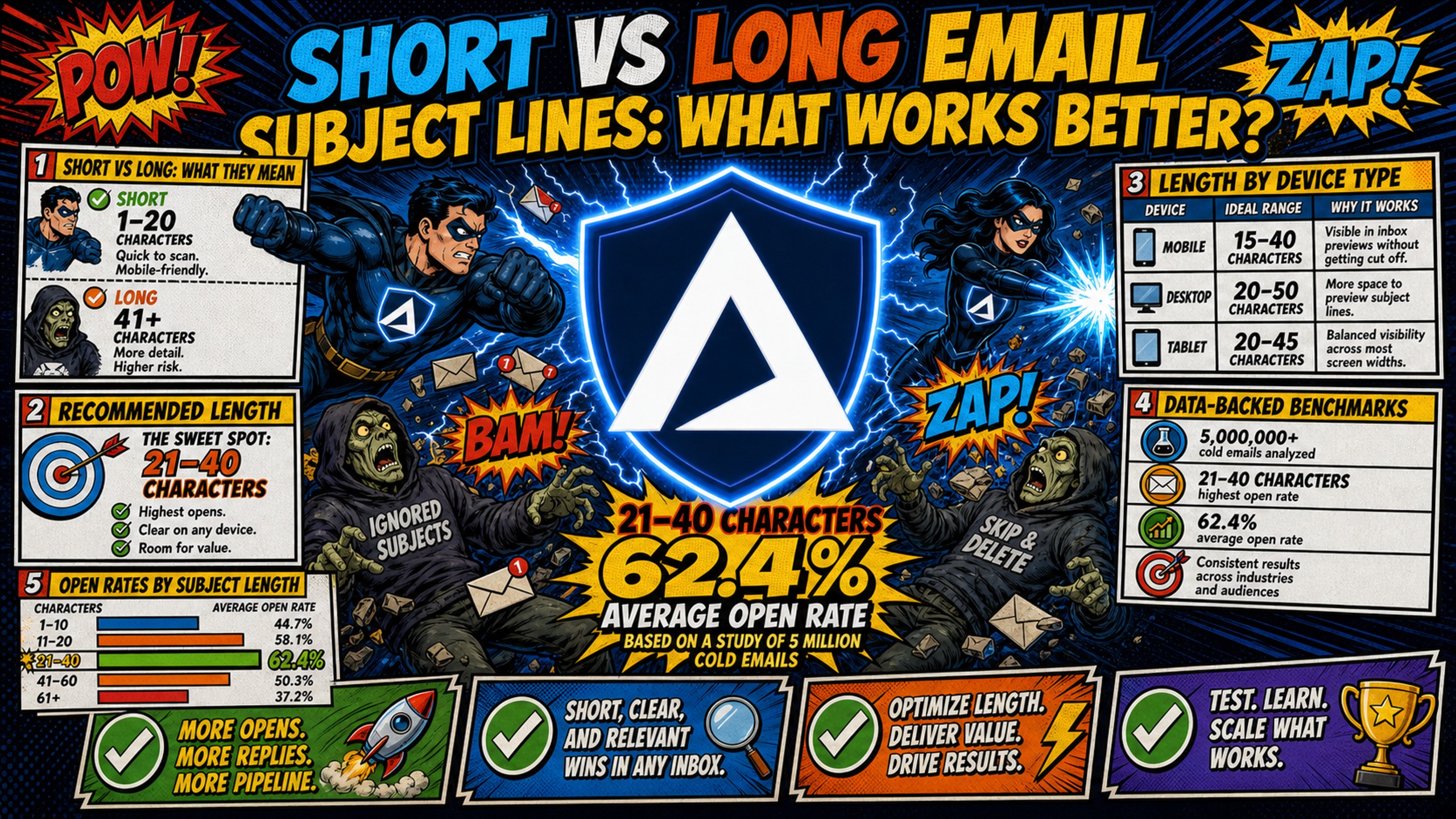
TL;DR: The highest cold email open rates come from subject lines in the 21-40 character range, which achieved a 62.4% average open rate across a study of 5 million cold emails. Cold email needs curiosity-driven, lowercase subject lines that mimic internal business communication, where brevity signals authenticity to filters and recipients alike. Newsletters typically perform better with more descriptive lines in the 6-10 word range, where the opted-in audience expects content context upfront. Testing short versus long subject lines requires multiple inboxes, and Inframail's flat-rate unlimited inbox model at $129/month keeps infrastructure costs fixed whether you run 50 or 500 test inboxes.
Most cold email advice tells you to keep subject lines under three words, but the data reveals a more complicated reality that you can use to your advantage. Short subject lines dominate open rates on mobile screens, where Gmail's mobile app cuts preview text at 37-40 characters depending on the device. Yet longer, highly personalized subject lines can outperform brevity when targeting high-intent B2B accounts where specific context builds credibility.
You need to balance mobile screen constraints with the specific intent of your B2B audience when choosing subject line length. While short subject lines drive high open rates across broad lists, longer personalized lines can secure the replies that book meetings. This guide breaks down the data-backed benchmarks and explains how to test variations without inflating infrastructure costs.
Defining short vs long email subject lines
For cold email, short subject lines run 1-4 words and under 40 characters. Long subject lines typically exceed 60 characters or 8+ words, while medium-length subject lines are broadly defined for this guide as falling in the 40-60 character range.
The distinction that matters most for campaign managers is purpose, not just length. A newsletter subject line that details specific content works because the subscriber opted in and expects value-packed context. A cold email subject line with that same structure looks like marketing immediately and fails the recipient's trust filter before the body copy gets a chance. Cold email success depends on curiosity and a reply, not a click on a well-labeled article.
Recommended length for cold email subjects
For cold outreach, keep subject lines to 1-4 words and under 40 characters. Research analyzing 5 million cold emails shows 21-40 character subject lines achieved a 62.4% open rate, the highest of any length range tested.
Subject lines that read like internal business messages ("quick question," "partnership idea," "intro from [name]") pass as peer communication. Subject lines that read like broadcast announcements ("7 ways to improve your Q3 outbound strategy") read as marketing and get filtered accordingly. Keeping subject lines short forces you to write something specific enough to provoke curiosity without over-explaining. Cold email practitioners note that brevity signals authenticity to both spam filters and recipients.
Subject line lengths by device type
Device context changes the calculus significantly. The table below shows how each major email client truncates subject lines:
Table 1: Desktop vs. mobile truncation limits by email client
| Client | Environment | Character limit before truncation |
|---|---|---|
| Gmail | Desktop (1400px browser) | ~88 characters |
| Gmail | Mobile (iOS/Android app) | 37-40 characters |
| Outlook | Desktop (15" laptop, full width) | ~78 characters |
| Apple Mail | iPhone | 36-38 characters |
| Universal safe limit | All devices and clients | 33 characters |
The universal 33-character limit is extremely tight and forces most subject lines to sacrifice clarity for safety. The practical working threshold is 40 characters, which displays in full on Gmail mobile and front-loads the core message across every other environment. Inframail's cold email infrastructure monitoring guide covers how device-level visibility issues compound with deliverability problems when infrastructure is not properly configured.
Data-backed benchmarks for subject line length
The benchmarks for subject line length split sharply depending on whether the audience has opted in or not. Understanding where cold email data diverges from general email marketing data is what allows you to apply the right benchmark to the right campaign type.
Subject line length data splits along audience lines, which explains why generic email marketing advice often contradicts cold email-specific guidance.
Comparing open rates by subject length
The 21-40 character range achieves a 62.4% open rate in cold-email-specific testing across 5 million sends. General email marketing data from BuzzStream's analysis shows subject lines over 71 characters achieving 40.71% open rates across their dataset, with the 9-13 word range hitting 40.20%.
The divergence reflects audience intent, not a contradiction in the data. General marketing email recipients expect promotional content and respond to descriptive subject lines. Cold email recipients have not opted in, so they filter for trust signals first. Short, lowercase subject lines that mimic internal business communication pass that filter. As Sales Scripter's B2B cold email guidance explains, prospects who receive high outreach volume have developed strong pattern-recognition for marketing language and filter it out before reading body copy.
Optimizing subject length for replies
Open rates measure curiosity. Reply rates measure relevance. For cold email, reply rate is the KPI that matters, and the optimal subject line length for replies differs from the optimal length for opens.
Table 2: Campaign Manager's quick-reference table
| Length | Characters | Open rate signal | Reply rate signal | Best fit |
|---|---|---|---|---|
| Short | Under 40 chars / 1-4 words | High (62.4% at 21-40 chars) | High for broad lists (cold email-specific data; general email research shows mixed results by list type) | Mass cold outreach, mobile-first audiences |
| Medium (working definition) | 40-60 chars / 5-7 words | Moderate | Moderate | Warm prospects, event follow-up |
| Long | 60+ chars / 8+ words | Variable (40.71% in some datasets) | Higher for high-intent segments | Named accounts, personalized account-based marketing (ABM) plays |
- Medium-length category used as a working framework for this guide. No independent dataset explicitly benchmarks this range as a distinct tier.
Data from cold-email-specific testing suggests short subject lines tend to drive more opens from broader lists, though general email marketing research shows mixed results, with some datasets finding longer subject lines achieving the highest open rates depending on audience and list composition. Long subject lines can drive higher reply rates from highly targeted, high-intent account lists where genuine personalization justifies the length. Learning how to boost cold email reply rates means tracking both metrics separately, not using open rate as a proxy for campaign success.
Optimizing length for mobile inbox views
The practical working limit is 40 characters. Front-load the key information within the first 30-40 characters so the hook lands even when the rest of the subject line disappears behind an ellipsis. Put the prospect-relevant detail first and leave secondary context for the preheader or the email body. Chris Bussing's B2B subject line examples demonstrate this front-loading principle across tech sales contexts where mobile opens dominate.
When concise subject lines drive higher open rates
Short subject lines outperform longer ones in cold outreach by removing friction at the point of first contact: the inbox preview. The sections below cover the specific conditions where brevity is the lower-risk and higher-performing choice.
Optimizing for mobile inbox constraints
Short subject lines prevent mobile truncation entirely. A 1-4 word subject line like "quick question" (15 characters) or "partnership idea" (16 characters) stays well under the 33-character universal safe limit. That's the threshold at which a subject line displays in full across all major Apple and Android devices and email clients, including Gmail mobile (37-40 characters depending on device), Apple Mail, and Outlook mobile. For campaign managers running outreach across large, less-segmented lists where you cannot guarantee device type, staying under 40 characters is the lowest-risk choice for preserving full subject line visibility across all environments.
Subject line length for mass campaigns
When scaling outreach to hundreds of contacts across broad B2B lists, shorter subject lines perform more consistently because they remove the personalization expectation. A 3-word subject line does not imply that you researched the specific recipient. A 14-word subject line referencing a company initiative implies deep research, and if that research is surface-level or wrong, the reply rate drops sharply because the email reads as a template pretending to be personal.
Mass campaigns benefit from subject lines under 40 characters that create genuine curiosity without requiring specific context to land.
Improving open rates for flash sales
Brief, urgent subject lines drive immediate action for time-sensitive offers. "Spots closing Friday" or "one question before EOD" create time pressure without relying on promotional language that triggers spam filters. Avoid excessive punctuation in any subject line. Research on spam trigger patterns shows that using more than 3 punctuation marks in a subject line increases spam score risk, and ALL CAPS combined with excessive punctuation pushes spam scores significantly higher because these patterns closely match phishing attempt signatures.
When long email subject lines boost open rates
Long subject lines can outperform short ones when the audience is high-intent and the personalization is accurate and verifiable. The conditions that make longer subject lines work are narrower than most cold email guides acknowledge.
When detailed subjects boost open rates
The data shows a pattern in general email marketing where both the shortest and the longest subject lines outperform the middle range in certain datasets. BuzzStream's analysis found subject lines over 71 characters achieving 40.71% open rates. The 9-13 word range hit 40.20% in the same dataset.
Long subject lines work under specific conditions: the audience is high-intent, the personalization is genuine, and the subject line provides enough context to justify engagement. In cold email, this means named account outreach where you reference a specific trigger event (a recent funding round, a published article, or a job posting) directly in the subject line.
Personalizing for high-intent accounts
For enterprise or named account outreach, a longer subject line referencing a specific and verifiable detail builds credibility rather than diluting it. "Saw your post on the Series B timing, quick question" (58 characters) works for a prospect who did publish a post about their funding timeline. It reads as research, not a template. B2B subject line examples for tech sales cover this approach for contexts where deal sizes justify the per-account research investment.
For longer personalized subject lines to work, treat per-contact verification of the specific detail referenced as a best practice. Inaccurate or unverified personalization is widely flagged by practitioners as a significant driver of reply rate decline, even if no single source defines a formal verification threshold. Inaccurate personalization ("Hi [FirstName]" or a wrong company reference) damages reply rates faster than a generic short subject line because it signals that the email is automated and poorly maintained.
Using longer lines for complex content
High-ticket consulting, agency services, and enterprise sales tolerate longer subject lines (40-70 characters) when the personalization is genuine and the buyer is evaluating vendors actively. A subject line like "partnership conversation re: Q3 capacity" (41 chars) works in high-ticket contexts because it implies mutual benefit and a specific timeline without reading like a cold blast. Keep the subject line under 60 characters even for high-ticket plays to preserve mobile visibility. Tyler Nannetti's cold email inbox rankings note that deliverability at enterprise scale requires clean infrastructure and disciplined subject line practices working together.
Ideal email subject line length by industry
Subject line length benchmarks shift when filtered by industry because audience intent, buyer sophistication, and outreach volume all vary. The guidance below focuses on B2B SaaS cold outreach and high-ticket contexts where campaign managers most frequently need calibrated length defaults.
Ideal email lengths for B2B SaaS
B2B SaaS cold email open rates vary across the category depending on list quality, targeting precision, and sending infrastructure. The highest-converting B2B SaaS subject lines run 1-4 words, lowercase, and read like a message from a colleague rather than a vendor pitch. "Quick question" and "idea for [Company]" consistently outperform descriptive promotional lines in cold outreach. Email strategies for B2B SaaS reinforce this across growth-stage company contexts.
Optimizing subjects for higher replies
Front-loading restructures a longer subject line so the highest-value information appears in the first 25-30 characters, protecting visibility on every device.
Three front-loading examples:
- Before: "How [Company] can reduce infrastructure costs by 40% this quarter" (64 chars) | After: "infrastructure cost question" (26 chars)
- Before: "Quick intro - we help lead gen agencies book 200+ calls per month" (65 chars) | After: "200 calls/month - realistic?" (28 chars)
- Before: "Saw your LinkedIn post about outbound scaling challenges at [Company]" (68 chars) | After: "[Company] outbound scaling" (25 chars)
Each rewrite preserves the core hook within the first 30 characters and moves the full context to the preheader or email body where it can be read after the subject line earns the open. Connecting subject line optimization to sales email automation tools helps you build front-loading into templates systematically.
Email length for high ticket outreach
High-ticket consulting, agency services, and enterprise sales tolerate longer subject lines (40-70 characters) when the personalization is genuine and the buyer is evaluating vendors actively. Keep the subject line under 60 characters even for high-ticket plays to preserve mobile visibility, and always put the most specific word or reference in the first 30 characters.
Testing your email subject line impact
Testing subject line length requires controlling for variables beyond the subject line itself: body copy, list segment, send timing, and infrastructure must stay constant between variants. The framework below covers execution, sample sizing, and the three KPIs that determine whether a test produced a real signal.
How to execute your split test
A/B testing subject line length follows a three-step framework focused on reply-rate delta rather than open rate alone:
- Define the variable: Change only the subject line length between the control and variation. Keep the body copy, send time, and list segment identical. Set the success metric before running the test: a meaningful reply-rate delta is typically a 15-30% relative lift over the control.
- Split and send: Divide the list segment equally. Run both variants simultaneously or within the same business-day window to remove timing variables. Avoid running tests across different days of the week since open and reply behavior varies significantly by day.
- Measure reply-rate delta: Calculate reply rate by dividing replies by emails sent, then multiplying by 100. An example: 8 replies from 200 sends equals 4% reply rate. If the variation generates 14 replies from 200 sends, that is 7%, a 75% relative lift. Look for a p-value (statistical measure of whether the result is due to chance) of 0.05 or lower to confirm significance. The Inframail cold email deliverability guide covers the infrastructure setup required to run clean split tests.
Setting sample sizes for A/B tests
Run a minimum of 500 contacts per variant to approach statistical significance for cold email reply rates. For high confidence in smaller improvements (10-20% lift), plan for 5,000-20,000 contacts per variant depending on baseline reply rates, per Prospeo's A/B testing guide. Smaller sample sizes produce noise, not signal, and calling a test early based on 50 sends per variant creates false winners that hurt the next campaign.
Wait at least 24-48 hours before reading results, and confirm the window covers 2-3 full business days of delivery. Many replies arrive on day 2 or 3, so pulling results at 12 hours consistently produces false winners. Inframail's sending capacity calculator helps campaign managers work out how many inboxes are needed to hit test sample sizes within a standard campaign window.
Track these 3 subject line KPIs
The three KPIs that define a subject line test:
- Open rate: Measures curiosity. A high open rate with a low reply rate signals the subject line drew attention but the body copy or offer did not land. Track open rate as a leading indicator, not the final judgment.
- Reply rate: The core performance metric for cold email. This is where subject line length has its most direct measurable impact on campaign results.
- Deliverability and spam rate: Tracks whether the subject line triggered filters before the email reached the inbox. Spam rate above 0.3% signals a structural problem with subject line language, punctuation, or sending infrastructure.
Testing multiple subject line variations requires scaling inboxes, and that is where infrastructure cost becomes a real constraint. On Google Workspace at $7-8.40 per inbox, running 50 test inboxes costs $350-420/month in infrastructure alone. Inframail's flat-rate model charges $129/month for unlimited inboxes, meaning infrastructure costs stay fixed as the test matrix grows, whether you run 50 or 500 inboxes. Dedicated US-based IPs (1 IP on the Unlimited Plan, 3 IPs on the Agency Pack) keep sending reputation isolated from other users, so a high-volume test does not contaminate domain health across active client campaigns.
For a full comparison of how dedicated IP infrastructure affects deliverability during testing, the dedicated IP vs. shared IP video from Inframail covers the mechanics directly.
"We spent months hunting for a reliable cold-emailing stack. After repeated failures with another provider, we trialled two options - Inframail and a competitor. We chose the competitor. A month later, we switched back to Inframail. Zero issues since. Rock-solid infrastructure, sharp support, genuinely dependable. Highly recommended." - Verified user review of Inframail
Inframail reports a 98%+ deliverability rate and a 68.3% blacklist delisting success rate within 48 hours, which matters during high-volume split tests when domain health is under more pressure than in standard single-sequence campaigns.
"InfraMail makes it remarkably easy to purchase domains, configure them correctly, create inboxes, and initiate warm-up immediately. The level of automation is exceptional and clearly designed for serious operators; it removes friction and allows you to focus on execution rather than setup." - Verified user review of Inframail
Sign up to Inframail and get started today. If you manage multiple client accounts and need to keep sending reputation separated across campaigns, explore the agency plan for 3 dedicated US-based IPs at $327/month.
FAQs
What is the recommended email subject line length for cold outreach?
Keep cold email subject lines to 1-4 words and under 40 characters for the best balance of mobile visibility and open rate performance. Research analyzing 5 million cold emails shows the 21-40 character range achieves a 62.4% average open rate, the highest of any length range tested.
How do emojis affect subject line length and spam filters?
Each emoji counts as 1-2 characters against your total subject line length, reducing the space available for text before mobile truncation. Emojis in cold email subject lines increase the likelihood of spam filter triggers because B2B filters like Microsoft Defender for Office 365 apply additional heuristics for cold outreach from unfamiliar domains.
What is the character limit to avoid mobile email screen truncation?
The universal safe limit across all tested devices and email clients is 33 characters, but the practical working limit for cold email is 40 characters, which displays in full across Gmail mobile devices (37-40 characters depending on device) and covers the vast majority of mobile inbox views. Front-load the core message within the first 30-33 characters to protect visibility across every environment.
How does subject line length affect deliverability?
Subject lines over 60 characters packed with promotional language increase spam filter risk because excessive length combined with trigger words matches patterns flagged by inbox providers. Using more than 3 punctuation marks in a single subject line and writing in ALL CAPS each push spam scores significantly higher, with research showing these patterns closely match phishing attempt signatures in the heuristics used by major ESPs.
Key terms glossary
Dedicated IP: An IP address used exclusively by one sender, ensuring their sending reputation is isolated from other users on the same infrastructure.
Front-loading: Restructuring a subject line so the highest-value information appears in the first 25-30 characters, protecting visibility when email clients truncate longer subject lines on mobile devices.
Reply-rate delta: The percentage-point difference in reply rates between a control subject line and a test variant, used to measure the performance impact of subject line changes.
ABM (Account-Based Marketing): A B2B strategy focusing sales and marketing resources on a specific set of target accounts rather than broad outreach.
KPI (Key Performance Indicator): A measurable value used to evaluate the success of a campaign or activity.
ESP (Email Service Provider): A platform that sends, delivers, and tracks email campaigns.