
Professional subject lines for business emails: 40+ examples
Professional subject lines for B2B outreach should avoid spam trigger words and lead with a clear, specific value. Analysis of 5.5 million emails found 2-4 word
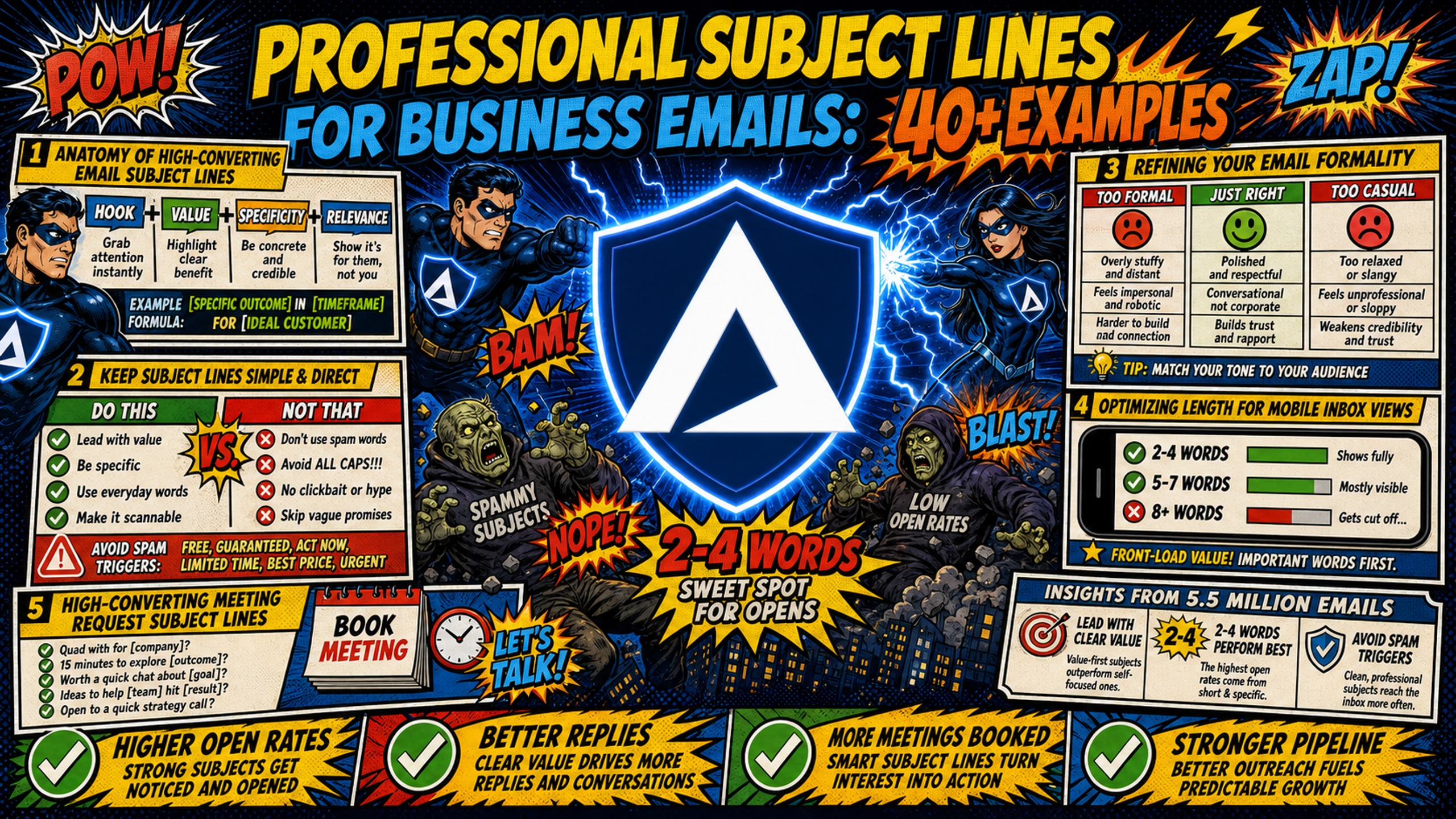
TL;DR: Professional subject lines for B2B outreach should avoid spam trigger words and lead with a clear, specific value. Analysis of 5.5 million emails found 2-4 word subject lines hit 46% open rates, though optimal length still varies by device and audience. But copy alone doesn't guarantee inbox placement. Corporate spam filters also analyze your sending domain's SPF, DKIM, and DMARC authentication. Subject line copy determines whether recipients open your email. DNS configuration and dedicated IP infrastructure determine whether it reaches the inbox in the first place. Both matter independently. Below, you'll find 40+ templates across every major B2B use case, plus a technical checklist to keep your domain healthy.
A professional subject line is only as effective as the infrastructure delivering it. Microsoft's Exchange Online Protection evaluates every inbound message across multiple filtering layers, and authentication failures at the domain level will block your email before any subject line copy is even read. Writing clean, direct subject lines matters. But those lines also need a properly configured sending domain behind them to survive strict corporate filters.
This guide covers the formulas, templates, and technical context you need to get business emails opened and replied to at scale.
Anatomy of high-converting email subject lines
The structure of a high-performing subject line follows a predictable pattern: clarity first, specificity second, and tone matched to the recipient. Research shows personalized subject lines achieve a 46% open rate versus 35% for generic equivalents, a 31% relative improvement in visibility. Precision beats polish every time.
| Strategy | Example | Expected open rate impact |
|---|---|---|
| Personalized with company name | "[Company] + [Your Company]: quick question" | 46% (personalized) vs. 35% (generic) |
| Question-based | "Are you the right person to speak with?" | Higher than statement-based equivalents |
| Metric-led | "How [Company] could reduce setup time by [X]%" | Outperforms non-numeric equivalents across B2B verticals |
| Referral-led | "[Mutual name] suggested I reach out" | Higher than cold outreach |
| Generic/vague | "Quick question" | ~15% (generic cold email baseline) |
For tactical frameworks on building high-converting B2B cold email sequences, Aaron Reeves breaks down what's working in 2025.
Keep subject lines simple and direct
The most common mistake in B2B outreach is writing a subject line that tries to be clever rather than clear. A subject line like "Thought you'd find this interesting" signals nothing, while "3 ways [Company] could reduce DNS setup time" delivers a concrete reason to click. Direct language reduces cognitive load and increases the likelihood of an open.
Refining your email formality
Tone calibration matters more than most campaign managers acknowledge. A subject line written for a startup founder will fail with a Fortune 500 VP of Operations. Casual startup outreach can accept informal phrasing such as "Got 10 minutes this week?" while formal corporate outreach requires structured language such as "Partnership opportunity for review: [Company]." Matching the formality of the recipient's industry and role prevents human filtering before any algorithm even runs. Chris Bussing's breakdown of top B2B tech sales subject lines is worth reviewing for tone calibration across verticals.
Optimizing length for mobile inbox views
Gmail's mobile app truncates subject lines at approximately 30 characters, making it the tightest constraint across major email clients. Put your core message inside the first 30 characters and treat everything beyond that as supplementary context that may not display on all devices.
| Device / Client | Character limit | Best practice |
|---|---|---|
| Gmail Mobile | ~30 characters | Front-load the hook |
| Yahoo Mail Mobile | ~36 characters | Keep to one idea |
| Apple Mail (iPhone) | ~48 characters | Safe for a short qualifier |
| Gmail Desktop | 70+ characters | Can add context after core message |
| Outlook Desktop | ~50-60 characters | Subject line visible at full browser width |
For a practical walkthrough on inbox placement and mobile rendering, Inframail's deliverability tutorial covers the full technical picture.
High-converting meeting request subject lines
Meeting request emails succeed when the subject line reduces friction and signals relevance immediately, because vague asks get ignored while specific requests with a clear value signal get opened. The templates below are built for sequences running inside platforms like Instantly or Smartlead. Test subject line variations systematically across campaigns, keeping length in the 30-50 character range to ensure mobile visibility.
Cold outreach meeting request templates
- "15-min call re: [Company]'s outbound stack"
- "Quick question about [Company]'s lead gen"
- "Intro from [Mutual Name] - worth 10 minutes?"
- "[Company] + [Your Company]: collaboration?"
- "Can we solve [specific pain] at [Company]?"
Professional follow-up email templates
Following up without sounding pushy requires anchoring the subject line to a concrete reason for reconnecting, not just an acknowledgment that time has passed.
- "Following up: [original topic] at [Company]"
- "Still relevant? [Your value prop] for [Company]"
- "One more thought on [Company]'s outbound"
- "Wanted to share one resource with you"
- "Quick update since my last note"
Subject lines for C-suite outreach
Executives filter by bottom-line relevance: subject lines that reference a specific metric, a cost figure, or an operational outcome consistently outperform abstract value propositions at the C-suite level.
- "Cut [Company]'s infrastructure cost by $2,600/yr"
- "How [Competitor] reduced setup time 700%"
- "3 changes that improved reply rates at [Company]"
- "Operating efficiency question for [Name]"
- "A direct ROI question for [Name] at [Company]"
Professional subject lines for project proposals
Mid-funnel emails carry more weight than initial outreach because the prospect already knows who you are. Subject lines at this stage need to signal forward progress and make the next step obvious without overselling.
5 proposal email subject examples
- "Proposal for [Company]: ready to review"
- "[Name], your custom plan is attached"
- "Next steps: [Project Name] proposal for [Company]"
- "Our recommendation for [Company]'s Q3 outbound"
- "[Company] infrastructure proposal - 3 options"
Proven templates for partner outreach
Partnership outreach subject lines work best when they signal mutual benefit up front rather than framing the ask as a favor.
- "Partnership idea: [Company] + [Your Company]"
- "[Name], co-selling opportunity worth discussing"
- "Shared audience - worth a conversation?"
- "Referral partnership for [Company]?"
- "Quick question about a mutual client opportunity"
For a deeper look at partnership outreach and cold email compliance, Inframail's compliance guide covers what's required across outreach types.
Optimized subject lines for partnership sales
Co-selling and business development outreach requires subject lines that lead with operational specifics rather than abstract value.
- "Co-selling pilot: [Product] + [Your Product]"
- "[Company]: revenue share opportunity"
- "Can [Company] help our mutual clients?"
- "Joint go-to-market idea for [Name]"
- "Intro: [Company] partnership program details"
High-converting follow-up email subjects
Question-based subject lines are among the highest-performing formats for follow-up sequences. The templates below are optimized for use in Instantly and Smartlead, where you can categorize sequences by use case and monitor reply rates at the sequence level. For guidance on cold email automation tools that support these workflows, Inframail's comparison of 25 tools covers the full picture.
Professional post-meeting email templates
- "Notes from today's call + next steps"
- "Following up: [topic discussed] action items"
- "Resources I mentioned - [Name]"
- "Next step for [Company]: proposal timeline"
- "Quick recap from our [date] conversation"
How to re-engage silent prospects
Re-engagement works best when the subject line gives the prospect a concrete reason to open rather than a reminder that they went quiet. Referencing something specific from the original conversation (a named pain point, a project timeline, or a mutual connection) tends to outperform generic check-ins.
- "Still worth a look? [original offer]"
- "A new angle on [original pain point]"
- "Things may have changed at [Company] since we spoke"
- "One question before I close your file"
- "An update relevant to [Company]'s situation"
Driving action with timely reminders
Soft urgency works in subject lines when it's tied to a real external event rather than manufactured pressure.
- "Deadline approaching: [offer / proposal] for [Company]"
- "Our Q3 capacity fills up [date] - wanted to flag"
- "Before [event]: a quick note for [Name]"
- "End of [month] check-in: [project or proposal]"
- "Last note before [event or decision point]"
Business email subject lines for referrals and intros
Warm outreach consistently outperforms cold email: reply rates average 34% for warm outreach versus 2-5% for cold email (B2B Drum, GrowLeads), a gap driven by shared social context reducing resistance across the entire interaction, not subject line copy alone. A subject line that leads with a mutual name signals credibility before the body copy is ever read.
Referral outreach email subject lines
- "Could you connect me with [Name] at [Company]?"
- "Referral request: [specific need] - takes 2 minutes"
- "Would you recommend anyone for [specific role]?"
- "Quick favor re: your [industry] network"
- "[Name], could you make a warm intro?"
Referral lines via mutual connections
- "[Mutual Name] thought we should connect"
- "[Mutual Name] mentioned your work on [topic]"
- "Reaching out via [Mutual Name]'s suggestion"
- "[Mutual Name] said you're the right person"
- "Introduction from [Mutual Name] at [Company]"
Drafting value-driven outreach lines
The most effective warm outreach subject lines frame the introduction as a mutual benefit rather than a one-sided ask. Instead of "Can you help me?", use "An idea that could benefit both of us." The recipient's decision becomes easier when the subject line anchors to a specific, shared outcome rather than a generic greeting.
Internal email subject lines that drive action
Internal email subject lines operate under different constraints than outbound cold email: there is no spam filter to bypass and no cold prospect to hook, so the only variable that determines whether a colleague acts is how clearly the subject line communicates what is needed and by when. Vague internal subject lines tend to generate follow-up threads rather than first-response action. The underlying mechanism is consistent: a subject line that tells the recipient exactly what is needed and by when removes the friction that causes delay.
Internal cross-team email templates
- "Action needed: [project] by [date]"
- "[Team]: input required on [decision]"
- "Handoff from [Your Team] to [Their Team]"
- "Cross-team sync request: [topic] this week"
- "Feedback requested: [document or plan name]"
Clear status update email templates
- "[Project name]: status update for [date]"
- "Milestone reached: [specific milestone]"
- "Q[X] progress report: [project or campaign]"
- "Update: [campaign name] metrics for [date range]"
- "Weekly report: [project] - [date]"
For a reference on monitoring campaign infrastructure health alongside internal communication, Inframail's guide covers alert systems that prevent blacklist incidents from disrupting active client campaigns.
Urgent internal email subject lines
- "URGENT: [issue] needs resolution by [time]"
- "Immediate action required: [specific task]"
- "Time-sensitive: [decision] needed today"
- "High priority: [project] blocker identified"
- "Alert: [system or campaign] issue - response needed"
Subject line mistakes that hurt reply rates
Bad copy triggers spam filters. Bad infrastructure guarantees them. Campaigns with polished subject lines can still fail when the sending domain isn't properly authenticated.
Microsoft's Exchange Online Protection assigns every inbound email a Spam Confidence Level score from -1 to 9, where a score of 5 or higher flags the message as spam. Subject line content is one input into that score, but domain authentication failures, IP reputation, and engagement history all contribute to the final verdict.
Deliverability checklist before you send:
- Avoid excessive caps (e.g., "URGENT FREE OFFER NOW")
- Limit punctuation to one mark per subject line
- Use merge tags to personalize with company name or first name
- Test drafts against a spam filter tool before scheduling
- Confirm SPF, DKIM, and DMARC records are configured and active
- Check that your dedicated IP is not on a blacklist before the send window opens
Spam trigger words to avoid
Research on B2B spam trigger patterns identifies several high-risk categories that consistently push Spam Confidence Level scores above the threshold for filtering. Context matters, because the word "free" in normal formatting carries lower risk than "FREE!!!" with excessive punctuation. The following categories should be avoided entirely in formal corporate outreach:
- Urgency/pressure: "Act now," "last chance," "offer expires," "limited time"
- Financial promises: "Earn," "income," "instant cash," "get paid," "credit"
- Credibility-undermining: "Guaranteed," "risk-free," "no cost," "promise you"
- Deceptive formatting: ALL CAPS subject lines, excessive exclamation marks, broken merge tags
Microsoft's filtering layers evaluate context, sender reputation, and authentication alongside content. One poorly written campaign can accumulate negative engagement signals that damage deliverability for all future sends from that domain.
This is exactly the problem Inframail was built to solve. Inframail automatically configures SPF, DKIM, and DMARC records for every domain provisioned on the platform, eliminating the 12+ hours of manual DNS setup required for 50 domains. Microsoft's authentication requirements, effective May 2025, require domains sending over 5,000 daily emails to Outlook, Hotmail, and Live addresses to have all three records active, or face delivery failures regardless of how clean the subject line copy is.
Inframail's dedicated IP infrastructure adds another layer of protection. Shared IP pools create contamination risk because a single bad actor on the same IP can get the entire range flagged, pulling down inbox placement rates for every other sender on that pool. Inframail's Unlimited Plan includes 1 dedicated US-based IP. The Agency Pack includes 3. Your sending reputation stays isolated because your behavior alone determines the IP's trust level with inbox providers.
For 50 inboxes, Google Workspace Business Starter costs $420/month at $8.40 per seat. Inframail's infrastructure runs $129/month for unlimited inboxes plus approximately $34/month in amortized domain costs, totaling $163/month. That's a monthly saving of $257 on infrastructure, or $3,084 annually. (Warmup tools such as Warmbox or Lemwarm are additional on both sides, typically $15-50/month per inbox, and are not included in this comparison.) For a full breakdown of infrastructure costs across seven platforms, Inframail's cost comparison covers the options currently available.
Trustpilot reviews from Inframail users confirm the practical impact:
"InfraMail makes it remarkably easy to purchase domains, configure them correctly, create inboxes, and initiate warm-up immediately. The level of automation is exceptional and clearly designed for serious operators; it removes friction and allows you to focus on execution rather than setup." - Verified user review of Inframail
For teams that use Smartlead, the Inframail to Smartlead integration guide walks through the full CSV export and credential import process, confirming that IMAP/SMTP credentials export cleanly and import without additional configuration.
Why vague subject lines kill reply rates
Subject lines like "Quick question" or "Checking in" fail in professional B2B contexts because they provide no signal about the sender's value or the email's purpose. Research shows cold emails without a specific hook underperform compared to value-specific outreach. Vague subject lines also accumulate negative engagement signals over time, training inbox providers to deprioritize your domain. For a practical breakdown of what prospects actually see, the Salesman.com cold email guide covers the mechanics of what inbox providers track.
Why clickbait kills reply rates
Using "Re:" or "Fwd:" prefixes when no prior conversation occurred is one of the fastest ways to destroy long-term domain health. The CAN-SPAM Act explicitly prohibits deceptive subject lines, which increases legal exposure alongside deliverability risk. In practice, even when deceptive subject lines produce a short-term open rate spike, the spam complaints and unsubscribe rates they generate create negative engagement signals that accumulate on your sending domain and IP over time, as Jeremy Miner's breakdown of poor email practices illustrates. That damage compounds across future campaigns, reducing inbox placement rates for every subject line you send, including the well-written ones.
Sign up to Inframail and get started today. The platform provisions unlimited inboxes under dedicated US-based IPs with automated SPF, DKIM, and DMARC setup at $129/month, so the subject lines you write above actually reach the inbox.
FAQs
What is the optimal subject line length for B2B emails?
Keep B2B subject lines to 33 characters or fewer to ensure full visibility across Gmail's mobile client, which truncates at approximately 30 characters. On desktop, Outlook displays 50-60 characters at full browser width, but putting your core message in the first 33 characters protects visibility across all major devices.
When should you personalize your subject lines?
Personalize with the recipient's first name or company name when you have a specific, relevant reason to reference it, such as a recent funding round, a mutual connection, or a named pain point. Generic name insertion without a contextual hook can also read as automated, particularly when the body copy does not match the specificity implied by the personalization.
What is the impact of names on email open rates?
Research shows personalized subject lines achieve a 46% open rate versus 35% for non-personalized equivalents, a 31% relative improvement in visibility. The lift is strongest when the personalization element ties to a specific, relevant detail rather than just inserting a first name.
When is it acceptable to use emojis in B2B subject lines?
Research on emoji use in email shows mixed results, with emoji campaigns tending to underperform plain-text equivalents on both open rates and click rates. In formal corporate or C-suite outreach, avoid them entirely. In less formal B2B contexts, limit to one emoji maximum and A/B test against a plain-text variant before scaling.
Key terms glossary
DNS (Domain Name System): The internet's address book that translates domain names into IP addresses, allowing email servers to route messages correctly.
SPF (Sender Policy Framework): A DNS record that specifies which mail servers are authorized to send email on behalf of your domain.
DKIM (DomainKeys Identified Mail): An email authentication method that adds a digital signature to your emails, proving they were not altered in transit.
DMARC (Domain-based Message Authentication, Reporting, and Conformance): An email protocol that uses SPF and DKIM to determine the authenticity of an email message, with enforcement requirements applied by major inbox providers including Microsoft.
Dedicated IP: An IP address used exclusively by a single sender, isolating their sending reputation from other users on shared pools.
Spam Confidence Level (SCL): A score from -1 to 9 that Microsoft's Exchange Online Protection assigns to inbound emails, where a score of 5 or higher flags the message as spam and determines inbox placement or filtering.
DNS propagation: The time it takes for DNS record changes, including SPF, DKIM, and DMARC updates, to spread across all internet servers globally after configuration.