
Personalized email subject lines: how to add personalization that works
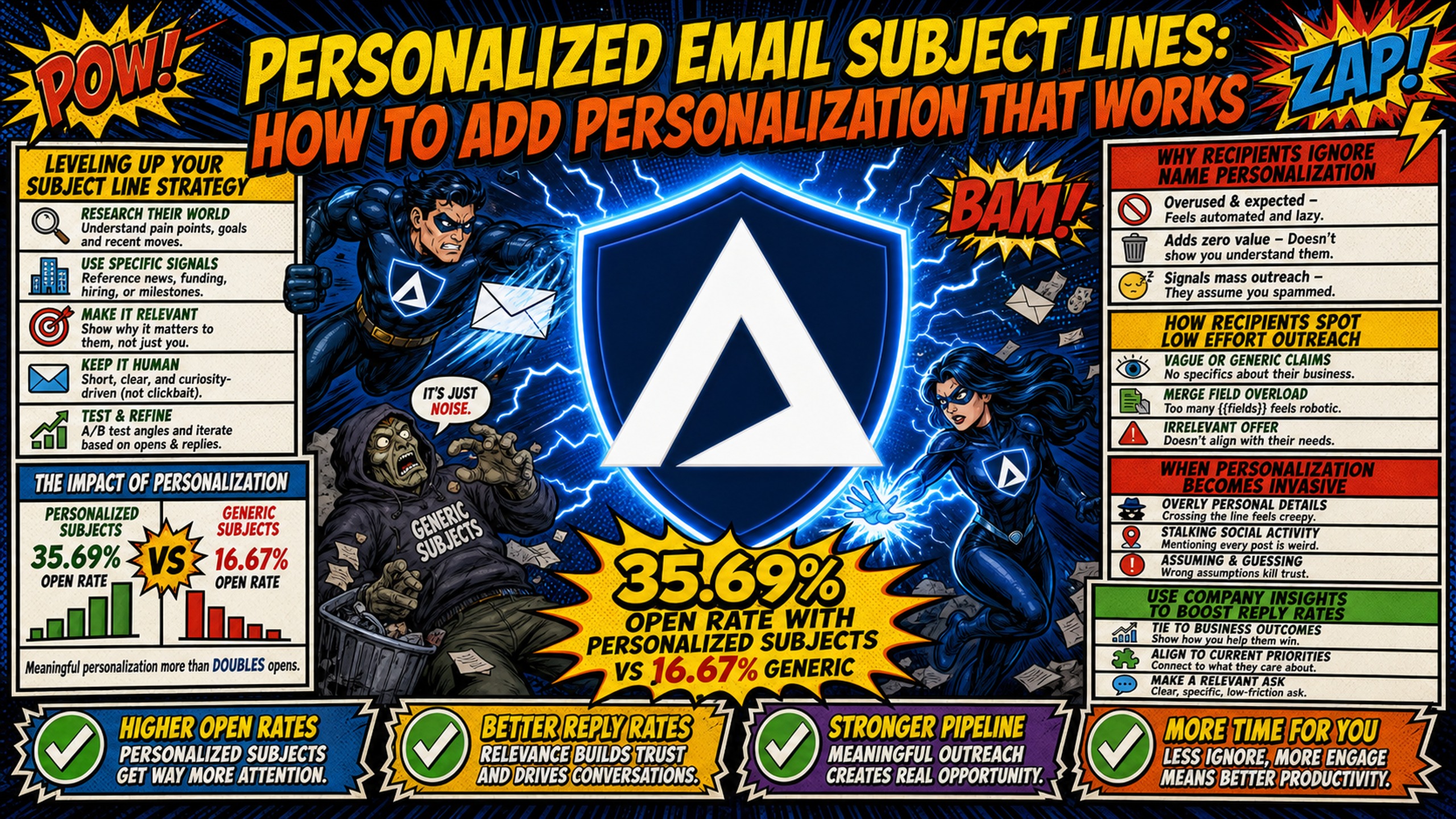
Effective cold email personalization goes well beyond {{firstname}}. Personalized subject lines average a 35.69% open rate versus 16.67% for generic ones, a 114
TL;DR: Effective cold email personalization goes well beyond
{{first_name}}. Personalized subject lines average a 35.69% open rate versus 16.67% for generic ones, a 114% lift according to Klenty's research, but at scale, repetitive token patterns from a single domain trigger modern spam filters. The fix is a two-part approach: write subject lines using contextual triggers (company news, job duties, and recency signals) with solid fallback logic, then distribute sending volume across multiple domains on dedicated IPs. Inframail automates DNS setup and provides unlimited inboxes at a flat $129/month on the Unlimited Plan, making domain rotation affordable without per-inbox billing. The Agency Plan at $327/month provides 3 dedicated IPs for higher volume operations.
Personalizing subject lines can significantly improve your open rate. Klenty's data shows emails with personalized subject lines hit a 35.69% open rate versus 16.67% for generic ones, a 114% lift that makes personalization essential for every sequence.
But there's a catch. Modern spam filters use neural networks to detect statistically similar templates sent at volume from a single domain. The more you scale personalized outreach on shared infrastructure, the faster your domain reputation erodes. Campaign Managers who focus only on writing better tokens, while ignoring the sending infrastructure underneath, consistently see open rates drop mid-campaign with no obvious cause.
This guide covers how to write subject lines using advanced personalization, how to configure fallback logic so broken tokens never reach a prospect, and how to build the domain infrastructure that lets you send at scale without triggering filters.
Leveling up your subject line strategy
Most Campaign Managers start with {{first_name}} and stop there. Prospects receive dozens of cold emails weekly and recognize the pattern immediately. First-name personalization alone produces a marginal lift, because it has become the baseline expectation rather than a signal of genuine research. The meaningful open rate improvements come from contextual personalization: company news, job duties, and recency signals that demonstrate the sender actually studied the recipient's current situation.
The matrix below maps personalization type against manual effort, deliverability risk, and expected outcome, based on industry patterns across cold email infrastructure:
| Personalization type | Manual effort | Deliverability risk | Expected open rate |
|---|---|---|---|
| Hyper-personalized (manual research) | High | Typically lower (due to lower send volume) | Highest |
| Automated tokens (no domain rotation) | Low | High (spam filters) | Lowest |
| Automated tokens (with domain rotation) | Low | Low | Improved (better inbox placement than single-domain sending) |
Automated tokens with domain rotation close most of the gap to manual personalization at a fraction of the effort. The Inframail infrastructure cost guide covers how agencies compare options when building this infrastructure layer.
Why recipients ignore name personalization
{{first_name}} personalization no longer creates the impression of individual effort. A subject line reading "Hey John, quick question" signals automated bulk outreach, not a relevant message worth opening. To earn attention, the subject line must show that the sender researched something specific to the recipient's current situation, not just appended their name to a template.
How recipients spot low effort outreach
Beyond name tokens, several patterns trigger immediate deletion:
- Bad formatting: Merge tags rendering literally (e.g.,
{{first_name}}) when data is missing - Generic framing: No reference to the recipient's company, role, or any recent event
- Irrelevant offers: Subject lines pitching a solution that doesn't match the recipient's industry or growth stage
- Overloaded tokens: Multiple merge tags crammed into a single short subject line
Nick Abraham's 2025 deliverability breakdown covers how modern filters evaluate these patterns in combination, scoring not just individual words but the cumulative structure of a message. In B2B cold email, multiple emojis combined with exclamation marks and ALL CAPS trigger spam filters before the message ever reaches a human. Overusing emojis can detract from your message and hurt deliverability. Emoji impact on open rates varies by audience and context. Test before applying at scale.
When personalization becomes invasive
There's a clear line between professional context personalization and data that feels like surveillance. Professional signals that work well include recent funding rounds, job title and reported responsibilities, published content or LinkedIn posts, and industry-specific compliance changes.
Data that crosses into invasive territory includes scraped personal social media activity or information a recipient has only shared in private contexts. For compliant B2B outreach, stick to data sources that are publicly accessible through professional channels and that you've obtained through methods consistent with each platform's terms of service. Invasive personalization generates spam reports at a higher rate, and a single spam report per 1,000 sends starts degrading domain reputation.
Using company insights to boost reply rates
Company-level personalization outperforms name tokens because it signals actual research. Referencing a funding round, product launch, or leadership change shows the email was written for a specific company's current situation. Subject lines using company news follow a simple structure: acknowledge the event, then connect it to a relevant outcome the recipient cares about.
Examples:
- "Congrats on the Series B, [Company]"
- "Saw [Company]'s expansion into Europe, Middle East, and Africa (EMEA)"
- "Quick question after [Company]'s product launch"
How company news boosts reply rates
Funding rounds, product launches, and executive hires signal that a company is in an active growth phase with new budget, new goals, and new problems to solve. A subject line that acknowledges the event and connects to a relevant offer lands far better than a cold introduction with no context.
The cadence for using company news is straightforward: set up alerts for funding announcements (Crunchbase, TechCrunch), track hiring surges on LinkedIn as a proxy for growth, and monitor product launch pages. These triggers can be pulled via Apollo or ZoomInfo and mapped to personalization tokens in your sending platform.
Automate personalization with your stack
The data flow from Apollo or ZoomInfo into a sending platform like Instantly or Smartlead runs through CSV export and import. Apollo pulls company name, job title, recent funding, and headcount data into a list. That list exports to CSV with custom columns that map directly to merge tags in your sequence.
The problem that emerges quickly: as campaigns scale to 50 or 100 domains, sending personalized sequences from a single domain or shared IP pool puts all of that volume behind one reputation score. Spam filters detect the statistical pattern of thousands of similar-structured emails originating from one IP range and flag the domain. Inframail addresses this by providing unlimited inboxes and dedicated US-based IPs on a flat $129/month plan, so Campaign Managers can partition send volume across multiple domains without paying per-inbox fees. The Inframail-Smartlead integration guide details the exact CSV export and IMAP/SMTP credential import process for connecting provisioned inboxes to active sequences.
Adjusting subjects by growth stage
Early-stage companies (seed to Series A) tend to respond to subject lines that reference speed-to-value and measurable growth outcomes, with general SaaS guidance consistently pointing to brevity and metric-focused framing as effective at this stage. Enterprise contacts are generally more skeptical of cold outreach and tend to engage with subject lines that lead with specific, relevant business outcomes rather than broad value propositions. Matching the subject line's framing to the recipient's known priorities demonstrates research without requiring explicit claims about complexity or process.
Targeting specific industry pain points
Industry-specific triggers work because they reference a shared problem that every operator in that vertical deals with. Examples by industry:
- Fintech: Regulatory compliance updates, payment infrastructure changes, risk management requirements
- E-commerce: Order fulfillment demands, product return rates, seasonal demand fluctuations
- B2B SaaS: Customer retention metrics, user onboarding performance, product adoption rates
- Staffing: Hiring pipeline management, placement speed metrics, workforce policy changes
Remi Taffin's scraping and AI blueprint covers how to build this data enrichment layer at scale, automating the trigger capture that makes industry-specific personalization sustainable across large prospect lists.
Beyond tokens: personalizing by job duties
Role-based personalization writes to the daily problems that a specific title owns. It doesn't just name the role, it signals an understanding of what that role is held accountable for. A VP of Sales cares about pipeline coverage, deal velocity, and forecast accuracy. A Head of Engineering cares about deployment speed, incident response, and technical debt.
Chris Bussing's B2B subject line breakdown covers several role-specific frameworks that Campaign Managers can adapt to their own sequences.
Personalize subject lines by job role
Writing a subject line that references the VP of Sales' specific accountability ("Closing Q3 with one fewer outbound bottleneck") outperforms a generic "I help sales teams" opener. The difference is specificity: the first subject line implies the sender understands what the VP is responsible for delivering, while the second says nothing about the recipient's actual situation.
Personalizing for job levels and scale
C-suite recipients (CEO, CRO, CTO) respond to shorter subject lines with outcome framing: "3 fewer steps to enterprise close." Mid-level managers typically hold departmental budget authority and decision-making power, and tend to engage with subject lines that speak directly to the outcomes their team is responsible for delivering, for example: "Cutting DNS setup time for [Company]'s outbound team." When a Sales Development Representative (SDR) team runs campaigns across multiple client accounts, building a shared library of fallback-tested, role-segmented subject line templates reduces per-campaign configuration time. Albert Zuszman's 220+ inbox management breakdown covers the operational architecture that makes this scale without constant oversight.
Using recency signals to improve open rates
Timing-based personalization connects a subject line to something the recipient did or experienced recently. It creates the impression that the outreach is a direct response to their behavior, not a scheduled campaign blast. Three recency signals produce the highest lift in B2B cold email.
Targeting based on site browsing habits
Intent data from G2, Bombora, or ZoomInfo surfaces accounts actively researching a category in the last 30-90 days. A subject line that references this behavior without being explicit ("Noticed [Company] evaluating options in [category]") signals timely relevance. The strongest intent signals are specific high-intent actions, repeated pricing page visits or competitor comparisons, rather than broad category-level research, which captures a wide range of research stages and reduces signal quality.
How to use social data in subject lines
Recent LinkedIn posts, articles, or comments give Campaign Managers low-cost, high-signal personalization material. A prospect who published a post on hiring SDRs is actively thinking about outbound team growth. A subject line like "Your post on SDR hiring at [Company]" works because it references a public action without manufacturing a false connection. Kidous Mahteme's LinkedIn lead-capture tutorial shows how to automate this signal capture and push it into personalized sequences at volume.
Using job changes for outreach
A new executive hire is one of the highest-converting personalization triggers in B2B cold email. New leaders have budget to spend, mandates to prove, and no loyalty to the incumbent vendor stack. A subject line like "Congrats on the new role at [Company]" combined with a relevant offer lands in the first 30-90 days when new hires are most open to change. Salesforge's 2025 cold email strategy breakdown covers how to build trigger-based sequences around job changes at scale.
Using mutual connections for higher open rates
Trust-based personalization borrows credibility from a shared relationship. A subject line referencing a mutual connection achieves warmth that cold outreach normally can't produce, because the recipient evaluates the email through the lens of the shared contact's credibility.
How to use shared LinkedIn contacts
The subject line formula is direct: "Mutual connection with [Name] at [Company]." The reference creates an implied endorsement even without a direct introduction. Only use this approach when the mutual connection is genuine. Manufacturing a false shared contact damages trust the moment the prospect verifies it, generating spam reports and unsubscribes that hurt domain reputation.
Using mutual professional contacts
Shared investors, past colleagues, or conference co-presenters all qualify as mutual professional context. A subject line like "Both worked with [Name] at [Company]" creates the same trust signal as a direct mutual connection. This tier of personalization works best for high-value accounts where the manual enrichment investment is justified by deal size.
Using event attendee data
Industry conference attendee lists (where legally obtained) provide a strong shared-experience signal. "Saw you at [Event] last week" opens a subject line with a credible, time-bound reference that transforms a cold email into a follow-up from a shared experience. The window for event-based outreach is typically 1-2 weeks post-event for maximum relevance.
Metrics for tracking outreach success
Personalization quality shows up in measurable performance differences. Campaign Managers who track the right metrics can identify which personalization types drive replies versus which ones only lift vanity opens. Three metrics matter most.
A/B testing personalized subject lines
Clean A/B tests isolate a single variable per test: one subject line changes the personalization type (company name versus job title), while sending volume, audience segment, day of week, and email body remain constant. Inframail's multi-domain infrastructure lets Campaign Managers run parallel tests on different domains with identical audience profiles, producing cleaner data. The Inframail infrastructure monitoring guide covers how to track domain health across test setups.
Tracking open rates by personalization type
Segment performance data by token type: company news versus job title versus recency signal versus mutual connection. Open rates alone are unreliable since Apple Mail Privacy Protection (MPP) inflates them. Track reply rate as the primary performance indicator and use open rate as a secondary directional signal.
Measuring reply quality, not just volume
Positive reply rate, calculated as replies expressing genuine interest, is the metric that predicts pipeline impact. A campaign with a 3% positive reply rate outperforms one with a 6% total reply rate that is half unsubscribes. For B2B cold email, a solid positive reply rate sits at 0.5-2%, with research from Prospeo indicating that only around 14.1% of cold email replies are genuinely positive, translating to roughly 0.64% of all contacts emailed on a typical campaign, with tight ICP targeting on verified lists pushing positive reply rate toward the higher end of that range. Lead Gen Jay's 100k daily email breakdown includes the math on inbox count versus send volume ratios that support these rates.
Stop making these email personalization errors
Even technically correct personalization fails when data quality breaks, token density triggers filters, or fallback logic never gets tested. The errors below destroy deliverability faster than no personalization at all.
Fixing errors in personalization data
Bad personalization data is worse than no personalization. A subject line rendering as "Hi {{first_name}}" or "Congrats on raising {{recent_funding}}" signals broken automation and generates immediate deletion or spam reports.
Data hygiene checklist before any send:
- Remove legal entity suffixes from company names ("Acme Corp LLC" becomes "Acme Corp")
- Fix inconsistent casing in name fields ("JOHN" becomes "John")
- Set up fallback values for all custom variable columns to handle missing data gracefully
- Test the sequence with a seed email using empty variable values to verify fallbacks render correctly
- Bounce-test the list to keep bounce rates below 1%
The Inframail Zerobounce vs. Neverbounce comparison covers which verification tool handles each of these data quality issues most effectively.
Avoiding creepy personalization tactics
Stick to publicly available professional data obtained through compliant means. Company press releases, LinkedIn profiles, industry news, and published content are appropriate sources when accessed within each platform's terms of service. Scraped private activity or data recipients have never shared in a professional context generates spam reports at a higher rate and creates legal exposure. The Inframail cold email compliance guide covers which data types are legally compliant for B2B cold outreach in the US.
Combining too many personalization tokens
Spam filters flag emails with dense, repetitive token patterns sent at volume from a single domain. Modern filters use AI to evaluate vocabulary, formatting, and sender reputation simultaneously. An email with multiple merge tags, an emoji, and a domain sending hundreds of emails per day triggers cumulative scoring that lands the message in spam.
Safe limits for personalization tokens per subject line:
- Maximum 2-3 personalization points per email (subject line plus body combined)
- Keep token density light in subject lines, typically 1-2 tokens
- Avoid stacking tokens that could render blank (e.g.,
{{company_name}}and{{recent_news}}in the same subject line without fallbacks)
The only sustainable solution for high-volume personalized campaigns is domain rotation. Distributing send volume across multiple domains on dedicated IPs breaks the pattern detection that spam filters rely on.
Inframail UI: setting up 10 domains simultaneously
Inframail automates SPF/DKIM/DMARC configuration across all provisioned domains in a single workflow. At $129/month for unlimited inboxes on the Unlimited Plan, the per-inbox cost approaches zero as domain count scales. Contrast this with Google Workspace at $7-8.40 per user per month: 50 inboxes on Google Workspace costs $350-420/month before warmup.
With Inframail, 50 inboxes cost $129/month plus approximately $34/month in amortized domain costs, totaling $163/month. Warmup tools are a separate external cost on both setups, typically $15-50/month per inbox.
"The level of automation is exceptional and clearly designed for serious operators; it removes friction and allows you to focus on execution rather than setup." - Verified user review of Inframail
Shared IP providers like Maildoso route sends through pooled IP ranges. When one sender on that pool triggers a spam filter, every other account on the same IP range absorbs the reputation damage. Inframail's dedicated IPs (1 IP on the Unlimited Plan, 3 IPs on the Agency Plan at $327/month) mean each Campaign Manager's sending reputation stays isolated to their own IP history. The Maildoso deliverability review covers how shared IP contamination affects inbox placement rates in practice.
"We spent months hunting for a reliable cold-emailing stack. After repeated failures with another provider, we trialled two options - Inframail and a competitor. We chose the competitor. A month later, we switched back to Inframail. Zero issues since." - Verified user review of Inframail
Fixing broken personalization with fallbacks
Fallback logic prevents blank fields from reaching a prospect's inbox. Both Instantly and Smartlead support native fallback syntax that substitutes a generic value when a custom variable is empty.
Technical workflow: fallback syntax configuration
Instantly uses merge tag fallbacks in this format: {{firstName | there}} renders as "there" if no first name is available. Smartlead uses Liquid Syntax: {{#if company_name}}{{company_name}}{{else}}your team{{/if}}.
The fallback logic table below covers five common B2B tokens with practical fallback values:
Common B2B fallback patterns include:
| Merge tag | Example value | Suggested fallback | Example output (fallback) |
|---|---|---|---|
{{company_name}} |
Acme Corp | your company | Question about your company |
{{job_title}} |
VP of Sales | your team | Quick note for your team |
{{recent_news}} |
funding round | your update | Congrats on your update |
{{mutual_contact}} |
Sarah Jenkins | a shared contact | Reaching out via a shared contact |
{{industry}} |
Fintech | your industry | Trends in your industry |
Kidous Mahteme's spintax configuration walkthrough shows how to combine fallback logic with spintax variation (syntax for rotating alternate text) to produce subject lines that read differently across sends even when pulling from the same template. The ChatGPT spintax tutorial covers how to generate spintax variants at scale using AI.
Domain rotation makes high-volume personalization sustainable. Without it, even the best subject lines can't overcome the pattern-detection algorithms that modern spam filters use to protect inboxes. Support is available 16 hours per day, 7 days a week from real people, covering the critical window when a domain incident during an active send needs immediate escalation. For Microsoft-specific blacklist incidents, the Inframail Microsoft blacklist guide covers the exact delisting process.
Sign up to Inframail and get started today.
FAQs
What is the optimal number of personalization tokens per email?
Use 2-3 personalization points per email maximum, with no more than 1-2 tokens in the subject line itself. Stacking more tokens increases the risk of blank renders and triggers spam filter cumulative scoring.
What are realistic open rate benchmarks for personalized cold email?
Klenty's research shows personalized subject lines average 35.69% open rates compared to 16.67% for non-personalized ones, though Apple MPP inflates open rate figures across the board. Positive reply rate (replies expressing genuine interest) is the more reliable performance indicator — expect 0.5-2% for broad outbound, with tightly targeted ICP campaigns on verified contact lists pushing to 2-5% or higher.
Where should I source clean personalization data?
Apollo and ZoomInfo provide company name, job title, headcount, and funding data that maps directly to merge tags in Instantly or Smartlead. Verify every list with an email validation tool (Zerobounce or Neverbounce) to keep bounce rates below 1% before any send.
How does personalization affect inbox placement and spam filters?
Repetitive personalization token patterns sent at high volume from a single domain or shared IP trigger spam filter pattern detection. Distributing send volume across multiple domains on dedicated IPs, provisioned through a platform like Inframail, reduces the statistical signature that filters detect and maintains inbox placement rates across active campaigns.
Key terms
Merge tag: A variable placeholder in an email template (e.g., {{first_name}}) that is replaced with prospect-specific data at send time.
Fallback logic: Conditional syntax in a sending platform that substitutes a default value when a merge tag field is empty, preventing blank renders from reaching the prospect.
Domain rotation: The practice of distributing outbound email volume across multiple sending domains to avoid concentrating send patterns on a single domain reputation.
Dedicated IP: A sending IP address assigned exclusively to one sender, so that reputation is determined solely by that sender's behavior rather than shared with other accounts on a pooled range.
SPF/DKIM/DMARC: Authentication protocols that verify a sending domain's identity to receiving mail servers. Correct configuration is required for inbox placement in modern cold email infrastructure.
Inbox placement rate: The percentage of sent emails that arrive in the recipient's primary inbox rather than spam, promotions, or other filtered folders.
Spintax: Syntax notation that allows multiple text variations to be specified within a single template, rotating alternate phrases across sends to create unique-looking messages at scale (e.g., {Hi|Hello|Hey} rotates three greetings).