
Meeting reminder email: templates and best practices
A three-step reminder cadence (confirmation, 24 hours prior, 1 hour prior) improves meeting completion rates, and research on reminder sequences finds that mult
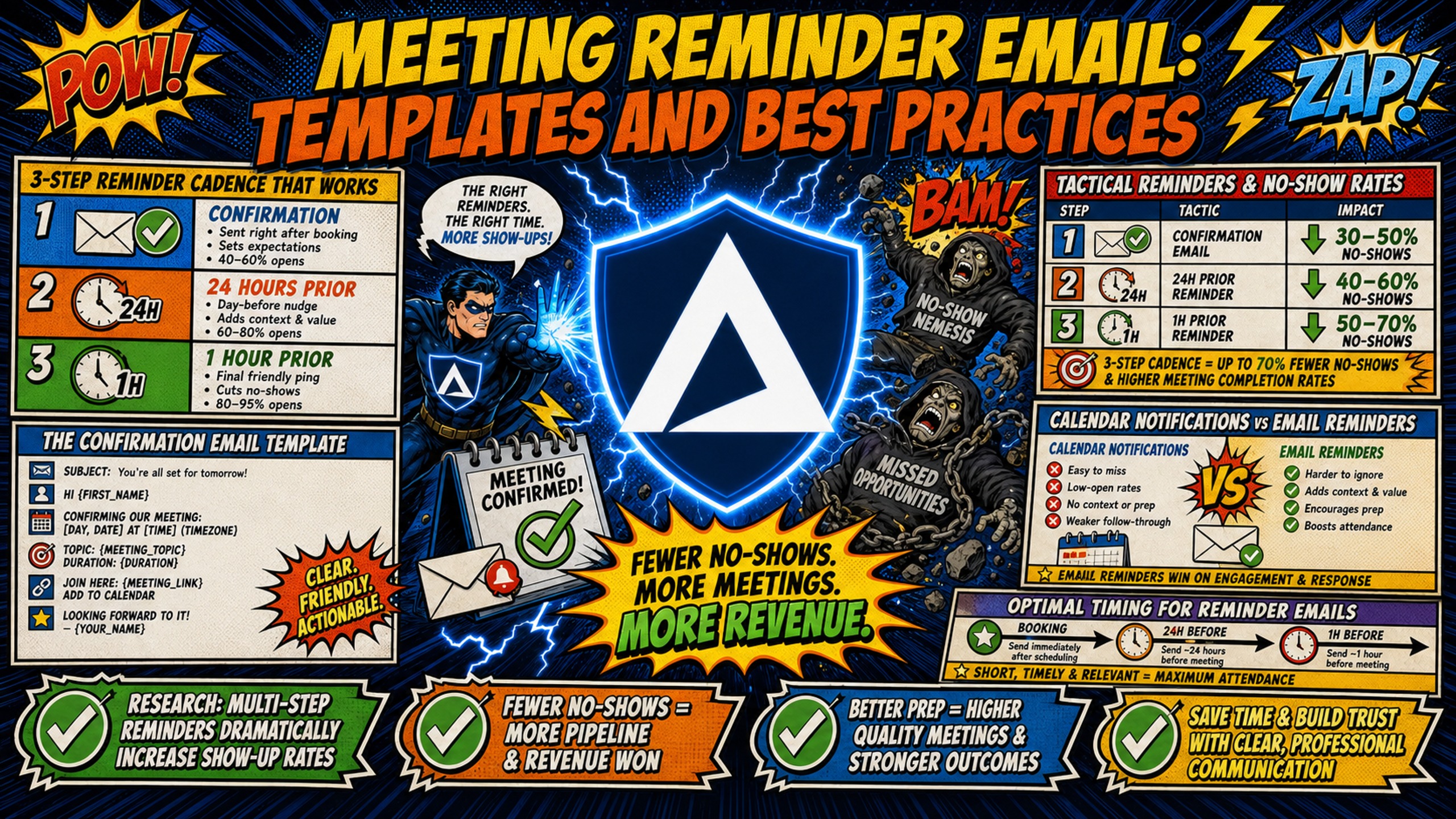
TL;DR: A three-step reminder cadence (confirmation, 24 hours prior, 1 hour prior) improves meeting completion rates, and research on reminder sequences finds that multiple reminders outperform single ones. The templates below cover all three stages with copy-and-paste language. The infrastructure point most agencies miss: reminders should never go out from the same domains as cold outbound, because a complaint spike on one will take down the other. Send reminders from the inbox your scheduling tool connects to, and keep cold outbound isolated on dedicated infrastructure at $129/month flat for unlimited inboxes, versus $350 to $420/month for 50 inboxes on Google Workspace. Domains and warmup tools are extra on both sides.
Agency founders spend thousands of dollars generating qualified leads, yet a significant share disappear before the sales call starts. The problem is rarely the offer. It is the absence of a structured reminder sequence, or worse, a reminder sequence running from the same outbound domains used for cold prospecting, quietly degrading inbox placement rates for every active client campaign.
Tactical reminders and no-show rates
No-shows are not random. They are a predictable outcome of a prospect who confirmed a meeting days ago, got pulled into other priorities, and received no signal that the call still mattered. Tactical reminders change that outcome by creating lightweight touchpoints that keep the meeting visible, reinforce the value of the time, and lower the friction required to reschedule rather than ghost.
The goal is not to pressure a prospect into attending. It is to respect their time by ensuring they have everything they need to show up or let you know they cannot.
Performance impact: A meta-analysis of 21 reminder studies covering 8,345 people who received notifications and 7,731 who received none found recipients were 23% more likely to attend and 25% less likely to no-show, and concluded that multiple reminders outperformed single ones. That research covers healthcare appointments rather than B2B sales calls, so treat the direction as reliable and the exact figures as indicative.
The revenue cost of missed meetings
Work the math with your own inputs. Assume 10 booked meetings a month and a 30% no-show rate, which leaves 3 lost conversations. Assume a 25% close rate on calls that actually happen, so those 3 missed calls represent roughly 0.75 clients that never entered the pipeline.
Now attach a value. On a $3,000 monthly retainer with a 12-month average client life, each client is worth $36,000. That puts the monthly no-show cost at roughly $27,000 in lifetime revenue, before accounting for the sales development representative (SDR) time and ad spend that generated those leads in the first place.
Swap the retainer, close rate, and client life for your own numbers and the shape of the answer does not change. For agencies operating on lean margins, every no-show is a direct draw on monthly recurring revenue (MRR). Fixing a high no-show rate with a structured sequence is among the highest-return operational improvements available, and it costs almost nothing to implement.
Optimal timing for reminder emails
The three-step cadence works because it matches the natural rhythm of how people manage their calendars:
- Confirmation (immediately after booking): Confirms the time, sets the agenda, and locks in the calendar hold.
- 24-hour reminder: The most important touchpoint. Catches prospects before their morning planning session and gives them enough lead time to reschedule rather than ghost.
- 1-hour reminder: Short, mobile-friendly, and focused on the single action of clicking the meeting link.
Email open rates of 20% to 28% make email the weaker channel for time-critical nudges, though it carries the agenda and the reschedule link that a text cannot. SMS open rates are usually quoted at 95% to 98%, though that figure is an industry estimate rather than a measured metric, since SMS has no tracking pixel equivalent. The practical point holds: a text reaches someone who is not checking email between meetings, so use SMS to supplement the email sequence at the 1-hour mark rather than replace it.
Calendar notifications vs email reminders
Native calendar invites can carry more than one notification, but they arrive as calendar alerts rather than as a message in the inbox. That makes them easy to dismiss in a stack of back-to-back calls and hard to search for later. Email reminders arrive on the prospect's terms, are searchable, contain the agenda and link, and can include a one-click reschedule button.
Calendly's workflow templates show that you can add reschedule or cancellation links to automated reminders, which keeps prospects engaged rather than forcing them into a binary choice between attending and simply not showing up. A prospect who books on desktop and does not have the meeting link saved will not attend based on a calendar notification alone.
The confirmation email template
The confirmation email does the quiet work of the sequence. It arrives while the prospect still remembers why they booked, sets expectations for what the call covers, and gives them a reschedule path before anything has gone wrong. Send it immediately after booking, and keep it short enough to read on a phone.
Sample confirmation email
Subject: Confirmed: [Meeting Name] on [Date] at [Time]
Hi [First Name],
You're booked for [Meeting Name] on [Day, Date] at [Time, Time Zone].
Here's what we'll cover:
[Agenda point 1, e.g., your current outbound infrastructure setup][Agenda point 2, e.g., where costs are compressing margin][Agenda point 3, e.g., a specific option to fix it]
Meeting link: [Meeting URL]
Need a different time? Pick a new slot here: [Reschedule URL]
Looking forward to our meeting.
[Your Name] [Your Title]
24-hour pre-meeting email template for clients
The 24-hour reminder is the most important email in the sequence. It arrives when the prospect is planning the next day, has enough time to reschedule if needed, and is primed to re-engage with the reason they booked the call. Keep it agenda-forward and easy to act on.
Direct 24-hour reminder email samples
Subject: Still on for tomorrow, [First Name]?
Hi [First Name],
Just confirming we're still on for [Meeting Name] tomorrow at [Time, Time Zone].
Here's what we'll cover:
[Agenda point 1][Agenda point 2][Agenda point 3]
Meeting link: [Insert Zoom/Meet URL]
If the time no longer works, here's a direct link to pick a new slot: [Calendly/YouCanBook.me URL]
Looking forward to our meeting.
[Your Name] [Your Title]
Wording for RSVP email requests
Asking for confirmation without sounding aggressive requires framing the request around the prospect's convenience, not the agency's need for certainty. Soft calls-to-action acknowledge autonomy rather than demanding compliance.
Use phrases like "Reply 'yes' if this time still works, or use the link below to grab a new slot" rather than "Please confirm your attendance." That language belongs in internal HR contexts, not sales conversations.
Placement of the reschedule link
Embedding a rescheduling link directly in the 24-hour reminder removes the single biggest friction point that turns "I need to cancel" into a no-show. When a prospect has to email back to cancel, find a reply thread, and negotiate a new time, most choose silence. Tools like Calendly and YouCanBook.me provide reschedule URLs that can be included directly in reminder emails.
Place the reschedule link before the meeting link, so it is the first option a time-pressured prospect sees.
1-hour reminder template to prevent no-shows
The 1-hour reminder is a short, mobile-optimized nudge. Its only job is to surface the meeting link and confirm the time, so do not include an agenda at this stage. The prospect already knows why they booked, and they need the link plus a fast confirmation of the time, ideally readable in 10 seconds on a phone screen.
This is also the right moment to trigger an SMS backup if the prospect has opted in. A text sent 60 minutes before the call with the meeting link covers the gap for people who are not checking email between meetings.
Sample 1-hour reminder email
Subject: Your call with [Name] starts in 1 hour
Hi [First Name],
Your meeting with [Your Name] starts at [Time] today.
Here's your direct link: [Meeting URL]
Dial-in: [Dial-in number and PIN, if applicable]
Looking forward to our meeting.
[Your Name]
Keep it under 60 words. The prospect is between meetings and scanning on mobile.
The 1-hour SMS backup script
SMS backup at 60 minutes:
"Hi [First Name], your call with [Your Name] is in 1 hour at [Time]. Direct link: [URL]. Reply if you need to move it."
Pair this with the email above so the prospect gets the link on whichever channel they check first.
Same-day meeting reminder email template
Morning-of reminders serve afternoon meetings differently than the 24-hour email. The prospect has already seen the confirmation. The same-day email is about rebuilding the context for why this call is worth protecting when the day fills up with competing demands.
Value-forward framing ("Here is what we'll cover") combined with a visible meeting link gives the prospect a concrete reason to protect the slot. Empathy-first openers ("I know your calendar is packed") reduce resistance before asking for attention.
Same-day email templates to reduce no-shows
Subject: Your [Meeting Name] is today at [Time]
Hi [First Name],
Today at [Time, Time Zone] we're covering:
[Agenda point 1][Agenda point 2][Agenda point 3]
Meeting link: [URL] Dial-in: [Number and PIN]
If the time doesn't work, use this link to find a new slot: [Reschedule URL]
Looking forward to our meeting.
[Your Name]
For technical demos or product walkthroughs, add context about what the prospect needs to have ready:
Subject: Your [Product Demo] is today at [Time]
Hi [First Name],
Your [Product Demo] with [Your Name] is today at [Time, Time Zone].
Before we connect, it would help to have:
[Prereq 1, e.g., your current sending platform open][Prereq 2, e.g., your last 30 days of domain health data]
Meeting link: [URL] Screen share: [URL]
Looking forward to our meeting.
[Your Name]
Reschedule scripts that keep the meeting alive
A prospect who reaches out to reschedule is still a live opportunity. The risk is losing them between the cancellation and a new booking, and every step added to that process increases the likelihood of a quiet drop-off.
Calendly's workflow templates include an option that emails invitees marked as a no-show and sends them a scheduling link to book a new time. That recovers a share of missed meetings without any manual follow-up from the agency.
The one-click reschedule principle
The one-click reschedule principle means the prospect never has to compose an email, negotiate a time, or feel the friction of initiating a change. A rescheduled meeting is a future sale. A no-show is wasted preparation time and a burned lead.
Scripts for proposing new meeting times
Subject: Moving our [Time] call, new options inside
Hi [First Name],
I need to move our [Time] call on [Date]. Here are two options that work on my end:
[Day, Date] at [Time, Time Zone][Day, Date] at [Time, Time Zone]
Or grab a time directly here: [Scheduling URL]
Looking forward to our meeting.
[Your Name]
Automation tools for reminder sequences
Running a three-step reminder sequence manually at scale is not viable for agencies managing 5 to 15 clients. Automation tools like Calendly, HubSpot, or YouCanBook.me can trigger each email at the right interval, include personalization tokens, and fire the no-show follow-up without human intervention.
The setup detail that matters is which inbox the reminders send from. Calendly sends workflow emails either from its own default address or from a connected Gmail or Outlook account, and connecting your own account is worth doing so replies land where you can see them. Whichever tool you use, the sending inbox should be the one you use for client communication, not one of your cold outbound inboxes.
Domain separation for reminder and outbound traffic
Reminder emails and cold outbound emails are different kinds of traffic, and they should not share domains. Cold outbound goes to people who have never heard from you, draws complaints, and lives or dies on domain reputation. Reminders go to people who booked a call, and they need to arrive reliably every time.
Mixing them puts both at risk. Gmail requires senders to keep spam rates below 0.3% and warns against sudden volume spikes, noting that "immediately doubling previously sent volumes suddenly could result in rate limiting or reputation drops." Microsoft applies similar scrutiny to unusual sending volume. A cold campaign that draws complaints on the same domain your reminders use will take the reminders down with it.
The split is straightforward. Send reminders from the inbox your scheduling tool connects to, and keep cold outbound on infrastructure built for it, where high volume across many new domains is expected rather than anomalous. That second half is where the cost question lands, because per-seat pricing makes a dedicated outbound domain stack expensive to run.
Inframail's flat-rate model is $129/month for unlimited inboxes. Google Workspace charges $350 to $420/month for 50 inboxes at $7 to $8.40 per seat, and it requires a unique DKIM key per domain added by hand at your domain host, which is where the 12+ hours goes on a 50-domain build. Inframail's all-in cost for 50 inboxes is $129 for the platform plus roughly $34/month in amortized domain costs, or $163/month. Warmup tools are separate on both sides at $15 to $50 per inbox per month.
Table 1: Cost comparison for dedicated cold outbound infrastructure (50 inboxes)
| Provider | Monthly cost (50 inboxes) | IP type | DNS setup |
|---|---|---|---|
| Google Workspace | $350-$420 | Shared | Manual per domain |
| Maildoso | ~$95-$125 | Shared pool | Automated |
| Inframail | $129 (unlimited) | Dedicated US IP | Automated (SPF/DKIM/DMARC) |
Platform fees only, current as of August 2026. Domain costs ($5-$16/year each) and external warmup tools ($15-$50/month per inbox) add to these figures on all platforms. Per-mailbox pricing in this category changes often, so check current rates before committing.
Per-mailbox providers are cheaper than a flat rate at 50 inboxes on sticker price. The flat rate wins as inbox count grows, because $129/month covers 50 inboxes or 500, while per-mailbox pricing keeps climbing with every client you add. That crossover matters most for agencies whose domain count tracks headcount.
The other difference is IP type. Multiple dedicated IPs let you separate clients or campaigns so one underperforming campaign does not drag down the rest. The Unlimited Plan includes 1 dedicated IP and the Agency Pack includes 3, which is the practical route to separating traffic at the IP level rather than only at the domain level. On shared IP pools, your deliverability is exposed to the sending behavior of every other sender on the same address.
Support quality is easy to underrate until a domain gets flagged mid-campaign and the fix is time-sensitive.
"We spent months hunting for a reliable cold-emailing stack. After repeated failures with another provider, we trialled two options, Inframail and a competitor. We chose the competitor. A month later, we switched back to Inframail. Zero issues since. Rock-solid infrastructure, sharp support, genuinely dependable. Highly recommended." - Verified user review of Inframail
Setting up the outbound side is fast. Inframail configures SPF, DKIM, and DMARC automatically for each domain, then exports IMAP/SMTP credentials to CSV for direct import into cold email platforms like Instantly and Smartlead. Inframail also supports custom tracking domains, with automated configuration available for several of the major sending platforms, so click tracking runs on a domain you control rather than a shared platform subdomain.
The seven-platform cost comparison breaks these costs down across 50 and 200 inbox tiers, and Inframail's infrastructure monitoring guide covers domain and IP health checks.
Best practices for meeting reminder emails
Reminder emails fail for one of three reasons: missing the meeting link, providing no context for why the call is worth keeping, or making cancellation harder than a no-show. Each is fixable with a consistent checklist applied to every template.
Include meeting link and dial-in details
The meeting link must appear in the body of every reminder email, not just the calendar invite. A prospect checking email on a phone three hours after a calendar notification will not return to the calendar to find the link. For video calls with a separate dial-in option, include both, since some prospects join by phone from a car.
Provide pre-meeting context and agendas
A three-bullet agenda in the 24-hour reminder gives the prospect a concrete reason to protect the time. Keep bullets to one line each. "Your current infrastructure cost vs. what you could be paying" outperforms "We will discuss your email infrastructure" because it names a specific outcome the prospect cares about.
Streamline guest cancellation workflows
Making it easy to cancel is better than receiving a no-show. Give the prospect four options in every email: attend, reschedule, cancel, or propose a new time. Every option is better than silence, and workflow automation handles the rebooking step so cancellations feed back into the pipeline rather than becoming lost leads.
Monitor meeting attendance rates
Tracking open rates and link clicks on reminder emails identifies which stage of the sequence is underperforming. A high open rate on the 24-hour email with a low click rate on the meeting link points to a friction issue at the link placement. A low open rate on the same-day email points to a subject line or sending domain problem.
Track show rate week over week alongside these, since the sequence is only working if completed meetings go up.
The bottom line for agency margins
A three-step reminder cadence costs nothing to run and recovers meetings you have already paid to book. Using the worked example above, cutting a 30% no-show rate to 15% puts roughly half of that $27,000 monthly lifetime revenue figure back into the pipeline, on the same ad spend and the same SDR hours.
The infrastructure side protects the other end of the same funnel. Keeping reminders off your cold outbound domains means a complaint spike on a campaign cannot take down the emails that get prospects onto calls, and running outbound on flat-rate dedicated infrastructure keeps that cost from scaling linearly as client count grows.
Sign up to Inframail and get started today.
FAQs
How many reminder emails should agencies send before a meeting?
Send three reminders: an immediate confirmation after booking, a 24-hour reminder with the agenda, and a 1-hour reminder with the direct meeting link. Three is a reasonable ceiling for most B2B calls. Multiple reminders do keep improving attendance, but each additional touch on a high-value prospect carries a real risk of reading as pressure, and the research on where the returns stop is not settled.
How should agencies handle reminders for recurring client calls?
Use a single 24-hour reminder with a reconfirmation format rather than a full agenda email. A brief "Our weekly call is tomorrow at [Time], here's the link: [URL]" is sufficient for established relationships, with full three-step sequences reserved for new prospect calls.
What should agencies do when a lead doesn't show up to a meeting?
Send a no-show follow-up within 15 minutes of the missed start time: "Hi [First Name], I was on at [Time] but didn't see you there. Here's a link to grab a new slot at your convenience: [Scheduling URL]." Calendly can automate this step with its no-show workflow template.
Can you send meeting reminders from Inframail inboxes?
No, and you should not want to. Inframail is an email infrastructure provider, not a sending platform, and it is purpose-built for B2B cold email campaigns rather than transactional messages. Send reminders from the inbox your scheduling tool connects to, and keep the two traffic types on separate domains so a complaint spike on a campaign cannot reach your reminders.
For the outbound side, Inframail exports IMAP/SMTP credentials to CSV for import into supported cold email platforms. The Inframail and Smartlead integration guide shows the credential setup step.
Key terms glossary
Transactional email: An automated email triggered by a specific user action or scheduled event, such as a meeting confirmation or reminder, as distinct from cold outbound prospecting email.
Dedicated IP: A sending IP address reserved exclusively for one sender's use, so that sending reputation depends only on that sender's behavior rather than the behavior of others in a shared pool.
SPF/DKIM/DMARC: Three DNS-based authentication records that verify the sender's identity and signal to email service providers (ESPs) that outbound mail is legitimate. Inframail configures all three automatically for each domain.
Inbox placement rate: The percentage of sent emails that land in the recipient's primary inbox rather than spam or promotional folders, a direct measure of domain and IP health.
Custom tracking domain: A sender-owned subdomain such as links.yourdomain.com used to track email opens and clicks, isolating tracking reputation from the shared subdomains used by sending platforms.
No-show rate: The percentage of booked meetings where the prospect does not attend and does not notify the agency in advance.
Domain isolation: The practice of running transactional email traffic (reminders, confirmations) on separate domains from cold outbound campaigns, preventing spam filter activity on one domain type from damaging the other.