
How to write a reminder email: complete guide & best practices
Writing effective reminder emails means using low-pressure subject lines, context-triggered timing, and a widening-interval sequence structure to drive replies.
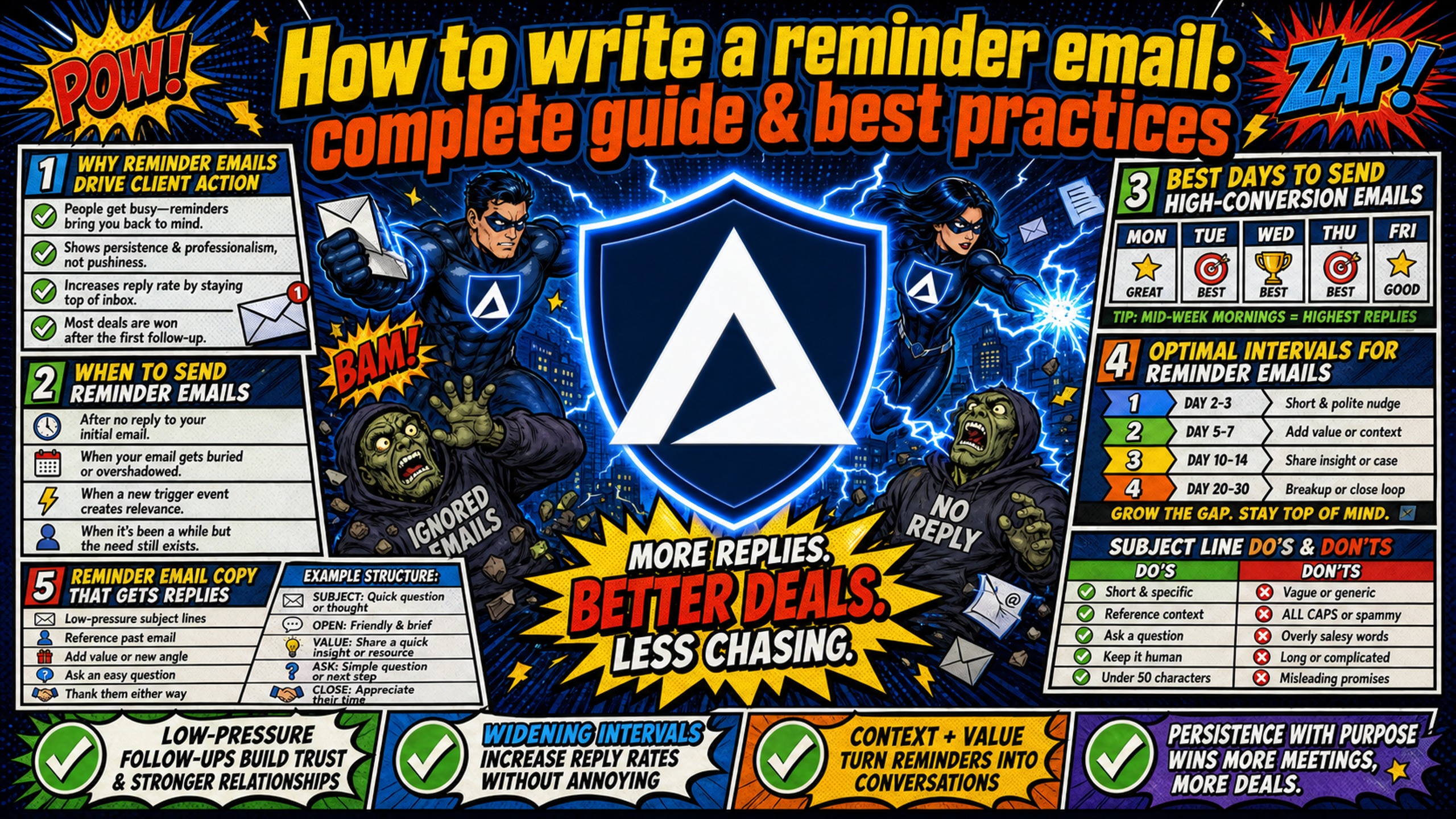
TL;DR: Writing effective reminder emails means using low-pressure subject lines, context-triggered timing, and a widening-interval sequence structure to drive replies. It also means stable technical infrastructure. Copy determines whether a prospect replies. Your DNS setup determines whether the message reaches the inbox at all. Traditional providers like Google Workspace charge $7-8.40 per seat, compressing margins as you scale follow-up sequences. Inframail offers flat-rate Microsoft email infrastructure at $129/month for unlimited inboxes, with automated DNS setup and dedicated IPs, allowing agencies to scale campaigns without per-inbox infrastructure costs eating into net margin.
Your reminder email copy means nothing if your infrastructure routes it to the spam folder. If your agency pays Google Workspace $7-8.40 per seat for every inbox in a follow-up sequence, your margins shrink with every reminder you send. The most effective reminder emails do not demand attention. They make replying the easiest task on the recipient's list.
This guide covers exact templates, timing intervals, subject line formulas, and the infrastructure setup needed to run high-conversion follow-up campaigns that protect your sender reputation and your agency margins.
Why reminder emails drive client action
Busy professionals miss emails. It is not negligence, it is volume. A single cold email competes with calendar invites, Slack threads, and internal approvals. According to Woodpecker's cold email study across 20 million emails, campaigns with 4-7 touchpoints hit 8.3% reply rates versus 4.1% for single-touch outreach, by reaching prospects again after they've had time to reconsider. The key is keeping each follow-up short, contextually relevant, and free of pressure.
Before building any sequence, audit your current approach against this checklist:
Founder's checklist: is your reminder automated or robotic?
- Does the email reference a specific, real pain point?
- Have you avoided phrases that may sound passive-aggressive (like "As per my last email")?
- Is there a clear, low-pressure "easy out" clause?
- Are you sending from a dedicated IP to protect deliverability?
- Is your sending volume spaced out naturally to mimic human behavior?
When to send reminder emails
Reminders work best when triggered by a specific context rather than a fixed calendar schedule. Context-driven triggers include upcoming payment due dates, scheduled meetings within 24 hours, unanswered proposals after a defined inactivity window, and pending client approvals that block campaign launch.
Sending a reminder simply because "it has been a few days" signals to the recipient that the message is automated with no real purpose behind it. Grounding each reminder in a specific event or deadline gives the recipient an obvious reason to act and makes the follow-up feel considered rather than mechanical.
Best days to send high-conversion emails
Industry guidance generally points to Wednesday and Thursday as the top-performing days for B2B cold outreach, with Wednesday cited most often as the strongest day for replies. Monday and Friday typically see lower engagement as recipients manage weekend carryover or week-end closeout tasks.
Morning time frames, particularly the 7-11 AM window in the recipient's local time zone, are widely cited as showing strong engagement for cold outreach. Decision-makers have cleared overnight messages but are not yet deep in afternoon meetings. Without time-zone-aware scheduling, optimal send times can miss the mark for recipients in different regions. Platforms like Instantly and Smartlead offer sequencing features that can help manage campaigns across multiple time zones.
Optimal intervals for reminder emails
A 4-step sequence should follow this widening gap structure:
- Email 1: Initial outreach with a specific value hook.
- Email 2 (2-3 days later): Short follow-up adding one new piece of context or a relevant resource.
- Email 3 (4-7 days after Email 2): Direct question with an easy-out clause ("Should I hold off on this?").
- Email 4 (7-14 days after Email 3): Breakup email closing the file politely.
Widening the gap between each step reduces spam complaint risk and creates a natural pause that makes each follow-up feel considered rather than automated. For cold outreach specifically, waiting 2-3 days before the first follow-up, then gradually extending intervals with subsequent touches, creates a rhythm that feels human rather than robotic. The spam avoidance rules guide breaks down how interval compression triggers email service provider (ESP) behavioral filters before content filters even apply.
"We spent months hunting for a reliable cold-emailing stack. After repeated failures with another provider, we trialled two options, Inframail and a competitor. We chose the competitor. A month later, we switched back to Inframail. Zero issues since. Rock-solid infrastructure, sharp support, genuinely dependable. Highly recommended." - Verified user review of Inframail
Reminder email copy that gets replies
Reminder email copy follows three rules: short wins, specific beats general, and low-pressure language outperforms urgency-driven language. The goal is reducing friction so replying takes less effort than ignoring the message.
Every reminder email should stay concise and scannable. Brevity signals that replying will require minimal effort. Keep messages short enough to read quickly on mobile devices, where many recipients check email between meetings.
Proven reminder email subject formulas
Low-pressure subject lines that imply collaboration consistently outperform urgency-driven lines that signal demands:
| High-pressure subject line (avoid) | Low-pressure subject line (preferred) | Why it works |
|---|---|---|
| "URGENT: Action required on invoice" | "Quick question regarding invoice #104" | Frames request as collaboration, not demand |
| "Did you see my last email?" | "Should I hold off on this for now?" | Gives recipient permission to decline, triggers helpful response |
| "Meeting reminder for tomorrow" | "Confirming our chat tomorrow" | Confirms rather than nags, maintains professional tone |
| "Final notice before escalation" | "Closing the file on this one" | Creates urgency through finality, not threat |
For more subject line frameworks built for B2B cold outreach, this top B2B subject line breakdown from experienced SDRs covers the psychology behind each format with real campaign data.
Effective reminder email hooks
Avoid opening with "I am following up" or "As per my last email." These phrases can make the email feel like a generic sequence step rather than a considered message.
Replace these openers with context-aware lines that reference something specific: the recipient's role, a recent company announcement, or the outcome the reminder is designed to help them reach. "Wanted to check in on the proposal from last week, given that your team mentioned Q3 deadlines" outperforms any variation of "Just checking in." Aaron Reeves' cold email guide breaks down hook construction with examples across different B2B verticals.
Reminder email structure for higher reply rates
An effective reminder email typically follows these core components in order:
- Hook: A context-specific opening sentence that references the recipient's situation.
- Context: One sentence explaining why this reminder is relevant right now.
- Low-pressure CTA: A single, specific ask that requires minimal effort to respond to.
- Signature: Clean, text-only, with no images or social icons.
Keep each section to one sentence where possible. Two sentences is the maximum for context. Anything longer shifts the cognitive load back to the recipient and reduces the chance of a reply.
Reminder email tone and voice
Tone must match the relationship level. A cold lead requires a different register than an existing client who missed an invoice. Three rules keep email tone consistently professional:
- Lead with benefit, not the ask. Frame the reminder around what happens when the recipient acts, not what they failed to do.
- Avoid blame language. Phrases like "you have not responded" or "I have sent three emails" put the recipient on the defensive.
- Do not apologize for following up. Phrases like "sorry to bother you" weaken professional positioning before the recipient has read the email. Acknowledge prior outreach with a factual reference ("I sent a note last Tuesday about [X]") and keep the tone direct.
The CTA must appear at the end of the email, isolated on its own line. A strong CTA is a single, low-friction question: "Are you open to a 10-minute call on Thursday?" Inframail's soft versus hard CTA guide covers six high-performing CTA formats with reply-rate data for each.
Send limits and deliverability protection
High-volume reminder sequences trigger spam filters when sent from a single inbox or a shared IP pool. Conservative daily sending limits for cold outreach help protect domain reputation, especially on newly provisioned inboxes. Exceeding safe thresholds increases the risk of domain suspension and blacklisting.
Deliverability risk warning
High-volume cold email sending from a single inbox risks permanent domain suspension. To scale reminder campaigns safely, distribute volume across multiple domains and inboxes using dedicated IP addresses. Inframail's infrastructure includes 1 dedicated US-based IP on the Unlimited Plan ($129/month) and 3 dedicated IPs on the Agency Pack ($327/month). Across properly configured domains, Inframail's infrastructure achieves a 98%+ deliverability rate.
Shared IP pools create a contamination risk for agencies running 50-200 domains. If one sender on the pool generates spam complaints or hits a blacklist, every sender on that IP range absorbs the deliverability penalty. Think of shared IP pools as a carpool lane where one bad driver affects everyone. Dedicated IPs are a private lane where your behavior alone sets the pace.
When a dedicated IP does get flagged, recovery speed matters. Inframail monitors dedicated IPs for blacklist events and achieves a 68.3% delisting success rate within 48 hours. For agencies running active client campaigns, that turnaround limits the window of inbox placement loss. The infrastructure monitoring guide walks through the health checks and alert protocols that catch issues before a client complains.
Dedicated IP infrastructure compounds in value when combined with full DNS authentication. Domains with SPF, DKIM, and DMARC records properly configured achieve better inbox placement rates than domains with incomplete or missing authentication. Setting up these three records manually across 50-200 domains is time-intensive and creates configuration errors. Inframail automates SPF, DKIM, and DMARC setup for every provisioned domain, removing that bottleneck entirely.
Recommended reminder email sequence
The interval framework above (2-3 days to Email 2, 4-7 days to Email 3, 7-14 days to Email 4) translates to the following fixed-day schedule when applied to a real campaign. A standard 4-step sequence distributed across multiple inboxes keeps daily per-inbox volume well under the safe threshold while maintaining campaign velocity:
- Step 1 (Day 1): Initial outreach. 1 email per prospect.
- Step 2 (Day 3): First follow-up adding one new piece of context.
- Step 3 (Day 7): Easy-out follow-up ("Should I hold off on this?").
- Step 4 (Day 14): Breakup email closing the file politely.
For campaigns at scale, distributing sends across multiple inboxes keeps per-inbox volume within safe thresholds while maintaining campaign velocity. Stop after 4 touchpoints without a reply. Continuing beyond this point can produce diminishing returns and potential deliverability issues. Remove non-responsive contacts from active sequences and move them to a "re-engage in 90 days" list. Some prospects are unresponsive due to timing, not disinterest. A 90-day gap resets the context of the outreach and gives the prospect time for their situation to change.
Invoice and payment reminder scripts
Each template below follows the Hook-Context-CTA-Signature structure, stays under 120 words, and includes an easy-out clause.
First invoice reminder email template
Subject: Quick note on invoice [#Invoice Number]
Hi [First Name],
Wanted to flag that invoice [#Invoice Number] for $[Amount] is due on [Date]. If you have any questions about the line items or need a different payment format, happy to sort that out before the due date. Just let me know.
[Your Name] [Title], [Company] [Phone Number]
Second payment reminder email template
Subject: Invoice [#Invoice Number] - checking in
Hi [First Name],
Invoice [#Invoice Number] for $[Amount] was due on [Date] and I have not seen a payment confirmation. If there is an issue on your end or you need a brief extension, let me know and I can work around it. Otherwise, a payment this week keeps everything on track.
[Your Name] [Title], [Company]
Final payment reminder email template
Subject: Final notice - invoice [#Invoice Number]
Hi [First Name],
This is the final notice for invoice [#Invoice Number] totaling $[Amount], now [X] days overdue. If payment is not received by [Final Date], I will need to pause services and refer the balance to our collections process. If there is a situation I am unaware of, please reach out before that date.
[Your Name] [Title], [Company] [Phone Number]
Meeting reminder templates
Meeting reminders require a confirmatory frame rather than an administrative one. The goal is reducing friction before a scheduled event, not creating urgency.
24-hour meeting reminder email template
Subject: Confirming our chat tomorrow at [Time]
Hi [First Name],
Just confirming our call tomorrow at [Time] [Timezone]. I will send a calendar link 10 minutes before start. If anything has come up and you need to reschedule, no problem at all. Just reply here and I will find a new slot.
Looking forward to it.
[Your Name] [Title], [Company]
30-minute meeting reminder email template
Subject: Starting in 30 - joining link below
Hi [First Name],
Just a quick heads-up that we are on in 30 minutes. Here is the link: [Meeting Link]. If anything has come up and you need to reschedule, just reply here and I will sort a new time.
[Your Name] [Title], [Company]
Same-day meeting follow-up templates
Subject: Good talking today - next steps
Hi [First Name],
Thanks for the time today. To recap: [One-sentence summary of what was agreed]. I will send [next deliverable] by [Date]. If anything from today's conversation needs clarifying before then, just reply here.
[Your Name] [Title], [Company]
Cold outreach follow-up templates
Cold outreach follow-ups require adding new value at each step rather than repeating the original pitch. A prospect who did not reply to the first email will not reply to an identical message five days later.
First follow-up email template
Subject: One thing I forgot to mention
Hi [First Name],
Sent a note last week about [specific outcome your service delivers]. Forgot to mention: we recently helped [Client Type] achieve [specific result, e.g., "23% more booked meetings in 60 days"]. Thought it might be relevant given what [Their Company] is working on. Worth a 15-minute call to see if the approach fits?
[Your Name] [Title], [Company]
Second follow-up email template
Subject: Should I hold off on this?
Hi [First Name],
No response yet, which usually means the timing is off or it is not a fit. Totally fine either way. If now is not the right time, happy to reach out again in Q4. Or if you want to close this out entirely, just let me know.
[Your Name]
Breakup email template
The breakup email signals that the conversation is ending, which creates genuine urgency without manufactured pressure. Many prospects who ignored earlier emails reply to a polite, final-close message because it removes the implicit obligation to respond, which paradoxically makes responding easier.
Subject: Closing the file on this one
Hi [First Name],
I have reached out a few times about [specific value proposition]. Since I have not heard back, I am going to assume the timing is not right and close this out. If things change down the road, happy to reconnect. Best of luck with [Company Name].
[Your Name]
Proven scripts to automate your follow-ups
Running these sequences manually across 50-200 domains is not operationally viable. Automation requires two components: a sending platform (Instantly or Smartlead) and a flat-rate email infrastructure provider that generates IMAP/SMTP credentials at scale.
Inframail provisions unlimited Microsoft email inboxes, generates IMAP/SMTP credentials automatically, and exports them to CSV for direct import into Instantly or Smartlead. The full process is detailed in the Inframail and Smartlead integration guide. For additional sending tools across the stack, the 25 sales email automation tools covers 25 sales email automation platforms and what each is built for.
Agencies switching mid-campaign can migrate gradually by moving new client onboarding to Inframail while running existing campaigns to completion on legacy infrastructure. This staged approach prevents disruption to active sequences while building familiarity with the new stack.
Effective service reminder templates
Subject: [Client Name] - renewal coming up on [Date]
Hi [First Name],
Your [Service Name] contract renews on [Date]. Flagging it early in case you want to review terms, adjust scope, or ask any questions before the renewal processes. Happy to schedule a quick call this week if that would help.
[Your Name]
Reminder email templates for clients
Subject: Waiting on [Asset] to move forward
Hi [First Name],
Still waiting on [specific asset, e.g., "the brand guidelines file"] before I can move to the next stage. Once I have it, I can complete [deliverable] by [Date]. If there is a hold-up on your end, let me know and I will adjust the timeline accordingly.
[Your Name]
Common follow-up email challenges and fixes
The most common follow-up challenges split into two categories: copy problems (tone, length, CTA position) and infrastructure problems (deliverability, DNS setup, shared IP contamination). Fixing copy without addressing infrastructure produces marginal gains.
Ideal length for reminder emails
Under 100 words is the target. Under 150 is acceptable. Every sentence in a reminder should pass a single test: does this make it easier or harder for the recipient to reply? Remove anything that fails that test. The best B2B cold email structure recommends leading with a pattern-interrupt hook and closing with a single low-friction ask, which keeps word count tight and reply rates high.
Tools for scheduling follow-up emails
The essential stack for agency-scale reminder sequences:
- Sending platform: Instantly or Smartlead for sequence management, scheduling, and behavioral triggers.
- Email infrastructure: Flat-rate infrastructure that provisions unlimited inboxes on dedicated IPs.
- Email warmup: External warmup tools like Warmbox or Lemwarm (typically $15-50/month per inbox) to establish inbox reputation before cold sends. Agencies on Inframail's DFY package get free domain warmup included.
- List verification: Zerobounce or Neverbounce to reduce hard bounces and protect domain health. A side-by-side look at cost and accuracy for both tools is available in the Zerobounce vs. Neverbounce comparison.
Total cost of ownership at scale:
| Tier | Inframail | Google Workspace | Monthly savings |
|---|---|---|---|
| 50 inboxes | $129/mo + ~$34/mo domains = ~$163/mo | $350-420/mo | ~$187-257/mo |
| 100 inboxes | $129/mo + ~$68/mo domains = ~$197/mo | $700-840/mo | ~$503-643/mo |
| 200 inboxes | $129/mo + ~$136/mo domains = ~$265/mo | $1,400-1,680/mo | ~$1,135-1,415/mo |
Warmup tools are additional on both platforms and not reflected in this comparison. Domain costs amortized at $5-16/year per domain.
Infrastructure costs compound quickly at scale. Google Workspace infrastructure for 100 inboxes can represent a significant portion of monthly revenue per client. Inframail's flat-rate model keeps infrastructure costs predictably low regardless of inbox count, protecting the 15-20% net margins high-performing agencies target.
"InfraMail makes it remarkably easy to purchase domains, configure them correctly, create inboxes, and initiate warm-up immediately. The level of automation is exceptional and clearly designed for serious operators; it removes friction and allows you to focus on execution rather than setup." - Verified user review of Inframail
For agencies evaluating alternatives to Maildoso's shared-pool model, the complete Maildoso alternatives comparison details per-inbox pricing across competing platforms. Real-world reports of inbox rate drops on shared-IP platforms are in the Maildoso deliverability review.
Sign up to Inframail and get started today.
FAQs
How many reminder emails should I send before stopping?
A typical recommendation is 3-4 reminder emails maximum. Continuing significantly beyond this point without a response can increase your risk of spam complaints and deliverability issues, which damages performance across all active campaigns on that sending domain.
What is the best time of day to send a meeting reminder?
Send meeting reminders 24-48 hours before the scheduled time, with a follow-up reminder closer to the meeting start (typically 30 minutes to 1 hour before). This cadence gives recipients enough notice to reschedule if needed while keeping the meeting top of mind.
How long should I wait between payment reminder emails?
Send the first reminder a few days before the due date, the second on or shortly after the due date itself, and follow up again 7-14 days after the due date passes. Escalate to a final notice at 14-30 days overdue if payment has still not arrived.
Does apologizing in a reminder email hurt reply rates?
Yes. Phrases like "sorry to bother you" can weaken professional positioning and may signal low confidence before the recipient has even read the email. Acknowledge prior outreach with a factual reference instead, such as "I sent a note on Tuesday about [X]," and keep the tone direct.
What DNS records does a cold email domain require?
A cold email domain requires three DNS records: an SPF record authorizing your mail server to send on behalf of the domain, a DKIM record adding a digital signature to outgoing messages, and a DMARC record specifying how receiving servers handle authentication failures. Domains with all three records properly configured typically achieve better inbox placement rates than domains with incomplete or missing authentication.
How does a shared IP pool affect deliverability?
A shared IP pool means your sending reputation is partially determined by other senders on the same IP range. If one sender generates high spam complaint rates or hits a blacklist, every sender on that range sees a deliverability drop. Dedicated IPs isolate your reputation so only your sending behavior determines inbox placement.
Key terms glossary
SPF (Sender Policy Framework): A DNS record that specifies which mail servers are authorized to send email on behalf of your domain. Without a valid SPF record, receiving servers cannot verify that your email originated from a legitimate source.
DKIM (DomainKeys Identified Mail): An email authentication method that adds a digital signature to outgoing messages, proving they were not altered in transit. DKIM configuration varies by email provider, and incorrect record types are a common setup error in cold email configurations.
DMARC (Domain-based Message Authentication, Reporting, and Conformance): An email protocol that uses SPF and DKIM results to determine whether an incoming message is authentic and specifies how receiving servers should handle messages that fail authentication checks.
Dedicated IP address: An IP address used exclusively by your domain for email sending. Your sender reputation reflects only your own sending behavior, with no exposure to the activity of other senders sharing the same IP range.
Inbox placement rate: The percentage of sent emails that land in the recipient's primary inbox rather than the spam folder. Proper SPF, DKIM, and DMARC configuration is a critical technical factor in inbox placement rate.
ESP (Email Service Provider): A platform that manages email delivery infrastructure, including servers, IP addresses, and authentication protocols. ESPs like Gmail, Outlook, and Yahoo use behavioral and content filters to determine whether incoming messages reach the inbox or spam folder.
SDR (Sales Development Representative): A sales professional focused on outbound prospecting and lead qualification through cold outreach, typically managing 30-120 domains across multiple campaigns.
DFY (Done-For-You): A service model where the provider handles setup, configuration, and ongoing management tasks. Inframail's DFY package includes domain warmup and DNS configuration.
IMAP/SMTP: Internet Message Access Protocol (IMAP) and Simple Mail Transfer Protocol (SMTP) are the technical standards that allow email clients to receive and send messages through mail servers. Cold email platforms require IMAP/SMTP credentials to connect and send from your domains.
Easy-out clause: A phrase in a follow-up email that gives the recipient a low-friction way to decline or defer without conflict. Examples include "If the timing is off, happy to circle back in Q4" and "Should I hold off on this?" Easy-out clauses lower the perceived cost of responding by removing the implicit obligation to commit, which makes replying feel like a smaller decision for the prospect.