
How to create an email sequence: step-by-step guide
A cold email sequence is an automated series of 4 to 7 emails sent to prospects who have never heard of you, spaced 2-3 days apart early and 7+ days later, halt
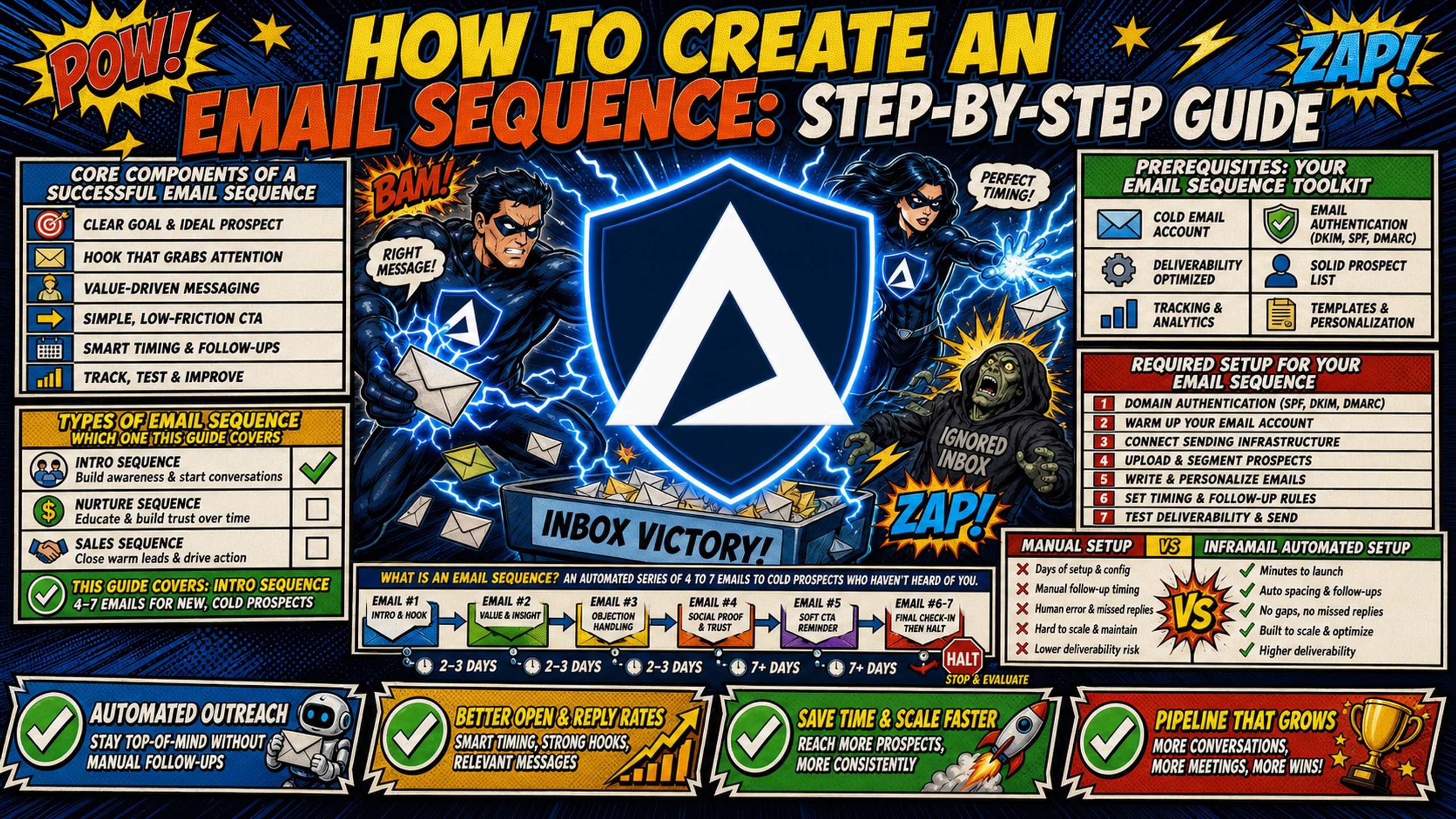
TL;DR: A cold email sequence is an automated series of 4 to 7 emails sent to prospects who have never heard of you, spaced 2-3 days apart early and 7+ days later, halting the moment someone replies. Building one runs in eight steps: define the ICP, write a trigger-based hook, draft the copy, map the cadence, load the sending platform, set reply and bounce exit rules, run pre-launch DNS and warmup checks, then deploy. Roughly 58% of replies arrive on the first email and 42% on follow-ups, according to Instantly's 2026 Cold Email Benchmark Report, so stopping early costs close to half the return. Copy is only half the job. Every domain needs SPF, DKIM and DMARC configured and 2-3 weeks of warmup before the first send. Inframail automates that setup and provides unlimited inboxes on dedicated US IPs for a flat $129/month, with warmup tools billed separately.
Most campaign guides treat email sequences as a copywriting exercise. The reality is that your sequence is only as good as the technical foundation beneath it. Manual DNS errors, shared IP contamination, and per-inbox pricing that scales against you will kill reply rates no matter how sharp the copy is.
This guide pairs copy frameworks with a technical setup checklist so you can build and launch a cold outbound sequence that lands in the inbox and keeps infrastructure spend predictable as your domain count grows.
Core components of a successful email sequence
A cold email sequence is generally structured as an automated, multi-step outreach campaign triggered by a defined starting condition, typically a new lead entering your pipeline. Each email builds on the last, and the automation halts the moment a prospect replies. Common phases in sequence design include defining the objective, setting the trigger, drafting the content, verifying deliverability, and iterating based on engagement data.
Types of email sequence, and which one this guide covers
Not every email sequence is cold outbound. Onboarding and lifecycle sequences go to people who already signed up, so deliverability is rarely the constraint and the copy job is activation rather than persuasion. Nurture sequences warm leads who opted in, usually off the back of a content download or a webinar. Cold outbound sequences go to people who have never heard of you, which is the only one of the three where infrastructure, domain reputation, and inbox placement decide whether the copy is ever read.
| Sequence type | Audience | Main constraint |
|---|---|---|
| Onboarding | New signups | Activation and timing |
| Nurture | Opted-in leads | Relevance and pacing |
| Cold outbound | No prior relationship | Deliverability and infrastructure |
This guide covers cold outbound, the hardest of the three. A sequence that never reaches the inbox produces no replies regardless of how well the copy is written. Steps 1 to 4 (ICP, hook, copy, cadence) transfer cleanly to nurture sequences. Steps 5 to 8 (sending platform setup, routing, deliverability checks, launch) are specific to cold outbound.
One-off emails remain the right choice for transactional alerts and confirmations, where a single triggered message is the entire communication. For outbound prospecting across 5 to 15 clients, manual follow-up is not a viable operating model.
Prerequisites: your email sequence toolkit
Before writing copy, confirm three tool categories are operational: a sending platform (Instantly or Smartlead), a data provider (Apollo or ZoomInfo), and email infrastructure with automated DNS setup. Add a warmup tool (Warmbox or Lemwarm, $15-50/month per inbox) and a verification tool (ZeroBounce or NeverBounce) to clean your list. For more helpful info, Inframail's ZeroBounce vs. NeverBounce comparison breaks down verification tool trade-offs.
Required setup for your email sequence
Every sending domain needs SPF, DKIM, and DMARC records configured before a single email goes out. Without all three, inbox providers treat your emails as unauthenticated and route them to spam. Inframail automates all three records the moment you provision a domain, with no DNS panel access required. Inframail's cold infrastructure setup guide walks through the DNS provisioning workflow in detail, and Inframail's founder infrastructure video shows the full process from domain purchase through CSV export.
Manual setup vs Inframail automated setup
The table below compares provisioning and CSV export steps between manual DNS setup and Inframail's automated workflow.
| Build step | Manual setup | Inframail automated setup |
|---|---|---|
| Inbox provisioning | Hours per batch | Customer testimonials report 10 inboxes provisioned in 2 minutes. |
| CSV export for sending platform | Manual credential entry | CSV export |
Step 1: define your ICP and campaign goal
Targeting is the first step in sequence design, not copy. A sharp ICP determines who receives your sequence, what pain you name in your hook, and whether low reply rates signal deliverability or messaging problems. The B2B cold email system guide breaks down repeatable ICP frameworks for agencies building scalable outbound processes.
Draft your precise ICP profile
A vague ICP produces vague copy and poor reply rates. A precise ICP specifies industry, revenue band ($5M-$50M ARR), headcount (25-200 employees), geography, and a trigger event. The trigger event is where most campaign managers underinvest.
A prospect who just hired three SDRs has an acute, immediate need. A prospect at a stable company with a full sales team does not.
Set a concrete KPI for your campaign
Define two numbers before writing the first email:
- Target reply rate: Inframail customers report reply rates of 9%+ and 25%+ on their campaigns. These are customer-reported figures, not platform averages. Industry-wide data from Instantly and Saleshandy puts the platform average closer to 3.4-3.7%, with top-decile senders reaching 8-12%.
- Daily send volume per inbox: Inframail's capacity guidance recommends 40 emails per inbox per day in total, split roughly 70% warmup and 30% campaign. That works out to about 12 campaign emails per inbox per day, with 50 as the per-inbox ceiling.
Without a defined KPI, you can't separate a deliverability problem from a messaging problem when reply rates drop.
Step 2: write a hook tied to a trigger event
Your subject line and opening sentence do all of the work in the first two seconds of a prospect's attention. The hook must name a specific, measurable problem tied to the trigger event you identified in your ICP.
Bad opener: "I wanted to reach out about how we help companies like yours."
Good opener: "Noticed your team added three SDRs last quarter. Most teams that grow that fast hit DNS configuration bottlenecks fast."
The good opener names a trigger, connects it to a specific pain, and implies a solution. Once your hook is solid, compress your entire offer into one sentence: "I help [ICP descriptor] [achieve specific outcome] in [time frame] without [common trade-off]."
Step 3: write the copy for each email
This step covers the copy structure for each email in your sequence, from the opening message through the final breakup touch.
Writing openers that earn a reply
Short emails outperform long ones. Analyses across tens of millions of cold emails put the best-performing range somewhere under 80 words, and the discipline matters more than the exact number (Saleshandy's analysis of 53 million cold emails). When you only have 80 words, you cannot waste any on preamble. The cold email deliverability guide from Inframail's channel shows how word count and structure affect inbox placement directly.
Email 2: craft a value-driven touchpoint
Your second email should introduce a new asset or proof point, not restate the first. A case study summary or a relevant data point earns a second read. Avoid "just bumping this up" as your only follow-up message. A short paragraph referencing a result relevant to the prospect's industry adds genuine value and justifies the second send.
Email 3: drafting the direct request
By the third email, state the ask plainly and cut everything else. Keep to 3-4 short sentences. Name the specific action you want (15-minute call, a referral to the right person, a yes or no).
Emails 4 and 5: nudge patterns for later-sequence emails
Later emails use two primary patterns:
- The quick question: One sentence asking a direct yes/no question ("Is outbound infrastructure a current priority for your team?")
- The breakup email: Positioned as the final touch, this email uses mild disengagement language ("I'll stop reaching out after this") paired with a final low-friction option. The breakup email works because it asks for a decision rather than attention. Prospects who have been passively ignoring the sequence often reply to a message that signals it is the last one. Sequences running to 6 or 7 touches repeat the quick-question pattern at 7 to 9 day intervals before the breakup email.
Step 4: map out your follow-up cadence
Roughly 58% of replies arrive on the first email, with the remaining 42% coming from follow-ups, per Instantly's 2026 Cold Email Benchmark Report. A sequence that stops at one email leaves close to half of its potential replies uncaptured. The recommended sequence length is 4 to 7 emails, using graduated spacing that mirrors natural follow-up behavior and avoids the predictable daily patterns spam filters flag as automated.
| Step | Send day | Delay from previous email |
|---|---|---|
| Email 1 | Day 1 | - |
| Email 2 | Day 3-4 | 2-3 days |
| Email 3 | Day 8-9 | 4-5 days |
| Email 4 | Day 15-16 | 7 days |
| Email 5 | Day 22-25 | 7-9 days (breakup email) |
Send-day testing consistently favors midweek. Test your own send windows against your list rather than adopting a generic time slot.
Step 5: automate your outreach in your sending app
Inframail exports all provisioned inbox credentials as a CSV file of IMAP/SMTP credentials, formatted for direct import into Instantly and Smartlead. The Inframail to Smartlead integration guide walks through the full import workflow step by step. No manual credential entry is needed.
Configure three settings before bulk uploading:
- Daily send cap: Inframail's capacity guidance recommends 40 emails per inbox per day in total, split roughly 70% warmup and 30% campaign, which is about 12 campaign emails per inbox per day. 50 is the per-inbox ceiling. The Inframail send capacity guide in the help center explains total capacity calculation across your inbox count.
- Merge tag mapping: Map merge tags to your contact CSV column headers exactly as they appear in your data source (e.g.,
{{first_name}},{{company_name}}). - Preview test: Send one test record through the platform's preview mode to catch broken variable syntax before launch.
Step 6: master automated workflow routing
When a prospect responds, all further automated emails must halt immediately. Continuing to send a scheduled follow-up to someone who already replied reads as inattentive and generates complaints that damage domain reputation. Most sending platforms (Instantly, Smartlead) include a native "Stop on Reply" toggle. Confirm it is enabled before launch.
Beyond stop-on-reply, configure exit triggers for:
- Hard bounces: Remove immediately and flag for list hygiene.
- Unsubscribe clicks: Remove permanently for compliance.
- Out-of-office replies: Both Instantly and Smartlead include automated OOO detection that distinguishes temporary absence from genuine replies and pauses the lead until their return date. Confirm your platform's OOO handling is configured correctly so temporarily absent prospects re-enter the sequence at the right step rather than being dropped.
Spencer Painter's bulletproof infrastructure guide breaks down scalable cold-email infrastructure for agencies managing high-volume client outreach.
Step 7: run pre-launch deliverability checks
This step covers the technical checks required before a single email leaves your sending platform, across DNS, warmup status, and IP health.
Verify DNS records and warmup status
Before sending a single email, verify all three DNS records propagated correctly using MXToolbox's DMARC check. Inframail's deliverability monitoring dashboard tracks domain health automatically, but a manual check before launch catches any propagation delays from your domain registrar. Inframail reports a 98%+ deliverability rate. Inframail's cold email infrastructure monitoring guide walks through ongoing health checks for agencies running domains at scale.
Every new domain needs 2 to 4 weeks of warmup before cold outreach begins. Inframail's capacity guidance sets the operating model: 40 emails per inbox per day for optimal deliverability, split roughly 70% warmup and 30% campaign, so about 28 warmup and 12 campaign emails per inbox. 50 per day is the technical ceiling, 40 is the recommendation.
Twelve campaign emails per inbox sounds small until you multiply it. At 50 inboxes that is 600 cold emails a day, roughly 13,200 a month, comfortably inside the Unlimited Plan's 80,000 monthly allowance. Need double the volume? Add 50 more inboxes. On Inframail the platform fee stays at $129/month. On Google Workspace Flexible, 100 inboxes costs $840/month. Per-inbox throughput is exactly why per-seat pricing compounds against you and flat-rate does not.
Higher-volume senders sometimes run a 1:1 warmup-to-cold ratio, as Mailivery's warmup guide recommends by week four. That pushes total per-inbox volume above 40 a day, so only run it once inbox age and warmup tooling support it.
Inframail does not include a built-in warmup tool. External tools like Warmbox or Lemwarm are required and typically cost $15-50/month per inbox, which is why the cost table above carries warmup on both sides. Inframail's Done-For-You campaign setup package includes free domain warmup as part of the managed service.
Shared IP pools work like carpool lanes where you are affected by other drivers. One bad actor spamming gets the whole range flagged. Dedicated IPs work like private lanes where your behavior alone determines reputation.
Inframail provides 1 dedicated US-based IP on the Unlimited Plan and 3 on the Agency Pack, with a 68.3% blacklist delisting success rate.
Final QA checklist for launch readiness
Before hitting send on any campaign, confirm:
- DNS records verified: SPF, DKIM, and DMARC propagated and confirmed via MXToolbox
- Warmup period completed: Minimum 14 days, ideally 21 days
- Stop on Reply enabled: Confirmed in sending platform settings
- Daily send cap set: 40 emails/day per inbox in total (roughly 12 campaign emails at the 70/30 warmup-to-campaign split), 50 per-inbox ceiling.
- Merge tags tested: Sample record shows no "undefined" values
- Lead list verified: Bounce rate below 2% after running through a verification tool
- Sequence spacing set: Graduated intervals (2-3 days, 4-5 days, 7+ days)
- Blacklist check run: All sending IPs and domains clean
- Seed inbox test completed: Emails landing in primary inbox, not spam
The Inframail spam metrics guide explains what open rate, bounce rate, and placement benchmarks to look for in seed tests. You can also check out Kidous Mahteme's 32 ironclad rules video to see what you can do to avoid landing on spam.
Step 8: deploy sequence and audit deliverability
Upload your verified contact list to the sending platform. Confirm column headers match your merge tag variables exactly, then run the platform's built-in duplicate check before confirming the import.
Within the first two days of launch, monitor three numbers:
- Bounce rate: Should stay below 2%. Anything above that signals list quality issues and requires an immediate pause to re-verify contact data.
- Open rate: A rate below 15% on a warmed domain with correct DNS indicates a placement problem rather than a subject line problem.
- Reply rate: The goal metric. A high open rate with a low reply rate points to copy or offer problems. A low open rate with a low reply rate points to deliverability or targeting problems.
For editing live sequences, pause new leads from entering before changing copy, run a fresh seed test, then resume. Avoid mid-flight edits that create inconsistent messaging for contacts already in the sequence.
Sequence economics: monthly infrastructure spend for 10 vs. 50 inboxes
If you need to make the infrastructure case internally, here is the cost math. The full infrastructure cost picture includes three variables: platform fee, domain costs, and warmup tools. The Maildoso alternatives comparison guide breaks down how per-mailbox pricing compounds against you at scale.
| Cost variable | 10 inboxes (Google Workspace) | 10 inboxes (Inframail) | 50 inboxes (Google Workspace) | 50 inboxes (Inframail) |
|---|---|---|---|---|
| Platform fee | $84.00/mo | $129.00/mo | $420.00/mo | $129.00/mo |
| Domain costs | ~$8.33/mo | ~$8.33/mo | ~$41.67/mo | ~$41.67/mo |
| Warmup tools | ~$150.00/mo | ~$150.00/mo | ~$750.00/mo | ~$750.00/mo |
| Total | ~$242.33/mo | ~$287.33/mo | ~$1,211.67/mo | ~$920.67/mo |
Google Workspace pricing based on the Flexible Plan at $8.40/user/month (month-to-month, no commitment). Agencies scaling inboxes up and down across 50-200 domains use Flexible, not the $7.00/month Annual Plan that requires a 12-month commitment. Domain costs modelled at $10/year per domain, inside Inframail's published $5-16/year range. Warmup tools estimated at $15/month per inbox on both sides.
At 10 inboxes, Google Workspace has a lower total cost. At 50 inboxes, Inframail's flat-rate model saves approximately $291/month in platform fees, or roughly $3,492 annually. Domain and warmup costs are the same on both sides. That gap widens to $711-$1,551/month in platform fee savings at 100 to 200 inboxes, where Google Workspace Flexible Plan scales linearly while Inframail stays at $129/month flat, assuming send volume stays within the Unlimited Plan's 80,000 emails per month cap. Above that, the Agency Pack at $327/month applies.
Maildoso uses per-mailbox pricing ($2.50/mailbox at 30 mailboxes, decreasing to $0.49/mailbox at 1,000 mailboxes), so the cost-per-inbox math compounds against you as you scale, while Inframail charges $129/month flat whether you run 50 or 500 inboxes. Mailscale publishes no pricing figures on its site, while Inframail publishes $129/month with no gating. The Inframail infrastructure comparison guide breaks down how these cost models compare across the full provider set.
Start building your sequence on solid infrastructure
Inframail is a flat-rate Microsoft email infrastructure provider for agencies running cold email at scale, with automated DNS setup, dedicated US-based IPs, and a 98%+ deliverability rate.
Check out this case study video and see how Inframail helped a client generate a high-value opportunity that resulted in roughly £30,000 (about $50,000 at the client's stated conversion) in revenue from a single deal.
Sign up to Inframail and get started today. For a fully managed setup including domain warmup, a dedicated cold email coach, and the first batch of 2,500 contacts, explore Inframail's Done-For-You campaign setup at $3,497 one-time or $499/month.
FAQs
How many emails should be in a cold email sequence?
An ideal cold email sequence contains 4 to 7 emails using graduated spacing: 2-3 days between early emails, widening to 7+ days between later ones. Roughly 58% of replies arrive on the first email, with the remaining 42% coming from follow-ups, so stopping at one or two emails leaves close to half of potential replies uncaptured.
What is the cost of managing 50 inboxes on Inframail?
Inframail costs $129/month flat for unlimited inboxes on the Unlimited Plan. Adding amortized domain costs of approximately $41.67/month for 50 domains at $10/year per domain brings the platform-plus-domain total to approximately $171/month, compared to roughly $462/month on Google Workspace Flexible Plan (approximately $420 in platform fees plus $41.67 in amortized domain costs). Warmup tools add $15-50/month per inbox on both platforms.
Does Inframail include built-in email warmup?
No, Inframail does not include a built-in warmup tool. External tools like Warmbox or Lemwarm cost $15-50/month per inbox (Inframail's Done-For-You package includes free warmup as part of the managed service).
Why must sequences stop automatically when a prospect replies?
Continuing to send automated follow-ups after a prospect replies signals inattentiveness and generates complaints that damage domain reputation. Enable "Stop on Reply" in your sending platform before launch, and verify your platform's OOO detection settings so temporarily absent prospects re-enter the sequence at the correct step rather than being removed from the flow entirely.
How long should initial cold emails be?
Short emails outperform long ones. Analyses across tens of millions of cold emails put the best-performing range somewhere under 80 words (Saleshandy's analysis of 53 million cold emails). That discipline forces a single clear idea and a single CTA, which is the core structure of an effective cold email opener.
What DNS records do you need before sending cold email?
You need SPF, DKIM, and DMARC records configured and propagated for every sending domain. Without all three, inbox providers treat your emails as unauthenticated. Inframail configures all three records automatically at domain setup, and you can verify propagation using MXToolbox's DMARC checker before launching any campaign.
Key terms glossary
SPF (Sender Policy Framework): A DNS record that specifies which mail servers are authorized to send email on behalf of your domain. Missing or misconfigured SPF records cause authentication failures that route emails to spam.
DKIM (DomainKeys Identified Mail): An email authentication method that adds a digital signature to your emails, proving they were sent by the domain owner and were not modified in transit.
DMARC (Domain-based Message Authentication, Reporting, and Conformance): An email validation system that protects your domain from spoofing and phishing attacks by telling receiving servers what to do with emails that fail SPF or DKIM checks.
Dedicated IP: An IP address used exclusively by one sender, ensuring your sending reputation is not affected by other users on the same infrastructure. Inframail provides 1 dedicated US-based IP on the Unlimited Plan and 3 on the Agency Pack.
DNS propagation: The time it takes for DNS record changes to reach resolvers worldwide, governed by the record's TTL. Most record changes resolve within hours. Nameserver changes at the registrar level can take 24-48 hours. This is registrar-side timing and is separate from provisioning, which Inframail completes at domain setup.
Inbox placement rate: The percentage of sent emails that land in the primary inbox rather than spam or promotions. This metric most directly drives open and reply rates.
Stop on Reply: An automation rule that halts all further sequence emails the moment a prospect responds, preventing awkward follow-ups to contacts already in conversation.
Warmup: The process of gradually increasing email send volume from a new domain or inbox to build sender reputation with inbox providers before launching cold outreach.