
How to choose cold email templates that actually get replies
: Cold email templates fail for infrastructure reasons more often than copy reasons. A proven template on a blacklisted domain struggles to reach the inbox, whi
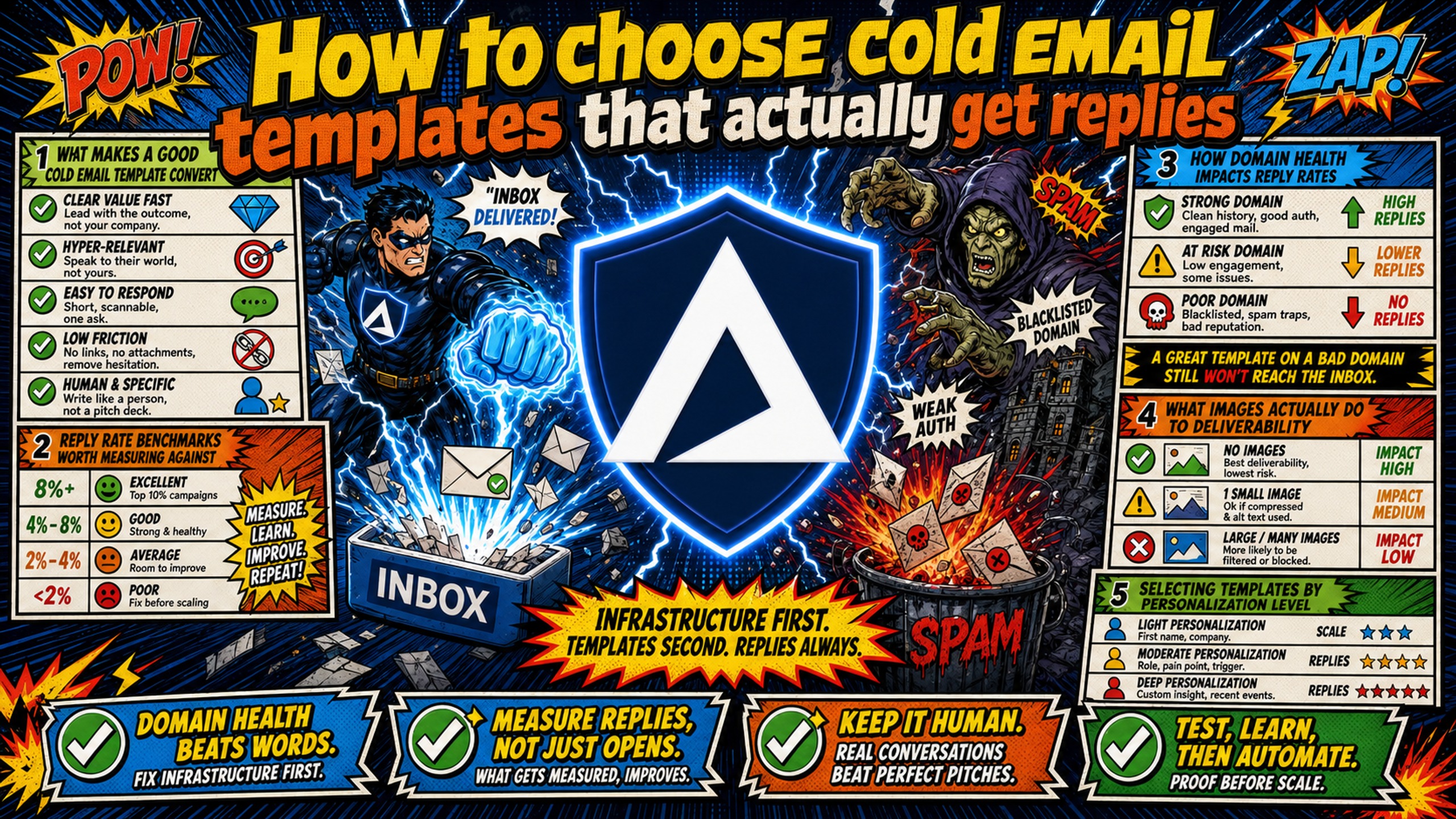
TL;DR: Cold email templates fail for infrastructure reasons more often than copy reasons. A proven template on a blacklisted domain struggles to reach the inbox, while a mediocre template on a healthy domain can still convert. Consider evaluating templates against reply rate benchmarks, spam trigger density, personalization token placement, success audit data, and sequence logic. Ask vendors for split test data and dataset timestamps before you buy. Inframail automates SPF/DKIM/DMARC setup and provides dedicated US-based IPs, so domain authentication is not the variable in your test.
Cold email templates often fail because of infrastructure issues rather than copy quality. A template that gets 20% reply rates for one sender can get 2% for another, and the difference depends on sending domain authentication, clean IP reputation, and blacklist status, not the writing quality.
Choosing cold email templates is not a creative decision but an infrastructure decision with copy attached. This guide gives campaign managers a five-standard evaluation framework, vendor questions to ask, and red flags to avoid, so template selection becomes a repeatable process instead of a gut call.
What makes a good cold email template convert
A good cold email template does three things: it reaches the primary inbox, earns a reply, and moves the conversation toward a meeting. Template libraries that optimize for reply rates without addressing inbox placement leave even great copy vulnerable to landing in spam.
Reply rate benchmarks worth measuring against
Reply rate is the metric that matters, but only when it connects to pipeline. Inframail's cold email reply rate benchmarks guide sets out what good looks like in 2026, and two third-party reports corroborate the range: Instantly's 2026 cold email benchmark report puts the average cold email reply rate at 3.43%, while signal-based personalized campaigns achieve 15-25% according to the Autobound data broken out in the personalization tiers below. That four to sevenfold improvement comes from referencing specific buying signals like funding rounds, leadership changes, and hiring surges, so the template you choose should support this level of personalization beyond merging a first name.
How domain health impacts reply rates
Your template can be perfectly written and still land in spam. SPF, DKIM, and DMARC records are the authentication protocols that tell inbox providers your email is legitimate. Gmail requires senders above 5,000 messages per day to authenticate with SPF, DKIM, and DMARC, and requires SPF or DKIM below that. Google's email sender guidelines state that unauthenticated bulk mail can be rejected or sent to spam. A domain without verified records can fail before a prospect ever sees the copy.
Inframail automates this configuration so every domain you spin up ships with proper authentication, removing the manual DNS work that delays template testing.
What images actually do to deliverability
Spam filters cannot read images, and spammers commonly use images to hide malicious content, so inbox providers can treat image-heavy emails as suspicious. Lemlist's analysis of millions of cold emails sent over one month found no measurable deliverability gap between emails with and without images, so no universal one-image threshold exists. At 500 characters or more, zero to three images had no effect on deliverability either way, and in shorter emails one image can help the email stay out of spam. Across emails generally, adding one image lifted replies by nearly 20%, though GIFs produced lower open rates and are best avoided. Plain text still outperforms HTML loaded with images on most deliverability metrics, but a logo or single product screenshot does not automatically hurt placement when the text-to-image ratio is balanced.
Selecting templates by personalization level
Reply rates scale with personalization depth, according to Autobound's 2026 cold email guide:
- No personalization: 1-3% reply rate
- Basic personalization: 5-9%
- Advanced personalization: 9-15%
- Signal-based personalization: 15-25%
When picking cold email templates, match the template's personalization structure to your data quality. A template built for signal-based outreach will underperform if your list only has names and company titles.
Choosing templates for your industry
A template that works for SaaS outbound will not work for staffing agency outreach. Industry context changes the tone, the offer framing, and the CTA. Look for templates that include industry-specific variants or at minimum provide clear guidance on which verticals the template was tested against.
5 standards for cold email template evaluation
These five standards separate proven templates from underperformers. Use them as your cold email template criteria before committing budget or sender reputation to any template library.
| Standard | What to check | Red flag |
|---|---|---|
| Reply rate benchmarks | Reply rate data with sample sizes, compared against the average and signal-based benchmarks cited earlier | "Proven" claims without datasets |
| Spam trigger density | Few or no flagged words such as "free," "guarantee," or "act now" | Multiple trigger words or sensational language |
| Personalization token placement | Prospect-specific trigger in the first sentence, not just {{first_name}} |
Generic opener or filler phrase |
| Success audit data | Your current reply rate and inbox placement measured before you adopt the template | No baseline to compare results against |
| Sequence logic | Defined follow-up touches, spacing, and differentiated messaging | A single standalone email with no follow-ups |
Expected reply rates for top templates
Start with Inframail's cold email reply rate benchmarks guide to judge what a template should deliver, then compare vendor data against the third-party figures cited earlier. A proven template should reach the signal-based range when paired with signal-based personalization, and the Autobound data above shows multi-signal stacked outreach reaching 25-40%. A template performing below the industry average may point to a copy or infrastructure problem, while results above the signal-based range suggest strong personalization. If a template vendor claims their templates get replies but cannot share specific performance data with sample sizes, treat the claim as unverified. Templates without measurable baselines are guesswork.
Identifying high-risk spam trigger words
Spam filters flag specific words and phrases that reduce inbox placement. Words like "free," "guarantee," "limited time," "act now," and "click here" are commonly flagged as spam triggers. Sensational language like "revolutionary," "life-changing," and "mind-blowing" also signals spam.
Evaluate every template for trigger word density before you test it on a live domain.
Where to insert personalization tokens
The first sentence is where personalization matters most. Salesforce's cold email template guidance specifically warns against opening with "I hope this email finds you well" because it signals a generic blast immediately. Personalization tokens should appear in the opening line referencing a prospect-specific trigger, not just the standard {{first_name}} merge.
Audit your cold email success rates
Before adopting any template, audit your current performance. Inframail's cold email reply rate benchmarks breaks down what good looks like in 2026 so you can diagnose whether your current reply rates are competitive. If you fall below the industry average cited earlier, the problem may be infrastructure, not copy.
Inframail's help center guide on detecting spam placement walks through the metrics that distinguish a deliverability problem from a template problem.
Building a high-converting sequence
A single template is not a campaign. Templates should come with follow-up logic: how many touches, what spacing between sends, and how each follow-up differs from the first. Inframail's email sequence strategy provides a systematic approach to building sequences. A template library without sequence logic is a collection of one-off emails, not a system.
How to audit your cold email template vendor
Vendor transparency helps you evaluate template performance before you spend a dollar. These five questions separate vendors with real testing data from those selling untested copy.
| Question to ask | What good looks like | Red flag |
|---|---|---|
| What are daily message limits during testing? | Clear send volume guidance per domain | No volume guidance or "unlimited sends" |
| What are industry benchmarks for your templates? | Specific reply rate ranges with sample sizes | "Our customers love them" with no data |
| What is your verified inbox placement? | Published inbox placement rate above 90% | No placement data or vague "high deliverability" claims |
| Do you share split test data? | A/B test results with variant performance | No test data available or "proprietary" |
| How recent is your dataset? | Data from the last 6 months with timestamps | Undated or stale performance claims |
Daily message limits during testing
Ask the vendor what send volume they recommend per domain during template testing. A template tested at 500 sends per day on one domain tells you nothing about how it performs at 30 sends per day across 10 domains. The testing parameters should match your actual campaign structure. Inframail's $147/month platform fee covers unlimited inboxes whether you test on 5 domains or 50, so only the per-domain cost ($5 to $16 per domain per year) scales with your test footprint. Inframail does not include a warmup tool, so budget for an external service (typically $15 to $50 per inbox per month).
Industry benchmarks for reply rates
Vendors should provide reply rate data broken down by industry, not a single aggregate number. Reply rates vary dramatically across verticals because buyer behavior and decision cycles differ between SaaS, healthcare, finance, and staffing. Inframail's buyer guide on choosing email infrastructure covers the evaluation criteria that apply to both infrastructure and template vendors.
What is their verified inbox placement?
A template vendor should know where their templates land. If they cannot tell you their average inbox placement rate, they are selling copy without understanding the deliverability layer that determines whether prospects ever see that copy. Inframail maintains a 98%+ deliverability rate across its infrastructure.
Do template providers share split test data?
Ask for A/B test results showing variant performance. Inframail's A/B testing framework explains how to structure tests that isolate variables. A vendor who runs their templates through this kind of testing and shares results is more credible than one who relies on testimonials.
Check the dataset timestamp for accuracy
Template performance data from 2022 is not relevant in 2026. Spam filters change, inbox providers tighten requirements, and buyer behavior shifts. Ask when the vendor last validated their templates and whether they re-test periodically.
How to identify templates that kill reply rates
These three red flags signal a template will underperform in production, regardless of how good the copy sounds.
Why static templates kill reply rates
A template with fixed copy and no personalization variables will not convert. Prospects recognize generic outreach immediately. Inframail's analysis of personalized vs generic openers shows the reply rate data on this trade-off directly. Static templates also fail because they cannot adapt to different buyer signals, industries, or deal stages.
Avoid archaic or overly formal phrasing
"I hope this email finds you well" is one of the most common openers to avoid in cold email. Salesforce's template guidance, cited earlier, specifically warns against it because it signals a generic blast immediately and tells recipients they are just another name on a list. Inframail's breakdown of cold email opener mistakes covers additional phrasing patterns that signal automated, impersonal outreach. Templates that read like a formal business letter from 2015 will get deleted.
Missing automated follow-up logic
A first-touch template without follow-up logic is incomplete. Follow-ups earn a substantial minority of replies. Instantly's 2026 benchmark report, cited earlier, found 58% of replies come from the first email and 42% from all follow-ups combined, and campaigns with 3 to 5 follow-ups reply at 8.3% versus 4.1% for campaigns with none. If a template library does not include follow-up sequences with differentiated messaging, you are buying one email, not a campaign.
Run small pilot tests for new email sequences
Before scaling any template across your full domain portfolio, run a controlled pilot. This protects sender reputation and gives you real performance data.
Defining ideal cold email sample sizes
For reply rate testing, treat 1,000 contacts per variant as a floor, not a guarantee of statistical significance. At a baseline near the industry average reply rate, detecting a modest lift can require several thousand emails per variant, so use a sample size calculator at 95% confidence to confirm the exact number for your test. Samples under 1,000 per variant work for open rate tests but are directional only for reply rates.
Structuring your A/B test groups
Test one variable at a time: subject line, opening line, CTA, or follow-up timing. Running multiple variable changes simultaneously makes it impossible to isolate what drove the result. The A/B testing framework linked earlier covers how to structure tests without breaking what already works. Inframail's flat-rate pricing at $147/month removes the platform cost barrier to running rigorous multi-variant tests across separate domains (domain costs of $5 to $16 per domain per year and external warmup tools, typically $15 to $50 per inbox per month, are additional).
Validating inbox placement rates
Before judging template performance, confirm your emails are reaching the inbox. A template with a 2% reply rate might have great copy but terrible inbox placement. Inframail's domain health dashboard monitors blacklist status and auto-submits delisting requests, achieving a 68.3% delisting success rate within 48 hours. This visibility lets you separate infrastructure problems from copy problems immediately.
Evaluating cold email template performance
After your pilot, compare results against the signal-based benchmark cited earlier. If your template hits that range and your domain health is clean, scale it. If it falls below the industry average, check inbox placement before you touch the copy. If it falls between, iterate on personalization depth before scaling.
Customizing email copy to fit your brand voice
Even a proven template needs customization to sound like you, not like a template.
Customizing emails for target markets
Adjust the language, offer framing, and CTA to match your specific buyer. A template targeting VP-level SaaS buyers will not land with small business owners. The structure stays the same, but the vocabulary and specificity need to change based on who reads it.
Aligning templates with brand voice
Your cold email should sound like your best salesperson wrote it, not like a marketing team designed it. Strip out corporate jargon, shorten sentences, and make the ask direct.
Automating template variable insertion
Once you have customized a template, use your sending platform's variable insertion to scale personalization. Inframail provisions IMAP/SMTP credentials that export to CSV for direct import into Instantly or Smartlead, so your customized templates go live across all inboxes without manual credential entry.
Refining your cold email send cadence
Template performance depends on send cadence. Sending too fast triggers spam filters, and sending too slow loses momentum. The optimal cadence depends on your domain age, warmup status, and daily volume. Inframail's help center guide on calculating send capacity helps you match send volume to infrastructure capacity.
"For years, I considered running cold email campaigns but consistently held back due to a lack of technical knowledge and confidence... The learning curve became manageable, my confidence grew, and I am now successfully sending thousands of cold emails per day while generating high-quality leads." - Verified user review of Inframail
Template testing requires both technical confidence and clean infrastructure, and Inframail automates SPF/DKIM/DMARC setup, provides dedicated IPs (1 on Unlimited Plan at $147/month, 3 on Agency Pack at $387/month), and monitors blacklist status across all your domains so every template test starts on solid ground.
Test your cold email templates on clean infrastructure
Inframail is a flat-rate Microsoft email infrastructure provider for agencies and sales teams running cold email across 50-200 domains. It automates DNS configuration, maintains a 98%+ deliverability rate, and monitors blacklist status with a 68.3% delisting success rate within 48 hours.
Check out this case study video and see how Inframail helped a client scale cold email outreach more affordably with infrastructure built for high-volume sending, supporting campaigns of up to 15,000 emails per day and helping a coaching client collect $18,000 from three paid-in-full sales in just 35 days.
Sign up to Inframail and get started today.
FAQs
How many templates should I test at once?
Test 2-3 templates per campaign with at least 1,000 contacts per variant as a floor, and run a sample size calculator at 95% confidence, since detecting a modest lift off the 3.43% average cold email reply rate can take several thousand contacts per variant. Testing more than 3 variants simultaneously dilutes your sample size and makes results unreliable.
Can a good template hurt my sender reputation?
Yes, if the template contains spam trigger words or excessive links. Even well-written copy damages sender reputation when spam filters flag the content repeatedly across thousands of sends.
Should I buy templates or build them myself?
Buying templates saves time if the vendor provides split test data and industry benchmarks, giving you proven copy immediately. Building in-house gives you full brand control but requires significant testing time and the infrastructure cost to run those tests.
How long does it take to validate a template?
Plan for 3-4 weeks of sending at 1,000+ contacts per variant to get statistically meaningful reply rate data. Shorter tests under 1,000 contacts per variant produce directional signals, not validated results.
What reply rate should I expect from a proven template?
A proven template with signal-based personalization should reach a 15-25% reply rate. Any result above the 3.43% average cold email reply rate beats typical cold email performance.
Key terms glossary
Reply rate: The percentage of delivered emails that receive any response, calculated as total replies divided by delivered emails (not total sends, which includes bounces and blocks). Instantly's 3.43% benchmark uses a different denominator, dividing all replies (including follow-up responses) by total emails sent, so compare it against your own reply rate on that same basis.
Inbox placement rate: The percentage of sent emails that land in the primary inbox rather than spam, promotions, or junk folders.
Spam trigger words: Specific words and phrases like "free," "guarantee," and "act now" that cause spam filters to flag emails and reduce inbox placement.
Personalization tokens: Merge fields like {{first_name}} or {{company}} that insert prospect-specific data into template copy at scale.
Follow-up sequence: A series of automated emails sent after the initial touch, spaced across days, with differentiated messaging designed to earn a reply from non-responders.