
Fix cold email deliverability: troubleshooting inbox placement
Most deliverability drops trace back to three technical root causes: misconfigured DNS records, shared IP contamination from other senders, and overly aggressiv
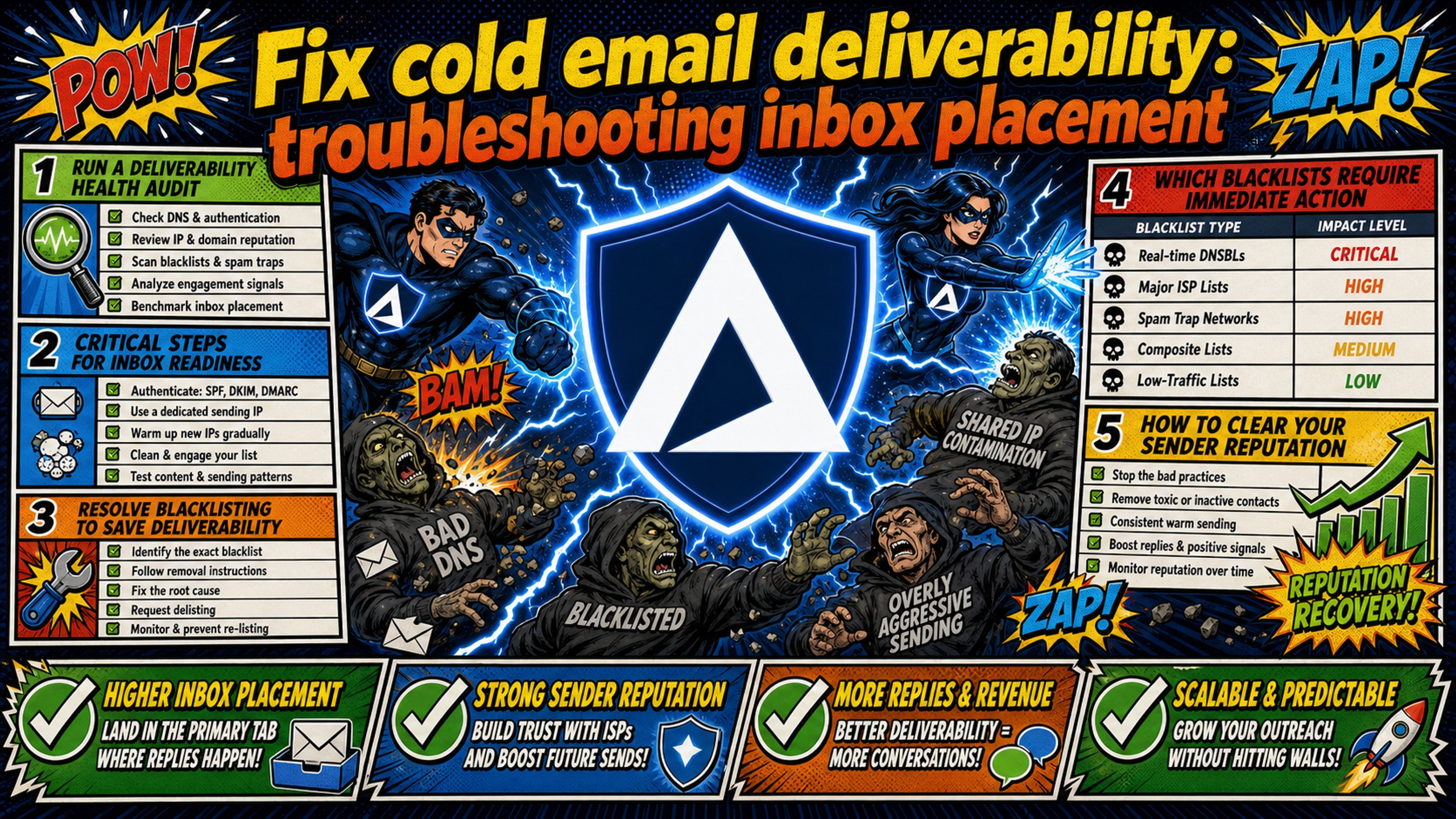
TL;DR: Most deliverability drops trace back to three technical root causes: misconfigured DNS records, shared IP contamination from other senders, and overly aggressive sending on under-warmed domains. Run the deliverability health audit checklist below to isolate the exact failure point. Check blacklists with MXToolbox, validate SPF/DKIM/DMARC syntax, audit your warmup schedule, and review bounce codes in your sending platform logs. For agencies managing 50-200 domains, moving from shared IP infrastructure to dedicated IP infrastructure significantly reduces "noisy neighbor" risk, and automated DNS setup cuts manual configuration time from 12+ hours to under 5 minutes.
Most deliverability guides tell you to rewrite your copy. Manual DNS panels and shared IP pools hide the real bottleneck almost every time. Setting up 50 cold email domains manually takes 12+ hours, and a single SPF syntax error can quietly destroy inbox placement across every client campaign you're running simultaneously.
This guide walks through a systematic deliverability health audit to diagnose and resolve inbox placement drops, covering diagnostic tools, common failure modes, specific fixes, and realistic recovery timelines.
Run a deliverability health audit
Deliverability troubleshooting matrix
| Symptom | Likely cause | Diagnostic test | Solution |
|---|---|---|---|
| Bounce rate above 5% | Poor list hygiene or active IP block | Check SMTP error codes (4xx vs. 5xx) | Run list through NeverBounce, check blacklists |
| Open rate below 15% on warmed domain | Spam folder placement | Send test to personal Gmail/Outlook, check folder | Pause campaigns, increase warmup ratio |
| Immediate spam placement on new domain | Insufficient warmup or domain too young | Check domain registration date, warmup history | Age domain 14+ days, run pure warmup for 21 days |
| Mail-Tester score below 7/10 | Composite score: may reflect DNS misconfiguration, broken links, spam trigger language, or other content issues, not a DNS authentication failure specifically | Run MXToolbox SPF/DKIM/DMARC checks | Review the full Mail-Tester report for specific point deductions. Address flagged items in order (DNS records, broken links, content flags). Note: a 10/10 score does not guarantee inbox placement: scores above 7/10 indicate a passing baseline, not confirmed deliverability |
| Blacklist on Spamhaus/Barracuda | Volume spike or spam complaints | Check MXToolbox blacklist status | Pause sends, submit delisting request, reduce volume |
Critical steps for inbox readiness
Start with a baseline score before touching anything else. Run each affected domain through Mail-Tester by sending a test email to the unique address it generates.
Once you have the baseline, check blacklist status using MXToolbox's blacklist checker. Paste the domain and sending IP separately, because MXToolbox checks against 100+ blacklists simultaneously and flags which specific lists cause blocks. This tells you whether the issue is domain-specific, IP-specific, or both.
The remaining audit checks cover sending volume against warmup status and bounce rate analysis. Pull your sending platform's campaign report in Instantly or Smartlead and compare daily send volume per inbox against the age of that inbox. Bounce rates above 2% signal either poor list hygiene or active blocking by a major email provider.
Check SMTP error codes in the bounce logs: 4xx codes indicate temporary throttling (the server is rate-limiting you), while 5xx codes signal permanent rejections, which often point to blacklisting or authentication failures. The Inframail Help Center article on campaign spam metrics covers acceptable thresholds in detail.
Track these benchmarks across active campaigns:
- Inbox placement rate: Target 80%+ on active cold campaign domains
- Bounce rate: Under 2% per campaign
- Spam complaint rate: Under 0.1% (Gmail and Yahoo enforce a hard cap at 0.3% per their 2024 bulk sender guidance)
Resolve blacklisting to save deliverability
Which blacklists require immediate action
Not all blacklists carry equal weight. Prioritize in this order:
- Spamhaus SBL/ZEN: A Spamhaus listing blocks delivery to Gmail, Outlook, Yahoo, and most business email providers. This is the highest-priority delisting request you'll submit.
- Barracuda BRBL: Enterprise email security gateways widely deploy the Barracuda Reputation Block List, affecting a significant share of business inboxes.
- SpamCop: SpamCop listings auto-expire within 24-48 hours without new reports, so pausing sends often resolves this without manual intervention.
Note: SORBS (Spam and Open Relay Blocking System) was decommissioned in June 2024 and is no longer an active blacklist. Any legacy tools or guides referencing SORBS delisting can be disregarded. Minor blacklists (smaller regional lists) rarely affect real-world inbox placement for US-targeted campaigns. Focus effort on Spamhaus and Barracuda first.
How to clear your sender reputation
Follow this process for each flagged domain:
- Pause all active campaigns on the affected domain immediately to stop accumulating new spam reports.
- Identify specific blacklist entries via MXToolbox.
- Visit the blacklist's removal portal directly (Spamhaus, Barracuda, and SpamCop each have self-service portals).
- Confirm you resolved the underlying issue (authentication error, content policy violation, or volume spike) before submitting the request.
- Submit the delisting request with a brief explanation of the root cause and the fix applied.
Inframail's deliverability monitoring dashboard handles this automatically for domains hosted on the platform, achieving a 68.3% blacklist delisting success rate within 48 hours.
Delisting speed expectations and signs it's time to scrap an IP
| Blacklist | Typical delisting time | Method |
|---|---|---|
| Spamhaus SBL | Variable: hours to weeks depending on severity and ISP response time. 24-72 hours is possible if the request is approved quickly, but manual investigations can take significantly longer | Self-service portal |
| Barracuda BRBL | 12-48 hours once the root cause is fixed and a valid explanation is provided. Some cases may take up to 72 hours with no response | Self-service portal |
| SpamCop | 24-48 hours (auto-expires) | Pause sending |
When a shared IP accumulates repeated Spamhaus listings with no available delisting path, replacement is faster than continued repair attempts. This pattern, where other senders on the same pool re-trigger the blacklisting before your domain fully recovers, is the core operational risk of shared IP infrastructure at agency scale. Inframail's dedicated IP model gives each customer 1-3 US-based dedicated IPs, as explained in this dedicated vs. shared IP breakdown, so a bad actor on the platform cannot drag down your campaigns.
Audit DNS settings to boost sender reputation
Ensuring correct SPF record syntax
SPF (Sender Policy Framework) lists every IP address authorized to send email from your domain. Each domain may only have one SPF TXT record, and publishing multiple records invalidates all of them. Merge any duplicates into a single record using the format:
v=spf1 include:spf.inframail.io ~all
Check current SPF records using MXToolbox's SPF checker. If the result shows more than one TXT record beginning with v=spf1, merge them before doing anything else.
DKIM setup for Mailforge users
DKIM (DomainKeys Identified Mail) provides a cryptographic signature confirming no one altered the email in transit. Mailforge offers automated setup of DKIM, DMARC, and SPF, with configuration time estimated at under 5 minutes through its automated provisioning flow.
Mailforge DKIM setup (step-by-step):
- Purchase or connect your domain inside the Mailforge dashboard.
- Navigate to the domain settings panel and allow Mailforge's automated provisioning system to generate DKIM keys and publish DNS records.
- Verify propagation using MXToolbox's DKIM checker after 24-48 hours.
- Confirm DMARC alignment by running a test email through Mail-Tester and checking the authentication results section.
Mailforge: pros and cons for agencies
| Feature | Pro | Con |
|---|---|---|
| Setup speed | Automated DNS, under 5 minutes | Shared IP pool, other users affect your reputation |
| Pricing | Competitive per-mailbox cost at small volumes | Per-mailbox pricing scales linearly with inbox count |
| Deliverability | 4.7/5 on G2 across 80+ reviews | IP pool contamination risk at agency scale |
| Warmup | Partial warmup features included | Full warmup suite may require separate Salesforge subscription |
Mailforge sits within the broader Salesforge ecosystem alongside Leadsforge, Primeforge, Warmforge, and Infraforge. This integration offers convenience, but inbox deliverability depends on a shared IP pool distributing accounts across millions of businesses rather than dedicated IPs per customer.
How to audit your DMARC settings and configure tracking domains
DMARC builds on SPF and DKIM, letting domain owners set authentication policies for receiving servers:
v=DMARC1; p=none; rua=mailto:dmarc@yourdomain.com
For tracking domains, set up a CNAME record on a separate domain pointing to your sending platform's tracking server. Without a custom tracking domain, your sending platform routes all click and open tracking through a shared provider subdomain, and blacklisting on that subdomain affects every sender on the platform.
Fixing DNS issues before campaigns launch
Inframail's automated DNS configuration provisions domains with zero manual panel work, eliminating the 12+ hours of manual setup required across 50 domains, as demonstrated in this 2-minute inbox setup walkthrough. SPF, DKIM, and DMARC records are auto-configured at the point of domain creation with no DNS panel access required.
"InfraMail makes it remarkably easy to purchase domains, configure them correctly, create inboxes, and initiate warm-up immediately. The level of automation is exceptional and clearly designed for serious operators; it removes friction and allows you to focus on execution rather than setup." - Verified user review of Inframail
Refine email body copy for better inbox placement
Modern spam filters use contextual analysis, not simple word matching. Words like "free," "guarantee," and "make money" still trigger pattern-based filters, but the bigger risk is commercial density: too many links, too many capitalized words, and too much promotional framing in one email. One link per email is a safe default for cold outreach until sender reputation is established.
Before launching any campaign, send 5 test emails to internal addresses and confirm every personalization token resolves correctly. Broken merge tags create deliverability problems when a tag that doesn't match the exact variable name in your platform's contact fields sends the literal string (for example, the raw variable name) to every contact, which spam filters can flag as automated bulk mail.
Copying text from Google Docs or Microsoft Word into your email template can introduce hidden HTML formatting (including span tags, font declarations, and non-standard whitespace) that produces irregular or broken HTML in the final send. Spam filters are known to flag broken HTML as a risk signal, so pasting through a plain-text intermediary (such as Notepad or a plain-text editor) before importing into your sending platform reduces this risk.
Analyze sender reputation and IP health
Evaluating your current sender score and IP reputation
Microsoft's Smart Network Data Services (SNDS) is the primary tool for monitoring IP reputation on Microsoft infrastructure. Since Inframail is a Microsoft-only platform, SNDS is the first place to check when Outlook inbox placement drops. SNDS tracks IP reputation status, spam complaint rates, and sending volume per IP. Note that SNDS access requires dedicated IPs. Shared IP providers restrict SNDS access for privacy reasons, which means no direct visibility into how your sending IP is actually performing.
Shared IP pools work like carpool lanes where you're affected by other drivers. One bad actor spamming gets the whole range flagged, and every sender on that pool absorbs the reputation hit. Dedicated IPs work like private lanes where your behavior alone determines reputation, which matters most for agencies managing multiple clients simultaneously.
Inframail's Unlimited Plan ($129/month) includes 1 dedicated US-based IP and the Agency Plan ($327/month) includes 3, giving each customer full reputation control. The cold email infrastructure guide for 2025 covers how dedicated IP selection affects long-term sender reputation.
Timeline for inbox placement recovery
Recovery windows depend on damage severity. A first-time single blacklist listing can clear within 24-72 hours once root causes are fixed and a delisting request is submitted. Moderate domain reputation damage (regular spam folder placement) typically takes 4-8 weeks of disciplined recovery warmup.
Severe damage, where emails are blocked outright, typically requires 8-12 weeks of careful recovery work. Extreme cases (such as repeated blacklist listings, stolen credentials, or sustained spam complaint history) may extend to 3-6 months. New domains also need 14-30 days of aging before running cold campaigns, because ESPs apply tighter spam filter thresholds to recently registered domains regardless of DNS configuration quality.
Optimize sending limits and warmup logic
Signs of insufficient warmup and fixing ramp schedules
Watch for these symptoms on new domains: bounce rates above 5% on initial sends, immediate spam folder placement on test emails, or open rates below 15% on a domain that has received no warmup, noting that new and recently migrated domains typically see open rates in the 5-20% range, which is expected during early warmup and not itself a failure signal. Any of these signals indicates the domain isn't ready for cold outreach. The Inframail Help Center guide on post-migration warmup covers the exact warmup steps for newly provisioned inboxes.
A safe ramp schedule for new inboxes:
- Days 1-7: 5-10 emails per inbox per day, high-engagement contacts only
- Days 8-14: Increase sending volume incrementally: the Inframail warmup guide recommends 1 additional email per day as a conservative baseline. Some sources suggest aiming toward 25-50 daily by end of week two for healthy accounts. Adjust based on warmup metrics remaining stable throughout.
- Days 15-21: Target 25-30 emails per inbox per day before adding to cold campaign rotation
- Week 4+: Maximum 30-40 cold emails per inbox per day, sustained
Never exceed 30 cold emails per day per inbox before reputation is established. Skipping week 1 of warmup typically costs 6-8 weeks of recovery if the domain gets flagged. Pull a domain back into pure warmup when open rates on active cold campaigns drop below 30% for two consecutive weeks (borderline range), or immediately if open rates fall below 15%, as this is a reliable indicator that spam folder placement is increasing.
Configure sending tools to boost deliverability rates
Preventing throttle-induced drops and configuring alerts
Set a minimum delay of 120-180 seconds (2-3 minutes) between individual emails from each inbox. A 120-180 second delay between sends on a 30-email-per-day limit spaces emails naturally throughout the business day, matching human sender behavior and reducing automated-bulk-mail signals that trigger ESP spam filters.
Set up automated alerts in your sending platform to pause campaigns when the bounce rate crosses 3% within a single sending window. Both Smartlead and Instantly offer campaign-level bounce thresholds. Catching a bounce spike early, before it reaches 5%, prevents the domain from accumulating enough negative signals to trigger active blacklisting. See the Inframail Smartlead integration guide for platform-specific configuration steps.
Google and Yahoo's 2024 guidelines mandate one-click unsubscribe for senders transmitting more than 5,000 messages per day. The technical requirement is a List-Unsubscribe header in the email's internet headers, with a List-Unsubscribe-Post header enabling one-click opt-out. Unsubscribes must be honored within two days.
Resolving Mailforge integration failures
Common integration failures between Mailforge and sending platforms involve IMAP/SMTP credential mismatches and DKIM alignment errors after domain migration. If Mailforge inboxes show connection errors in Instantly or Smartlead, verify that the SMTP port (587 for TLS, 465 for implicit TLS/SMTPS) matches the platform's connection settings and that the DKIM selector propagated correctly in DNS.
Cold email platform comparison
| Provider | IP type | Cost (50 inboxes/month) | DNS automation |
|---|---|---|---|
| Inframail | Dedicated (1-3 per plan) | $129/month flat + ~$34 domains | Full auto (SPF/DKIM/DMARC) |
| Mailforge | Shared pool | ~$150/month + domain costs | Automated, ~5 minutes |
| Maildoso | Shared pool | Higher when warmup included | Automated |
| Zapmail | Google/Microsoft accounts | Per-mailbox | Varies by account type |
| Infraforge | Dedicated (paid add-on) | ~$200/month + $99 IP fee | Automated |
For a full Zapmail pricing breakdown, the Zapmail vs. Inframail comparison covers per-inbox cost crossover points. For Maildoso deliverability data, the Maildoso deliverability review covers real inbox rate testing.
Proven solutions for inbox placement bottlenecks
Quick fixes vs. rebuilding reputation
Two categories of action apply when deliverability drops: immediate triage and structural rebuilding.
Immediate actions (first 24-48 hours):
- Pause campaigns on all affected domains to stop accumulating spam reports
- Check blacklists via MXToolbox for both domain and sending IP
- Validate DNS records using MXToolbox SPF, DKIM, and DMARC checkers
- Submit delisting requests only after fixing the underlying issue
Long-term structural fixes:
- Move from shared IP pools to dedicated IP infrastructure so one bad actor can't contaminate your campaigns
- Implement automated DNS provisioning to eliminate manual syntax errors
- Build a domain rotation strategy so no single domain carries full campaign load
Steps to fix inbox placement loss and high bounce rates
When deliverability drops, run this checklist in order:
- Pause campaigns on all affected domains.
- Check blacklists for both the domain and sending IP.
- Validate DNS records (SPF, DKIM, DMARC).
- Review copy for broken links and unresolved personalization tokens.
- Check warmup status against current sending volume.
- Audit bounce codes in your sending platform logs.
- Submit delisting requests only after fixing the underlying issue.
High bounce rates trace to three root causes: poor list hygiene (invalid addresses generating hard bounces), hard blocks from recipient servers pointing to active blacklist entries, and domain age (domains under 14 days old receive tighter filtering regardless of DNS quality). Run lists through a verification tool like NeverBounce before importing. The Inframail ZeroBounce vs. NeverBounce guide covers accuracy and pricing differences between verification tools.
Open rates below 30% on a warmed domain signal a borderline deliverability issue. Rates below 15% are a critical indicator of active spam folder placement, not just a subject line problem. By the time open rate drops noticeably, the inbox placement issue has already been running for several days. Copy changes alone won't fix a domain that's already landing in spam at the infrastructure level.
Escalation triggers for your sending platform
Contact your infrastructure vendor's support team when an IP-wide blacklisting affects all domains on that IP simultaneously, SMTP connection timeouts indicate a server-level issue, or DKIM verification fails despite correct DNS record syntax (often a key rotation issue on the provider's end). Handle copy refinement, list cleaning, warmup schedule adjustments, and DMARC policy progression internally.
When contacting support, provide these three items upfront to accelerate diagnosis:
- SMTP error codes from your sending platform's bounce log (full 3-digit code and descriptive text).
- Bounce-back emails with full headers (raw source, not just the readable preview).
- DNS TXT records as returned by MXToolbox for the affected domain at the time of the issue.
Inframail's priority support is available 16 hours a day, 7 days a week from real people. When a deliverability issue appears on a Friday evening, waiting until Monday for a response isn't an option for agencies running active client campaigns.
"Rock-solid infrastructure, sharp support, genuinely dependable. Highly recommended." - Verified user review of Inframail
Resolving persistent inbox placement issues
Expected time to fix inbox placement and recovering from blacklists
| Issue severity | Expected recovery window |
|---|---|
| First-time single blacklist listing | 24-72 hours after root cause is fixed and delisting submitted |
| Moderate (multiple blacklists, domain reputation degraded) | 4-8 weeks of recovery warmup |
| Severe (emails blocked outright, burned IP) | 8-12 weeks typically. Up to 3-6 months in extreme cases, or domain/IP replacement |
Pausing campaigns stops the negative feedback loop immediately. Every send from a domain landing in spam accumulates another spam report, which deepens the blacklisting and extends recovery. A complete pause, where the domain receives only warmup traffic, gives the IP and domain time to shed negative signal weight before cold sends resume.
For agencies on shared IP infrastructure, recovery is complicated because other senders on the same IP may re-trigger the blacklisting before your domain fully recovers. The Inframail guide on getting off the Microsoft blacklist covers the specific delisting process for Outlook/Hotmail domains.
How do I prevent future deliverability drops?
The prevention is structural: move from shared IP infrastructure to dedicated IP infrastructure with automated DNS configuration. Dedicated IPs significantly reduce the "noisy neighbor" risk by isolating your sending reputation from other users, and automated DNS setup eliminates manual syntax errors as a failure mode.
Cold email infrastructure TCO comparison
The table below compares platform fees and domain costs only. Warmup tool costs are separate across all providers and typically run $15-50/month per inbox.
| Provider | Platform fee | Domain costs (50 domains) | Total (50 inboxes/month) |
|---|---|---|---|
| Inframail (Unlimited) | $129/month | ~$34/month amortized | ~$163/month |
| Google Workspace | $7-8.40/inbox | Separate | $350-420/month |
| Mailforge | ~$3/inbox/month | ~$14/year per domain | ~$150+/month (warmup extra) |
| Infraforge | ~$4/inbox/month | ~$14/year per domain | ~$200+/month + $99 IP fee |
For 50 inboxes, Google Workspace costs $350-420/month. With Inframail, infrastructure drops to approximately $163/month (platform plus amortized domains, before warmup), representing $187-257/month in savings on infrastructure alone, or $2,244-3,084 annually. At 200 inboxes, Inframail stays flat while Google Workspace climbs to $1,400-1,680/month, with savings of approximately $1,271-1,551/month according to Inframail's infrastructure cost guide. The 7-platform cost breakdown covers this comparison across additional providers.
For agencies that want the full setup handled from day one, Inframail's Done-For-You campaign setup includes free domain warmup, a dedicated cold email coach, and the first clean batch of 2,500 contacts. Sign up to Inframail and get started today.
FAQs
What are the main alternatives to Mailforge?
The primary alternatives are Inframail (flat-rate dedicated IP infrastructure at $129/month for unlimited inboxes), Maildoso (per-mailbox shared IP infrastructure), Zapmail (Google Workspace and Microsoft 365 accounts, per-mailbox pricing), and Infraforge (dedicated server infrastructure at ~$4/mailbox/month plus a $99/month dedicated IP add-on). The Maildoso alternatives comparison guide covers setup time, cost, and deliverability across providers.
How does Mailforge pricing compare to its competitors?
Mailforge charges approximately $3/mailbox/month on annual billing, working out to roughly $150+/month for 50 inboxes in mailbox slot costs alone, with additional warmup costs if you don't hold a separate Salesforge subscription. Inframail's Unlimited Plan charges $129/month flat for unlimited inboxes on a dedicated IP, making Inframail cheaper than Mailforge at 43+ inboxes.
What are the key features of Mailforge?
Mailforge features automated domain registration, shared IP pool distribution, and basic email warmup integration within the broader Salesforge ecosystem (Leadsforge, Primeforge, Warmforge, Infraforge). Automated DNS setup is included with configuration time under 5 minutes and a 4.7/5 rating on G2 across 80+ reviews.
Is Mailforge easy to set up and use?
Yes, Mailforge offers automated DNS setup that reduces configuration time to under 5 minutes. The trade-off is that inbox placement depends on shared IP pool health, which other senders on the platform can affect without warning.
What do user reviews say about Mailforge's support and reliability?
Users report strong ease of use and fast initial setup. The primary reported concern is deliverability drops caused by shared IP pool contamination, where other senders on the same IP infrastructure affect inbox placement across the pool.
How long does blacklist delisting take?
Spamhaus SBL delisting timelines vary significantly (from hours to several weeks) depending on the severity of the listing and your ISP's response time. A 24-72 hour resolution is possible if the request is approved quickly, but complex or repeat listings may involve a manual investigation that takes considerably longer.
Barracuda BRBL typically clears within 12-48 hours once the root cause is fixed and a valid explanation is provided, though some cases may take up to 72 hours. SpamCop auto-expires within 24-48 hours without new spam reports. Inframail's automated system achieves a 68.3% delisting success rate within 48 hours across monitored domains.
When should I replace a domain rather than repair it?
Replace a domain when repeated Spamhaus listings occur with no available delisting path, particularly when re-listing happens within days of each removal attempt. At that point, the cost and time of continued repair attempts exceeds the cost of spinning up a fresh domain on dedicated infrastructure.
Key terms glossary
Cold email infrastructure: The combination of domains, mailboxes, DNS records, and IP addresses configured specifically to send outbound cold email campaigns at scale.
TCO (Total Cost of Ownership): The complete cost of running email campaigns, including platform fees, domain registration, warmup tools, and sending platform subscriptions. The 7-platform cost comparison provides a full line-item breakdown across providers.
Deliverability: The percentage of sent emails that successfully land in the recipient's primary inbox rather than the spam folder or being blocked entirely.
DNS configuration: The technical setup of domain records (SPF, DKIM, DMARC, and MX records) that verify a sender's identity to receiving mail servers. Inframail's automated DNS provisioning is demonstrated in this cold email setup video.
Warmup: The process of gradually increasing sending volume on a new email account using automated peer-to-peer networks to build a positive sender reputation before launching cold campaigns. Full warmup to 30-40 emails per day typically takes 21-28 days.
SPF (Sender Policy Framework): A DNS TXT record that lists every IP address authorized to send email from your domain, allowing receiving servers to verify sender identity before delivery.
DKIM (DomainKeys Identified Mail): A cryptographic signature attached to outgoing emails that confirms the message was not altered in transit and originates from an authorized sender.
DMARC: A DNS policy record that builds on SPF and DKIM, specifying how receiving servers handle messages that fail authentication checks. Minimum policy for bulk senders is p=none per Google and Yahoo's 2024 requirements.
Dedicated IP: An IP address used exclusively by one sender, meaning that sender's behavior alone determines the IP's reputation, contrasted with shared IP pools where multiple senders share the same IP range.