
Email tracking software vs. email marketing software: What's the difference?
: Email tracking software and email marketing software answer different questions. Tracking tools like Yesware, Mixmax, and HubSpot Sales monitor opens, clicks,
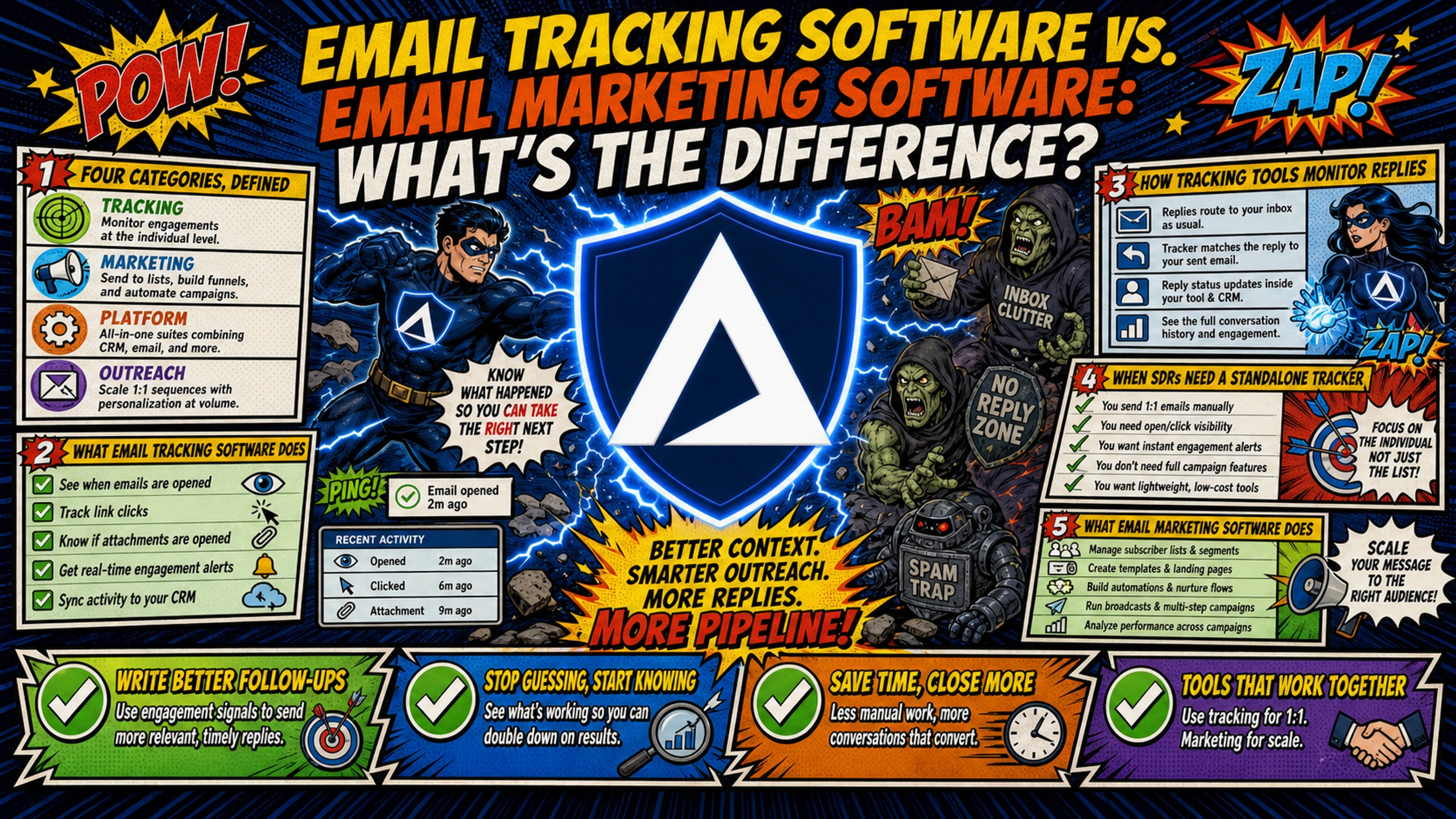
TL;DR: Email tracking software and email marketing software answer different questions. Tracking tools like Yesware, Mixmax, and HubSpot Sales monitor opens, clicks, and replies on individual 1:1 sales emails, so reps know when a specific prospect engaged. Email marketing platforms like Mailchimp and Constant Contact send bulk campaigns to opted-in subscribers and report aggregate list performance. Use tracking for low-volume, manually written sales emails, and marketing software for newsletters and nurture drips. For cold outbound at scale, sequencers like Instantly and Smartlead include tracking built in, so a standalone tracker is often redundant. Rely on replies over opens, since Apple Mail Privacy Protection inflates typical B2B open rates by 15 to 20+ percentage points. All of these tools sit on an infrastructure layer. Google Workspace costs $420/month for 50 inboxes on the Flexible Plan, while Inframail costs $129/month flat for unlimited inboxes (domain and warmup costs apply on both sides).
An SDR team running 50 inboxes on Google Workspace pays $420/month on the Flexible Plan before buying a single software license. The tracking tool, the marketing platform, and the sequencer all sit on top of that bill, and none of them can fix a deliverability problem that starts in the infrastructure underneath.
That is why the "email tracking software vs email marketing software" debate confuses buyers. Teams compare feature lists across categories that solve different problems, end up paying for overlapping functionality across three vendors, and still miss the layer that controls inbox placement. This article defines each category, maps it to the workflow it fits, and shows where infrastructure providers like Inframail slot into the stack.
The four categories, defined
Before comparing vendors, get the category boundaries straight. Teams waste budget when they buy a tool in one category to do a job that belongs to another.
| Tool category | Primary function | Best for | Example tools |
|---|---|---|---|
| Email tracking software | Monitors opens, clicks, and replies on individual emails | 1:1 sales outreach, follow-up timing | HubSpot Sales, Yesware, Mixmax |
| Email marketing software | Bulk sends, list management, campaign automation | Opt-in newsletters, nurture campaigns | Mailchimp, Constant Contact, Customer.io |
| Cold outreach sequencer | Multi-touch outbound cadences with reply detection | SDR teams booking meetings from cold lists | Instantly, Smartlead, Lemlist |
| Email infrastructure provider | Inbox provisioning, DNS setup, dedicated IPs | Teams running high-volume cold email campaigns | Inframail, Maildoso, Mailforge |
The functional split is engagement scope: email tracking tools capture open rates, times, locations, and click-throughs at the individual email level, while bulk email marketing software manages large subscriber lists, templates, and aggregate campaign analytics. One answers "did this specific prospect engage." The other answers "did this list segment convert."
Cold outreach sequencers occupy a third category. A sequencer schedules a multi-touch sequence (email, call tasks, LinkedIn steps) and pauses it automatically when a prospect replies. Infrastructure providers sit underneath all three, handling the inboxes, domains, and IP reputation that every upper layer depends on.
What email tracking software does
Email tracking software embeds a small tracking mechanism in outgoing emails and reports back when a recipient opens the message, clicks a link, or replies. Sales reps use these signals to time follow-ups, prioritize hot leads, and coach messaging based on what gets engagement.
The mechanics matter for data accuracy. A tracking pixel is a 1x1 image inside the email that loads when someone opens it, signaling to the sending platform that the email was opened. The problem is that pixel data is increasingly unreliable.
Apple Mail Privacy Protection preloads emails on Apple-managed proxy servers, which triggers the tracking pixel whether the recipient opened the message or not. Stripo's 2026 B2B benchmark research shows that Apple MPP significantly inflates open rate metrics, with true human B2B open rates typically sitting at 15% to 25% while dashboards report 35% to 55%. That is 15 to 20+ percentage points of inflated data feeding your coaching decisions.
How tracking tools monitor replies
Tools like HubSpot Sales, Yesware, and Mixmax log replies alongside opens and clicks, so reps can see which prospects engaged. Sequencers with built-in tracking keep both signals in one system, which eliminates the need for multiple dashboards without losing the reply alert.
When SDRs actually need a standalone tracker
Standalone tracking makes sense in a narrow set of cases:
- Low outbound volume: A founder or AE sending individual, manually written emails from their primary inbox rather than running automated cadences.
- CRM-first workflows: Teams where logging every touch to Salesforce or HubSpot records matters more than campaign automation.
- No sequencer in the stack: If reps send one-off emails rather than cadences, there is nothing to build tracking into.
What email marketing software does
Email marketing software is built for permission-based sending at scale. It manages subscriber lists, segments audiences, automates drip sequences, and reports on campaign-level metrics like open rate, click rate, and conversion. The category streamlines mass sending, manages large lists, and tracks deliverability for newsletters, promotions, and announcements.
Mailchimp requires senders to point to an opt-in form or other evidence of consent, and bans purchased, rented, third-party, and publicly available lists. Mailchimp notes that most senders share IP addresses, so one sender's behavior can affect others on the same pool. Violations can get an account suspended or terminated, and cold outreach from a marketing platform can damage your marketing domain's sender reputation.
Who needs a marketing platform
Marketing teams running opt-in newsletters, product announcements, webinar invites, and customer nurture campaigns need this category. SDR teams usually do not, with one exception: if your company sends product updates or event invites to an existing opted-in customer list, a marketing platform handles that job correctly while your sequencer handles outbound. The expensive mistake is buying Mailchimp to run cold prospecting, not owning Mailchimp alongside an outbound stack for your opted-in sends.
Email tracking vs. marketing automation
The email tracking vs marketing automation comparison trips people up because both produce "engagement data." The difference is the data model. Tracking tools record individual contact activity in real time for a rep to act on today. Marketing automation records aggregate list performance for a marketer to optimize a campaign over weeks.
Conflating the two leads teams to buy a marketing platform expecting sales-grade reply detection, or a tracking tool expecting campaign analytics, and both purchases disappoint.
Cold outreach sequencers: the third category most comparisons miss
Sequencers like Instantly, Smartlead, and Lemlist orchestrate multi-touch outbound campaigns. They send a sequence of emails spaced across days, branch based on prospect behavior, and stop the sequence when a reply comes in. Instantly's sequence tooling includes templates, automated follow-up rules, and analytics, and Smartlead's cadence features let teams build sub-sequences triggered by prospect interactions with API-based reporting on open, click, and reply rates.
Here is the key point for SDR managers: sequencers include tracking. Open detection, reply detection, and engagement-based branching all live in the same system that sends the emails. When tracking data lives in Yesware and sending data lives in Instantly, diagnosing a deliverability drop means reconciling two dashboards that do not talk to each other. Built-in tracking keeps engagement signals and sending behavior in one place, which is what makes root-cause analysis possible when reply rates fall.
Sequencers still need infrastructure underneath them. They do not provision inboxes, register domains, or configure DNS records.
Key differences between email tracking and email marketing
The tool categories covered above overlap in naming but not in function. The table and breakdowns below separate them across four dimensions that matter for buying decisions.
For a quick answer to the difference between email tracking and email marketing, these four rows cover it:
| Dimension | Email tracking software | Email marketing software |
|---|---|---|
| Core question | Did this prospect engage? | Did this campaign convert? |
| Data model | Individual contact activity, real time | Aggregate list performance, campaign level |
| Audience | Cold or warm 1:1 prospects | Opted-in subscribers |
| Pricing model | Per seat | Per contact or list size |
Spam complaint limits apply to every sender
Gmail asks all senders to keep spam complaint rates below 0.3%, ideally below 0.1%. Bulk senders (5,000+ messages a day to Gmail) face stricter rules, including DMARC and one-click unsubscribe.
The practical takeaway: keep cold outbound off the domain and platform you use for opted-in marketing, so complaints from cold sends cannot push your marketing domain past those limits.
Meeting CAN-SPAM and GDPR requirements
Compliance obligations do not change based on which tool category you use. CAN-SPAM permits unsolicited commercial email in the US as long as you include a physical address, a working unsubscribe mechanism, accurate headers, non-deceptive subject lines, and a clear disclosure that the message is an ad, with opt-outs processed within 10 business days. Violations cost up to $53,088 per email as of January 2025.
GDPR is stricter. Direct marketing can rely on legitimate interest, but recipients have the right to object at any time. If you did not collect their data directly, you must tell them where it came from by your first email. Fines reach €20 million or 4% of total worldwide annual turnover, whichever is higher.
Hidden costs of email tools
Each category bills on a different axis, and the costs stack:
- Tracking tools: Per-seat pricing that scales with headcount.
- Marketing platforms: Per-contact pricing that scales with list size.
- Sequencers: Flat, tiered, or per-seat fees (Lemlist bills per user).
- Infrastructure: Per-inbox pricing on Google Workspace ($7.00/user/month annual, $8.40/user/month flexible), plus domains at $5-16 per year and warmup tools at $15-50 per inbox per month.
The infrastructure line is the one that surprises teams, because it scales linearly with inbox count regardless of which software sits on top.
Mapping tools to your pipeline needs
Stack decisions go wrong when teams buy for features rather than workflow fit. The matrix below maps each tool category to the job it belongs to, so overlap is visible before a purchase is made.
Use this decision matrix to audit your current stack for overlap:
| Workflow need | Tracking software | Marketing platform | Sequencer |
|---|---|---|---|
| 1:1 engagement monitoring | Typically yes | Typically no | Commonly built in |
| Bulk campaign automation | Rarely, though some include follow-up sequences and mail merge (e.g. Saleshandy) | Yes | Yes, for outbound cadences only, not opt-in campaigns |
| Multi-touch outbound cadences | Typically no | Typically no | Yes |
| Inbox provisioning and DNS | No | No | No (needs infrastructure) |
When to use email tracking software
Use a standalone tracker when outbound volume is low, CRM logging is the primary need, and no sequencer is in the stack. Accept the trade-off: a separate vendor adds a per-seat bill on top of your sequencer or infrastructure costs.
When to use email marketing software
Use a marketing platform for opt-in newsletters, nurture drips, and product announcements to existing customers. If list size rather than individual engagement is the metric, this is the right category.
When to use a cold outreach sequencer
Use a sequencer when your KPIs are reply rate and meetings booked from cold lists at scale.
When to combine platforms
A mature stack often runs a marketing platform for opt-in campaigns and a sequencer for outbound, with an infrastructure provider underneath both. The audit question is simple: is any feature being paid for twice? If your sequencer tracks opens and replies, the standalone tracker is the first line item to cut.
Why pixel tracking data fails and what to use instead
As covered in the tracking section above, MPP preloading corrupts open-rate data. Reply rate is the signal that survives, and sequencers detect it natively.
The cost of multi-vendor stacks and data silos
Vendor fragmentation creates operational drag beyond the subscription costs. Each vendor (a domain registrar, an email provider, a warmup tool, a tracker, and a sequencer) brings its own billing relationship and its own dashboard. When deliverability drops mid-quarter, each vendor points at another, and there is no single view of whether the cause is domain age, content, volume, IP reputation, or ESP filtering.
Consolidating tracking into the sequencer and infrastructure into one provider removes two of those vendors. For teams that consolidate, Inframail's guide on spotting emails that land in spam covers the healthy metric ranges to watch (those ranges are dashboard figures, which include Apple MPP opens), and a monitoring setup with health checks at the infrastructure layer catches blacklist events before they show up as a pipeline gap in a weekly review.
How email infrastructure providers fit into your stack
Infrastructure is the layer every other category depends on and the one most comparisons ignore. An infrastructure provider provisions inboxes, registers or migrates domains, configures SPF, DKIM, and DMARC records, allocates IPs, and monitors blacklist status. Without that layer, sequencers and marketing platforms have nothing to send from.
The TCO math at 50, 100, and 200 inboxes
Google Workspace Business Starter costs $8.40 per user per month on the Flexible Plan, which is the fair comparison point since teams scaling inboxes up and down do not lock into annual commitments. Inframail charges $129/month flat for unlimited inboxes on the Unlimited Plan.
| Inbox count | Google Workspace (Flexible) | Inframail Unlimited |
|---|---|---|
| 50 inboxes | $420/month | $129/month |
| 100 inboxes | $840/month | $129/month |
| 200 inboxes | $1,680/month | $129/month |
Domain costs ($5-16 per domain per year) and warmup tools ($15-50 per inbox per month) apply on both sides and are not included in this comparison. At 50 inboxes, the platform-fee savings alone are $291/month, or $3,492 annually. The video on the Inframail vs Google Workspace math walks through where per-seat pricing stops making sense.
"This is genuinely the best cold email hosting software you can find for many reasons." - Verified user review of Inframail
Dedicated IPs separate outbound from everything else
Shared IP pools work like carpool lanes where you are affected by other drivers. One bad actor spamming gets the whole range flagged. Dedicated IPs work like private lanes where your behavior alone determines reputation.
Inframail includes 1 dedicated US-based IP on the Unlimited Plan and 3 on the Agency Pack, so sending reputation isn't affected by other users on shared IP pools. The video on dedicated IP vs shared IP pools demonstrates the difference in practice. Mailforge runs mailboxes on a shared IP pool, and Inframail's dedicated IPs give scaling teams the reputation isolation that shared pools cannot deliver.
Automated DNS removes the onboarding bottleneck
Manual SPF, DKIM, and DMARC configuration takes 15-30 minutes per domain across GoDaddy, Namecheap, or Cloudflare panels. For 50 domains, that is 12+ hours of DNS work blocking campaign launches.
Inframail configures all three records automatically with no DNS panel access required, and customer testimonials report 10 inboxes operational in 2 minutes. The Inframail setup tutorial shows the process step by step, and the platform compatibility docs list the sending platforms Inframail supports.
One candid trade-off: Inframail does not include a built-in warmup tool, so budget for an external service or run warmup through your sequencer. The post-migration warmup guide walks through that process.
Get started with Inframail
Inframail is a flat-rate Microsoft email infrastructure provider built for agencies and SDR teams running cold email at scale. It provisions unlimited inboxes at $129/month, configures SPF, DKIM, and DMARC automatically, and includes dedicated US-based IPs so sending reputation stays isolated. Inframail reports a 98%+ deliverability rate and a 68.3% blacklist delisting success rate within 48 hours.
Watch this case study video and see how Inframail helped a client automate email infrastructure setup, launch campaigns quickly, and generate a 2% reply rate with around 20 interested leads in just 1-2 hours.
Sign up to Inframail and get started today.
FAQs
Is email tracking the same as email marketing?
No. Email tracking monitors individual 1:1 emails for opens, clicks, and replies. Email marketing software automates bulk sends to opted-in lists and reports aggregate campaign performance.
Can I use email tracking software for cold outreach campaigns?
Yes, but it is usually redundant. Sequencers like Instantly and Smartlead include open and reply tracking natively, so a standalone tracker adds cost and a data silo without adding capability.
Do I need separate tools for tracking, sending, and infrastructure?
You need infrastructure and a sending tool at minimum. Tracking should come built into your sequencer, which removes the third vendor from the stack.
Which is cheaper: email tracking or email marketing software?
Tracking tools bill per seat and marketing platforms bill per contact, so cost depends on team size versus list size. The bigger hidden cost is infrastructure underneath both: $420/month for 50 Google Workspace inboxes versus $129/month flat on Inframail (domain and warmup costs apply to both).
How does email tracking work with marketing automation?
Marketing platforms include their own campaign-level tracking, so no separate tracker is needed. Standalone trackers only add value for 1:1 sales emails sent outside a marketing platform.
Key terms glossary
Email tracking software: A tool that monitors opens, clicks, and replies on individual emails, typically via a tracking pixel and reply detection. Used by sales reps to time follow-ups on 1:1 outreach.
Email marketing software: A platform for sending bulk campaigns to opted-in subscriber lists, with segmentation, automation, and campaign analytics. Examples include Mailchimp and Constant Contact.
Cold outreach sequencer: A sending platform that automates multi-touch outbound cadences, branches on prospect behavior, and pauses sequences when a reply arrives. Examples include Instantly, Smartlead, and Lemlist.
Email infrastructure provider: A service that provisions inboxes and domains, configures SPF/DKIM/DMARC records, and allocates IPs for cold email sending. It sits underneath sequencers and marketing platforms in the stack.
Deliverability rate: The percentage of sent emails that reach the recipient's inbox rather than spam or a bounce. Inframail reports a 98%+ deliverability rate and a 68.3% blacklist delisting success rate within 48 hours.