
Email Sequence Strategy: The Complete Guide for Outbound Campaigns
An email sequence is a scheduled series of outbound touches sent to the same prospect over days or weeks, and cold outbound needs 6 to 15 of them depending on d
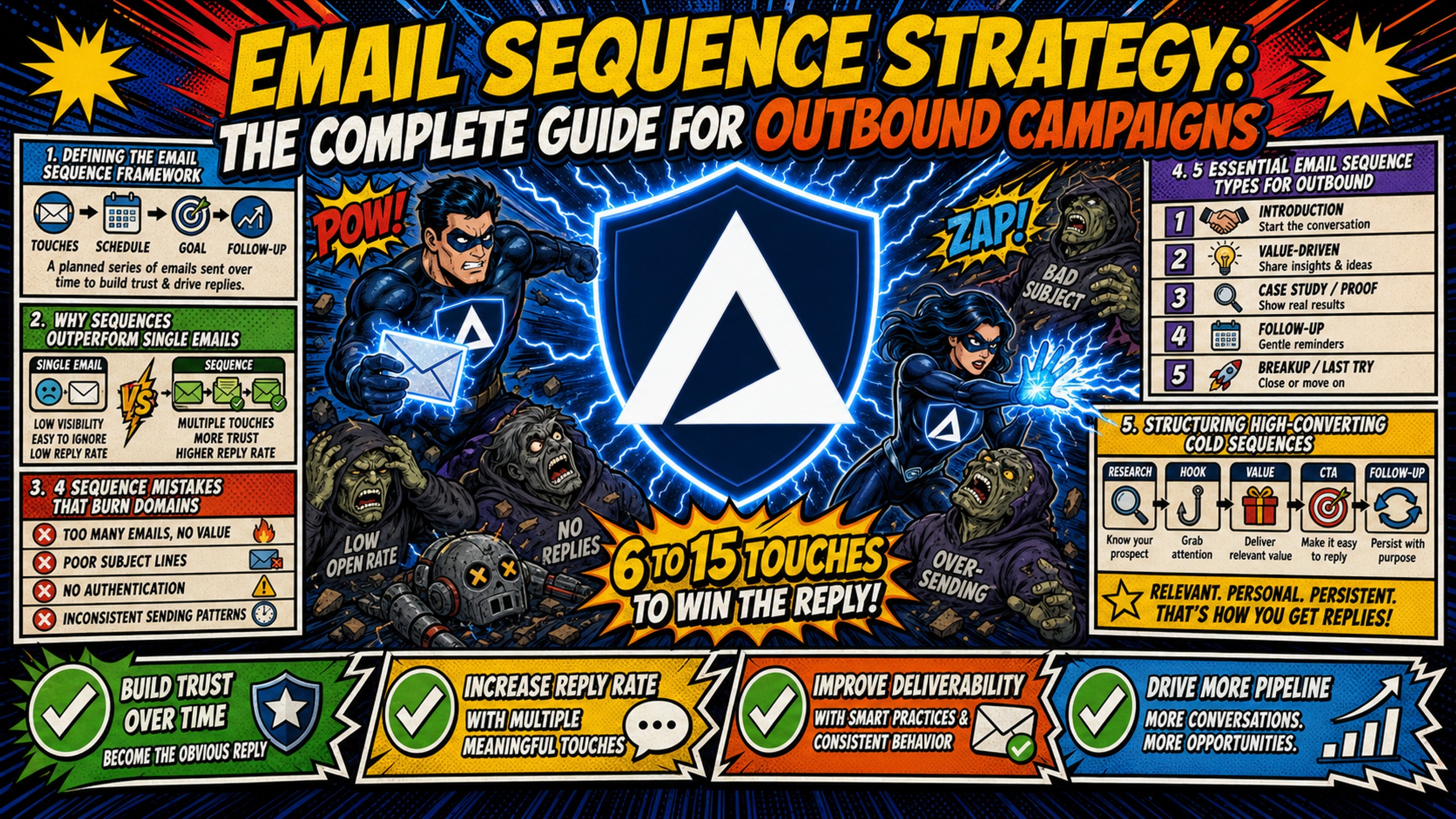
TL;DR: An email sequence is a scheduled series of outbound touches sent to the same prospect over days or weeks, and cold outbound needs 6 to 15 of them depending on deal size. Space each email at least 3 days apart, run 4 to 6 email steps for standard cold outreach, and set exit rules before launch. Woodpecker's 2026 analysis of over 20 million emails puts the average reply rate at 3.43%, with 5% to 10% counting as good. Deliverability decides whether any of it lands: Google requires SPF, DKIM, and DMARC for bulk senders, and dedicated IPs isolate reputation that shared pools expose. Inframail auto-configures those records and provisions unlimited inboxes on dedicated IPs for a flat $129/month against $420 for 50 Google Workspace seats (warmup tools are separate on both sides).
Scaling outbound sequence volume should not mean scaling software bills linearly. Most campaign managers obsess over copy while infrastructure silently routes messages to spam or inflates per-seat costs past sustainable margins. High-converting campaigns require both: structured multi-touch sequences that build familiarity across each touchpoint, and infrastructure that doesn't compound costs as domain count grows.
Defining the email sequence framework
Understanding how sequences are structured, and where most campaigns break down, is the starting point for building outbound that converts.
Why sequences outperform single emails
Single-touch cold emails rarely convert because the prospect hasn't built enough familiarity with the sender to act on a first message. Skipcall's B2B cadence analysis puts the average at 8 touchpoints to get a response from a cold B2B prospect, with that number rising for complex or high-ticket deals. Single cold emails perform like one voicemail with no callback, while a follow-up cadence converts interest into booked meetings across multiple touchpoints. The infrastructure supporting those touches determines whether sequences land in the inbox or the spam folder.
Sequence-based outbound also lowers cost-per-meeting by extracting more output from each lead list, reducing the volume of net-new prospects needed to hit targets. If per-inbox costs run at $8.40/seat on Google Workspace's Flexible Plan, 50 inboxes cost $420/month before domains or warmup, which eats directly into margins as client count scales. The ROI case for sequence-based outbound is strongest when infrastructure costs stay flat regardless of inbox count, which is the core argument for flat-rate pricing over per-seat billing.
4 sequence mistakes that burn domains
Four errors cause the majority of domain blacklisting events and wasted lead lists:
- Sending too fast: Blasting emails without spacing triggers spam filters. Volume spikes from a new domain signal to ESPs (Email Service Providers) that the sender is a bad actor before a single reply arrives.
- Poor list hygiene: High bounce rates from unverified contact lists damage domain reputation quickly. ESPs treat a bounce rate above 2% as a signal of poor list quality, and sustained violations degrade domain reputation until deliverability drops materially.
- Broken DNS records: Missing or misconfigured SPF, DKIM, or DMARC records cause messages to fail authentication checks. Setting these records manually across 50 domains is a time-consuming, error-prone process that creates a real operational bottleneck.
- Sending from shared IP pools: Shared IP pools expose every sender to contamination risk. If one sender in the pool gets flagged, the entire IP range takes the hit, even when your own sending practices are clean. Inframail's dedicated IP model (1 IP on the Unlimited Plan at $129/month, 3 IPs on the Agency Pack at $327/month) isolates sending reputation so your behavior alone determines ESP trust.
DNS misconfiguration, especially missing or misaligned SPF, DKIM, and DMARC records, is a common cause of cold‑email deliverability failures, so fixing authentication and domain setup before optimizing sequence copy is the highest‑return step in the workflow.
5 essential email sequence types for outbound
Different outbound goals call for different sequence structures. The five types below cover the core use cases from initial cold contact through post-demo follow-up.
Structuring high-converting cold sequences
A standard cold outbound sequence runs 4 to 6 email steps, with each touch adding a new element of value rather than repeating the same ask. The structure should open with a relevant problem framing, move to a case-specific reason to connect, and close with a direct, low-friction call to action. Setting up that sequence volume on infrastructure that charges per seat creates a cost barrier before the first email goes out, which is why flat-rate pricing is the operational prerequisite to running cold sequences at scale.
Building nurture flows that convert
Nurture sequences handle prospects who are interested but not ready to act. The goal is to build trust and share useful content before making any significant ask, so by the time the ask arrives, the prospect has a reason to respond. These sequences typically run 3 to 5 touches spread over 2 to 4 weeks, each delivering something the prospect finds useful on its own. For a setup walkthrough before running nurture flows at scale, Inframail's inbox migration guide covers the technical warmup requirements.
Automating follow-up for no-replies
Prospects who open but don't reply are the highest-value segment in any list. Automating follow-ups for this group inside platforms like Instantly or Smartlead means no lead falls through the cracks between manual check-ins. Jordan Platten's walkthrough of sending 3,000+ cold emails daily using Instantly shows how automated follow-up steps run in sequence without manual intervention at each stage. Space these follow-ups at least 3 to 5 days apart to avoid triggering spam filters from rapid successive sends.
Setting up responsive email triggers
Event-triggered sequences fire when a specific prospect behavior occurs: clicking a link in a prior email, visiting a pricing page, or downloading a resource. These triggers allow the sequence to respond to demonstrated intent rather than just elapsed time since the last send. Connect these triggers through the sending platform's behavioral tracking or via webhook integrations from your CRM (Customer Relationship Management system).
Post-demo email sequence best practices
The post-demo sequence is the most time-sensitive in the outbound stack. Send the first follow-up within one hour of the demo ending while the conversation is still fresh. Subsequent steps should address specific objections raised during the meeting, include a clear next step such as a proposal or follow-up call, and offer a direct line to the sales rep for questions.
When to deploy each sequence framework
Match sequence depth to deal complexity and expected ACV (Annual Contract Value). Artisan Growth Strategies' 2026 sales cycle benchmarks name stakeholder count as the single biggest factor in cycle length: deals with one buyer close fast, deals with a committee close slowly. Their data puts $5K to $25K deals at 1 to 2 stakeholders across a 30 to 90 day cycle, while $25K to $100K deals pull in multiple stakeholders, security review, and legal across 90 to 180 days. HubiFi's analysis frames the same split from the seller's side: a high ACV usually means a longer, more hands-on process aimed at enterprise clients, while a low ACV model relies on a high-volume, low-touch approach serving small businesses or individual users.
Longer cycles with more stakeholders need more touches to stay present across the full decision window. A sequence that ends after four emails disappears from a 90 to 180 day evaluation long before the decision gets made. Channel mix follows the same logic: reaching a buying committee means reaching people who do not all live in the same inbox, so higher ACV tiers add LinkedIn and phone alongside email. The table below maps sequence depth and channel to deal size.
| ACV Range | Recommended Touches | Sequence Type | Primary Channel |
|---|---|---|---|
| $10K-$25K | 6-10 touches (typical) | Cold Outbound + Nurture | Email-first |
| $25K-$50K | 8-12 touches (typical) | Multi-channel Outbound (ABM approach above $30K) | Email + LinkedIn |
| $50K+ | 12-15 touches (typical) | Account-Based Playbook | Email + Phone + Social |
How to build effective email sequence flows
Building an effective sequence requires decisions on metrics, messaging alignment, and exit logic before the first email goes out.
Setting KPIs for outbound sequences
The foundational metric for any outbound sequence is inbox placement rate, which measures the percentage of delivered emails that land in the primary inbox rather than the spam folder. A healthy inbox placement rate sits above 90%, and anything below 80% signals a deliverability problem requiring immediate investigation (per Inframail's healthy metrics guide linked below). Above that baseline, track open rate, reply rate, positive reply rate, and meeting-booking rate to measure sequence performance. The Inframail help center guide covers how to diagnose whether campaign emails are hitting spam and what healthy metric ranges look like.
Mapping touchpoints to buyer awareness stages
Align each sequence step with where the prospect sits in their awareness path. Early touches should acknowledge a known problem without immediately pitching a solution, which builds credibility and lowers the prospect's defensive response. Middle touches introduce the solution and provide social proof or case-specific evidence. Final touches shift to a direct call to action with a specific, low-commitment next step.
Setting sequence depth by deal size
Sequence depth must match deal complexity or later touches will feel like pressure rather than value. A 4-step sequence on a $75K deal will underperform because the prospect needs more touchpoints to build sufficient trust for a high-stakes decision. Use the ACV-to-touch benchmarks in the table above to set depth before writing copy, because adding steps retroactively disrupts the sequence's logical flow.
Configuring lead handoff and exit points
Set firm exit rules in the sending platform before activating any sequence. A prospect who replies to any step, positively or negatively, should exit the automated flow immediately. A prospect who books a meeting should trigger an immediate pause on all remaining sequence steps. Failing to configure these exit points results in automated follow-ups reaching prospects after they've already engaged, which can kill deals that were moving toward close.
Optimizing sequence copy and sending frequency
What gets written and when it gets sent are two of the highest-impact variables in any outbound sequence.
Proven subject lines for outbound campaigns
Mixmax's 2026 best‑practice guide recommends plain, lowercase, human‑sounding subject lines (around four words, no spammy phrasing) because they feel less like marketing and tend to earn more clicks in crowded inboxes. Here are five sample subject line structures that you can use in a B2B cold email:
- Name-based: "[First name] / [Company]" signals a direct message rather than a broadcast.
- Question format: "Question re: [specific topic]" creates curiosity without clickbait language.
- Referral hook: "Intro via [mutual connection or shared context]" adds immediate credibility.
- Result-specific: "How [Company X] reduced [metric] by [number]" leads with proof rather than a pitch.
- Short direct ask: "[First name], worth a quick call?" minimizes friction on the call to action.
Hype language, urgency framing, and all-caps text depress reply rates and correlate with spam placement, but modern filters score sender reputation, authentication, and engagement rather than scanning for banned words. Write plainly because it performs better, not because a single word will trip a filter.
3 core cold outreach copy structures
Three frameworks cover the majority of high-performing cold email copy:
- Problem-Agitate-Solve (PAS): Open by naming a specific problem the prospect likely faces. Agitate it by showing the cost of not solving it, then present the solution clearly in two to three sentences.
- Attention-Interest-Desire-Action (AIDA): Grab attention with a specific fact, build interest with a relevant insight, create desire by showing concrete outcomes, then close with a single action.
- Short and Direct (the 3-sentence email): One sentence showing you understand their world, one stating your offer, one with a low-friction call to action. This performs strongly for follow-up touches where brevity signals confidence.
Optimal send frequency for cold outreach
Space emails across a minimum of 3 days per touch, with longer gaps in later steps. A working cadence for a 6-step sequence:
- Day 1: Email 1
- Day 4: Email 2
- Day 8: Email 3
- Day 13: Email 4
- Day 19: Email 5
- Day 26: Email 6
Daily blasting from the same domain triggers spam filters and accelerates blacklisting. Domain variation strategy can distribute volume across multiple sending domains when daily send targets exceed safe per-domain limits.
Spacing emails 3 or more days apart helps optimize inbox placement by avoiding volume spikes that can trigger spam filters. Daily sending from the same domain, or erratic volume patterns, signals suspicious behavior to ESPs and accelerates deliverability degradation. Inbox placement depends on multiple factors including authentication, list quality, sender reputation, and sending cadence working together.
Automating personalized email sequences
Use merge tags for first name, company name, job title, and one custom variable referencing a specific detail about the prospect's company or situation. The custom variable separates an automated email from a mass broadcast. Set fallback values for every merge tag, because a blank field where the prospect's name should appear destroys trust immediately. Inframail exports IMAP (Internet Message Access Protocol) and SMTP (Simple Mail Transfer Protocol) credentials directly to CSV, and the Smartlead integration guide shows exactly how to import those credentials into the sending platform's workflow.
Split testing outbound email copy
Run A/B tests on one variable at a time: subject line, opening sentence, or call to action. At a 3-4% baseline reply rate, detecting a one-point improvement takes several thousand sends per variant to reach 95% confidence. Plan for at least 1,000 per variant as a floor, and run a sample size calculation before splitting traffic. Track positive reply rate as the primary A/B metric, not open rate, because open rate measures curiosity while positive reply rate measures intent to act.
Securing inbox placement for outbound campaigns
Technical configuration and monitoring determine whether a sequence reaches the inbox or disappears before anyone reads it.
Configuring SPF, DKIM, and DMARC
SPF (Sender Policy Framework) lists the IP addresses authorized to send email on behalf of a domain. DKIM (DomainKeys Identified Mail) signs each message with a digital key so the receiving server can verify it wasn't altered in transit. DMARC (Domain-based Message Authentication, Reporting, and Conformance) tells receiving servers what to do when a message fails SPF or DKIM checks.
Configuring all three before your first send is critical: since February 2024, Google requires bulk senders of more than 5,000 messages per day to Gmail to configure SPF, DKIM, and DMARC, and Yahoo enforces equivalent requirements. All three are mandatory, not optional hardening. Manual configuration across multiple registrars creates a real bottleneck: logging into DNS panels, creating TXT and CNAME records, waiting for propagation, and testing each domain individually adds up to hours of repetitive work per month.
Inframail auto-configures SPF, DKIM, and DMARC records upon domain purchase or transfer, removing that entire manual workflow. The dedicated IP vs. shared IP comparison on Inframail's blog explains how DNS automation pairs with dedicated IP isolation for consistent inbox placement across all provisioned domains.
Pacing daily warmup volume
New domains need a minimum of 14 to 28 days of warmup before any cold outbound sequences run, and brand-new domains with no sending history benefit from longer, with no campaigns sent during this initial phase. For a detailed week-by-week sending ramp, Inframail's inbox warmup guide covers the full volume schedule from day one through the end of the warmup window. Inframail does not include a built-in warmup tool, so external services like Warmbox or Lemwarm are required at an additional $15-50/month per inbox. Users on Inframail's Done-for-You package get domain warmup included.
Daily sending limits for new domains
Inframail recommends 40 emails per inbox per day as the working figure, with 50 as the hard ceiling. Exceeding daily limits before reputation is established accelerates blacklisting regardless of how clean the copy or contact list is. To protect sending capacity at scale, distribute volume across separate domains rather than stacking multiple campaigns against a single domain.
How to measure your inbox placement
Inbox placement rate and delivery rate measure different things. Delivery rate measures whether the recipient's mail server accepted the email. Inbox placement rate measures whether that accepted email reached the primary inbox rather than the spam folder. Measuring inbox placement requires seed list testing: a panel of real email accounts maintained across Gmail, Outlook, Yahoo, and other major providers that confirm exactly where messages land. Run a seed test before launching any new sequence and after any infrastructure change.
Stop blacklists from killing your sequence
Blacklists occur when sending behavior, list quality, or shared IP contamination triggers a spam classification at the domain or IP level. On shared IP pools, one bad actor's behavior can flag the entire IP range, pulling clean senders into a blacklist event they had no part in creating. Inframail's deliverability monitoring dashboard tracks domain and IP health proactively, monitors blacklists, and auto-submits delisting requests when domains are flagged, achieving a 68.3% blacklist delisting success rate within 48 hours and maintaining a 98%+ deliverability rate across its infrastructure.
Operational blueprints for scaling outbound sequences
Consistent campaign execution at scale depends on repeatable checklists and handoff processes that don't rely on manual memory.
The email sequence setup checklist
Run through this checklist before launching any new campaign:
- Purchase domains through Inframail at $5-$16/year each.
- Auto-configure DNS via Inframail's dashboard for SPF, DKIM, and DMARC with no manual panel work.
- Provision unlimited inboxes under a dedicated IP.
- Export IMAP/SMTP credentials to CSV directly from Inframail.
- Import the CSV into your sending platform (Instantly or Smartlead).
- Connect external warmup tool and run for a minimum of 14 to 28 days before cold sends.
- Upload verified lead list with bounce rate below 2%.
- Set exit rules for replies and meeting bookings before activating.
- Run a seed test to confirm inbox placement above 90%.
- Launch sequence.
For a full walkthrough of the domain-to-sending workflow, Inframail's 30-60k emails per month setup video demonstrates the complete process from domain purchase through CSV export.
Campaign launch approval process
Before activating a sequence, run this five-point quality check:
- Test merge tags: Send a test email to an internal inbox and verify every variable populates with correct prospect data.
- Verify fallback values: Confirm all merge tags have fallback text so blank fields cannot appear in live sends.
- Run a seed test: Confirm inbox placement rate is above 90% before the first send.
- Check bounce thresholds: Set the sending platform to pause automatically if bounce rate exceeds 2%.
- Confirm exit rules: Verify that replies and meeting bookings trigger immediate removal from the active sequence.
Inframail's guide on cold email infrastructure monitoring covers the ongoing alert protocols agencies use to catch issues before a client notices a deliverability drop.
Managing client-specific sequence workflows
Agencies running sequences for multiple clients need separate domain sets and sequence configurations per client to prevent cross-contamination of sending reputation. One client's deliverability problem should never bleed into another client's campaign. The cost of maintaining this separation scales directly with per-seat pricing: Google Workspace's $8.40/user Flexible Plan adds $8.40 to infrastructure cost for every inbox added across each client, as the cost table below shows. Inframail's flat-rate model keeps infrastructure cost per client flat as domain count grows, which is the number that matters when reporting capacity to whoever owns the budget.
Maildoso's per-mailbox pricing ranges from $2.50/mailbox at 30 mailboxes down to $0.49/mailbox at 1,000 mailboxes, while Inframail's $129/month covers all inboxes at any volume. Maildoso also uses automatic IP rotation rather than dedicated IPs.
| Number of Inboxes | Google Workspace ($8.40/seat) | Inframail (flat-rate + domains) | Monthly Savings |
|---|---|---|---|
| 50 inboxes | $420.00/month | $129.00 + ~$34.00 domains = $163.00 | $257.00/month |
| 100 inboxes | $840.00/month | $129.00 + ~$68.00 domains = $197.00 | $643.00/month |
| 200 inboxes | $1,680.00/month | $129.00 + ~$136.00 domains = $265.00 | $1,415.00/month |
(Warmup tools are separate on both sides and are not included in this comparison.)
For a broader look at infrastructure costs across 7 platforms, Inframail's comparison article covers the full cost breakdown including domain and warmup variables.
Transferring leads from sequences to sales
Configure the sending platform to route positive replies to the CRM or the sales team's calendar booking tool immediately on detection. A lead who replies with interest should never wait in a sending platform queue while a campaign manager manually reviews the inbox between check-ins. Connect the sending platform's reply detection to a Slack alert or CRM task trigger so the sales team can respond within the hour. Clay's breakdown of 10 million cold emails sent identifies response time after a positive reply as one of the highest-impact variables in converting warm replies to booked meetings.
Refining campaign results with iterative testing
Improving sequence performance over time means tracking the right signals and knowing when to adjust targeting, copy, or cadence.
Tracking your email sequence health
Check bounce rate, spam complaint rate, and reply rate at minimum once per week for every active sequence. Google's sender guidelines put the spam complaint rate target below 0.1%, with 0.3% and above materially damaging inbox delivery. Weekly health checks catch problems before they compound into blacklisting events that require domain replacement and restart the warmup clock entirely.
Converting replies into meetings
Woodpecker's 2026 analysis of more than 20 million sales emails puts the average cold email reply rate at 3.43%, down from 5.1% in 2024. A reply rate of 5% to 10% is good, and above 10% is excellent. Tight targeting is the clearest lever: campaigns under 50 contacts average 5.8% while lists of 1,000 or more average 2.1%. When reply rates sit below the 3.43% average across a large send sample, start with deliverability and list quality, since verified lists return roughly twice the reply rate of unverified ones.
Inframail customers have reported reply rates of 9%+ and 25%+ on their campaigns. Of total replies, positive replies expressing genuine interest typically convert to booked meetings at a 30% to 50% rate depending on how quickly the sales team responds and how clearly the call to action is framed.
Sequence lifecycle: when to pull the plug
When a sequence generates zero positive replies after contacting a substantial sample with no engagement trend, continuing to run the same copy against new leads wastes list inventory. The refresh should address either targeting (wrong ICP or Ideal Customer Profile, wrong title, wrong company size) or copy (wrong problem framing, wrong offer, wrong call to action). For a structured audit of why cold email campaigns fail, Inframail's 37-point breakdown covers the most common root causes across messaging, infrastructure, and targeting.
Tuning send timing on real data
Test send time variations after collecting baseline data across a statistically meaningful sample per variant. Tuesdays through Thursdays between 8am and 11am local time for the prospect consistently outperform other windows in B2B cold email. After establishing baseline metrics, adjust step spacing based on observed open-to-reply lag to capture prospect momentum at its peak.
Start scaling outbound on flat-rate infrastructure
Inframail is a cold email infrastructure platform built on Microsoft's cloud for agencies and sales teams running 50 to 200 domains. It provisions unlimited inboxes on dedicated IPs for a flat $129/month, auto-configures SPF, DKIM, and DMARC records on domain purchase, and monitors domain and IP health with a 68.3% blacklist delisting success rate within 48 hours across a 98%+ deliverability rate on its infrastructure. Domain costs run $5-$16/year each with no per-inbox charges for additional mailboxes. (Warmup tools are separate and not included in the platform fee.)
Sign up to Inframail and get started today.
FAQs
What is the ideal number of emails per sequence?
4 to 6 emails covers standard cold outbound sequences effectively. Complex enterprise deals with ACVs above $50K may require 12 to 15 touches to build sufficient trust across multiple stakeholders.
What reply rate should I target for cold outreach?
The 2026 average sits at 3.43%, with 5% to 10% considered good and above 10% excellent. Reply rates consistently below the average point to deliverability or list quality first, since verified lists return roughly twice the reply rate of unverified ones.
How long should I warm up a new domain before sending cold email?
New domains need a minimum of 14 to 28 days of warmup before any cold outbound sequences run, and brand-new domains with no sending history benefit from longer. SPF, DKIM, and DMARC must be fully configured before day one of warmup.
Can I run multiple sequences on one domain?
Best practice is to distribute daily volume across multiple sending domains rather than stacking all campaigns on a single domain. Domain-level reputation is shared across all inboxes under that domain, so adding separate domains is the right way to protect isolation at scale.
What causes sequences to land in spam?
Spam placement results from misconfigured SPF, DKIM, or DMARC records, high bounce rates from unverified lists, poor sender reputation and low engagement, or sending from a blacklisted shared IP. Inframail's automated DNS configuration and dedicated IPs address two of these four causes directly.
How do I verify my DNS records are configured correctly?
Inframail's dashboard tracks domain and IP health, including blacklist monitoring. For DNS record verification, running a check through MXToolbox alongside the Inframail dashboard confirms SPF, DKIM, and DMARC are correctly configured.
Should I use the same domain for multiple clients?
No. Separate domains per client prevent one client's deliverability problem from contaminating another's campaigns. Inframail's flat-rate pricing makes this separation affordable at scale, since adding domains costs $5-$16/year each with no per-inbox charges for additional mailboxes.
Key terms glossary
Inbox placement rate: The percentage of delivered emails that land in the primary inbox rather than spam or promotions folders. A healthy rate sits above 90% for active cold outbound campaigns.
Dedicated IP: An IP address used exclusively by one sender, isolating reputation from shared pool contamination. Inframail provides 1 dedicated IP on the Unlimited Plan and 3 on the Agency Pack.
SPF, DKIM, DMARC: Three DNS authentication protocols that verify sender identity. SPF authorizes sending IPs, DKIM signs messages cryptographically, and DMARC tells receivers what to do when authentication checks fail.
Warmup schedule: A gradual sending ramp run over a minimum of 14 to 28 days that builds domain reputation before cold outreach begins. Brand-new domains with no sending history benefit from a longer window. See Inframail's inbox warmup guide for the full week-by-week volume schedule.
Bounce rate: The percentage of emails rejected by recipient servers due to invalid addresses or delivery failures. Keep below 2% to protect domain health.
Positive reply rate: The percentage of replies expressing genuine interest, excluding out-of-office messages and unsubscribes. Campaigns typically convert 30-50% of positive replies to booked meetings.