
Email sequence strategy framework: From goal to live sequence in 60 minutes
Cold email sequences that book meetings do not require hours of manual planning or expensive per-seat software. This framework compresses sequence design into f
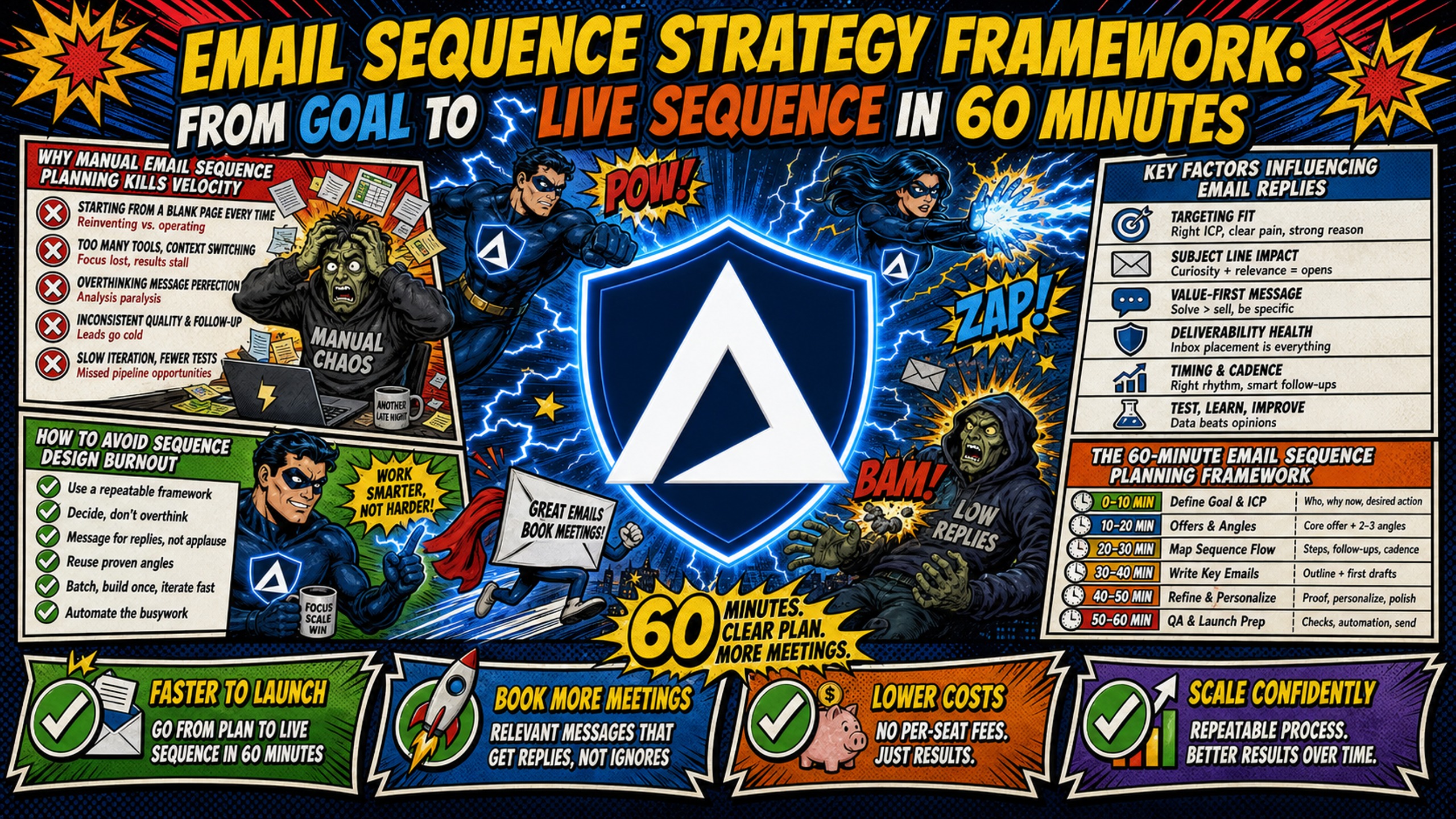
TL;DR: Cold email sequences that book meetings do not require hours of manual planning or expensive per-seat software. This framework compresses sequence design into five structured phases, from goal definition to live launch. Pair this structured copy approach with Inframail's flat-rate, automated Microsoft email infrastructure to spin up unlimited inboxes on a dedicated US-based IP for $129/month, eliminating manual DNS bottlenecks and keeping infrastructure costs predictable as campaigns scale. For 50 inboxes, that is $257/month less than Google Workspace's flexible plan, before domain costs or warmup tools on either side.
Scaling your cold email outreach should not mean watching software bills climb linearly or spending evenings copy-pasting SPF records into Namecheap. The real bottleneck in most outbound programs is not copy quality. It is the operational friction that surrounds every sequence launch: manual DNS setup, per-seat billing surprises, and ad-hoc planning that restarts from scratch for every new client.
This framework compresses the planning process into five time-boxed phases so you stop rebuilding the same sequence from a blank page every week.
Why manual email sequence planning kills velocity
Manual planning and technical setup are two of the most common causes of delayed campaign launches. Reply rates are under real pressure from inbox saturation, tighter spam filtering, and a flood of AI-generated outbound. The deeper problem is that most teams layer AI tools and higher send rates on top of broken processes and amplify the damage. SalesHive's B2B email benchmarks put the median reply rate band at 3 to 6%.
A campaign delayed by DNS propagation issues or a Google Workspace bill that hits $840/month for 100 inboxes does not fix itself with better copy. Infrastructure spend and setup time are the first constraints to remove. At $8.40 per inbox on Google Workspace's flexible plan, 100 inboxes costs $840/month in platform fees alone, before domain costs or warmup tools. Inframail's flat-rate Unlimited Plan covers the same inbox count for $129/month.
How to avoid sequence design burnout
Creating multiple sequences from scratch in a short period can burn out even experienced campaign managers. The fix is modular copywriting: a reusable set of opening hooks, follow-up angles, and CTA variants that you assemble rather than create from scratch each time. This approach treats your sequence like a build, not a blank page, and the 26-step B2B cold email system walkthrough by Daniel Jindoo covers this assembly model in practical detail.
Key factors influencing email replies
Three variables determine whether a sequence books meetings: targeting precision, offer clarity, and inbox placement rate. SalesHive's B2B email benchmarks show that campaigns sent to fewer than 50 highly targeted recipients average a 5.8% reply rate, against 2.1% for large sends. That difference comes from targeting, not copy.
Offer clarity determines whether a prospect who opens the email understands what they are being asked to do and why it is worth their time. Poor inbox placement suppresses reply rates regardless of copy quality, making technical infrastructure the foundation everything else is built on.
The 60-minute email sequence planning framework
The framework breaks into five phases: goal definition, ICP and offer, email architecture, copy, and pre-launch QA. Each phase has a hard stop to prevent over-engineering and a specific deliverable. You leave each phase with a concrete output, not just notes.
This structure was built for B2B outbound with 4 to 7 emails per sequence and 8 omnichannel touches. The cold email infrastructure guide from Inframail's founder covers the technical side of this setup in video format.
The 12-step email planning framework
Run through these steps in order before writing a word of copy:
- Define the campaign goal: Demo booking, phone call, or asset click.
- Set KPIs: Target positive reply rate, meetings booked per 100 sends, and cost-per-meeting ceiling.
- Identify the ICP: Job title, company size, industry vertical, tech stack, and specific pain points.
- Validate the contact list: Verify emails before import to protect domain health.
- Set up infrastructure: Configure SPF, DKIM, and DMARC. Export IMAP and SMTP credentials to CSV.
- Confirm inbox warm-up status: Do not launch on cold domains.
- Design the sequence architecture: 4 to 7 emails with strategic spacing.
- Write the opening hook: Keep it concise, focus on one pain point, include one CTA.
- Draft follow-ups: Each email adds a new angle rather than repeating the first.
- Write subject lines: Keep them brief, low hype, no false urgency.
- Add merge tags: Use variables like
{{first_name}},{{company_name}},{{job_title}}for personalization. - Run the pre-launch audit: Authentication, word count, CTA clarity, sending limits.
Steps 4 to 6 are the prerequisites covered above. The remaining nine map to the five phases below.
Criteria for using the 60-minute process
This framework works best for B2B cold outbound campaigns targeting defined decision-maker roles, rapid client onboarding at lead generation agencies, and testing offers across multiple ICP segments. It is less suited to account-based programs where deep research per account replaces modular copy, or to nurture sequences where warm leads may benefit from slower, relationship-focused cadences.
Prerequisites for your sequence strategy
Before Phase 1 begins, two conditions must be in place: technical infrastructure configured and costs modeled. On the technical side, that typically means domains purchased, DNS records active, inboxes provisioned with credentials, and warm-up underway or completed.
On cost, the comparison below shows why infrastructure choice affects how many campaigns you can run profitably:
| Cost item | Google Workspace (flexible) | Inframail (Unlimited Plan) |
|---|---|---|
| Platform fee | $8.40/inbox/mo | $129/mo flat |
| 50 inboxes total | $420/mo | $129/mo |
| Domain costs (50 domains amortized) | ~$34/mo | ~$34/mo |
| External warmup (both sides) | $15-50/mo/inbox | $15-50/mo/inbox |
| Monthly infrastructure (before warmup) | ~$454/mo | ~$163/mo |
| Annual savings | N/A | ~$3,084/yr |
Warmup tools are an additional cost on both sides and are not included in the platform fee. Inframail's sending capacity guide walks through inbox count requirements before you choose a plan.
Phase 1: Define your campaign goals (10 minutes)
Phase 1 is the fastest section to skip and the most expensive to skip. Campaigns without a clear success metric produce data that cannot be acted on.
Define your primary sequence metrics
Set a positive reply rate target (B2B cold outbound baseline is 3 to 8%), a meetings-booked target per 100 sends (1 to 2 per 100 sends is the realistic baseline, per SalesHive's B2B email benchmarks), and a cost-per-meeting ceiling based on your infrastructure and list costs. If the cost-per-meeting ceiling is not defined before launch, there is no way to determine whether the campaign is profitable.
Define volume and send windows
Inframail's sending capacity help article sets the recommended limit at 40 emails per inbox per day (50 maximum), with roughly 28 of those going to warmup traffic and approximately 12 available for campaign outreach. For 50 inboxes, that is roughly 600 campaign emails per day. Send Tuesday through Thursday, mid-morning in the recipient's time zone. Monday backlogs and Friday drop-off both cost replies.
Choose your primary campaign objective
Pick one objective per sequence: booking a demo, securing a 15-minute call, or driving traffic to a case study or audit offer. Multiple CTAs in a single sequence dilute response and make attribution impossible. Every email in the sequence should support the same singular action.
Phase 2: Define ICP and craft your offer (15 minutes)
A tight ICP definition is the highest-impact activity in this framework. SalesHive's benchmark data describes one case where narrowing the ICP from "all SaaS companies" to "Series B SaaS companies using Salesforce with 50-200 employees" pushed reply rates from 2% to 11% with zero copy changes.
Clarify your target persona fast
Fill in these fields for your target: job title, company size, industry vertical, tech stack, and specific pain points. "VP of Sales" lacks specificity. "VP of Sales at Series A B2B SaaS companies with 10 to 50 SDRs struggling with outbound infrastructure costs" provides a tighter targeting foundation. The cold email SaaS playbook from Finn Thormeier covers ICP precision for high-volume outbound in practical detail.
Lead with prospect pain
Translate your product's features into the prospect's daily frustration. "Automated DNS setup" becomes "you stop spending evenings in Namecheap copying SPF records." "Flat-rate pricing" becomes "your infrastructure bill stops climbing every time you onboard a new client." Pain-first framing performs because it reflects the prospect's reality, not your product roadmap.
Build your low-friction offer hook
A low-friction CTA makes replying feel easier than ignoring the email. Use a binary question format: "Would it make sense to spend 15 minutes on this?" rather than "Please book a demo on my Calendly." The goal is a reply, not a commitment.
Phase 3: Building a modular email framework (15 minutes)
With goals, ICP, and offer defined, the sequence architecture takes 15 minutes. The key decision is step count and spacing.
Set your step count
Per Rain Group's research, booking a meeting with a cold prospect takes 8 or more total touches across channels. The table below maps email steps to cumulative touches when LinkedIn and phone touches are added:
Sequence design calculator:
| Email steps | LinkedIn touches | Phone calls | Total touches | Vs. threshold |
|---|---|---|---|---|
| 4 emails | 2 | 1 | 7 | Below |
| 5 emails | 2 | 1 | 8 | At |
| 6 emails | 2 | 1 | 9 | Above |
A 5 to 6 email sequence paired with LinkedIn and one call can help you reach the 8 touch threshold.
Space your sequence
Use this spacing as a starting point:
- Day 1: Opener
- Day 4: First follow-up
- Day 8: Second follow-up
- Day 14: New angle
- Day 21: Breakup email
Consecutive-day follow-ups read as desperation. Space them deliberately.
Draft your opening hooks
Your opening sentence should establish relevance quickly. Three templates that work across most B2B ICPs:
- Pain hook: "Most [title]s at [company type] tell me that [specific pain] costs them [X hours/$/outcome]."
- Insight hook: "I noticed [specific company signal, e.g., recent hire, funding, product launch]."
- Benchmark hook: "Companies like [recognizable peer] are averaging [specific result] from [specific approach]."
Avoid openers that start with "I" or "We." They signal the email is about you, not the prospect.
Phase 4: Polishing outreach copy (10 minutes)
With architecture and hooks drafted, Phase 4 is refinement: tighten word count, finalize subject lines, and format merge tags correctly. This phase should take no longer than 10 minutes.
Tighten subject lines
Keep subject lines short and specific, roughly under 40 characters so they display in full on a mobile notification. Formats that work: "Quick question," "[Company] + [Sender company]," or a single pain reference. High-hype subject lines and excessive punctuation trigger spam filters. Keep it plain.
Rotate a new angle in every follow-up
Each follow-up email needs a new angle, not a restatement of Email 1. Use this plug-and-play structure:
- Email 1: Pain hook
- Email 2: Social proof or case study reference
- Email 3: Different angle or value-add
- Email 4: Insight or data point
- Email 5: Direct breakup
Rotating angles prevents the sequence from reading as a single repeated request and gives prospects multiple entry points for engagement.
Format and test your merge tags
Format merge tags consistently before import: {{first_name}} for given name, {{company_name}} for company, and custom variables for pain-specific personalization like {{tech_stack}} or {{recent_hire}}. Test the CSV import into Instantly or Smartlead on a 5-row sample before uploading the full list. A broken merge tag in Email 1 destroys the personalization effect for the entire sequence. Inframail's Smartlead integration guide covers the CSV credential import process step by step.
Phase 5: Launching your email sequence (10 minutes)
Phase 5 is the gap between a finished sequence and one that is actually sending. The 10-minute pre-launch window is not optional.
Final 10-minute pre-launch audit
Run every sequence through this checklist before activating:
Sequence audit checklist:
- Sequence has 4 to 7 emails planned
- Each email is under 150 words (under 80 words for Email 1)
- One CTA per email, not multiple asks
- Subject line is under 40 characters with no spam triggers
- All merge tags tested on a real 5-row CSV sample
- Sending limit set to 40 emails per inbox per day (50 maximum), with campaign sends at approximately 12 per inbox after warmup allocation
- Send window restricted to business days and business hours
- Unsubscribe mechanism present and functional
- Domain authentication verified (SPF, DKIM, DMARC all passing)
- Inboxes have completed minimum warm-up period
The cold email legal guide on Inframail's blog covers the compliance layer of this checklist in detail.
Confirm inbox placement before launch
SPF, DKIM, and DMARC are not optional. Gmail and Outlook.com both require SPF, DKIM and DMARC from senders of more than 5,000 messages per day to their consumer accounts, and all three recommend them for every sender regardless of volume.
What each record does:
- SPF: Lists IP addresses authorized to send on behalf of your domain
- DKIM: Adds a cryptographic signature verifying the email was not altered in transit
- DMARC: Defines what the receiving server does when SPF or DKIM fails (none, quarantine, or reject)
Setting up all three manually across 50 domains takes 12+ hours in DNS panels. Inframail automates SPF, DKIM, and DMARC configuration for every domain on the account, with no manual panel access required. Customer testimonials on the platform report spinning up 10 inboxes in 2 minutes after domain purchase.
"The setup is ridiculously fast. SPF, DKIM, DMARC, forwarding - all handled in literally seconds without me having to dig through docs or guess what records to add. Unlimited inboxes on a flat price? That alone saves me hundreds every month compared to Google Workspace or similar." - Verified user review of Inframail
Set alerts for deliverability drops
Blacklist incidents kill active campaigns and typically surface without warning. Inframail's deliverability monitoring dashboard tracks domain and IP health continuously, auto-submits delisting requests when domains are flagged, and reports a 68.3% blacklist delisting success rate within 48 hours. The cold email infrastructure monitoring guide details the specific alert protocols and health check cadences to build into your weekly workflow.
Example walkthrough: SaaS outbound campaign
A lead generation agency is running this campaign on behalf of a mid-size B2B SaaS client. The client's goal is to book product demos with VP-level buyers at Series B companies using Salesforce with 50 to 200 employees. The agency has 40 warmed inboxes provisioned for the client.
Defining your SaaS campaign objectives
Before launching your SaaS cold email campaign, define clear objectives and benchmarks to keep your outreach focused and measurable. For example:
- Goal: Book 15-minute product demos.
- KPI targets: 5% positive reply rate, 1.0 meetings per 100 sends.
- Cost ceiling: $80 cost-per-meeting.
- Volume: 40 inboxes at approximately 12 campaign sends each equals roughly 480 campaign emails per day (with the remaining daily send volume allocated to warmup traffic).
- ICP: VP Sales or VP Revenue at Series B SaaS, 50 to 200 employees, Salesforce users.
- Single CTA: "Worth a 15-minute call this week?"
Industry benchmarks suggest a 3 to 8% reply rate for this segment when ICP precision is maintained, with 1 to 2 meetings per 100 sends as the baseline for well-targeted sequences, per SalesHive's B2B email benchmarks.
Drafting sequences for SaaS outreach
Email 1 (Day 1, under 80 words): Subject: Revenue ops at [Company]
Hi {{first_name}}, noticed [Company] recently [specific signal, e.g., expanded SDR team / moved to Salesforce]. Most VP Sales at Series B SaaS I speak with are dealing with [specific pain point your product solves]. [One sentence: your result or proof point, e.g., "We helped [peer company type] reduce that by [X] without changing headcount."]. Worth a 15-minute call this week?
Email 2 (Day 4): Subject: How [Peer Company] handled this
Hi {{first_name}}, [Peer Company] ran into the same [specific challenge]. After [approach they took, e.g., switching vendors / restructuring their process / adding a specific tool], their [key metric, e.g., cost-per-meeting / pipeline volume] moved to [figure]. Happy to share the exact setup. Still interested in a quick call?
Email 3 (Day 8): Subject: Different ask
Hi {{first_name}}, instead of a call, happy to send you the [relevant asset, e.g., 2-page cost breakdown / case study / audit framework] we put together for companies at your stage. Just reply "yes" and I'll send it over.
By Day 7, check positive reply rate (target above 3%) and bounce rate (under 5%). Treat open rate as directional at best, since Apple Mail Privacy Protection inflates it and tracking pixels can hurt deliverability. If positive reply rate is below 2% and bounces are clean, the ICP or offer is the variable to adjust, not deliverability.
Common problems once sequences are live
Even with a clean framework, operational challenges surface at scale. These four scenarios cover the most common obstacles campaign managers face once sequences are live.
Handling complex multi-step sequences
For sequences extending beyond 30 days or branching based on prospect engagement, tag replies inside your sending platform and pause the sequence on positive responses automatically. Use a CRM or Airtable tracker to log sequence stage per lead when managing multiple client accounts. The sales email automation tools comparison on Inframail's blog covers 25 platform options for managing this automation layer.
Adapting frameworks for nurture sequences
Warm leads tolerate longer emails and slower cadences. A nurture sequence built on this framework adjusts three variables: email length increases to 150 to 200 words, spacing extends to 7 to 14 days between touches, and CTA shifts from "book a call" to "here's a relevant resource." Inbound-sourced cadences generally need fewer touches than cold outreach, because the prospect has already raised a hand. The same 4 to 7 email structure works, spaced wider.
Adapting sequences for multi-channel use
Email and LinkedIn reinforce each other because a prospect who has seen your name in one channel recognizes it in the other. A LinkedIn connection request sent on Day 2, after Email 1 on Day 1, frames the email follow-up as a continuation rather than a cold reach. Build automated pauses into your email sequence when a LinkedIn reply is received to prevent duplicate follow-ups.
Troubleshooting low reply rates
If reply rates drop below 2% on a sequence that previously performed above 4%, check the bounce rate before anything else. Bounces spiking alongside the reply drop points to a delivery problem. Clean bounces with falling replies points to copy or targeting. Work the diagnostic in that order:
- Rule out a hard block: If bounces spiked, read the bounce code. A 550 5.7.1 is an Outlook consumer block, 550 5.7.606 is an Office 365 IP block, and 550 5.7.511 needs an email to delist@microsoft.com. Inframail auto-submits delisting requests when a domain is flagged, so treat the manual route as the escalation. Inframail's Microsoft blacklist recovery guide has the portals and the full walkthrough.
- Verify authentication: Authenticate all domains through SPF, DKIM, and DMARC validation. A failed DMARC record will suppress inbox placement regardless of copy quality.
- Audit word count: Emails above 150 words see a measurable drop in reply rate, per Sales.co's analysis of 3.1 million cold emails. The optimal range is 50 to 125 words.
- Check for AI copy flags: AI-generated copy at scale tends to produce repetitive patterns across sends, which can register as bulk-template signal. Taylor Haren's RB2B teardown walks through AI copy as a trigger for sudden reply rate drops on otherwise healthy infrastructure.
- Review ICP fit: If the list pulled too broadly, reply rate will suffer regardless of deliverability. Narrow the ICP criteria and re-test on a 100-contact segment.
The ranking of cold email infrastructure platforms video from Georgey Tishin provides a practitioner-level assessment of how infrastructure choices affect deliverability outcomes at scale, worth reviewing alongside any major infrastructure decision.
Start your first sequence on Inframail
Inframail is a flat-rate Microsoft email infrastructure platform built for agencies and outbound teams running 50 to 200 cold email domains. Inframail reports a 98%+ deliverability rate and a 68.3% blacklist delisting success rate within 48 hours, giving campaigns a stable infrastructure foundation from day one.
Sign up to Inframail and get started today. Inframail's flat-rate Unlimited Plan at $129/month provisions unlimited inboxes on a dedicated US-based IP with automated SPF, DKIM, and DMARC configuration, giving you the infrastructure foundation this framework requires without the DNS panel work.
FAQs
What framework should I use to design a cold email sequence?
Use the AIDA (Attention, Interest, Desire, Action) or PAS (Problem, Agitation, Solution) framework paired with a low-friction binary CTA. These models structure your 4 to 7 email sequence to address prospect pain points systematically across the 8 touches that may be required to book a meeting.
How many emails should be in a cold outbound sequence?
A cold sequence should contain 4 to 7 emails spaced over roughly 21 days, hitting Day 1, 4, 8, 14, and 21 as a baseline schedule. This structure, combined with 2 LinkedIn touches and 1 phone call, reaches the 8 or more touches needed to secure a meeting booking.
How much does cold email infrastructure cost?
Google Workspace costs $8.40 per inbox monthly on the flexible plan ($420/month for 50 inboxes), while Inframail's flat-rate Unlimited Plan costs $129/month for unlimited inboxes, plus $5 to $16 per domain per year and external warmup tools at $15 to $50 per inbox monthly as a separate line item on both platforms.
Key terms glossary
Dedicated IP: An IP address used exclusively by a single sending account, ensuring your sender reputation is entirely isolated from other users on shared pools.
Cost-per-inbox: The total monthly infrastructure spend divided by the number of active sending mailboxes, used to measure campaign profitability and infrastructure efficiency.
ICP (Ideal Customer Profile): A detailed description of the type of company or customer that would benefit most from your product or service, typically defined by firmographics like company size, industry, revenue, tech stack, and geographic location.
IMAP (Internet Message Access Protocol): An email protocol that allows you to access and manage your email messages on a mail server, enabling synchronization across multiple devices.
SMTP (Simple Mail Transfer Protocol): The standard protocol for sending emails across the internet, used by email clients to transmit outgoing messages to mail servers.