
Email Sequence Mistakes That Kill Reply Rates (And How to Fix Them)
Low reply rates are usually an infrastructure problem, not a copy problem. Industry data puts the average global inbox placement rate at 83.1%, meaning roughly
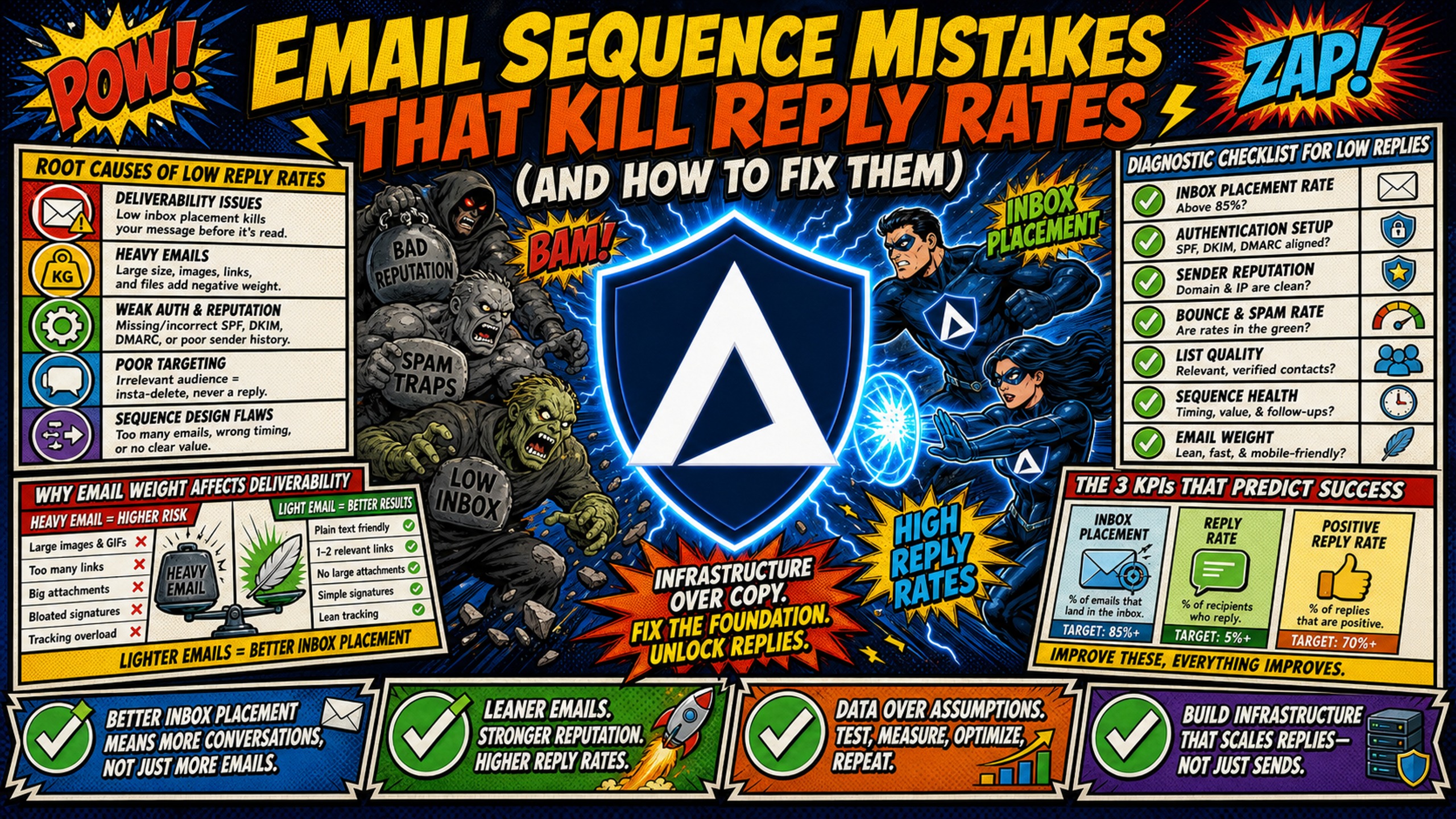
TL;DR: Low reply rates are usually an infrastructure problem, not a copy problem. Industry data puts the average global inbox placement rate at 83.1%, meaning roughly one in six emails never reaches the intended recipient, and rewriting a sequence cannot recover a message filtered before delivery. Diagnose in a fixed order: technical infrastructure first (SPF, DKIM and DMARC records, dedicated IPs, and volume spread across enough domains), then list health, then copy. This guide works through 12 specific mistakes in that order, with the fix for each. Inframail provisions unlimited inboxes on dedicated US-based IPs at $129 per month flat, with domains and warmup priced separately, against per-seat pricing on Google Workspace that scales with every inbox added.
When reply rates drop, most campaign managers running sequences across client accounts immediately rewrite their copy. A sequence is more than its copy. It is the domains it sends from, the inboxes behind them, and the cadence that spaces the touches, and a mistake anywhere in that stack surfaces as the same symptom of no replies.
The actual culprit is usually technical: a sending domain overloaded past its daily limit, SPF records that never propagated, or a shared IP pool contaminated by another sender. This diagnostic guide separates technical infrastructure failures from messaging errors so fixes go to the right place, fast.
Identify root causes of low reply rates
Audit in this order: technical infrastructure first, list health second, copy last. Technical issues block emails before a prospect ever sees them. List problems drive bounces that damage domain reputation. Copy issues only matter once the first two are clean.
Diagnostic checklist for low replies
Work through these three categories before touching a sequence. If technical checks surface a problem, fix it before changing any copy, because recovering deliverability can lift reply rates without a single word change.
- Technical: DNS records valid, inbox daily limits respected, domain not blacklisted, dedicated IP confirmed
- List health: Bounce rate below 2%, no catch-all addresses, spam traps removed, unsubscribes suppressed immediately
- Copy: Opening line under 2 sentences, CTA specific and low-friction, subject line free of spam triggers
For a full reference on spam metrics and healthy campaign benchmarks, Inframail's help center guide covers the thresholds to monitor daily.
The 3 KPIs that predict success
Three metrics tell you whether a sequence is structurally sound before optimizing individual variables. The average B2B cold email reply rate sits between 3.4% and 3.7%, with the top quartile at 5.5% or better and the top 10% of campaigns at 10.7% or better. Reply rates climb sharply as list size drops, with sequences under 200 contacts reporting 15% to 20%. The three KPIs below diagnose where in the funnel a sequence is losing that potential.
- Inbox placement rate: The percentage of sent emails that land in the primary inbox, not spam or promotions. A properly configured domain with correct DNS records and a warmed IP should land the large majority of sends in the primary inbox. A well-monitored domain with correct DNS records and a warmed IP is the primary driver of this number.
- Open-to-reply rate: The percentage of opens that convert to a reply. Open-to-reply rate varies by targeting quality. A meaningful drop below a sequence's own established baseline points to a copy or CTA problem, not a deliverability problem.
- Positive reply rate: Positive reply rate is the share of total replies that express genuine interest rather than a neutral or negative response. A sequence can hit its reply rate target while generating mostly unsubscribe requests, which signals audience or messaging misalignment, not success. Tracking positive replies separately from total replies shows whether the sequence is attracting the right prospects, and that distinction is what determines whether reply volume actually converts to booked meetings.
Mistake 1: Fluffy intros hurting your reply rate
Long opening paragraphs introduce two problems simultaneously: they trigger content-based spam filters, and they lose the prospect's attention before reaching the point. Use a 15 to 25 word signal-based opener that makes it about the prospect, not about you.
Why email weight affects deliverability
Spam filters analyze text-to-image ratios, HTML weight, and keyword density. Gmail clips emails over 102KB, showing a "View entire message" link that kills engagement for every recipient who does not click through. Long, paragraph-heavy intros add HTML weight and give filters more content to flag, which is why most senders aim to stay comfortably under that ceiling, particularly when intros include filler phrases common in bulk mail.
Fix your email lead sentences
Lead with a specific, relevant observation about the prospect's business, not a self-introduction:
- Weak: "Hi [First Name], I hope this email finds you well. My name is [Name] from [Company] and I wanted to reach out because..."
- Strong: "Noticed you're hiring three SDRs on LinkedIn. Most teams in that scaling phase hit DNS setup bottlenecks before campaigns launch."
The strong version is specific, shows research, and creates a reason to reply in under 20 words. Christian Bonnier's breakdown of 1,000,000 sent emails video covers what cold email openers convert at scale.
Mistake 2: Why hollow personalization fails prospects
"I saw your website and thought you'd be a great fit" is not personalization. It is a merge-tag placeholder that prospects recognize within seconds. Generic openers signal a mass-blast, not considered outreach, and trigger immediate deletion.
Targeting leads using behavioral signals
Replace generic merge tags with signals that indicate active buying intent. Four categories that reliably improve relevance:
- Hiring signals: A company posting five SDR roles on LinkedIn is almost certainly evaluating outbound infrastructure and tooling simultaneously.
- Funding events: A Series A announcement creates a window of new budget availability and initiative launches.
- Technology stack changes: A prospect adopting a new CRM signals an active build-out of their sales stack.
- Leadership changes: A new VP of Sales typically evaluates the existing outbound process early in their tenure.
Signal-based prospecting works because the email arrives attached to something that actually happened at the account, rather than to a merge tag. A prospect who posted five SDR roles last week has a live problem, and an email that names it does not need to manufacture relevance. Inframail provides access to a 545M+ contact B2B database, included on annual plans, to support tighter list-building from the start.
Mistake 3: Why passive CTAs kill your reply rates
Vague CTAs like "Let me know if this is relevant" transfer the decision burden entirely to the prospect. Decision fatigue at this stage kills replies that would otherwise convert.
Passive language vs. value-driven alternatives
Replacing passive language with clear, value-driven wording makes your outreach more direct, relevant, and compelling.
| Passive CTA | Value-driven CTA | Why it works |
|---|---|---|
| "Let me know if you have time" | "Open to a 15-minute call this Thursday or Friday?" | Specific time removes decision friction |
| "Happy to chat whenever" | "Worth a quick exchange next week to see if this fits?" | Low-commitment framing reduces perceived risk |
| "Would love to connect" | "Are you the right person, or should I reach out to someone else?" | Gives the prospect an easy path to route or reply |
| "Feel free to reach out" | "If scaling to 50+ domains is on your roadmap, it's a 10-minute conversation to confirm fit." | Stakes the relevance clearly |
Stop losing replies with clear CTAs
The most effective CTAs in cold email make the ask specific and make saying yes easy. A time-specific question ("Does Thursday at 2pm ET work?") outperforms an open-ended invitation because it requires a yes/no decision, not a calendar negotiation. Keep the ask to one line and put it at the end of the email, not buried mid-paragraph.
Mistake 4: Fixing broken follow-up cadences
Single-touch sequences leave roughly half of potential replies unreached. Woodpecker data across 20 million emails shows that the first email captures about 58% of replies, with the remaining 42% coming from follow-ups. Stopping after one touch means never reaching that 42%.
Key data points
Follow-ups can make a significant difference in cold email performance, but both the number of follow-ups and the timing between them matter. The data below highlights how a structured, consistent follow-up cadence can improve reply rates.
- The follow-up lift: Campaigns with 3-5 follow-up steps hit 8.3% reply rates vs. 4.1% for sequences without any follow-ups.
- Woodpecker's cadence guidance: Woodpecker spaces the first follow-up 3 to 4 business days after the initial email and the second follow-up 5 to 7 days after that, making consistent interval timing the core structural recommendation.
The fix: Optimal follow-up cadence
A four-step cadence with defined intervals outperforms ad-hoc scheduling:
- Day 1: Initial email, problem-specific opener with a behavioral signal
- Day 3: Follow-up 1, add a new angle or case study reference
- Day 7: Follow-up 2, ask a direct question about the specific pain
- Day 12: Follow-up 3, a short "closing the loop" message with a different CTA
Gaps of more than seven days between touches in the first two weeks require the follow-up to re-establish context rather than build on the prior message. Consistent spacing signals legitimate sender behavior to ESPs.
Mistake 5: Running the whole sequence from one sending domain
Sending 500 emails per day from a single domain is a fast path to blacklisting. Most sending platforms enforce a daily per-inbox ceiling for cold email, and reputation degradation from exceeding it compounds quickly.
Why single domains tank reply rates
One domain with 10 inboxes hitting 50 sends each produces 500 emails per day from a single domain identity. ESPs flag that volume pattern. A common structure is two to three inboxes per domain, spread across enough domains to keep daily volume per domain within safe limits. For 500 sends per day, that means a minimum of 10 domains with 2 inboxes each at 25 sends per inbox.
Cost-per-inbox model (12-month outlook, 50 inboxes)
The true cost of email infrastructure goes beyond the monthly subscription price. A 12-month cost-per-inbox comparison provides a clearer picture of what it actually costs to operate and maintain 50 inboxes over time.
| Expense category | Google Workspace (50 seats, flexible plan) | Inframail Unlimited Plan (50 inboxes) |
|---|---|---|
| Platform fee | $420/month ($5,040/year) | $129/month ($1,548/year) |
| Domain costs | ~$34/month amortized ($408/year) | ~$34/month amortized ($408/year) |
| Subtotal | $420/month | $163/month |
| Annual total | $5,040 | $1,956 |
| Annual savings | N/A | $3,084 |
Note: Warmup tools are a separate cost on both sides (typically $15-50/month per inbox) and are not included in this comparison.
Google Workspace bills at $8.40 per user monthly on the flexible plan. Inframail's flat-rate $129/month model means adding 50 more inboxes costs nothing additional. For a broader look at infrastructure costs across seven platforms, Inframail's comparison guide breaks down the full monthly infrastructure spend across major options.
How to rotate domains for deliverability
Set up each domain in the sending platform (Instantly or Smartlead) as a separate sender identity. Distribute the daily send target evenly across all active inboxes. If running 200 sends per day with 10 domains and 2 inboxes each, each inbox sends 20 emails daily, well inside the safe zone. Inframail provisions unlimited inboxes and exports IMAP/SMTP credentials to CSV for direct import into Instantly or Smartlead, as detailed in the Inframail-to-Smartlead integration guide.
The hidden cost of single domain sending
When a sending IP is listed on the Spamhaus SBL mid-campaign, every active sequence routing through that IP stops. Spamhaus requires the abuse issue to be terminated before a removal request is submitted, and every removal is the sole decision of The Spamhaus Project, so there is no published timeline a sender can plan around. Rebuilding sender reputation after removal typically takes several additional weeks of clean sending. Inframail's blacklist monitoring dashboard auto-submits delisting requests and achieves a 68.3% delisting success rate within 48 hours.
Mistake 6: Leaving negative replies unhandled
Automated sequences need manual oversight on replies. An unhandled "unsubscribe" or "not interested" reply that stays in the sequence creates a clear path for the prospect to click "report spam," which damages domain reputation faster than any volume issue.
How unhandled opt-outs become spam complaints
Google's email sender guidelines ask bulk senders to keep the spam rate reported in Postmaster Tools below 0.10% and warn against ever reaching 0.30%. Yahoo sets its requirement at 0.3%. A negative reply that turns into a spam report rather than an opt-out pushes directly toward those numbers at scale.
Standardizing your negative reply process
Build a daily 15-minute reply-monitoring workflow into the campaign schedule. Any reply containing "unsubscribe," "not interested," or "remove me" gets the contact suppressed from all active sequences immediately. Suppression should also happen at the data-provider level to prevent the contact from re-entering a sequence on the next list refresh.
Protecting your domain sender reputation
Clean list management is the most durable deliverability investment. Keeping the Postmaster Tools spam rate below Gmail's 0.10% target and bounce rates below 2% builds positive sender reputation over time. For more on maintaining domain health across multiple client accounts, Inframail's infrastructure monitoring guide covers the full health check workflow.
Mistake 7: Unoptimized subject lines killing open rates
Subject lines with excessive capitalization, emoji overuse, or high-frequency spam words flag both content filters and human attention.
Run each variant to a large enough sample to separate a real difference from noise, which for most cold email reply rates means at least a few hundred contacts per variant. Always track to reply rate, not just opens. For the full testing framework, see Mistake 10 below.
How to test subject line variables
Four variables carry most of the difference in a cold email subject line: length, specificity, question versus statement, and whether the personalization token sits in the subject or is held back for the opening line. Change one per cycle and hold the other three fixed. A subject line that moves on two variables at once cannot tell a campaign manager which one earned the result.
Order the tests by how much they cost to change. Length and question framing are edits, so they resolve quickly. Specificity usually depends on the underlying list, because a subject line cannot reference a hiring signal that the data pull never captured, which makes it a list problem before it is a copy problem.
Read the result against reply rate rather than open rate. A subject line that lifts opens while flattening replies has bought attention the body could not hold, and that trade works against sender reputation over a full cadence rather than improving it.
Mistake 8: Launching a sequence before DNS records verify
Every cold email domain requires three DNS records before a single send: SPF, DKIM, and DMARC. Missing any one of them tells receiving mail servers that the sender's identity cannot be verified, which routes emails directly to spam.
Essential DNS setup for email health
- SPF (Sender Policy Framework): A DNS TXT record specifying which mail servers can send email on behalf of the domain. Without it, any server can spoof the domain identity.
- DKIM (DomainKeys Identified Mail): Adds a cryptographic signature to outgoing emails, allowing receiving servers to verify the message came from an authorized server and was not altered.
- DMARC (Domain-based Message Authentication, Reporting, and Conformance): Uses SPF and DKIM results to set policy for what receiving servers should do with messages that fail authentication, either quarantine, reject, or pass.
Manual configuration of all three records requires logging into DNS panels for every domain, creating records, waiting for propagation (which can take up to 48 hours depending on the TTL set on each record), then verifying each one individually. For agencies managing 50+ domains, this process creates a recurring operational bottleneck. Inframail auto-configures SPF, DKIM, and DMARC on every domain provisioned through the platform, eliminating that bottleneck entirely.
Setup speed comparison
Setup time can determine how quickly a cold email campaign gets off the ground. Comparing the setup process across different options shows how much time and effort it takes to go from initial configuration to campaign-ready infrastructure.
| Setup step | Manual DNS setup | Inframail automated setup |
|---|---|---|
| SPF record creation | Manual, per domain | Automatic |
| DKIM key generation and upload | Manual, per domain | Automatic |
| DMARC policy configuration | Manual, per domain | Automatic |
| DNS propagation verification | 24-48 hours per domain (depending on TTL settings) | Monitored automatically |
The data behind your inbox placement
Inframail's infrastructure delivers a 98%+ deliverability rate across properly configured domains. Industry data shows the average inbox placement rate sits at 83.1%, meaning roughly one in six emails is filtered before a prospect ever sees it. Authentication is the part of that a sender controls directly, making correct DNS configuration the single biggest technical fix available. For a walkthrough of common cold email infrastructure failures, the Inframail cold email failure video from Kidous Mahteme covers 37 reasons campaigns break at the infrastructure level.
Mistake 9: Scheduling emails outside peak open windows
Sending a well-crafted email during off-hours for the prospect's timezone guarantees it competes with a full inbox when the workday begins. Configure sending platform timezone settings to match the prospect's local time.
For B2B targets, morning sends perform best. Belkins' 2025 study of 7.5 million cold emails found the 8:00 AM to 12:00 PM window drove the highest reply rates, and most practitioner guidance narrows that further to midweek, avoiding Monday backlogs and Friday afternoons.
How to configure send timing in your platform
Most sending platforms (Instantly, Smartlead) allow per-sequence timezone targeting. Set the prospect's local timezone at the sequence level, not the sender's. If the list spans multiple countries, segment by region and assign each segment a separate sequence with timezone-matched scheduling. Sending a Tuesday 10am email at 10am Eastern to a prospect in Berlin means it arrives at 4pm, outside the peak window.
Mistake 10: Lack of iterative copy testing
Running the same sequence for 60+ days without testing variables means accepting whatever reply rate the initial copy generates. Test one variable at a time (subject line, opener, or CTA) to at least a few hundred contacts per variant, run for one full cadence, then implement the winner before testing the next variable. For AI-assisted copy generation and spintax to create variant versions efficiently, the Inframail ChatGPT spintax tutorial shows a two-minute setup process.
How to structure a copy test
Run both variants at the same time, not in consecutive weeks. A sequential test changes the sending window, the list vintage, and often the domain health alongside the copy, which leaves no way to separate the edit from everything else that moved. Split one list segment randomly and send both variants across the same inboxes on the same days.
Let the test run a full cadence before reading it. A variant that wins on the first touch and loses across follow-ups is not a winner, and reply volume concentrates late enough in a sequence that an early call often reverses. Stopping a test at the first email measures curiosity rather than fit.
The order matters because each variable gates the next. A CTA test running under a subject line nobody opens produces a result about the subject line, not the CTA. Once a variable is settled, lock the winner as the control and leave it alone until the list or the offer changes.
Treat small gaps as noise. A difference that would vanish if the same test ran again is not a result, and acting on it introduces churn without improving anything. Hold changes for gaps large enough to repeat.
Pause testing while infrastructure is unstable. A domain in warmup or recovering from a blacklist hit produces reply rates that reflect deliverability rather than copy, and any conclusion drawn in that window will not hold once placement returns to normal.
Mistake 11: Mismatched audience and low list health
A well-configured domain with excellent copy sending to a dirty list will underperform a mediocre campaign sending to a clean, targeted list. Cold email bounce rates run well above the sub-2% norm in opt-in email marketing, and bounce-related reputation damage compounds over time rather than recovering quickly.
The hidden cost of low quality lists
A bounce rate that climbs above 2% flags ESP filters and begins degrading domain reputation. If the rate rises sharply past 2%, most practitioner guidance recommends pausing the campaign immediately, because bounce damage above that threshold accumulates faster than reputation recovers. The cost of recovering a blacklisted domain far exceeds the cost of email verification before the send. For a direct comparison of the leading verification tools, Inframail's Zerobounce vs. Neverbounce comparison covers the key differences.
5 steps to clean your prospect list
- Run through an email verification tool: ZeroBounce or NeverBounce removes invalid and catch-all addresses before they bounce.
- Remove role-based addresses: info@, support@, and admin@ addresses rarely reach decision-makers and generate low engagement.
- Suppress prior unsubscribes: Check new lists against your suppression file before every campaign launch.
- Remove duplicates across active sequences: A prospect who has already replied to a prior campaign should never re-enter an automated sequence.
- Validate against your ICP: Title, company size, and industry filters applied at the data-pull stage reduce messaging mismatch and improve positive reply rate.
Mistake 12: Starting a sequence on a domain with no sending history
Sending high volume from a new domain immediately tells ESPs that the domain has no sending history and is likely a spam operation. New domains need a gradual ramp-up period to build sender reputation before campaign-level volume begins. A warmup period of at least two to four weeks is the common floor. A standard ramp runs 10 to 20 emails per inbox per day in week one, 25 to 40 in week two, and 40 to 60 by week three, reaching campaign-level volume only after consistent engagement through the ramp.
Monitor warmup open and reply rates throughout the ramp period. If warmup open rates fall below 30% or reply rates fall below 20% during the ramp, pause and diagnose before continuing.
Warmup is not included on standard plans
Inframail's standard plans do not include a built-in warmup tool. Campaign managers need to connect an external warmup service such as Warmbox or Lemwarm during the warmup period, which typically costs $15-50/month per inbox. Inframail's Done-For-You email campaign setup package ($3,497 one-time or $499/month) includes free domain warmup for teams that want hands-off configuration. Inframail's email warmup sequence guide covers week-by-week volume scaling.
Ranking repairs for underperforming campaigns
When a campaign is actively underperforming, work through repairs in this order: technical first, list second, copy last. Fixing copy while a domain is blacklisted wastes time. Fixing DNS while sending to an unverified list still generates bounces that damage reputation.
- Check domain and IP health: Run the sending domain through Spamhaus and MXToolbox. Verify SPF, DKIM, and DMARC records are valid and propagated. Confirm the dedicated IP is not listed on any major blacklist. If a blacklist hit is confirmed, stop sending on that domain immediately and escalate to the infrastructure provider, since Spamhaus accepts SBL removal requests only from the operator responsible for the listed IP. Inframail's Microsoft blacklist guide covers the specific steps for Microsoft infrastructure.
- Refine prospect lists: Pull a bounce rate report from the sending platform. If bounce rate exceeds 2%, pause the campaign and run remaining contacts through email verification before resuming. Cross-check the active list against the suppression file and remove any contacts who have replied negatively in prior campaigns.
- Optimize copy and timing: Test one variable at a time starting with the opening line. Adjust send times to the 8:00 AM to 12:00 PM window in the prospect's local timezone. Review Inframail's cold email legal guide to confirm CAN-SPAM compliance before relaunching at higher volume.
Expected timelines
Delisting depends on how quickly the underlying sending issue is resolved, and Spamhaus publishes no processing time. Sender reputation rebuilding after a blacklist event takes several weeks of clean sending, not days. Bounce rate drops immediately after list verification, but domain reputation reflects that improvement gradually over weeks of clean activity.
Don't let bad infrastructure kill your campaigns
Inframail is a flat-rate Microsoft email infrastructure provider built for agencies and campaign managers running cold email across 50-200 domains. It provisions unlimited inboxes on dedicated US-based IP addresses, auto-configures SPF, DKIM, and DMARC on every domain, and includes blacklist monitoring with a 68.3% delisting success rate within 48 hours. Infrastructure runs at $129/month flat, whether running 50 inboxes or 200, with domain costs separate at approximately $5-16 per domain per year.
Sign up to Inframail and get started today.
FAQs
How much does Inframail cost compared to Google Workspace for 50 inboxes?
Inframail costs $129/month plus approximately $34/month in amortized domain costs, totaling $163/month for 50 inboxes. Google Workspace on the flexible plan costs $8.40 per seat per month, which equals $420/month for 50 seats, a difference of $257/month or $3,084 annually (warmup tools are separate on both sides and not included).
Does Inframail include built-in email warmup?
No, Inframail's Unlimited Plan and Agency Pack do not include a built-in warmup tool. Campaign managers need to connect an external service like Warmbox or Lemwarm (typically $15-50/month per inbox), though Inframail's Done-For-You email campaign setup package ($3,497 one-time or $499/month) includes free domain warmup.
How many dedicated IPs are included in the Unlimited Plan?
The Unlimited Plan includes 1 dedicated US-based IP address. The Agency Pack at $327/month includes 3 dedicated US-based IP addresses, which allows campaign managers to isolate sending reputations across multiple client accounts on separate IPs.
What bounce rate triggers ESP spam filters?
A bounce rate above 2% flags ESP algorithms and begins degrading domain reputation. Hunter's cold email guide identifies 2% as the widely adopted benchmark in the cold email industry. Verifying every list before launch is the primary way to keep bounce rates within safe limits.
How long does blacklist recovery take?
Spamhaus does not publish a processing time for SBL removals, and all removals are the sole decision of The Spamhaus Project. It requires the underlying abuse issue to be terminated before a request is submitted, so the practical timeline depends on how fast the sending problem is fixed rather than on a queue position. Inframail's automated blacklist monitoring submits delisting requests proactively and achieves a 68.3% delisting success rate within 48 hours. Full sender reputation recovery after a blacklist event typically takes several weeks of clean sending.
How many inboxes should each sending domain have?
A common structure is two to three inboxes per sending domain. Exceeding that concentrates risk so that one underperforming inbox can drag down the sender reputation of all inboxes sharing that domain.
Key terms glossary
SPF (Sender Policy Framework): A DNS TXT record that specifies which mail servers are authorized to send email on behalf of a domain. Emails from unauthorized servers fail SPF checks and are typically quarantined or rejected by receiving mail servers.
DKIM (DomainKeys Identified Mail): An email authentication method that adds a cryptographic digital signature to outgoing messages. Receiving servers use this signature to verify the message came from an authorized server and was not altered in transit.
DMARC (Domain-based Message Authentication, Reporting, and Conformance): A protocol that builds on SPF and DKIM to set policy for how receiving servers should handle messages that fail authentication checks. DMARC also generates reporting data on authentication failures.
Dedicated IP: An IP address used exclusively by one sender, ensuring that the sender's reputation is not affected by other users on shared IP pools. Inframail provides 1 dedicated US-based IP on the Unlimited Plan and 3 on the Agency Pack.
Domain rotation: The practice of distributing cold email sending volume across multiple domains to keep daily email volume per domain within safe limits, preventing volume-based spam flags, with most sending platforms enforcing a per-inbox daily ceiling that cold email practitioners treat as a hard limit.
Inbox placement rate: The percentage of sent emails that land in the primary inbox rather than the spam or promotions folder. Determined primarily by DNS authentication, sender reputation, and domain and IP health, not by copy quality.
IMAP/SMTP credentials: The authentication details (username, password, server address, port) required to connect an email inbox to a sending platform. Inframail generates these automatically for every provisioned inbox and exports them to CSV for direct import to Instantly or Smartlead.