
Email greetings & openers: The complete guide to higher reply rates
A cold email greeting is the salutation, and the opener is the first 10-15 words after it, which decide whether the rest gets read. Average cold email reply rat
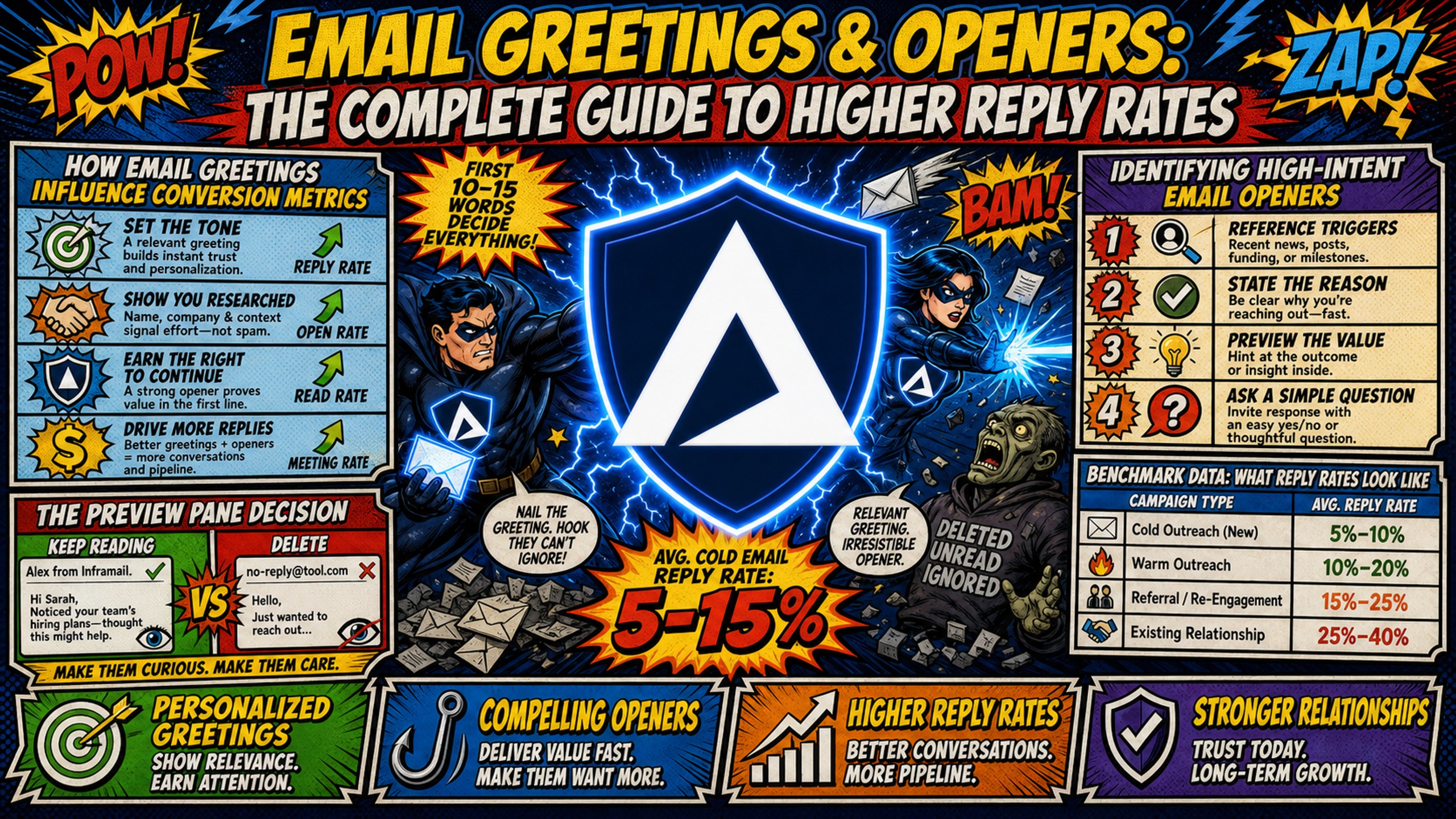
TL;DR: A cold email greeting is the salutation, and the opener is the first 10-15 words after it, which decide whether the rest gets read. Average cold email reply rates sit around 3-5% entering 2026, while top campaigns reach 8-15% with tight targeting and personalization, per Reachoutly. Opener choice alone moves results: timeline hooks averaged a 10.01% reply rate versus 4.39% for problem hooks, per The Digital Bloom. Use "Hi [First name]," as the B2B default and "Dear Mr./Ms. [Last name]," in law, medicine, and finance. Lead with a verifiable trigger, shared contact, or specific detail. Test one variable at a time with at least 500 sends per variant, and 1,000+ for 95% confidence. None of it matters if authentication fails, since Gmail says unauthenticated mail might be marked as spam or rejected.
The average cold email reply rate is 3-5%. Top campaigns reach 8-15% with tight targeting and personalization, and 15%+ is achievable on tight, high-intent segments. The difference is rarely the offer, it's the first 10 words and the infrastructure behind them.
Campaign managers get judged on reply rates and meetings booked, but they don't control every input. Reply rate comes down to three variables: deliverability, targeting, and messaging. This cold email opener guide covers the messaging layer in depth, with proven frameworks, persona-specific hooks, and testing workflows you can run in Instantly or Smartlead today. It also shows why the deliverability layer has to come first, because no greeting framework survives a spam folder.
How email greetings influence conversion metrics
Reply rates are measurable, and the opener is the variable most campaign managers underestimate. The signals that separate replied-to emails from deleted ones start with the first words the recipient sees.
The preview pane decision
Recipients decide within seconds whether to read, delete, or mark an email as spam, and that decision happens in the preview pane showing the subject line plus the first words of your opener. Those words are the most valuable real estate in the entire email.
Decision Pressure: Your prospect's inbox is a high-friction environment. They scan dozens of emails between meetings, often on mobile, and their default action is delete. An opener that starts with "I hope this email finds you well" or "My name is X and I work at Y" signals mass outreach instantly, and the email dies in the preview pane before your offer ever appears.
Practitioners consistently warn against exactly this: the opening line should be a specific observation, a bold claim, or a question that creates cognitive engagement, per ColdICP's reply rate analysis.
Identifying high-intent email openers
A high-intent opener does one of three things: references a specific trigger event (funding round, new hire, leadership change), names a verifiable shared contact, or delivers a compliment grounded in a real detail like a recent article or product launch. Generic openers signal that the same email went to thousands of other people, and reply rates reflect that difference.
Benchmark data: What reply rates look like
Most campaign benchmarks quote averages that mask wide variance by sector and campaign type. The numbers below give a realistic baseline for measuring your own results.
Expected cold email reply rates
Industry benchmarks put average cold email reply rates around 3-5%, and top performers exceed 10%, per Cleverly's cold email benchmarks. Response rates have trended down for years, from 8.5% in 2019 to around 3-5% entering 2026, per Reachoutly's internal campaign data. For a deeper look at realistic ranges, the Inframail B2B cold email response rates breakdown covers reply rate ranges by industry and country.
Improving reply rates via openers
Openers sit inside the messaging lever, alongside the subject line. Published benchmark data shows opener choice alone can move reply rates by several percentage points: timeline hooks averaged a 10.01% reply rate versus 4.39% for problem hooks, per The Digital Bloom's outbound benchmarks.
How opening lines affect reply metrics
The causal chain runs: deliverability → inbox placement → open → read-through → reply → meeting booked. Opener quality directly controls read-through. If your open rate is 40%+ but replies sit under 1%, the problem is in the email body, not the subject line, per ColdICP's open-rate vs reply-rate guide.
Reply rates by campaign type
Benchmarks vary sharply by campaign type:
| Campaign type | Reply rate |
|---|---|
| Sales outreach sequences | 3% |
| Marketing campaigns | 6.2% |
| Headhunting campaigns | 7.5% |
| Digital PR outreach | 13% |
According to Hunter's analysis of 31 million emails sent in 2025, sales outreach averages 3% while digital PR hits 13%. Judge your campaigns against your own vertical and campaign type, not a universal number.
How to start an email: Proven opener frameworks
One of the frameworks below, trigger-based openers, has published reply rate data. The rest follow the same principles, with templates built for specific use cases, from trigger-based hooks to compliment openers.
Pattern interrupts for cold email hooks
A pattern interrupt breaks the expected cold email format with a contrarian statement, an unexpected question, or an unconventional structure. Some practitioners call these gimmicky, and they can be when overused, but as one tool among several they work. Templates:
- Value-first hook: "[Process your prospect owns] takes [X hours] per [timeframe]. Here's how to fix it." (Use when you have a quantified time-saving benefit. Example for an infrastructure vendor: "Setting up 50 domains manually takes 12+ hours. Here's how to fix it.")
- Curiosity question: "What's your current [cost/metric] across [scope]?" (Use when the answer reveals a problem you solve. Example for an infrastructure vendor: "What's your current cost per inbox across client domains?")
- Contrarian statement: "Your reply rate problem probably isn't your copy." (Use when conventional wisdom in your space is wrong.)
Using shared contacts to get replies
Referencing a mutual connection is one of the oldest and most reliable openers, as long as the contact is verifiable. Template example: "Professor Smith suggested I contact you about a compliance framework we piloted last quarter." Never invent the connection, because one false claim can kill sender trust for good.
Crafting relevant trigger-based openers
Trigger events are verifiable changes in a prospect's situation: funding rounds, hiring sprees, product launches, leadership changes. Signal-based plays can perform measurably better: in one Unify case study (Peridio), plays targeting the company's social followers hit an 11.6% reply rate, more than double the team's average.
Personalization beyond the name: Use firmographic data that's public and professional. "Saw you just opened a second office in Austin" is relevant. "Saw your kid's soccer photos on Facebook" is creepy. The line is professional relevance, not personal surveillance.
Use compliments to boost reply rates
A compliment opener works when it's grounded in a specific, verifiable detail: "Your breakdown of outbound metrics on last week's podcast was the clearest explanation of the open-vs-reply diagnostic I've heard." Generic flattery like "Love what you're doing at Acme!" reads as a mail merge token and gets ignored.
Address pain points to boost replies
The pain point opener leads with a quantified, industry-specific problem, then presents the fix. Template: "Agencies your size typically spend $420/month on Google Workspace's Flexible Plan ($8.40/user/month) for 50 cold email inboxes, or $350/month on the Annual Plan ($7.00/user/month). Most of that spend is avoidable." This approach works because establishing a shared problem first shows you understand the prospect's challenges, which makes the eventual pitch feel less like a sales attempt, per EmailScout's cold email examples.
Best email greetings by lead persona and goal
Greeting choices and opener structure shift based on sector, seniority, and relationship. A cold C-suite intro requires a different approach than a warm referral follow-up or a re-engagement sequence.
Match the salutation to the sector
Email greeting psychology starts with formality.
| Sector | Recommended salutation | Why |
|---|---|---|
| Law, medicine, finance | "Dear Mr./Ms. [Last Name]," e.g. "Dear Ms. Chen," | Conservative sectors expect formality for senior and professional roles |
| Tech, SaaS, agencies | "Hi Sarah," | Casual tone fits culture |
| Unknown or mixed | "Hi Sarah," | Safe B2B default |
Use full names and titles for conservative sectors, and include a measurable outcome early. When in doubt, "Hi [First name]," is the safe B2B default.
Choosing between Hi, Hello, and no salutation
The word choice before the first name carries more signal than most senders realize. "Hi" is the standard B2B default: informal enough to feel human, neutral enough to work across sectors. "Hello" reads slightly more formal and fits traditional industries like law or finance where "Hi" may feel too casual but "Dear" is reserved for written correspondence. "Hey" works in high-familiarity contexts, such as a warm referral intro or a follow-up after a live conversation, but risks reading as unprofessional in cold outreach to senior buyers.
When the contact's name is unknown, avoid "Hi there," "Dear Sir/Madam," or leaving the field blank with a visible token error. The practical fix is to route unknown-name contacts to a separate variant that drops the salutation entirely and leads straight into the opener sentence.
Structuring follow-up email openers
Follow-up openers should reference the previous email without repeating it:
- "Following up on my note from Tuesday, one more data point worth your time."
- "Circling back. The short version: [one-line value prop]."
- "Last note from me. If [pain point] isn't a priority this quarter, I'll close the file."
- "Bump. One sentence version: [value prop]. Worth 10 minutes?"
- "I realized my last email buried the point. Here it is: [specific outcome]."
- "Three other [role]s at [sector] companies had the same objection. Here's how it played out." For more on structuring effective follow-ups, see Inframail's video on cold email follow-ups that get replies.
For CTA structure guidance inside those follow-ups, see Inframail's breakdown of CTAs that lift reply rates.
Best practices for warm email openers
Warm emails (referrals, inbound leads, existing relationships) need different openers than cold:
- Referral: "[Name] from [Company] suggested I reach out about your outbound setup."
- Inbound: "Thanks for downloading the benchmark report. Quick question about your current sending volume."
- Existing relationship: "It's been six months since we last spoke, and one thing changed that's relevant to your team."
Re-engagement email opener frameworks
Re-engagement openers acknowledge the lapse, give a new reason to respond, and make saying no easy:
- "We talked in March and timing wasn't right. Two things changed since then."
- "Closing the loop. If [problem] is solved, ignore this. If not, here's a 5-minute fix."
- "You went quiet after the demo. Fair. Here's what similar teams decided and why."
Relationship-building opener templates
Each template below illustrates one of four repeatable elements: specificity, relevance, brevity, or a clear next step.
- "Your comment on [thread] about [topic] was the sharpest take in the discussion."
- "We met briefly at [event]. You mentioned [specific problem], and I kept thinking about it."
- "No pitch. I put together a short teardown of [prospect's funnel/page/campaign] and it's yours either way."
What these openers have in common
Strong openers share four elements: specificity (a verifiable detail), relevance (tied to the recipient's current situation), brevity (one line, not a paragraph), and a clear next step. Generating deeply personalized openers at scale is a workflow challenge, and operators solving for 1,000+ sends can use AI-assisted personalization while maintaining these four elements. For an automation workflow breakdown, see this AI personalization guide.
Customizing email hooks for target personas
The hook that works for a C-suite buyer will underperform with an individual contributor. Role determines what the recipient values, and the opener has to match that priority or it gets deleted.
Drafting effective C-suite email hooks
C-suite recipients respond to strategic outcomes, not tactical details. Keep body copy short, ideally 50-125 words. Boomerang's analysis of more than 40 million emails found that range drew the highest response rates. That dataset covers general email from 2016, not cold C-suite outreach specifically, but the directional case for brevity holds. Templates:
- "One line: [Company] helps [prospect type] [specific outcome]. Relevant?" (Example for an infrastructure vendor: "One line: Inframail helps agencies protect margin as domain count scales. Relevant?")
Cold email openers for managers
Managers respond to operational efficiency and team performance:
Examples below are written for an email infrastructure vendor pitching agency operations managers. Swap the metric, process, and tool for your category.
- "Setting up 50 domains manually takes 12+ hours. That's a day and a half of dials."
- "How are you tracking warmup milestones across your inboxes today?"
Crafting IC openers
Individual contributors respond to personal productivity and career growth. Templates:
Examples below are written for an email infrastructure vendor pitching agency deliverability owners. Adapt [tool action] and [task] for your product.
- "The CSV export eliminates your Friday DNS work."
- "Saw you own deliverability for your team. This blacklist checklist cuts your troubleshooting time."
Adapting openers for technical buyers
Technical buyers respond to specificity and proof, not hype:
Examples below are written for an email infrastructure vendor. Replace the authentication and IP specifics with the technical proof point your product carries.
- "SPF, DKIM, and DMARC auto-configured on domain purchase. No panel access needed."
- "Dedicated US IPs, 1 on Unlimited and 3 on Agency Pack. Your reputation stays isolated from shared pools."
Mapping prospects to persona clusters (efficiency, revenue, risk, growth) helps ensure the hook matches their priorities regardless of exact job title, per Repliq's persona personalization guide. Mailchimp's analysis of about 11,000 segmented email marketing campaigns found 14.31% higher opens and 100.95% more clicks than the same senders' non-segmented campaigns, per Mailchimp's list segmentation research. That's opt-in marketing email, not cold outreach, but the relevance principle carries over.
Fixing low reply rates: A diagnostic checklist
Most low reply rate problems are fixable once the right layer gets isolated. Work through the diagnostic below before changing copy, because the root cause is usually deliverability or targeting, not the opener.
Checklist for low reply rate root causes
If reply rates fall below 3%, the problem is usually deliverability or targeting rather than copywriting, per Autobound. Audit in this order:
- Deliverability: Confirm SPF, DKIM, and DMARC pass and align, keep spam complaints below 0.1% and never let them reach 0.3%, per Google's sender guidelines, and keep bounces low (most practitioners aim for under 2%).
- Targeting: Verify list fit and data quality. Sending to poor-fit prospects wastes sends and damages sender reputation.
- Subject line: Check open rate. Open rates below 25% point to deliverability or subject line issues, per ColdICP's open-rate vs reply-rate guide. For ICs specifically, task-specific subject lines like "Can I help with [task]?" may land better than partnership framing, which reads as vendor outreach above their decision level.
- Opener hook: High opens with low replies means the first sentence isn't earning the read.
How to split test email openers
A/B testing email greetings requires statistical rigor: test one variable at a time, send to at least 500 recipients per variant for reply-rate tests, and run for a minimum of 48-72 hours across normal business days. Most sending platforms, including Instantly and Smartlead, support variant testing. At a 3-5% baseline reply rate, reaching 95% statistical confidence typically requires 1,000+ sends per variant, so treat anything below that threshold as directional signal, not a confirmed winner.
Run this 5-step workflow in Instantly or Smartlead:
- Define the variable: Change only the opener. Hold subject line and body constant.
- Set the sample size: Minimum 500 sends per variant for reply-rate tests, 1,000+ to reach 95% confidence at a 3-5% baseline.
- Run the test: At least 48-72 hours across normal business days, longer if daily send volume is low.
- Measure reply rate: Not opens. Reply rate is the metric that pays.
- Iterate: Winner becomes the new control. Test the next hypothesis against it.
Defining minimum test sample sizes
| Confidence level | Sends per variant | What you get |
|---|---|---|
| Directional | Below 500 | Early signal only, not reliable enough to call a winner |
| Standard | 500+ | Working floor for reply-rate tests, results are directional below this |
| High precision | 1,000+ | Reliable reads on low-base-rate metrics |
LeadHaste treats 200 sends per variant as the absolute minimum before drawing conclusions. At a 3-5% reply rate, 500+ is safer. Reply rates have a low base rate, so some testing guides recommend 1,000 or more per variant before calling a winner. Don't burn send volume on underpowered tests.
Fix these common cold email openers
- Weak: "I hope this email finds you well." Fixed: "Saw Acme just hired three SDRs. Onboarding them into sequences yet?" (Replaces filler with a trigger.)
- Weak: "My name is Jake and I work at XYZ Corp." Fixed: "Your current [cost or metric the prospect owns] is [benchmark]. [Your product] is [differentiator]." (Leads with their world, not yours. Example for an infrastructure vendor: "Your current per-inbox spend is roughly $8.40/user/month on Google Workspace's Flexible Plan. Inframail is flat-rate.")
- Weak: "I'd love to pick your brain." Fixed: "Two questions about your domain setup, answers help either way." (Specific ask, low commitment.)
The deliverability foundation under every opener
Here's the part most opener guides skip. If neither SPF nor DKIM passes in alignment, DMARC fails, and Gmail says unauthenticated mail might be marked as spam or rejected outright.
This is where infrastructure matters. Inframail auto-configures SPF/DKIM/DMARC on every domain, eliminating the 12+ hours of manual DNS work a 50-domain batch otherwise costs, and publishes a 98%+ deliverability rate with 68.3% blacklist delisting success within 48 hours.
For cost context, Google Workspace runs $420/month for 50 inboxes on the Flexible Plan ($8.40/user/month), or $350/month on the Annual Plan ($7.00/user/month), while Inframail's flat rate is $129/month for unlimited inboxes on a dedicated US IP, per this infrastructure cost comparison. Domain costs ($5-16/year each) and external warmup tools ($15-50/month per inbox) apply on both sides.
Credentials export to CSV and import directly into Instantly, Smartlead, and other compatible sending platforms. For the full setup, see the ultimate cold email infrastructure guide and Nick Abraham's 2026 deliverability rules video.
Get your emails to the inbox before optimizing openers
Inframail automates SPF/DKIM/DMARC configuration and provisions unlimited inboxes on 1 dedicated IP (Unlimited plan) or 3 dedicated IPs (Agency Pack) at a flat $129/month or $327/month respectively.
Watch how Inframail helped this client build a reliable cold email engine over more than a year in this case study video, ultimately generating $42,000 in new sales in just four weeks.
Sign up to Inframail and get started today.
FAQs
How long should a cold email opener be?
Keep it to 10-15 words, roughly one line in most email preview panes. Anything longer risks losing the reader before your value proposition appears.
Should I use the recipient's name in the greeting?
Yes, but only if the name is verified and spelled correctly. A wrong name is worse than no name, and first name only works in most B2B contexts.
What's the difference between a greeting and an opener?
The greeting is the salutation ("Hi Sarah,"). The opener is the first sentence after it that hooks the reader. Both matter, but the opener carries more weight because it controls read-through.
How many opener variants should I test per campaign?
Test 2-3 variants per campaign, changing only the opener while holding subject line and body constant. More variants dilute sample size and slow statistical significance.
Do emojis in openers improve or hurt reply rates?
There's little cold-email-specific research on emojis. Nielsen Norman Group found that emojis in subject lines increased negative sentiment and did not raise open rates. In a single A/B test on an ecommerce marketing email, Lebesgue found the no-emoji subject line produced 25% higher CTR. Neither study covers cold B2B outreach, but the signal points one way: default to no emojis with professional audiences, especially in the opener.
Does deliverability really matter more than opener quality?
They interact. An email that lands in spam gets zero replies regardless of copy, so fix authentication and inbox placement first, then optimize openers. Diagnose in order: infrastructure and authentication, sender health, data quality and targeting, then copy (subject line and opener).
Key terms glossary
Cold email opener: The first sentence after the greeting in a cold email, designed to hook the reader and earn the next 10 seconds of attention.
Reply rate: The percentage of delivered emails that receive a reply. Standard benchmark is 3-5%, top-tier is 8-15%.
Pattern interrupt: An opener that breaks the expected cold email format using a contrarian statement, unexpected question, or unconventional structure to capture attention.
Trigger event: A verifiable change in a prospect's situation (funding, hiring, product launch, leadership change) that creates a relevant reason to reach out.
Personalization token: A variable field (first name, company, industry) inserted into an email template to customize the message for each recipient.
SPF/DKIM/DMARC: The three email authentication records that verify your sending domain. If DMARC fails because neither SPF nor DKIM passes in alignment, inbox providers are likely to route the email to spam or reject it.
Dedicated IP: An IP address used only by your sends, so your sender reputation reflects your behavior alone rather than a shared pool's worst actor.