
Cold Email Infrastructure Checklist: 47-Point Agency Audit
Run this 47-point cold email infrastructure audit to protect client campaigns. Covers DNS setup, IP reputation, unit economics, and security for agencies.
Updated July 10, 2026
TL;DR Manual DNS setup and per-inbox pricing create significant margin pressure for cold email agencies. This 47-point audit covers DNS authentication, IP reputation, unit economics, security, and compliance so you can catch infrastructure failures before a client churns. Agencies running 50+ domains on per-mailbox tools like Mailforge pay roughly $150/month at 50 inboxes, scaling to ~$600/month at 200 inboxes ($3/mailbox on annual billing). Inframail's flat-rate $129/month covers unlimited inboxes on dedicated US IPs, saving over $2,600 annually versus Google Workspace at the 50-inbox tier.
Setting up 50 cold email domains manually takes over 12 hours of DNS panel work, and a single misconfigured SPF record can collapse deliverability across every campaign overnight. For agencies managing 50-200 domains across multiple clients, the infrastructure layer is where margin erodes quietly and client churn originates loudly.
This 47-point checklist gives you a structured audit across DNS authentication, reputation monitoring, integration requirements, unit economics, security, and compliance. Run it quarterly, or before signing any new client. It also works as a vendor evaluation framework when comparing Mailforge alternatives.
Infrastructure audit scope and metrics
Before scoring each item, align on definitions:
Cold email infrastructure: The combination of domains, mailboxes, IPs, and DNS records that routes outbound email to recipient inboxes.
TCO (total cost of ownership): The all-in monthly cost including platform fees, domain registration ($5-16/year each), warmup tools ($15-50/month per inbox), and sending platform fees. Never compare providers on platform fees alone.
Deliverability: The percentage of sent emails reaching the primary inbox rather than spam. Inframail's platform targets a 98%+ deliverability rate.
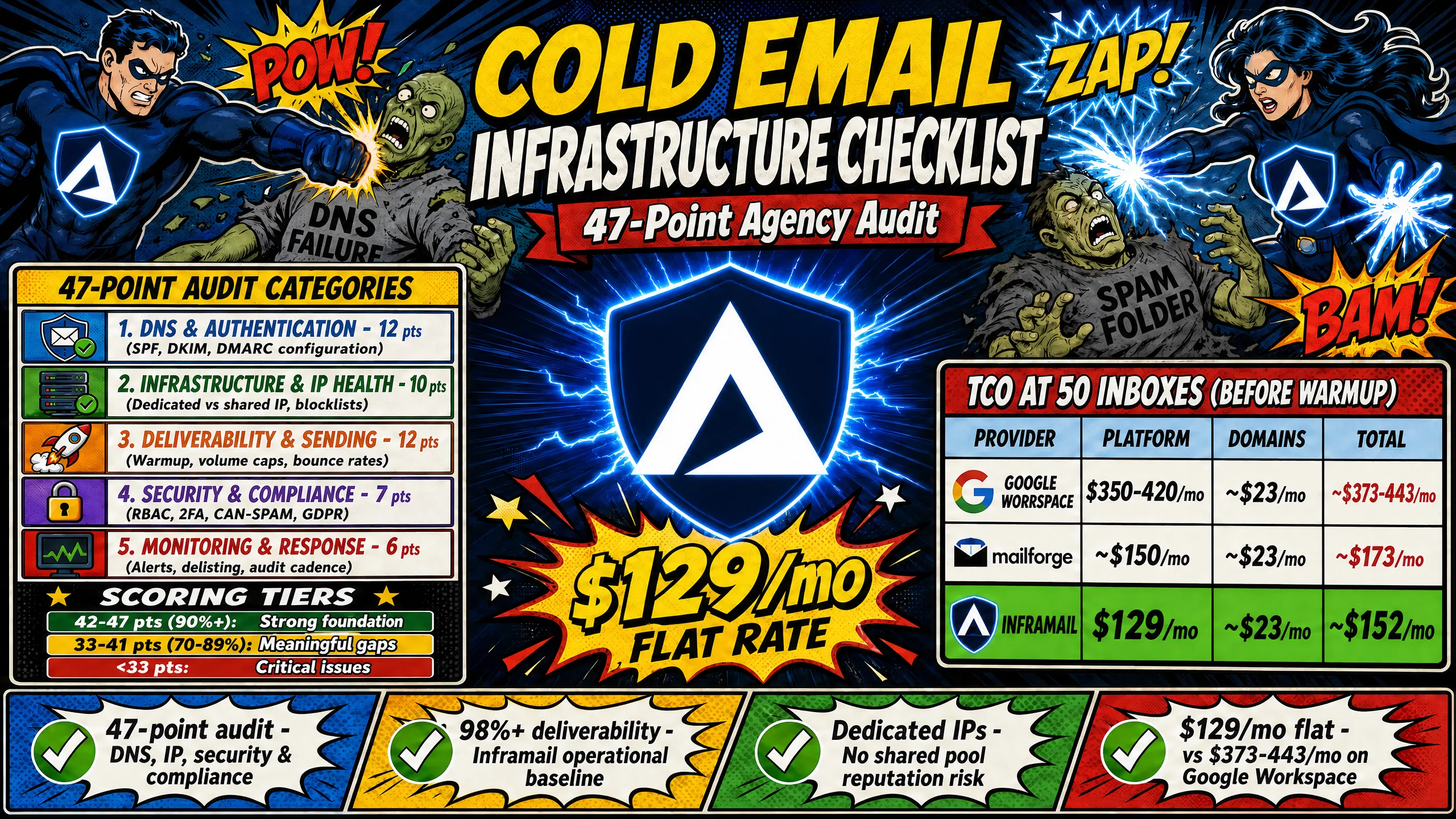
Warmup: A 3-8 week process of gradually increasing send volume on new inboxes to build ESP (Email Service Provider) trust before launching campaigns, required regardless of your infrastructure provider. The 47 audit points cover DNS and authentication (12 points), infrastructure and IP health (10 points), deliverability and sending practices (12 points), security and compliance (7 points), and monitoring and response (6 points).
Download the audit scoring spreadsheet
Score each point as Pass (1), Partial (0.5), or Fail (0). Compare your total against the tiers below.
How to interpret your audit score
Score | Status | Action required |
|---|---|---|
42-47 (90%+) | Strong audit foundation | Address any remaining gaps before scaling; no systemic failures present |
33-41 (70-89%) | Meaningful gaps present | Identify failing categories and prioritize remediation before expanding domain count or client load |
Below 33 (under 70%) | Systemic failures present | Pause scaling and resolve category-level failures before launching or continuing campaigns |
A score below 33 means at least one category has systemic failures. Scaling campaigns on broken infrastructure accelerates deliverability decay and increases client churn risk directly.
DNS authentication is the foundation of cold email deliverability. SPF, DKIM, and DMARC must all be configured correctly before a single email leaves a new domain. The SPF, DKIM, and DMARC setup walkthrough from the Inframail channel shows how agencies configure these records at scale without manual DNS panel work.
SPF record setup and validation
SPF (Sender Policy Framework) is a TXT record that lists authorized mail servers for your domain. The SPF lookup limit is 10 DNS hops. Exceeding it causes SPF to fail silently, breaking authentication without an obvious error. The ~all (soft fail) modifier returns a soft fail for unauthorized senders without outright rejection, while -all (hard fail) rejects unauthenticated mail entirely. Which setting is appropriate depends on your sending infrastructure and whether DKIM and DMARC are also in place. Consult your provider's documentation for the recommended configuration.
Points 1-3:
SPF record published with no more than 10 DNS lookups
SPF mechanism matches actual sending infrastructure (
~allorallset correctly)No conflicting SPF modifiers across multiple TXT records on the same domain
Validating DKIM records for cold email
DKIM (DomainKeys Identified Mail) uses a public/private key pair to sign outgoing messages. The public key sits in DNS as a TXT record under a selector subdomain (e.g., mail._domainkey.yourdomain.com). Confirm the DKIM signature appears in email headers and the selector is active using MXToolbox. Inframail's automated DNS provisioning configures DKIM selectors without manual panel work, cutting setup time per domain.
Points 4-6:
DKIM public key published under the correct selector
DKIM signature verified in outgoing email headers
Subdomain DKIM configured if using subdomain senders
Configuring DMARC for sender security
DMARC ties SPF and DKIM together and tells receiving servers what to do with unauthenticated mail. Start with p=none (report-only) to collect alignment data, then progress to p=quarantine and p=reject as you confirm clean authentication. Starting in May 2025, Microsoft requires DMARC, SPF, and DKIM for organizations sending 5,000 or more emails daily to its consumer services.
Points 7-12:
DMARC record published with minimum
p=noneDMARC aggregate report address (rua) configured
SPF alignment: MAIL FROM domain matches SPF-authorized domain
DKIM alignment: DKIM signing domain matches From header
Custom tracking domain configured via CNAME record
PTR (reverse DNS) record configured for the sending IP to verify server identity
Tracking your inbox placement rates
Inbox placement rate measures the share of sent emails landing in the primary inbox. Inframail targets 98%+ deliverability as its operational baseline. Run placement tests weekly using tools that seed test inboxes across Gmail, Outlook, and Yahoo to catch placement drops before a client notices.
Point 13: Inbox placement test results documented and reviewed on a schedule appropriate to program health.
Weekly is a strong baseline when deliverability conditions are stable. Increase to every 3 days during recovery periods or when placement drops are suspected. Monthly testing is insufficient if campaigns are underperforming or showing weak inbox placement rates.
How often to run blocklist scans
Run blocklist scans daily. A domain or IP landing on a major blocklist like Spamhaus can cause severe deliverability failures. For senders whose recipients are primarily on Microsoft (Outlook, Office 365), a Spamhaus listing is a near-complete delivery shutdown with visible error codes. For Gmail-heavy audiences, the failure is quieter but equally damaging, and significantly easier to miss until substantial harm has already occurred. Inframail's deliverability monitoring dashboard automates blacklist scanning and auto-submits delisting requests, with a 68.3% delisting success rate within 48 hours.
Points 14-18:
Daily automated blocklist scans active on all sending domains and IPs
Sender score tracked and logged across all active domains on a monthly basis as a gut-check baseline (Sender Score reflects a rolling 30-day average, making monthly review a natural interval, though it should not be treated as a primary deliverability signal in isolation). Monitor bounce rate, complaint rate, and blocklist status as more actionable day-to-day indicators.
Bounce rate monitored with a hard ceiling of 3% (target under 1.5%), alert triggered above 2%
Spam complaint rate monitored with a hard ceiling of 0.1%
Delisting process in place with resolution time targets documented per blacklist vendor. Timeframes vary by provider (ranging from hours to several days), so confirm expected timelines for each major list (Spamhaus, SpamCop, Barracuda) and build escalation steps around their specific procedures
Sending tool compatibility checklist
The two dominant cold email sending platforms are Instantly.ai and Smartlead, and both accept IMAP/SMTP credentials imported via CSV. Inframail exports credentials in exactly that format: provision inboxes, export CSV, import to your sending platform. The Smartlead integration walkthrough covers CSV column structure and import steps in detail.
Points 19-22:
IMAP/SMTP credentials exported in CSV format compatible with your sending platform
Sending platform successfully importing all credentials without errors
Test send confirmed from each new inbox before campaign launch
CRM integration tested with a live reply and opt-out event logged correctly
Warming up mailboxes for deliverability
New inboxes need 3-8 weeks of warmup before cold outreach at volume. Inframail does not include a built-in warmup tool, so this step requires an external service such as Warmbox or Lemwarm at $15-50 per inbox per month. The post-migration warmup guide covers the sequence after provisioning. One exception: Inframail's Done-For-You setup package at $3,497 one-time or $499/month includes free domain warmup.
Points 23-26:
Warmup tool connected to all new inboxes before first cold send
Warmup schedule running a minimum of 3 weeks before campaign launch
API rate limits documented for infrastructure provider and sending platform
Webhooks configured for bounce, complaint, and blocklist alerts across all active domains
Breakdown of monthly inbox expenses
Every comparison must include all line items, not just the platform fee. Here's the full TCO breakdown for a 50-inbox setup before warmup tools (warmup costs are additional on all sides):
Cost component | Inframail | Mailforge | Google Workspace |
|---|---|---|---|
Platform fee (50 inboxes) | $129/month | ~$150/month ($3/inbox) | $350-420/month |
Domain costs (17 domains, amortized) | ~$15/month | ~$15/month | ~$15/month |
Total before warmup | ~$144/month | ~$165/month | ~$365-435/month |
The 7-platform infrastructure cost comparison covers additional providers across the market.
Calculating your infrastructure overhead
Infrastructure spend as a percentage of client billings is the metric that matters for margin management. The formula: (platform fee + domain costs + warmup tools) divided by total monthly billings. Tracking this ratio regularly gives you a clear signal when infrastructure costs are compressing margin. The appropriate threshold will vary depending on your agency's billing model, client mix, and target net margin. At $5,000/month in client billings with $144/month in infrastructure (Inframail), overhead is 2.9%. At $420/month on Google Workspace for the same client volume, that ratio climbs to 8.4%, and the gap compounds as you scale. Use the sending capacity guide to match inbox count to the right plan tier.
Point 27: Infrastructure overhead calculated as a percentage of billings for each client and reviewed on a cadence that fits your agency's reporting cycle. Monthly works well as a default for most agencies, but the appropriate frequency will depend on your client mix, contract structure, and how actively you are scaling domain count.
Scaling costs: flat-rate vs. per-inbox
The financial gap between flat-rate and per-inbox pricing widens sharply above 50 inboxes:
Inbox count | Inframail | Mailforge | Google Workspace |
|---|---|---|---|
50 | $129/month | ~$150/month | $350-420/month |
100 | $129/month | ~$300/month | $700-840/month |
200 | $129/month | ~$600/month ($3/mailbox, annual billing) | $1,400-1,680/month |
Scaling from 50 to 200 inboxes on Google Workspace adds $1,050-1,260 per month to your infrastructure bill while retainers stay flat. On Inframail, adding 150 more inboxes costs only additional domain fees, not a new platform charge. The dedicated IP vs. shared IP comparison covers why dedicated IP infrastructure changes the unit economics at this price point.
Audit checklist for transparent pricing
Before committing to any provider, verify these items in writing:
Setup fees and domain transfer charges confirmed with vendor before committing. Domain transfer fees vary by registrar (typically $5-$15 per domain) and some providers surface these at checkout rather than upfront. Verify in writing before signing.
Billing terms confirmed with vendor before signing. Month-to-month options are available from some providers but many require 3-6 month minimums or annual contracts. Verify whether a minimum commitment period applies and what the exit terms are if you need to cancel early.
Overage policy confirmed with vendor before signing. Not all providers publish overage terms upfront. Ask explicitly whether any usage thresholds apply (inbox count, domain count, send volume) and what the cost or consequence is if you exceed them, then confirm the answer is reflected in your written agreement.
Domain costs confirmed with vendor before committing. Some providers exclude domain registration or renewal fees from their headline pricing and surface them separately at checkout or on the first invoice. Ask explicitly whether domain costs are included in the platform fee or billed separately, and at what rate, before signing.
Points 28-31: Transparent pricing verification confirmed for all four items.
Audit your Mailforge costs and ROI
Mailforge pricing starts at approximately $3 per mailbox per month. At 50 inboxes, that's around $150/month before domain costs, and at 200 inboxes, ~$600/month ($3/mailbox on annual billing). Mailforge uses a shared IP pool, meaning your sending reputation is affected by other users on the same IP range. The Maildoso deliverability review covers how shared IP pool behavior affects inbox placement in practice, and the pattern applies equally to Mailforge's shared pool model.
Point 32: IP type (dedicated vs. shared) documented for current provider, with potential reputation risk assessed.
Points 33-38 (security checklist):
2FA enforced on all admin accounts and accounts with DNS or mailbox provisioning access.
RBAC configured with documented roles. Clients restricted to read-only reporting access, write access limited to internal operations team.
API keys stored in a secrets manager (1Password, AWS Secrets Manager, or equivalent) with a 90-day rotation schedule and immediate rotation when any team member with access leaves.
Strong unique generated passwords per mailbox (minimum 15 characters per NIST SP 800-63B Rev. 4, or 16 characters per CISA), stored in a centralized password manager.
Sending platform alerts configured for daily volume spikes above your established baseline and bounce rate spikes above 2%.
Activity logs reviewed weekly for any unauthorized access or unusual sending patterns.
Uptime SLAs and response times
Infrastructure downtime stops active campaigns without notice. Confirm your vendor's uptime SLA (Service Level Agreement, target 99.9% or higher) and service credit terms before signing. A provider that doesn't publish SLA terms is signaling that uptime guarantees are not part of the offer.
When a deliverability issue hits, provider response time determines how fast you protect client campaigns. Inframail provides priority support 16 hours daily, 7 days per week from real people, not an automated ticket queue.
"I've been using inframail and what i liked most about them is the support. They are very quick to respond and solve all requests within a short time. I liked the price compared to other platforms." - Verified user review of Inframail
Points 39-40:
Vendor uptime SLA confirmed in writing.
Vendor support hours and response time documented before committing to a plan.
Exit clauses and migration
Confirm you can export all domain records, IMAP credentials, and configuration data before signing anything. Month-to-month pricing eliminates contract lock-in and gives you a clean exit if performance falls short. Migrating from Mailforge or Google Workspace without disrupting live campaigns requires parallel provisioning: spin up the new infrastructure, warm up new inboxes while keeping old ones active, then migrate campaigns in batches. The Maildoso-to-Inframail migration guide and the Mailreef-to-Inframail migration guide walk through the batch cutover mechanics.
"We spent months hunting for a reliable cold-emailing stack. After repeated failures with another provider, we trialled two options, Inframail and a competitor. We chose the competitor. A month later, we switched back to Inframail. Zero issues since. Rock-solid infrastructure, sharp support, genuinely dependable. Highly recommended." - Verified user review of Inframail
Points 41-43:
Escalation playbook documented for mass blocklist events.
Data export process confirmed with vendor.
Migration plan documented with parallel provisioning steps and batch cutover schedule.
Audit your CAN-SPAM compliance setup
Every commercial email must include a physical mailing address, a clear opt-out mechanism, and non-deceptive subject lines. Per CAN-SPAM compliance requirements, you must honor opt-out requests within 10 business days. Build a master suppression list that syncs across all active campaigns so an opt-out in one sequence cannot generate a follow-up from another.
Point 44: Physical address, opt-out link, and cross-campaign suppression list sync confirmed for all active sequences.
Managing GDPR and cross-border data
GDPR permits cold B2B email under the "legitimate interest" legal basis, provided the email is relevant to the recipient's professional role, includes a clear opt-out, and processes data minimally. If you handle EU prospect data, a Data Processing Agreement with every vendor that stores or processes that data is required. Under GDPR, you must fulfill data deletion requests within 30 days of a valid request.
Inframail's infrastructure is US-based only, making it the right fit for agencies targeting US and Canadian markets, but not for organizations with strict EU or APAC data residency requirements. If a client's procurement policy requires EU data residency, confirm this before provisioning.
Points 45-47:
DPA (Data Processing Agreement) in place with all vendors handling EU prospect data.
Data residency requirements confirmed with each client before provisioning.
Data retention and purge policy documented, applied to all active mailboxes, and reviewed quarterly.
Sign up to Inframail to automate DNS setup, provision unlimited inboxes on dedicated US IPs, and keep infrastructure costs flat at $129/month regardless of how many clients you add.
How often should agencies run this 47-point audit?
Run the full audit quarterly and before onboarding any new client that meaningfully expands your domain count. Adding 20 or more domains warrants a targeted re-audit of the DNS authentication and reputation categories at minimum.
What counts as a healthy audit score for active campaigns?
A score of 42-47 out of 47 (90% or above) means your infrastructure is campaign-ready with only minor optimizations needed. A score below 33 (under 70%) means at least one category has systemic failures, and campaigns should not be scaled until those failures are resolved.
How do I audit existing mailboxes before migrating to a new provider?
Export your current domain list, run blocklist scans on all active IPs and domains, verify SPF, DKIM, and DMARC alignment using MXToolbox, and pull 30-day bounce and complaint data from your sending platform before moving anything.
What if my current vendor fails multiple checklist items?
If your vendor fails three or more items in the DNS authentication category, or fails the dedicated IP check with documented deliverability impacts, treat it as a migration trigger. Provision 10-20 domains on a flat-rate dedicated IP provider, run parallel campaigns to validate inbox placement, then complete the full migration.
Does Inframail work with Google Workspace infrastructure?
No. Inframail is Microsoft-only. It provisions Microsoft email inboxes on dedicated US-based IPs. Agencies that require Google Workspace infrastructure should evaluate providers that explicitly support Google accounts.
SPF (Sender Policy Framework): A DNS TXT record listing authorized mail servers for a domain, with a hard limit of 10 DNS lookups before authentication fails.
DKIM (DomainKeys Identified Mail): A cryptographic signature system using a public/private key pair to verify that email content has not been altered in transit.
DMARC: A DNS policy record specifying how receiving servers handle messages that fail SPF or DKIM alignment, with policy options of none, quarantine, or reject.
Dedicated IP: A sending IP address assigned exclusively to one customer, so sending reputation depends solely on that customer's behavior rather than a shared pool.
TCO (total cost of ownership): The complete monthly infrastructure cost including platform fees, domain registration, warmup tools, and sending platform subscriptions. Always compare providers on TCO, not platform fees alone.
Inbox placement rate: The percentage of sent emails that land in the primary inbox rather than spam or being blocked at the server level.
ESP (Email Service Provider): The platform or service that sends, receives, and manages email infrastructure, such as Google Workspace, Microsoft 365, or Inframail.
RBAC (role-based access control): A permission system that assigns access rights based on defined roles rather than granting individual users broad administrative access.
DPA (Data Processing Agreement): A contract between a data controller and a data processor that defines how personal data will be processed, particularly required under GDPR when handling EU prospect data.