
Appointment reminder email: reduce no-shows with these templates
A structured three-step reminder sequence (booking confirmation, 24-hour alert, and 1-hour nudge) consistently reduces meeting no-shows across B2B sales context
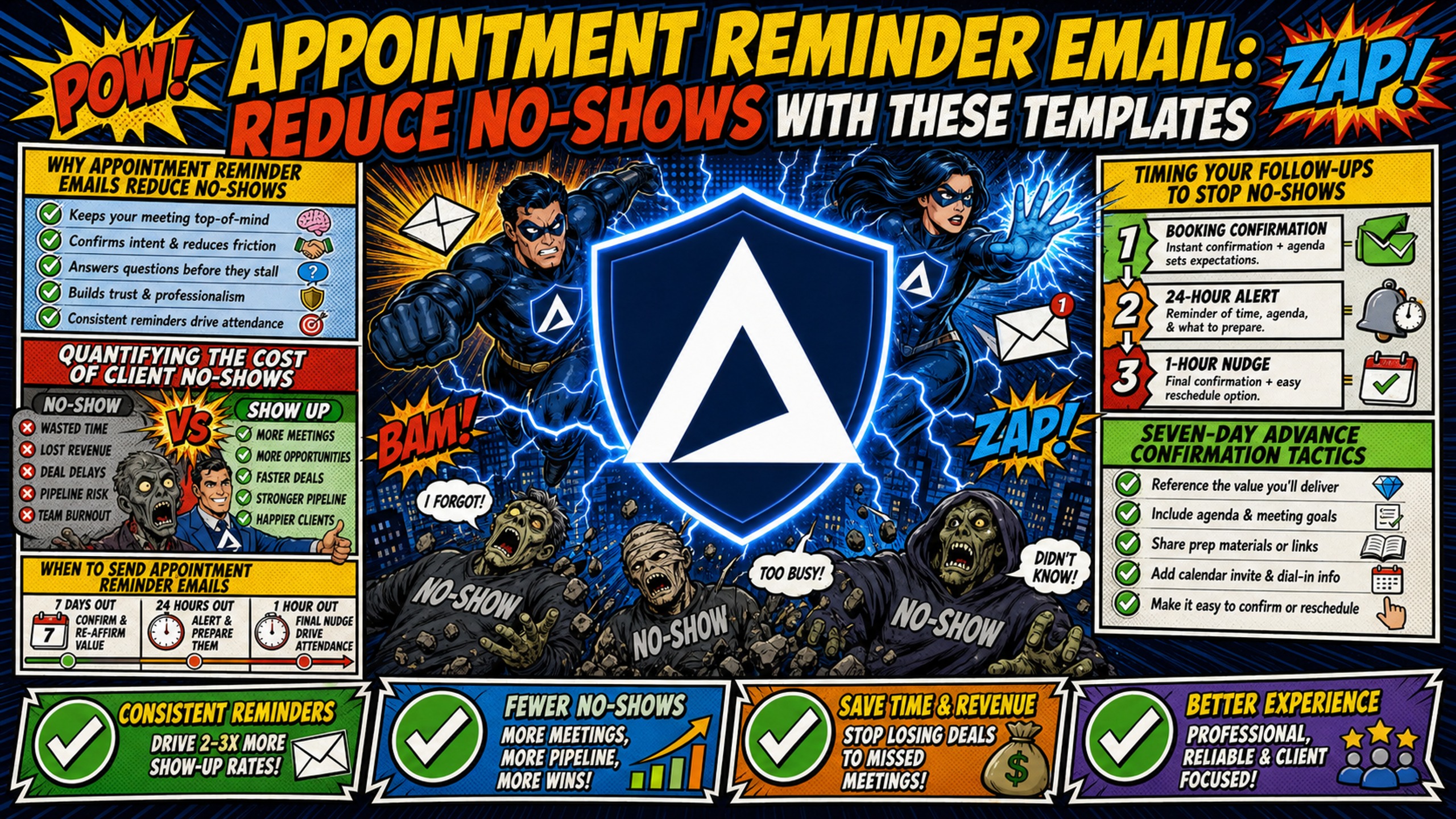
TL;DR A structured three-step reminder sequence (booking confirmation, 24-hour alert, and 1-hour nudge) consistently reduces meeting no-shows across B2B sales contexts. But copy alone doesn't solve the problem. If your sending domain lacks properly configured SPF, DKIM, and DMARC records, automated reminders land in spam before prospects ever see them. Inframail automates DNS configuration at a flat $129/month rate, keeping transactional inboxes out of the promotions folder and infrastructure spend predictable as client count grows. Use the templates below as a direct starting point, then address the technical layer before your next sequence goes live.
When a prospect doesn't show up for a sales call, it's often a technical issue rather than a lack of interest. Reminder emails may have landed in their spam folder due to deliverability problems. That's a solvable technical problem, not a sales failure.
To protect agency margins and keep sales pipelines full, founders must run a structured, multi-channel reminder sequence. Copy is only half the equation. This guide provides copy-paste reminder templates and covers the technical infrastructure required to keep automated emails out of the spam folder.
Why appointment reminder emails reduce no-shows
Appointment reminders work because they respect the prospect's time and create a professional touchpoint before the meeting. A calendar invite alone is passive. A well-timed email sequence is an active signal that the meeting matters, which increases the psychological cost of skipping it.
For most B2B and service contexts, the 24-48 hour window before a scheduled meeting is the most effective point to send a reminder, close enough to feel urgent, far enough that a prospect can still reschedule without conflict. The reminder signals that the time is confirmed and expected on both sides.
Quantifying the cost of client no-shows
A 25% no-show rate on discovery calls costs agencies real pipeline velocity, not just the meeting slot itself. The table below shows the scale of that impact across typical agency workloads.
| Scenario | No-show rate | Monthly missed calls | Est. monthly impact |
|---|---|---|---|
| 5 clients, 20 calls/month | 25% | 5 calls | High pipeline delay |
| 10 clients, 40 calls/month | 25% | 10 calls | Compounding revenue drag |
| 15 clients, 60 calls/month | 25% | 15 calls | Measurable churn risk |
Running a structured reminder sequence cuts that impact before it compounds. The Inframail guide on B2B cold email response rates touches on how domain warmup and sender reputation affect open and response rates.
Timing your follow-ups to stop no-shows
A structured three-step sequence is a proven approach that balances communication with respect for the prospect's inbox. The structure is straightforward:
- At booking: Confirmation with agenda and prep materials.
- 24 hours before: Direct reminder with rescheduling option.
- 1 hour before: Final link delivery and confirmation nudge.
Multiple well-timed reminders are effective across B2B and service contexts. The key is front-loading detail in the first message and keeping subsequent messages short and action-focused.
When to send appointment reminder emails
Timing determines whether your reminder helps the prospect show up or contributes to inbox fatigue. The goal at each stage is different: the 7-day message handles logistics, the 24-hour message handles last-minute conflicts, and the 1-hour message handles inertia.
Seven-day advance confirmation tactics
A 7-day reminder can be valuable for high-ticket deals, long-term project kickoffs, or any meeting that requires prep materials from the prospect. Sending it early gives them enough runway to reschedule without canceling entirely, which protects the pipeline. For higher-value deals, giving clients several days of lead time can increase the chance they arrive prepared, which improves conversation quality and conversion rate.
24-hour pre-appointment email
The 24-48 hour window before an appointment is generally the most effective for maximizing show rates across channels. It's close enough to feel urgent but far enough that a prospect can still reschedule without feeling guilty about wasting your time.
This message should confirm the time, include the direct meeting link, and make rescheduling a one-click action. If it doesn't, you're introducing friction that causes silent no-shows.
1-hour buffer to prevent no-shows
The 1-hour reminder exists purely to interrupt the prospect's workday and put the meeting back at the top of their mind. It should be short, direct, and contain only the meeting link and time. Nothing else. SMS open rates reach 98%, making a text at the 1-hour mark a strong complement to the email for any agency willing to run a two-channel approach.
Cadence testing to prevent no-shows
Testing your reminder timing is straightforward: split booked meetings into two groups and test different reminder windows (for example, a 2-hour reminder against a 1-hour reminder) over a statistically significant period. Track show rate by group, not open rate. Show rate tells you the sequence is working.
The Inframail video on converting emails to booked calls covers how small copy and timing changes compound across a full client roster.
Client-ready appointment reminder email library
These templates are built for client onboarding calls, project kickoffs, and service delivery meetings. Customize the placeholders in brackets before activating.
Seven-day pre-appointment email template
Subject: Your [Service] kickoff call is confirmed for [Date]
Hi [First Name],
Just confirming your call with [Your Name] at [Agency Name] on [Date] at [Time] [Timezone].
Agenda for our 30 minutes:
- [Point 1]
- [Point 2]
- [Point 3]
To make the most of our time, please review [Prep Material/Link] before the call.
If [Date] no longer works, reschedule here: [Scheduling Link]
Looking forward to it.
[Your Name]
24-hour alert template
Subject: Reminder: We're on for tomorrow at [Time]
Hi [First Name],
Quick reminder that we're scheduled for [Time] [Timezone] tomorrow, [Date].
Join here: [Meeting Link]
If something came up, reschedule here: [Scheduling Link]
See you tomorrow.
[Your Name]
1-hour pre-meeting reminder template
Subject: We're on in 1 hour - here's your link
Hi [First Name],
Your call with [Your Name] starts in 1 hour at [Time] [Timezone].
Join here: [Meeting Link]
See you shortly.
Last-minute rescheduling templates
When a prospect doesn't show, send this within 2-4 hours of the missed start time. Close enough that the meeting is still fresh, far enough that you don't appear reactive.
Subject: We missed you - easy rescheduling link inside
Hi [First Name],
It looks like we got our wires crossed on today's call. No problem at all.
Here's a direct link to book a new time that works for you: [Scheduling Link]
Alternatively, reply to this email and I'll find something that works.
[Your Name]
The non-accusatory tone is deliberate. Prospects who receive a friction-free rescheduling path re-engage at a higher rate than those who feel shamed for missing the call. For deeper follow-up strategy, see the Inframail breakdown of the best cold email follow-up approaches.
High-converting sales reminder email templates
Sales reminders need different framing than client onboarding messages. Prospect friction is higher on discovery calls, so these templates focus on reinforcing the value of showing up and making confirmation effortless.
One day out: reminder email copy
Subject: Tomorrow's call - a quick look at what we'll cover
Hi [First Name],
Looking forward to our call tomorrow at [Time] [Timezone].
Based on what you told me, here's what I'm planning to cover:
- [Specific challenge they mentioned]
- [Relevant case study or result]
- Concrete next steps if there's a fit
Join here: [Meeting Link]
If the time doesn't work, grab a new slot: [Scheduling Link]
Building anticipation with a personalized agenda line increases the prospect's investment in attending. The Inframail interview with Bhavesh Kumar, who books 200+ appointments per month, covers how pre-call framing affects show rates on cold outbound.
Urgent 1-hour pre-call email script
Subject: Starting in 60 minutes - [First Name]
Hi [First Name],
We're on in one hour. Here's everything you need:
Time: [Time] [Timezone] Link: [Meeting Link]
If you need to move it: [Scheduling Link]
See you in 60.
Automated follow-ups for missed calls
Subject: Sorry we missed each other
Hi [First Name],
I jumped on the call at [Time] but it looks like the timing didn't work out.
I'd still love to connect. Here's my calendar link to grab a new slot in the next few days: [Scheduling Link]
If you have questions before we talk, feel free to reply here.
[Your Name]
Essential elements for every confirmation email
Every reminder must contain six specific elements to function correctly. Missing any one of them introduces friction that converts to no-shows.
Mandatory elements checklist:
- Date (spelled out, not abbreviated)
- Time with explicit timezone
- Direct meeting URL or address
- One-click rescheduling link
- Clear call-to-action (confirm, join, or reschedule)
- Sender name and functional reply-to address
Meeting time and timezone sync
Timezone confusion is one of the most common causes of no-shows on multi-timezone calls. Always include the timezone explicitly. Many scheduling tools automatically display meeting times in each recipient's detected local timezone, but don't rely on that detection alone: spelling out "3:00 PM ET / 12:00 PM PT" helps eliminate the ambiguity.
Physical address or meeting URL
If the meeting is virtual, the link must appear on its own line as a hyperlink rather than buried in a sentence. If the meeting is in-person, include the full address with a maps link. Prospects shouldn't have to search for how to attend their own meeting.
Cancellation and rescheduling options
Making it easy to reschedule reduces friction and gives prospects a low-friction alternative to ghosting. Include a direct scheduling link in every reminder (7-day, 24-hour, and 1-hour) to help capture last-minute conflicts before they become silent absences.
Additional elements to curb no-shows
Three additions to a standard reminder that consistently increase prospect investment:
- A short case study link: A one-paragraph result from a comparable client signals proven value. Example: "Before the call, you can read how we helped [Similar Company] reduce their customer acquisition cost by 30% in 90 days."
- A single preparation question: Ask the prospect to write down their top challenge before the call. The act of doing so increases psychological commitment to attending.
- A 1-page agenda PDF: A simple pre-meeting prep sheet increases the prospect's sense of investment before the call begins.
How to automate appointment reminder emails
Automating the reminder sequence through a CRM or scheduling tool protects it from human error and ensures every prospect receives every touchpoint at the right time. The Inframail guide on sales email automation tools covers 25 platforms that handle this workflow.
Automation triggers for email reminders
The most reliable setup uses a webhook trigger from your scheduling tool (Calendly, HubSpot Meetings, or similar) that fires the moment a meeting is booked. That webhook enrolls the contact in a time-based sequence with delays calculated dynamically from the meeting timestamp, so reminders fire correctly regardless of when the booking occurred.
Email automation sequence setup
The sequence logic follows a straightforward pattern: the webhook enrolls the contact immediately and sends the booking confirmation, then time-based delays fire the 24-hour and 1-hour reminders automatically. For a detailed walkthrough, the Encharge video on trigger-based email flows covers the logic clearly.
No-show email delivery checks
Automation only works if the emails land in the inbox. Google and Yahoo introduced mandatory authentication requirements for bulk senders in February 2024, requiring valid SPF, DKIM, and DMARC records for domains sending high volumes to Gmail and Yahoo Mail accounts. Domains without proper authentication face deliverability challenges.
SPF (Sender Policy Framework) is a DNS record that lists which mail servers are authorized to send on behalf of your domain. DKIM (DomainKeys Identified Mail) adds a cryptographic signature to each message. DMARC ties both together and tells receiving servers how to handle messages that fail authentication checks. Together, these records help ensure your emails reach the inbox rather than spam folders.
Configuring these records manually for 50+ domains takes 12+ hours of DNS panel work per setup cycle, and a single misconfiguration across any domain can push reminders into the promotions folder silently.
Inframail automates SPF, DKIM, and DMARC configuration for every domain provisioned on the platform, eliminating manual DNS panel work entirely. The platform runs on dedicated US-based IPs (1 IP on the Unlimited Plan, 3 IPs on the Agency Pack), which means your sending reputation is isolated from other senders. Shared IP pools, used by competitors like Maildoso, expose transactional reminders to reputation damage from bad-actor neighbors on the same IP range.
At $129/month for unlimited inboxes, the cost comparison against Google Workspace is direct:
| Inbox count | Google Workspace ($7-8.40/seat/month) | Inframail total (monthly) | Monthly savings |
|---|---|---|---|
| 50 inboxes | ~$350-420/month | $129 + ~$34 domains = ~$163 | ~$187-257/month |
| 100 inboxes | Estimated ~$700/month | $129 + ~$50 domains = ~$179 | Estimated ~$521/month |
| 200 inboxes | ~$1,400/month | $129 + ~$67 domains = ~$196 | ~$1,204/month |
Domain costs ($5-16/year per domain) are amortized monthly and scale with domain count, not inbox count. Warmup tools are additional on both platforms, typically $15-50/month per inbox.
"InfraMail makes it remarkably easy to purchase domains, configure them correctly, and create inboxes. The platform removes friction and allows you to focus on execution rather than setup." - Verified user review of Inframail
For more on how shared versus dedicated IP infrastructure affects deliverability on transactional sending, the Inframail post on cold email infrastructure costs across 7 platforms runs through the numbers at each inbox tier.
Addressing frequent concerns about no-show emails
The questions below cover the most common operational decisions agencies face when building out a reminder sequence.
Recommended cadence to prevent no-shows
The three-step appointment reminder sequence (confirm at booking, remind at 24 hours, send the link at 1 hour) is the standard approach for reducing no-shows after a meeting is already booked. This reminder sub-sequence balances communication with respect for the prospect's inbox and is distinct from the broader B2B sales cadence required to convert cold prospects into booked meetings in the first place.
LeadHaste puts the optimal outbound cadence at 8-12 total touchpoints across 14-21 days. Highspot cites a tighter range for cold outreach specifically: 6-8 touchpoints over two to three weeks. The three appointment reminder touchpoints sit inside that broader cadence rather than replacing it. For higher-value deals or meetings requiring significant preparation, consider adding a 7-day agenda email to the reminder sequence to prompt prospect prep and reduce drop-offs from poor qualification.
Appointment reminder email timing
Adjust timing based on lead source. Cold outbound leads have less emotional investment in the meeting at booking time, so compress the sequence and reinforce value in every message. Warm inbound leads arrived with intent, so the 7-day touchpoint is appropriate and the 24-hour message can be shorter. For leads from paid media, include a brief case study link in the 24-hour reminder to re-anchor the value proposition before the call. The video on booking sales calls with cold email covers practical cadence decisions for B2B agencies.
Email vs. SMS for appointment reminders
SMS and email serve different roles in the reminder sequence, and the data makes the case for combining them clearly.
| Channel | Open rate | Response rate | Best use case |
|---|---|---|---|
| Varies by context | Varies by context | Agendas, links, prep materials, rescheduling paths | |
| SMS | 98% | 45% | Day-of nudge, 1-hour link delivery, no-show alerts |
SMS open rates reach 98%, and most messages are typically read within minutes of delivery. For the 1-hour reminder specifically, SMS typically delivers higher attendance rates than email. Use email to carry information and SMS to trigger action on the day of the meeting.
No-show reduction via email reminders
A technical checklist for agencies configuring automated reminder infrastructure:
- SPF record configured for every sending domain
- DKIM signature active and passing authentication checks
- DMARC policy set to at minimum
p=nonewith a reporting address to catch failures - Sending domain separate from primary business domain (protects root domain reputation)
- Transactional email tag applied in your sending platform to prevent Gmail from routing to Promotions
- Dedicated IP confirmed (not shared pool) for high-volume reminder sequences
- Blacklist monitoring active with auto-delisting alerts set to fire within 48 hours
Inframail's platform handles the first three automatically, citing a 98%+ deliverability rate and a 68.3% blacklist delisting success rate within 48 hours on flagged domains. For agencies with clients in regulated industries (healthcare, legal, financial services), limit reminder content to scheduling details only: recipient name, date, time, location, and a rescheduling link. Omit any reference to the reason for the visit, diagnosis, or service type to stay within minimum necessary standards under HIPAA.
"Rock-solid infrastructure, sharp support, genuinely dependable. Highly recommended." - Verified user review of Inframail
The Inframail guide on getting cold emails delivered is a practical walkthrough of the authentication and IP setup required to keep sending healthy across multiple client domains. Sign up to Inframail and get started today, with automated DNS configuration active from the first domain you provision.
FAQs
What is the ideal timing for appointment reminder emails?
Send a booking confirmation immediately after the meeting is scheduled, a detailed reminder 24 hours before, and a final direct link 1 hour before the call. This three-step sequence consistently reduces no-shows compared to sending no follow-up at all.
How do I prevent my automated reminder emails from landing in spam?
Configure valid SPF, DKIM, and DMARC records for every sending domain and use a dedicated IP rather than a shared pool. Inframail automates all three DNS configurations when a domain is provisioned, removing the manual setup bottleneck entirely.
Should I use email or SMS for meeting reminders?
Use both channels: SMS delivers a 98% open rate for day-of nudges and 1-hour alerts, while email carries agendas, calendar invites, prep materials, and rescheduling links that SMS can't accommodate in a single message.
How much does Google Workspace cost compared to Inframail for sending reminders at scale?
At 50 inboxes, Google Workspace Business Starter runs approximately $350-420/month at $7/seat monthly. Inframail's Unlimited Plan costs $129/month for unlimited inboxes plus approximately $34/month in amortized domain costs (total ~$163/month), saving roughly $187-257/month before warmup tool costs.
What happens to reminder deliverability on a shared IP pool?
Shared IP pools expose your sending reputation to every other sender on the same IP range, and bad-actor senders on that range can drag your inbox placement rate down with them. Dedicated IPs, like those included in Inframail's plans, isolate your reputation so only your sending behavior determines inbox placement.
What elements must every appointment reminder email include?
Every reminder needs the date (spelled out), the exact time with timezone, the direct meeting URL or address, a one-click rescheduling link, a clear call-to-action (confirm or join), and the sender's name with a functional reply-to address.
Key terms glossary
SPF (Sender Policy Framework): A DNS record that specifies which mail servers are authorized to send email on behalf of your domain. Receiving servers check the sending IP against this list on every inbound message.
DKIM (DomainKeys Identified Mail): An email authentication method that adds a cryptographic signature to each outgoing message, proving to receiving servers that the message was not altered in transit.
DMARC (Domain-based Message Authentication, Reporting, and Conformance): An email protocol that combines SPF and DKIM results and gives domain owners the ability to instruct receiving mail servers on how to handle messages that fail authentication checks.
Dedicated IP: An IP address used exclusively by a single sending account or platform, ensuring that only the owner's sending behavior determines the IP's reputation with inbox providers like Gmail and Outlook.
No-show rate: The percentage of scheduled meetings where the prospect fails to attend without canceling or rescheduling in advance. High no-show rates on discovery calls can create pipeline delays for agencies managing multiple active clients.
Transactional email: An automated message triggered by a specific user action or time-based event (such as a meeting booking), as opposed to a marketing broadcast. Transactional tags in sending platforms help inbox providers route these messages away from the Promotions folder.
Inbox placement rate: The percentage of sent emails that land in the recipient's primary inbox rather than spam, promotions, or other folders. SPF, DKIM, and DMARC configuration along with IP reputation are the primary determinants of this metric for automated reminder sequences.