
8 email tracking features that actually drive sales pipeline
Eight email tracking features correlate with pipeline: real-time open alerts, link click tracking, auto-reply filtering, sequence analytics, CRM attribution, se
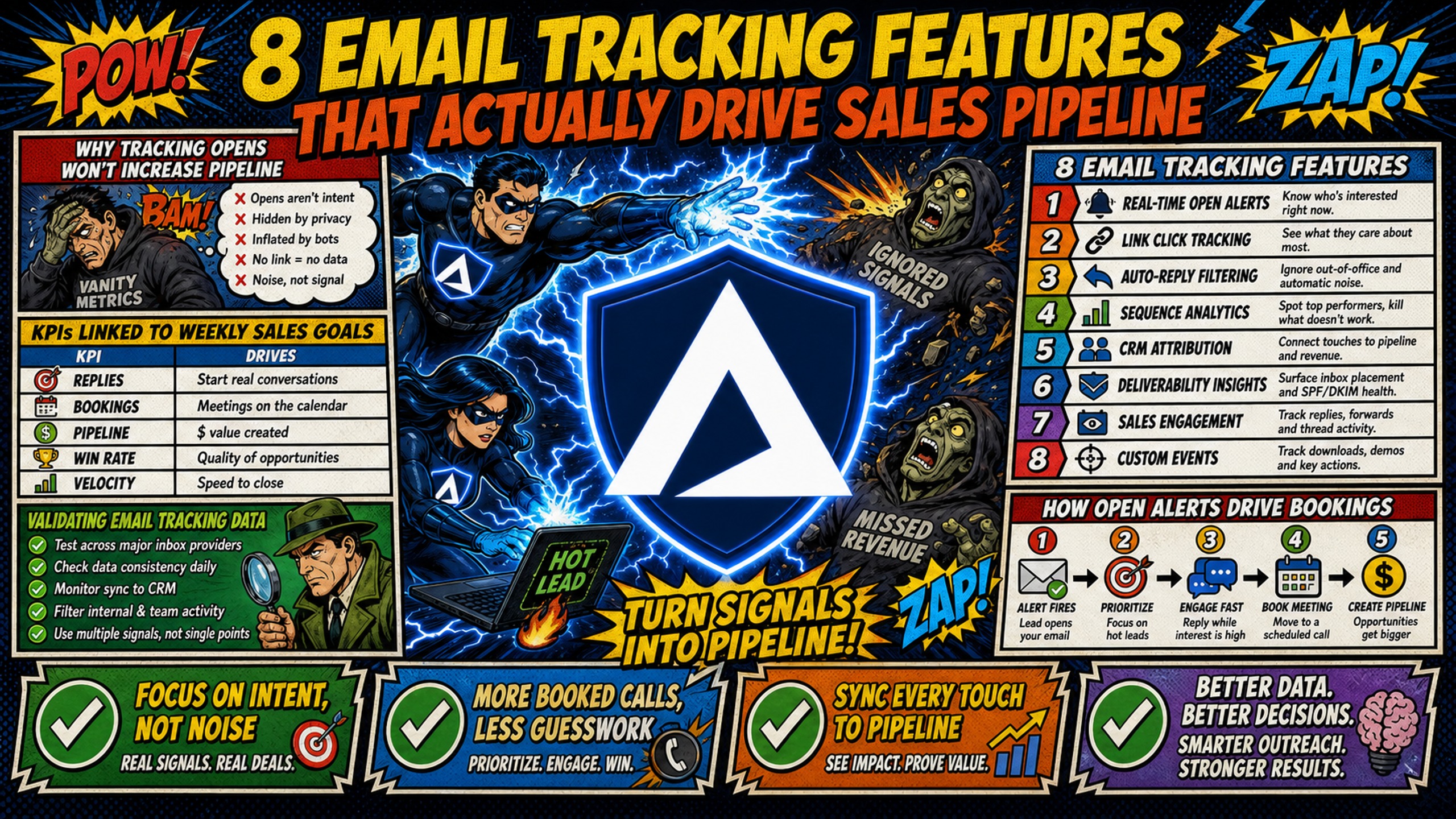
TL;DR: Eight email tracking features correlate with pipeline: real-time open alerts, link click tracking, auto-reply filtering, sequence analytics, CRM attribution, send-time optimization, AI intent classification, and blacklist monitoring. Blacklist monitoring ranks highest, because every other metric turns to noise once a domain is flagged. A Spamhaus SBL listing reaches the ISPs and corporate networks protecting billions of mailboxes, and Google requires bulk senders to hold spam rates under 0.30% in Postmaster Tools or risk delay, filtering, or outright rejection. Tracking data is only as reliable as the infrastructure underneath it, so a tracking pixel on a shared domain with poor reputation gets filtered before any prospect sees it. Inframail is a flat-rate Microsoft email infrastructure platform that provisions unlimited inboxes on dedicated US-based IPs for $129/month, against $420/month for 50 Google Workspace seats.
Open rate is the most-reported metric in cold email and the least predictive of pipeline. Eight tracking features correlate with booked meetings, and the highest-impact one is infrastructure, not tracking. Two further infrastructure layers determine whether the other seven produce real data at all. This guide breaks down which features change reply rate, meeting-booked rate, and cost-per-meeting, and shows how the infrastructure underneath those features determines whether the data is real or noise.
Why tracking opens won't increase pipeline
Raw open tracking is a vanity metric. High open numbers feel good in a weekly report, but they do not guarantee a positive reply, a booked meeting, or closed revenue. Apple Mail Privacy Protection launched in September 2021 and, for users who enable it, pre-loads images through proxy servers regardless of whether the recipient reads the email. Corporate security bots that auto-open every message for malware scanning compound the problem, leaving open rate data unreliable as a measure of real human engagement.
The fix is to stop optimizing for opens and start measuring what a VP of Sales actually cares about. This cold email deliverability guide covers why the 2026 rules for inbox placement have shifted significantly away from open-rate optimization.
KPIs linked to weekly sales goals
SDR managers most commonly track a core set of metrics across these categories:
- Positive reply rate: Interested replies only, excluding out-of-office messages and unsubscribes. SaaS-focused benchmarks put positive reply rates at 0.5-1.5%, with the top quartile at 2-4% (SaaSConsult).
- Meeting-booked rate: Qualified meetings booked divided by unique prospects contacted. Benchmarks run from 0.3-0.8% on average, with the top quartile at 1-2% (SaaSConsult).
- Cost-per-meeting: Total outbound spend (infrastructure, domains, warmup tools, sending platform, SDR labor) divided by held, qualified meetings in a given month or quarter. Target ranges vary widely by segment and deal size, commonly falling between $150 and $600 per meeting for mainstream B2B, and running considerably higher for enterprise targets.
Validating email tracking data
A 1x1 transparent tracking pixel works through a simple process:
- A unique transparent image (typically a GIF or PNG) is embedded in the email's HTML body.
- The image source URL points to a tracking server with a recipient identifier in the query string.
- When the recipient's email client renders the HTML, it sends an HTTP GET request to fetch the image.
- The tracking server logs the request, typically capturing data such as IP address, user-agent, and timestamp.
Gmail's email sender guidelines required bulk senders to use SPF, DKIM, and DMARC beginning in February 2024, and Outlook.com enforced similar standards for high-volume senders in 2025. If the tracking domain lacks proper SPF/DKIM/DMARC authentication, or if it sits on a shared IP pool with poor-reputation senders, spam filters route the email before any human opens it. This spam placement diagnostic guide by Inframail walks through how to confirm where emails actually land.
1. Real-time signals to prioritize hot leads
Real-time open alerts tell an SDR within seconds that a prospect has opened an email, but only when the open signal has been filtered for bot opens and Apple MPP proxy loads. Unfiltered, that signal wastes follow-up capacity on non-events. When filtered, it creates a precise follow-up window when the prospect is actively engaged.
How open alerts drive bookings
The workflow is straightforward:
- Prospect opens email in the morning.
- Real-time alert fires to the assigned SDR.
- SDR follows up through a phone call or LinkedIn connection request.
- Prospect responds because the context is fresh.
Features that filter bot opens from human opens (covered in section 3) are required before real-time alerts produce reliable lift. This guide on reply rate CTAs by Kidous Mahteme details the mechanics that convert that timing advantage into actual responses.
2. Measuring engagement with link click metrics
Opens indicate curiosity, but clicks indicate intent. Link click tracking identifies which prospects clicked a specific asset: a case study, a calendar link, or a pricing page. A click on a booking link signals far stronger intent than an open event alone.
Correlating link clicks to meetings
Click tracking tied to CRM attribution (covered in section 5) reveals which content types produce the highest meeting-booked rate. When the data shows certain assets converting at a higher rate than others, teams can prioritize those assets in sequence steps 2 and 3. In practice, booking-link clicks convert at a higher rate than content-link clicks, so sequences that surface a direct calendar link by step 2 tend to outperform sequences that lead with case studies or pricing pages. Click data makes that sequencing decision concrete rather than instinctive.
3. Filtering auto-replies and bot clicks from real engagement
Out-of-office auto-replies and security bot clicks inflate reply counts and distort positive reply rate calculations. An SDR team running high-volume outbound will encounter OOO replies that look like engagement but represent zero pipeline.
Filtering bot clicks before you calculate cost
Advanced tracking tools filter bot clicks by analyzing click timing patterns. Security bots often click every link in an email within seconds of delivery, before a human could physically open the message. Human click events follow natural reading patterns with irregular timing gaps between link clicks.
Once auto-replies and bot events are filtered, the cost-per-meeting calculation tightens. If 300 positive replies produce 45 booked meetings, the reply-to-meeting conversion rate is 15%, and cost-per-meeting divides total outbound spend by 45, not by a reply count inflated with OOO messages.
4. Analyzing sequence performance to boost reply rates
Sequence analytics reveal where prospects drop off across a multi-touch campaign. A sequence with a high open rate on email 1 but a low reply rate on email 3 often indicates a content or timing issue at that step, though deliverability and list quality can also play a role.
Turning email data into booked meetings
Multi-touch sequences consistently outperform standalone sends, and most campaigns land on four to seven emails before returns flatten. Test sequence length against your own reply data rather than adopting a fixed number. A/B testing subject lines and body copy at each sequence step, using tracking data as the scoring mechanism, directly increases meeting-booked rate. The discipline is testing one variable per experiment (subject line only, or CTA only) and letting the tracking data determine the winner before scaling to the full list.
5. Attributing cold email replies to closed deals
The gap between a booked meeting and a closed deal is where most cold email programs lose visibility. Without CRM attribution, an SDR team cannot tell which campaigns produced high-value deals versus low-value deals that consumed disproportionate sequence resources.
Measuring meeting lift from attribution
Syncing email tracking data to Salesforce or HubSpot with proper campaign source attribution (for example, "Outbound Cold Email - Campaign Q3") allows the team to filter pipeline by source. Attribution data answers a direct question: which campaign produced the meetings that converted to Stage 2+ opportunities? When the data shows one campaign converting meetings to pipeline at 30% and another at 10%, the resource allocation decision becomes clear. Inframail's infrastructure cost guide includes context on how infrastructure costs factor into the full pipeline ROI model.
6. Boosting reply rates via strategic send windows
Send-time optimization queues outgoing emails to arrive in a prospect's inbox during the time windows when that specific recipient is most active. Landing at the top of the inbox during peak reading hours produces a higher open-to-reply conversion than emails buried under overnight messages.
How send timing improves positive reply rate
Sending into recipient time zones, rather than blasting all emails at 8 AM Eastern regardless of location, produces measurable improvements in positive reply rate. Kidous Mahteme's cold email infrastructure guide covers how sending volume, timing, and domain rotation combine to maintain inbox placement across a large domain portfolio. Distributing sends across wider time windows also lowers the daily volume per domain, which reduces spam filter pressure and extends domain lifespan.
7. Filtering email replies for sales readiness
AI reply intent classification categorizes incoming replies automatically into segments such as interested, not interested, referral, out-of-office, or objection. Without this filtering, SDRs read every reply manually and allocate equal time to "remove me from your list" and "yes, I'd love to see a demo."
Routing warm replies to the top of the queue
Automated classification routes warm replies directly into the SDR's priority queue. An SDR running several active sequences cannot manually triage hundreds of replies without missing time-sensitive warm leads. Automated intent routing means the SDR's first hour of each day focuses on confirmed interested replies, not sorting through OOO messages.
Tracking the ratio of classified "interested" replies to booked calls reveals conversion efficiency and determines how many positive replies the team needs to hit a monthly meeting target. This follow-up sequence guide covers the reply patterns that signal genuine interest versus polite disengagement.
8. Instant alerts to prevent blacklist crashes
Blacklist monitoring is the highest-priority feature in this list because all other tracking data becomes worthless when domains are flagged. Spamhaus data protects billions of mailboxes across ISPs and corporate networks, and Spamhaus describes an SBL listing as carrying "enormous reach". A flagged domain shows a sharp bounce spike regardless of how well the sequence is optimized.
What a blacklisting actually costs
Google's email sender guidelines require bulk senders to keep spam rates below 0.30% as reported in Postmaster Tools. Cross that threshold and mail may be delayed, filtered to spam, or rejected outright, regardless of how clean your authentication is. Catching a blacklisting event within hours rather than weeks prevents the reply rate from bottoming out for an entire campaign cycle.
Inframail's infrastructure monitoring guide covers the health check protocols that should run weekly across a domain portfolio. Inframail's automated blacklist monitoring submits delisting requests with a 68.3% success rate within 48 hours.
When a blacklist incident goes undetected, the team loses pipeline generation on the affected domains with no clear diagnostic of why reply rates have dropped. Proactive monitoring allows the team to pause the affected domain, shift volume to clean domains, and submit delisting requests immediately.
Inframail's dedicated US-based IPs (1 on the Unlimited Plan, 3 on the Agency Pack) isolate sending reputation from other users' behavior. On a shared IP pool, one bad actor hitting spam traps flags the entire IP range. Dedicated IPs mean your complaint rate and sending patterns alone determine your reputation.
Feature priority ranked by pipeline impact
Not all tracking features contribute equally to the three pipeline metrics that matter in a VP Sales review. The table below ranks each feature by direct impact on reply rate, meeting-booked rate, and cost-per-meeting.
| Feature | Pipeline impact | Difficulty without Inframail | Inframail's role |
|---|---|---|---|
| Blacklist alerts | High (preserves deliverability) | High (requires constant monitoring) | Auto-monitoring, 68.3% delisting success within 48 hours |
| Real-time open alerts | Medium (improves follow-up timing) | Low (common in tools) | Supported via sending platform |
| Link click tracking | Medium (identifies intent) | Low (common in tools) | Supported via sending platform |
| Auto-reply filtering | Medium (cleans reply data) | Medium (depends on platform) | Supported via sending platform |
| Sequence analytics | Medium (reveals drop-off points) | Medium (requires platform support) | Supported via sending platform |
| CRM attribution | Medium (connects campaigns to closed deals) | Medium (requires CRM integration) | Supported via sending platform and CRM |
| Send-time optimization | Medium (lifts inbox rate) | Low (common in platforms) | Supported via sending platform |
| AI intent classification | Medium (reduces triage time) | Low (increasingly common) | Supported via sending platform |
Infrastructure prerequisites
These are not tracking features, but they determine whether tracking data is reliable. Without them, the table above produces noise.
| Infrastructure layer | Pipeline impact | Difficulty without Inframail | How Inframail solves it |
|---|---|---|---|
| DNS automation | High (prevents spam folder) | High (manual setup is time-intensive) | Auto-configures SPF/DKIM/DMARC |
| Dedicated IPs | High (isolates reputation) | Medium (a paid add-on on some platforms, unavailable on shared-pool providers) | 1-3 dedicated US IPs included |
The features with the highest direct impact on positive reply rate are infrastructure-level, not tracking-tool-level. Blacklist monitoring keeps domains sending, DNS automation ensures emails reach the inbox in the first place, and dedicated IPs prevent reputation contamination from other senders. Once infrastructure is stable, tracking-tool features (real-time alerts, auto-reply filtering, AI intent classification) produce measurable improvements on top of a reliable foundation.
The infrastructure cost that most tracking guides ignore
The pricing model for email infrastructure has a larger impact on cost-per-meeting than any individual tracking feature. Google Workspace bills per user, so infrastructure cost scales linearly with inbox count. Inframail bills flat, so it does not, and the gap widens with every inbox added.
TCO comparison: Google Workspace vs. Inframail
| Inboxes | Google Workspace cost (seats only) | Inframail cost (platform fee) | Monthly savings | Annual savings |
|---|---|---|---|---|
| 50 inboxes | $420/month | $129/month | $291/month | $3,492 |
| 100 inboxes | $840/month | $129/month | $711/month | $8,532 |
| 150 inboxes | $1,260/month | $327/month for Agency Pack | $933/month | $11,196 |
Google Workspace Business Starter Flexible Plan is at $8.40 per user per month. Inframail's pricing starts with its Unlimited Plan at $129/month flat and the Agency Pack at $327. Savings figures reflect the Google Workspace seat cost minus Inframail's flat platform fee. Domain costs ($5-$16 per domain per year through a registrar) apply on both sides and are excluded from both columns. Warmup tools are separate on both sides, typically $15-$50 per inbox per month, and are excluded throughout. The Unlimited Plan caps at 80,000 cold emails per month, so teams running 150 inboxes at production volume need the Agency Pack at $327/month, which supports 300,000.
For a team booking 30 meetings a month, the 50-inbox saving takes $9.70 off cost-per-meeting before warmup and labor.
Start sending with Inframail
Inframail is the flat-rate Microsoft email infrastructure provider built for agencies and SDR teams running cold email at scale. It provisions unlimited inboxes on dedicated US-based IPs, automates SPF/DKIM/DMARC configuration, and includes blacklist monitoring with a 68.3% delisting success rate within 48 hours, all for $129/month flat. This case study video shows how Inframail helps a client book 5-7 appointments per day through effective cold email outreach.
Sign up to Inframail and get started today.
FAQs
Which email tracking feature has the biggest pipeline impact?
Blacklist monitoring and automated DNS alignment have the biggest pipeline impact because infrastructure-level deliverability controls (dedicated IPs, SPF/DKIM/DMARC automation, real-time blacklist alerts) are the foundation that makes every other tracking metric reliable. Tracking-tool features produce useless data when emails land in the spam folder.
Do open notifications boost reply rates?
Yes, when used to trigger immediate multi-channel follow-up shortly after an open event, but only when the open signal is accurate. Open alerts must be filtered for bot opens and proxy opens (Apple MPP) before they reliably indicate human engagement.
Do tracking pixels hurt sender reputation?
Yes, when they are hosted on a shared tracking domain with poor reputation, because your email inherits the spam reputation of every other sender on that shared infrastructure. Using a custom tracking domain with proper SPF/DKIM/DMARC authentication on a dedicated IP reduces this risk significantly.
How does tracking depth affect pipeline ROI?
More tracking features can add more HTML requests per email, which may contribute to spam filter evaluation. The practical balance is: keep infrastructure monitoring and blacklist alerts active at all times, use auto-reply filtering to protect SDR time, and treat open rate data as directional given Apple MPP's proxy loading behavior.
Key terms glossary
Positive reply rate: The percentage of delivered emails that receive a reply expressing genuine interest, excluding OOO messages, unsubscribes, and bot responses. Formula: (positive replies / delivered emails) x 100.
SDR (Sales Development Representative): A sales professional responsible for outbound prospecting, qualifying leads, and booking meetings for account executives. SDRs typically manage multiple email sequences across dozens to hundreds of prospects simultaneously.
SPF/DKIM/DMARC: Three DNS records that authenticate the sender's identity and tell receiving email servers how to handle unauthenticated messages. Required by Gmail for bulk senders since February 2024 and by Outlook.com since May 2025. SPF lists authorized sending IP addresses. DKIM cryptographically signs the message. DMARC sets the policy for how authentication failures are handled.
CRM (Customer Relationship Management): Software platforms like Salesforce or HubSpot that track prospect interactions, deal stages, and attribution data. CRM integration allows teams to connect email tracking data to pipeline outcomes and measure which campaigns produce closed revenue.
Email Service Provider (ESP): Platforms that handle email sending, tracking, and deliverability. Examples include Instantly, Smartlead, and Lemlist. ESPs provide features like open tracking, click tracking, and sequence automation.
Dedicated IP: An IP address assigned exclusively to one sender, meaning the sender's complaint rate and sending history alone determine the IP's reputation. Contrasts with a shared IP pool, where any sender on the pool can damage the reputation of all others.
Domain alignment: The DMARC requirement that the domain used for either a passing SPF or DKIM result must match the domain found in the From header of the email. Misalignment can cause DMARC failure and may result in the message being routed to spam or rejected entirely.