
7 cold email myths that are killing your pipeline
Cold email still books meetings, but reply rate rather than send volume predicts pipeline. Instantly's Cold Email Benchmark Report 2026 puts the average reply r
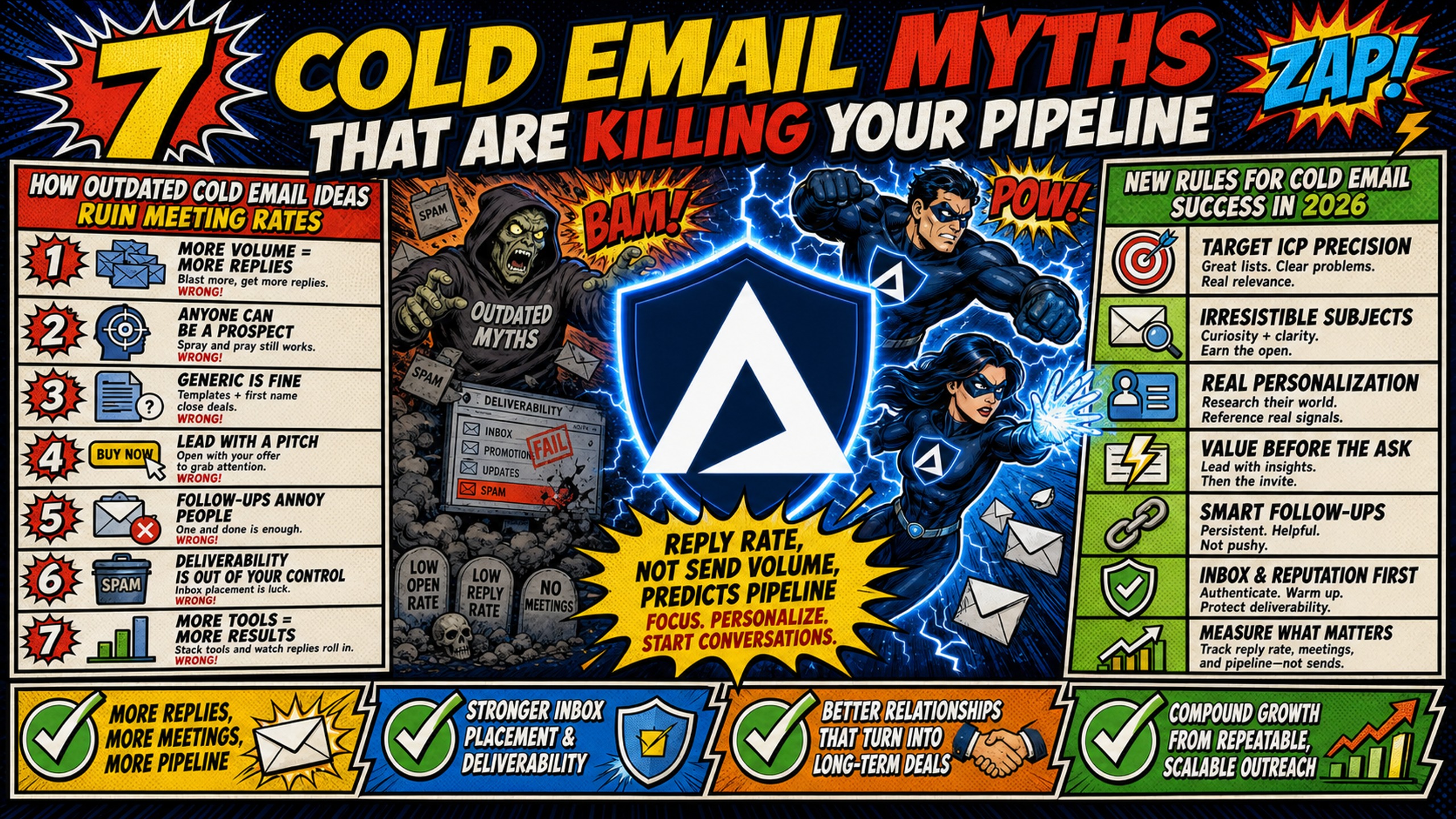
TL;DR: Cold email still books meetings, but reply rate rather than send volume predicts pipeline. Instantly's Cold Email Benchmark Report 2026 puts the average reply rate at 3.43% and top performers above 10%, and the gap comes from seven outdated beliefs about volume, manual personalization, single-touch sends, tool price, channel death, purchased lists, and DNS complexity. What closes it is narrow targeting, verified lists under a 2% bounce rate, follow-up sequences, and clean infrastructure. Sender reputation, the score inbox providers assign to a domain and IP, depends on dedicated IPs and correct SPF, DKIM, and DMARC records rather than how much a tool costs. Inframail automates that DNS setup and provisions unlimited Microsoft inboxes on a dedicated IP for $147 per month flat (before domain and warmup costs), against per-seat pricing on Google Workspace.
Most agencies and outbound teams run cold email campaigns on advice that was outdated two years ago. The result is reply rates that lag industry benchmarks and domains that lose inbox placement.
Cold email myths persist because they sound logical. Send more emails, get more replies. Personalize every message manually, and buy a lead list and blast it.
Each was marginally true in 2020, but inbox providers changed the rules. What worked then now damages sender reputation and kills pipeline.
This article names seven cold email myths, explains why each fails with current data, and replaces them with practices that drive reply rates in 2026.
How outdated cold email ideas ruin meeting rates
Cold email still books meetings. The gap between teams that succeed and teams that burn domains comes down to false beliefs about what drives results.
These misconceptions show up in three places. Deliverability craters when volume spikes or list quality drops. Reply rates fall well below the 3.43% average in Instantly's Cold Email Benchmark Report 2026 because targeting is loose, while top performers clear 10%+ with tightly targeted lists. Agency owners burn budget on per-inbox pricing and manual DNS setup when flat-rate infrastructure and automation have already solved both problems.
New rules for cold email success in 2026
The cold email best practices that work now differ from what most teams learned. Volume matters only after targeting and sender reputation are locked. Personalization still matters, but writing a unique opening line per prospect does not scale past 20-30 emails a day, while a signal-based segmentation system takes one sender to 50-100, according to Stealery, so enrichment and automation need to handle the rest. Infrastructure matters, but it no longer requires 12 hours of DNS work per 50 domains.
Teams booking meetings consistently in 2026 send from dedicated IPs with clean reputation. They verify lists to keep bounce rates under 2%. They automate DNS setup and inbox provisioning. They measure reply rate, not open rate, because Apple's Mail Privacy Protection downloads remote content in the background whether or not the recipient engages with the email, which makes open rate unreliable.
Myth 1: More volume equals more replies
The myth is that more emails equal more replies. The reality is that sudden volume spikes trigger spam filters and tank sender reputation faster than any other variable.
Inbox providers evaluate sending consistency alongside complaint and bounce rates, so a sudden volume jump on a domain with no sending history gives them nothing to trust. The result can be throttling, spam folder placement, or blocking. High volume works only after the domain builds trust through consistent, lower-volume sending.
Why volume spikes damage deliverability and reply rates
Sender reputation is the score inbox providers assign based on sending behavior. A spike on a brand-new domain immediately damages deliverability because providers have no reputation baseline.
Sending 10,000 emails at 1% reply rate books the same meetings as 1,000 emails at 10%, at ten times the domain risk.
Focusing on reply rates, not volume
Reply rate predicts pipeline. Open rate is vanity now that Apple's Mail Privacy Protection downloads remote content in the background whether or not the recipient engages with the email. Send volume is input, not outcome.
Track reply rate per sequence, persona, and domain. If a sequence falls below the 3.43% average, pause and diagnose deliverability, targeting, or messaging. A 5% reply rate on 500 emails matches 0.5% on 5,000 (25 replies each), and protects the domain while doing it.
Myth 2: Personalization requires manual research
The myth is that personalization requires manual research on every prospect. The reality is that triggered data and automation enable personalization at scale without hours of labor.
Manual personalization breaks down as lists grow. Senders who insist on hand-researching burn out or abandon outbound. Teams that scale use data triggers, enrichment tools, and adaptive templates.
Scaling outreach without manual labor
Personalization at scale means dynamic fields and triggered data, not writing from scratch. According to Hunter's analysis of 11 million cold emails, campaigns with 50 recipients or fewer get an average 5.8% reply rate, compared to 2.1% for campaigns with 1000+ recipients. The specific information for each small cohort comes from automated enrichment.
Enrichment platforms pull data on job changes, funding, launches, and hiring. Feed that data into your sending platform and map it to variables.
Automating data for triggered email
Triggered emails respond to specific events. A prospect raises Series A, posts a job for a role your product supports, or mentions a pain point on LinkedIn.
Set up monitors for signals that matter to your ICP. Use Apollo to enrich contacts with firmographic and behavioral data, then send through Inframail's unlimited inboxes without per-seat fees scaling against you. Map fields to templates so every send references something specific and recent. This scales to thousands of emails monthly without manual research.
Segment lists into cohorts of 50 or fewer with shared attributes. Write one template per cohort and let the platform handle the rest.
Myth 3: One great email is enough
The myth is that one great email is enough. The reality is that follow-ups contribute a large share of all replies, so a single email forfeits close to half your pipeline.
Single-touch campaigns leave pipeline on the table. Prospects miss the first email, deprioritize it, or need multiple exposures.
Why single-touch campaigns kill ROI
One email captures prospects who checked their inbox at the right moment. Follow-ups capture the rest. Per Instantly's 2026 dataset, the first email captures 58% of replies and follow-ups capture the remaining 42%.
If a single email gets a 2% reply rate and follow-ups contribute 42% of total replies, the full sequence reaches about 3.4% on the same list. That is roughly 1.7x the meetings for the same list size. The marginal cost of follow-ups is near zero.
Setting your follow-up cadence
Cadence is spacing between emails. Too fast feels spammy, and too slow loses momentum. Start with 3-4 days between emails one and two, then 5-7 days for subsequent follow-ups.
Test three, five, and seven emails to find your sequence length sweet spot. The 2026 benchmark data states that the sweet spot for sequence length is 4-7 touchpoints. Stop adding follow-ups once each extra email stops producing a meaningful lift in replies.
Adjust based on reply behavior. If replies cluster on email two, tighten that gap. If email four drives replies, extend the sequence.
Myth 4: Expensive tools guarantee deliverability
The myth is that paying more guarantees inbox placement. The reality is that deliverability depends on infrastructure, sender reputation, and list quality, not tool price.
Teams assume expensive platforms solve deliverability. They do not. Deliverability is a function of DNS setup, IP reputation, bounce rate, and spam complaints. Expensive tools with poor infrastructure still land in spam.
Beyond warmup: Real inbox placement
Warmup tools simulate engagement to build reputation. They are necessary but not sufficient. A warmed domain with bad lists still lands in spam.
Inbox placement depends on three factors. DNS records like SPF, DKIM, and DMARC must be configured correctly. The sending IP must have clean reputation. Engagement metrics like replies and low complaints signal that recipients want your emails.
Warmup builds reputation and engagement signals, but it cannot fix a misconfigured DNS record or a bad list. Inframail's warmup guide covers the process, but DNS and IP setup happen first.
Infrastructure that actually matters
The components that matter are DNS records and IP type. Get those right and deliverability follows.
SPF specifies which IPs can send for the domain. DKIM adds a cryptographic signature. DMARC tells providers what to do if SPF or DKIM fail. Misconfigured records guarantee spam placement.
Shared IP pools mean your reputation depends on other senders. If another business in the pool hits spam traps, that behavior pulls down inbox placement for everyone. Mailforge uses shared IP pools, while Inframail includes one dedicated IP on Unlimited Plan and three on Agency Pack, isolating your reputation from other users.
Myth 5: Cold email is dead
The myth is that cold email no longer works. The reality is that reply rates declined but cold email still books meetings for teams following modern practices.
Two 2024 datasets put the average at 4.1% (Hunter, 11 million emails) and 5.1% (Belkins with Reply), and 2026 benchmark data puts it at 3.43%. That decline reflects tighter filters and competition, not channel death. Teams that adapt generate pipeline. Teams running 2020 playbooks do not.
Current reply rate standards
Average cold email reply rate in 2024 was 5.1%, down from 7% the prior year, according to a Belkins study run with Reply. Hunter's analysis of 11 million cold emails sent in 2024 put the average campaign reply rate at 4.1%. Top performers hit 10%+ through targeting, hooks, and cadence. These are averages across all senders, including teams with poor lists, so they represent baseline rather than ceiling.
How to amplify your cold email results
The fastest improvement is tightening targeting. A 10% reply rate on a small, targeted list beats 2% on a huge, generic list.
- Segment by role, company size, industry, and trigger event.
- Write one template per segment and reference the trigger in the first line.
- Keep the ask small.
Kidous Mahteme's cold email copy framework shows how a value-first hook and low-friction CTA lift reply rates.
Myth 6: Purchased lists are the only scalable option
The myth is that purchased lead lists are the only scalable data source. The reality is that purchased lists have high bounce rates, trigger spam filters, and damage reputation faster than any other variable.
Purchased lists are cheap and fast, making them tempting. They are also full of stale data and spam traps, so skipping verification makes bounces worse. DeBounce advises keeping total bounce rates under 2% for a healthy sender reputation and warns that 3 to 5% indicates list quality problems, and anything above 5% puts sender reputation at risk.
The hidden costs of stale data
Stale data was accurate when collected but decayed. People change jobs, companies rebrand, addresses deactivate. A list that was clean six months ago will have decayed.
Purchased lists are a common reason cold emails bounce because they include dormant domains and spam traps. Purchased and rented lists carry a total bounce rate of 15-40%, against 2-5% for cold outreach generally, according to Bulk Email Checker. That is far above the 5% level that puts sender reputation at risk, because purchased lists skew toward stale contacts. Every bounce signals poor list quality to providers.
Stop buying data, start tracking signals
The alternative is building lists based on signals and enrichment. Signals indicate a prospect might need your product now: funding announcements, job postings, launches, leadership changes.
Track signals that matter to your ICP. When one fires, enrich the contact and add them to a sequence. This takes more effort upfront, but it keeps bounce rates under 2%, which Bulk Email Checker describes as the maximum acceptable threshold for maintaining healthy sender reputation. Small, targeted sends also reply better. Hunter's analysis found campaigns with 50 recipients or fewer average a 5.8% reply rate, compared to 2.1% for campaigns with 1000+ recipients.
Stop chasing leads, start picking them
The mindset shift is from volume to selection. Purchased lists are volume. Signal-based lists pick the right prospects at the right time.
- Define your ICP tightly.
- Identify three to five signals indicating buying intent, and set up monitors using Apollo, LinkedIn Sales Navigator, or industry databases.
- Verify every contact before adding to sequences.
This produces smaller lists but higher reply rates.
Myth 7: DNS setup requires technical expertise
The myth is that DNS setup requires technical expertise and hours of manual work. The reality is that modern platforms automate the entire process, so teams spin up domains in minutes.
Manual DNS setup for 50 domains takes 12+ hours according to Inframail's scaling guide. Each domain requires separate SPF, DKIM, and DMARC configuration plus propagation time. That cost used to be unavoidable. Not anymore.
Automating SPF, DKIM, and DMARC
Inframail automates DNS setup. Purchase a domain through the platform or transfer one, and the platform creates SPF, DKIM, and DMARC records automatically without DNS panel access. Setup for 10 inboxes takes 2 minutes according to customer testimonials. Automation eliminates the manual bottleneck, so teams no longer need DNS syntax knowledge or propagation waits.
Flat-rate pricing versus per-inbox costs
Cost does not have to scale linearly with inbox count. Google Workspace charges per seat at $8.40 per user per month on the Flexible Plan, so the bill climbs every time you add an inbox. Inframail charges $147/month flat for unlimited inboxes, which means the cost stops moving once you cross the breakeven point.
That breakeven sits at roughly 18 inboxes. Below it, per-seat pricing is cheaper on platform fee alone, and 10 inboxes on Google Workspace cost $84/month against Inframail's $147. Above it the gap widens fast, so 50 inboxes cost $420/month on Google Workspace versus $147 flat, a $273/month difference. At 200 inboxes Google Workspace reaches $1,680/month while Inframail stays at $147.
Domain costs and warmup tools apply on both sides and are not included in those figures. Domains run $5-16 per year each, and warmup tools typically run $15-50 per inbox per month. For an agency still sending from under 18 inboxes, the flat rate buys automated DNS setup and a dedicated IP rather than a lower bill. The savings arrive once outbound scales past that point.
Cost and setup comparison
| Inboxes | Google Workspace | Inframail | Difference |
|---|---|---|---|
| 10 | $84/month | $147/month | Inframail costs $63 more |
| 20 | $168/month | $147/month | $21/month saved |
| 50 | $420/month | $147/month | $273/month saved |
| 200 | $1,680/month | $147/month | $1,533/month saved |
Google Workspace Business Starter at $8.40 per user per month (Flexible Plan). Platform fee only. Domains ($5-16 per year each) and warmup tools ($15-50 per inbox per month) apply on both sides.
| Infrastructure Component | Google Workspace (50 inboxes) | Inframail Unlimited (50 inboxes) |
|---|---|---|
| Platform fee | $420/month ($8.40 × 50) | $147/month flat |
| Domain costs (50 domains) | $250-800/year ($5-16 each) | $250-800/year ($5-16 each) |
| Warmup tools | $750-2,500/month ($15-50 × 50) | $750-2,500/month (external tool required) |
| Setup time per 50 domains | 12+ hours manual DNS | Near-instant, approximately 2 minutes per 10 inboxes per customer testimonials |
| IP type | N/A | 1 dedicated US IP |
| Monthly platform savings | $0 (baseline platform fee of $420/month) | $273/month (before domain and warmup costs) |
Myth vs. reality quick reference
| Myth | Reality | Fix |
|---|---|---|
| More volume equals more replies | Volume spikes destroy sender reputation | Ramp gradually, focus on reply rate not send count |
| Personalization requires manual research | Triggered data enables scale | Use enrichment tools and dynamic fields |
| One great email is enough | Follow-ups contribute 42% of all replies | Build 4-7 email sequences with 3-7 day spacing |
| Expensive tools guarantee deliverability | Infrastructure and lists matter more than price | Verify lists, use dedicated IPs, automate DNS |
| Cold email is dead | Average reply rates are 3.43-5.1% | Target tightly, warm properly, iterate on data |
| Purchased lists are the only scalable option | Purchased lists average 15-40% bounce rates | Build signal-based lists, verify before sending |
| DNS setup is too technical | Modern platforms automate configuration | Use Inframail to spin up domains in minutes |
What actually drives cold email reply rates in 2026
Most reply rate gains in 2026 come from four variables: targeting, infrastructure, sequence design, and iteration. Get all four right and 10%+ reply rates are achievable.
Four variables determine reply rates in 2026:
- Quality targeting: Narrow ICP definition beats broad lists. Segment into cohorts of 50 or fewer with shared attributes. Verify every email before sending to keep bounce rates under 2%.
- Send triggers: Monitor signals that indicate timing like funding, hiring, or product launches. Use enrichment platforms to track contacts' recent activity. Map fields to templates so sends reference something specific and recent.
- Inbox health: Check DNS records to confirm SPF, DKIM, and DMARC are correct. Use dedicated IPs to isolate reputation. Keep bounce rates under 2% by verifying lists before sending. Monitor spam complaints and keep the rate under 0.1%, review the source and frequency between 0.1% and 0.2%, reduce risky sends and segment complaints between 0.2% and 0.3%, and treat anything above 0.3% as outside the safe range according to Suped's email deliverability guide. Inframail's dashboard tracks health with blacklist monitoring and automated delisting requests.
- Data-driven iteration: Test one variable at a time such as subject line, hook, CTA, or cadence. Measure reply rate by variant. Kidous Mahteme's deliverability guide shows how DNS and sending pattern changes improve placement. Iterate on infrastructure, targeting, and messaging in parallel.
Start sending with Inframail
Inframail is flat-rate Microsoft email infrastructure for teams running cold email at scale. The Unlimited Plan costs $147/month for unlimited inboxes (before domain and warmup costs), includes 1 dedicated US IP, and automates SPF, DKIM, and DMARC setup without DNS panel access.
In this case study video, see how Inframail helped a client build a cold email outbound system at 10x lower infrastructure costs, scale to 80 domains and over 400 email accounts with 90%+ open rates, and generate 20-30 leads and over $20,000 in new revenue within the first 30 days.
Sign up to Inframail and get started today.
FAQs
What's a good reply rate for cold email in 2026?
A good reply rate for cold email in 2026 is 5-10%, with 10%+ considered excellent. Industry benchmarks show averages between 3.43% and 5.1%, so anything above 5% puts you ahead of most senders.
How many domains do I need to send at scale?
The number of domains depends on daily send volume, and many cold email teams plan 20-50 campaign emails per mailbox per day, with a ceiling of roughly 500 per domain according to WarmupIP's calculator. These are practitioner conventions rather than published provider limits. New mailboxes start at just 5-10 emails per day and reach those volumes only after warmup is complete, so sending 1,000 emails per day typically requires 20-50 fully warmed inboxes spread across two or more domains. Inframail's Unlimited Plan supports 80,000 emails per month across unlimited inboxes, and Agency Pack supports 300,000 per month. An agency sending 1,000 emails per day across client campaigns lands near 20,000 per month, well inside the Unlimited Plan's 80,000.
Should I personalize every single email?
No, you should not manually personalize every email. Personalization at scale comes from triggered data, enrichment tools, and segmentation into cohorts of 50 or fewer contacts. Use dynamic fields for company name and trigger event, and automate the data collection process.
How long should I warm up a new domain?
Warmup takes a minimum of three to four weeks for a brand-new domain. Start with 5-10 emails per day per inbox in week 1 and increase gradually toward 150-200 warmup emails per day by week 4 according to Smartlead's email warmup guide, monitoring bounce and spam complaint rates as volume ramps. Campaign volume then starts lower, in the 20-50 per mailbox per day range.
What's the biggest cold email mistake teams make?
The biggest cold email mistake teams make is treating it as a volume game instead of a reputation and targeting game. Sending more emails to a bad list from a poorly configured domain guarantees low reply rates and burned sender reputation. Fix infrastructure and targeting first, then scale volume.
Key terms glossary
SPF (Sender Policy Framework): A DNS record that specifies which IP addresses are authorized to send email on behalf of your domain.
DKIM (DomainKeys Identified Mail): A DNS record that adds a cryptographic signature to each email, allowing inbox providers to verify the message was not altered.
DMARC (Domain-based Message Authentication, Reporting and Conformance): A DNS record that tells inbox providers what to do if SPF or DKIM checks fail. Options include quarantine, reject, or monitor.
Dedicated IP: An IP address used only by your sends, so your sender reputation is isolated from other users. Shared IP pools mean your reputation depends on other senders' behavior.
Sender reputation: A score inbox providers assign to your domain and IP based on sending behavior, bounce rate, spam complaints, and engagement. High reputation improves inbox placement.
Bounce rate: The percentage of emails that fail to deliver because the address is invalid, the domain does not exist, or the recipient server rejected the message. Bounce rates above 2% should trigger a list review, and rates above 3% indicate list quality problems, according to DeBounce.
Warmup: The process of gradually increasing send volume on a new domain or IP to build sender reputation. Warmup typically takes three to four weeks and involves sending to engaged contacts or using a warmup tool.
Reply rate: The percentage of delivered emails that receive a reply. Reply rate predicts pipeline and is more meaningful than open rate for cold email.
Blacklist: A list of domains or IPs flagged by inbox providers for spam-like behavior. Being blacklisted significantly reduces deliverability until the domain is delisted.
DNS propagation: The time required for DNS record changes to update across the internet, typically ranging from minutes to 48 hours depending on TTL settings.