
50+ best cold email subject lines for outreach campaigns
This article covers 50+ subject line templates across six proven angles: value proposition, mutual connection, industry-specific, question-based, follow-up, and
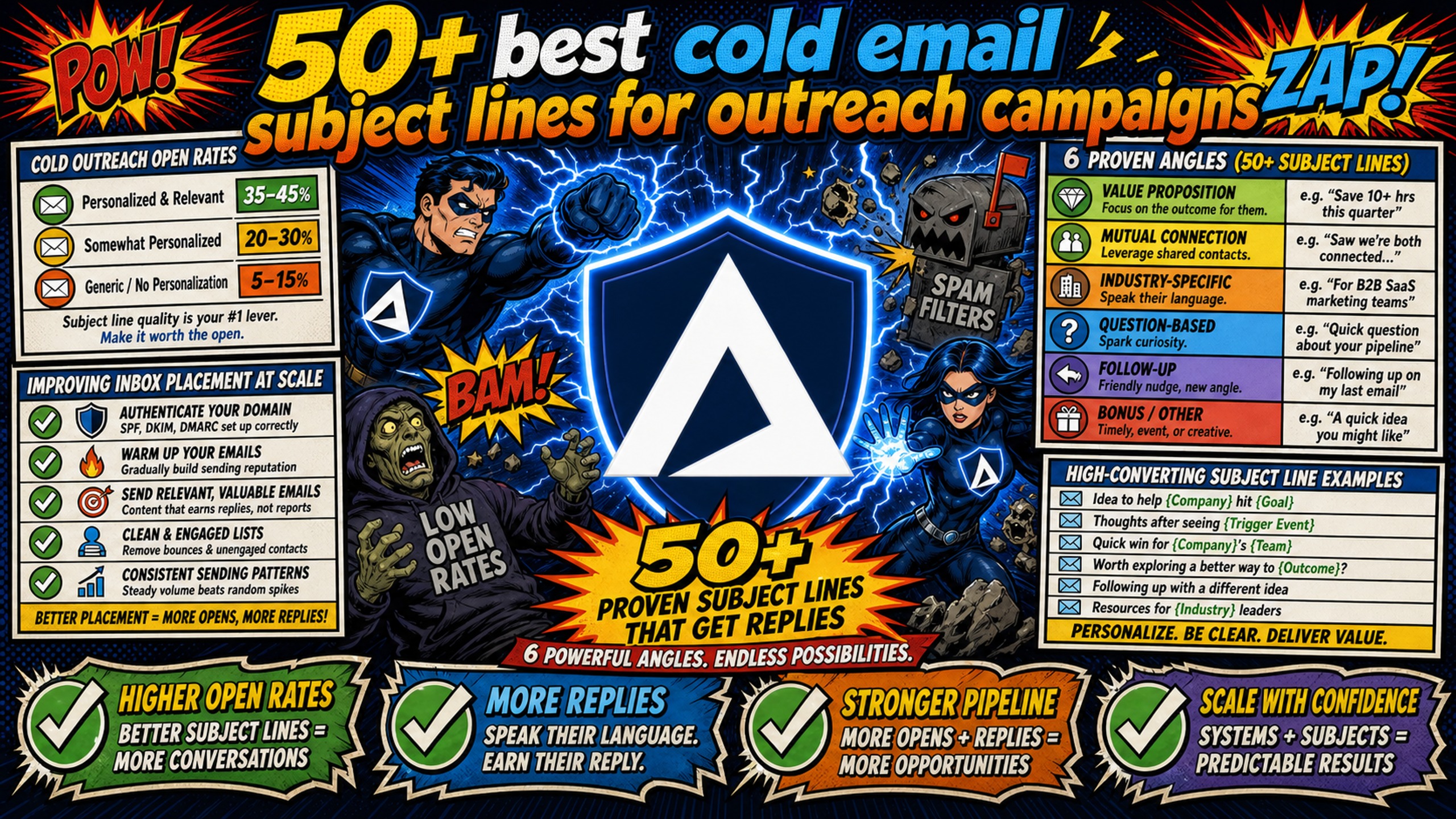
TL;DR: This article covers 50+ subject line templates across six proven angles: value proposition, mutual connection, industry-specific, question-based, follow-up, and trigger-event. Belkins' benchmark data shows 2-4 word subject lines average the highest open rates at 46%, making brevity the single most consistent formatting lever across all six categories. Templates alone don't book meetings if emails land in spam, so the article also includes a 5-step SPF/DKIM/DMARC setup checklist, a spam-trigger word list, and an A/B testing framework for drawing conclusions from clean data.
Campaign managers often spend significant time split-testing subject line variants, while misconfigured DNS (Domain Name System) records or shared IP contamination quietly push sends straight to spam. The two problems are not separate. Subject line copy and technical infrastructure operate as a system, and optimizing one without fixing the other wastes time. This article gives you 50+ ready-to-use subject line templates and the infrastructure checklist that makes sure those templates actually hit the primary inbox.
Cold outreach open rates
Open rates measure whether your subject line convinced someone to click, but they also measure whether your email arrived in the inbox at all. A shared IP pool exposes your sender reputation to every other user on that server, and when one bad actor engages in spam behavior, the IP range can be affected so your open rate collapses overnight through no fault of your copy.
Check your campaign spam health metrics before diagnosing a subject line problem. If inbox placement is significantly below target, fix the infrastructure first.
Typical open rates for cold sales emails
Belkins' benchmark data shows that 2-4 word subject lines average the highest open rates at 46%, making brevity the single most reliable formatting lever. Question-based formats and subject lines tied to a specific trigger event or personalization token consistently add lift to open and reply rates, with contextual relevance outperforming generic longer lines.
Improving inbox placement at scale
SPF (Sender Policy Framework), DKIM (DomainKeys Identified Mail), and DMARC (Domain-based Message Authentication, Reporting, and Conformance) authentication protocols work together to verify that your emails come from the domain they claim. SPF authorizes which servers can send for your domain, DKIM adds a digital signature to confirm message integrity, and DMARC ties these checks to the domain visible in the From header and tells receiving servers what to do when authentication fails. Running all three correctly is the foundation of consistent inbox placement, and propagation typically takes 24-48 hours after configuration.
For a full walkthrough of domain setup at scale, the cold email infrastructure guide covers the configuration steps required to keep domains healthy.
5-step DNS setup checklist:
- Purchase or transfer domains: Buy domains through your infrastructure platform or migrate existing ones with correct nameserver configuration.
- Configure the SPF record: Add a TXT record to your DNS authorizing the mail servers permitted to send for that domain.
- Configure the DKIM record: Add the DKIM public key as a TXT record so receiving servers can verify message signatures.
- Configure the DMARC record: Set a DMARC policy (p=none to start, then p=quarantine or p=reject after confirming SPF and DKIM pass consistently).
- Verify propagation and export credentials: Check DNS propagation within 24-48 hours, then export IMAP (Internet Message Access Protocol)/SMTP (Simple Mail Transfer Protocol) credentials to CSV (comma-separated values) and import into Instantly or Smartlead.
Inframail automates all five steps, configuring SPF, DKIM, and DMARC records automatically without requiring manual DNS panel access. The Smartlead integration guide covers the full credential export and import process, which takes minutes rather than the hours required for manual configuration across many domains.
Table 1: Cost vs. scale Total Cost of Ownership (TCO) comparison
| Inbox count | Google Workspace monthly cost | Inframail monthly cost | Monthly savings |
|---|---|---|---|
| 10 inboxes | $70-84 ($7-8.40/seat) | $129 + domains | -$45 to -$59 (GW wins at low volume) |
| 50 inboxes | $350-420 ($7-8.40/seat) | $129 + ~$34 domains = $163 | ~$187-257 |
| 100 inboxes | $700-840 ($7-8.40/seat) | $129 + domains ≈ $196 | ~$ 504-644 |
Domain costs ($5-$16/year each) and external warmup tools ($15-$50/month, required on both platforms) are not reflected above. At low inbox counts (under approximately 20), Google Workspace per-seat pricing may be more cost-effective, but the flat-rate model typically delivers savings once you scale beyond that point and the gap widens significantly at higher volumes. SeeInframail's full cost breakdownfor complete calculations including warmup and domain amortization.
"This is genuinely the best cold email hosting software you can find for many reasons... With 100 inboxes on the $129 / month plan sending 40 emails per inbox per day, I'm able to send 4,000 emails daily... Deliverability has been strong across the board." - Verified user review of Inframail
High-converting cold email subject line examples
Relevance beats generic personalization. A merge tag with a first name adds zero context. A subject line that references a trigger event, shared community, or specific company challenge tells the prospect you did your homework before hitting send. The templates below are organized by the type of relevance signal so you can match the right format to the context available in your prospect data. For benchmarks on what strong performance looks like, the B2B cold email response rates guide covers current standards across industries.
High-converting value proposition lines
The subject line sets the expectation. The opening line must immediately fulfill it. When you use generic openers, you destroy that expectation before the prospect reads a word of your value proposition. State the outcome in the subject line and let the body prove it with metric-driven specificity that filters for high-intent prospects.
Table 2: Generic vs. relevance-based subject lines
| Generic subject (before) | Relevance-based subject (after) | Trigger or context |
|---|---|---|
| "Quick question" | "Saw [Company] just hit 50 employees" | Company growth milestone |
| "Introduction from [Name]" | "[Mutual contact] said to reach out" | Mutual connection |
| "Checking in" | "Your LinkedIn post on [topic] caught my eye" | Recent content |
Value proposition subject line templates:
- "[Company] improved [metric] by [specific %] in [timeframe] - worth a look?"
- "3 ways [Industry] teams book more meetings without extra headcount"
- "Most [role]s overspend on inbox infrastructure by [calculated %] - here's the math"
- "[Benefit] in 2 minutes - no DNS work required"
- "How [Company] scaled to 200+ calls/month on cold email"
- "Re: [Company]'s website"
- "One thing I noticed on [Company]'s pricing page"
- "Quick observation about [Company]'s site"
Cold email openers using mutual ties
Mutual connections lower prospect defensiveness because the prospect's brain shifts from "who is this?" to "how do I know this person?" and that cognitive shift alone drives opens. Chris Bussing's top B2B subject lines covers similar mutual-tie frameworks for tech sales specifically.
- "[Mutual name] mentioned you're scaling outbound this quarter"
- "We're both in [Community/Group] - quick thought on [topic]"
- "Met [Mutual contact] at [Event] - they said to reach out"
- "[Name] said you're the person to talk to about [challenge]"
- "Both connected with [Name] - thought this was relevant"
Industry-specific cold email templates
Industry context signals that the email was written for this prospect's world, not a generic outbound list. Pair the industry signal with a specific challenge to increase relevance further.
- SaaS: "Most SaaS outbound teams overspend on inbox infrastructure"
- Marketing agencies: "[Agency] manages multiple clients with one flat-rate inbox stack"
- Recruiting: "How RPO firms source candidates via cold email at scale"
- Logistics: "Freight brokers cutting prospecting time with this setup"
- Consulting: "How [Consulting firm type] book more discovery calls/month"
- Staffing: "Staffing agencies scaling domains - this is the infrastructure"
- B2B SaaS SDR teams: "Cut your inbox costs while scaling outbound capacity"
High-converting question subject line templates
Questions drive curiosity by creating an open loop. The prospect wants the answer, and opening the email is the only way to close it. Industry research shows question-based subject lines perform strongly, making them one of the most effective formats in cold outreach. Watch CTAs (calls to action) that drive reply rates when paired with curiosity-based subject lines.
Pain-point question templates (open because they name an active frustration):
- "Still configuring DNS records manually for every new client?"
- "Why are your open rates dropping despite good copy?"
- "Is your inbox provider charging per seat as you scale?"
- "How many hours did your team spend on domain setup this month?"
- "Are shared IPs tanking your deliverability without warning?"
Curiosity-gap hook templates (open because they withhold just enough to require a click):
- "What [Company]'s ops team figured out about inbox placement"
- "The infrastructure change that moved open rates significantly"
- "This setup is faster than manual configuration - significantly"
- "The reason your emails hit promotions (copy is only part of it)"
- "Most [Role] overlook this reply rate lever entirely"
Ready-to-use outreach question templates:
- "Is [Company] ready for [specific outcome] this quarter?"
- "What's your current cost per inbox across your client base?"
- "Would cutting your DNS setup time from hours to minutes matter?"
- "Are you handling [specific pain point] with a manual process?"
- "Which part of cold email infrastructure costs you the most time?"
High-converting follow-up subject line templates
Follow-ups generate most replies, not the initial send, and sequences with 3-4 steps consistently outperform single-touch campaigns. Each follow-up needs a subject line that builds on the previous one without repeating it. This cold email follow-up framework covers how to use a different value angle at each step.
Mid-sequence follow-up templates (shift the frame or add a new proof point):
- "Different angle on [original topic]"
- "One more thing about [Company]'s [relevant challenge]"
- "Quick follow-up: [specific metric from first email]"
- "Did this land in spam? (Genuine question)"
- "3 other [Industry] teams who solved this"
Sample follow-up 2 script (Day 3-4): "Wanted to add some context to my last note. [Company X] was in a similar position and cut their infrastructure costs within a few months. Worth a 15-minute call to see if the same applies here?"
Breakup email subject lines (counter-intuitively trigger high reply rates by removing pressure):
- "Closing your file (unless timing is off)"
- "Last note from me, [First name]"
- "Removing you from my list - wanted to check first"
- "Is this a no, or just bad timing?"
- "Signing off - unless [specific challenge] is still relevant"
Event-based sales email subject lines
Trigger events provide the perfect context for outreach because they signal that something changed in the prospect's world, and change creates buying intent. A funding announcement, job posting, product launch, or conference attendance gives your email a reason to exist right now. The LinkedIn trigger event framework walks through catching high-intent signals the moment they surface.
Trigger event templates (reference the event specifically; generic congratulations get ignored):
- "Congrats on the Series B - scaling outbound next?"
- "[Company] just launched [product] - saw a cold email angle"
- "Now that [Company] is hiring SDRs (Sales Development Representatives), one thing to check"
- "Your [product launch] is live - is your inbox infrastructure ready?"
- "Saw [Company] expanding into [market] - timing felt right"
New role templates (new VPs and Heads of Growth actively evaluate tools in their first 90 days):
- "Congrats on the new [Title] role at [Company]"
- "Building your outbound stack at [Company]? Quick thought"
- "New role, clean slate - here's how others start fast"
- "Most new [Title]s inherit a broken inbox setup - check yours"
- "First 90 days as [Title] - things to fix in your stack"
Post-event follow-up templates (you share context with the prospect, so use it):
- "Great to see you at [Event] - quick follow-up"
- "From [Event]: the inbox placement question you raised"
- "We were both at [Event] - one thing stuck with me"
- "After [Webinar/Event]: the infrastructure slide you asked about"
- "[Event] attendees are asking this about deliverability"
Subject lines that trigger spam filters
Poor subject line formatting causes two problems: it reduces open rates and trains ESPs to filter future sends from your domain, and both problems compound over time so early spam signals become expensive to recover from. Nick Abraham's deliverability rules covers the current filter patterns in detail.
Flagged terms to remove from subjects
Modern ESP (Email Service Provider) spam filters flag both specific words and combinations of formatting signals. Industry spam word analyses identify the highest-risk categories. Each spam flag increases the probability that future sends from that domain land in spam, compounding deliverability issues over time and requiring hours of troubleshooting or domain replacement.
Spam trigger categories to avoid:
- Financial promises: Words suggesting guaranteed financial gains or risk-free returns
- Urgency and pressure: "Act now," "urgent," "limited time," "offer expires," "last chance," "don't miss out"
- Too-good-to-be-true: "Free," "100% free," "no cost," "no risk," "you've been selected"
- Health claims: "Lose weight," "miracle," "cure," "diet"
- Security triggers: "Verify now," "account suspended," "update required"
- High-pressure language: "Act now," "last chance," "limited time," "offer expires" (combines trigger word risk with low-trust signaling)
- Formatting red flags: ALL CAPS words, multiple exclamation points (!!!), excessive question marks (???) Modern spam filters analyze context, not just individual words, so combining a trigger word with aggressive formatting multiplies the risk. Keep urgency real and earned: "Saw your team is hiring 3 SDRs" is urgent because it's timely. "Act now before this offer expires!" triggers filters because it's manufactured.
What to do when a domain gets blacklisted
When open rates drop suddenly, you face one of three causes: a blacklisted domain, misconfigured DNS, or a spam-triggered subject line pattern. The diagnostic flow chart below helps isolate the root cause before spending time rewriting copy.
If a domain gets blacklisted, Inframail's monitoring dashboard detects the flag and auto-submits delisting requests. Inframail reports a 68.3% delisting success rate within 48 hours, and support is available 16 hours a day (7:00 AM to 11:00 PM PST), 7 days a week from real people. The Microsoft blacklist guide covers the specific escalation path for Outlook-related blocks. For a cost breakdown across providers, see cold email infrastructure costs across 7 platforms.
"We spent months hunting for a reliable cold-emailing stack... We chose the competitor. A month later, we switched back to Inframail. Zero issues since. Rock-solid infrastructure, sharp support, genuinely dependable." - Verified user review of Inframail
A/B testing cold email subject lines
Campaign managers often run invalid tests without realizing it, comparing subject lines across different send days, different list segments, or different infrastructure setups, then drawing conclusions from noise rather than signal. DynamicYield's A/B testing methodology and AB Tasty's sample size guidance both recommend a minimum of 1,000 recipients per variant to reach 95% statistical confidence.
3 rules for accurate subject line tests:
- Test one variable at a time: Change the subject line and keep the sender name, send time, body copy, and sending infrastructure identical across both variants. If two variables change simultaneously, you cannot attribute the result to either one.
- Use a sufficient sample size: Aim for at least 1,000 recipients per variant for statistically significant results at 95% confidence. Smaller lists produce directional signals only, not actionable conclusions.
- Keep sending infrastructure identical: Both variants must send from the same domain setup, the same IP type, and the same warmup status. Testing Variant A from a fresh domain and Variant B from a warmed domain contaminates every metric.
Once you have clean test data, isolate the subject line effect from body copy performance. Open rate measures subject line appeal, and reply rate measures body copy and CTA. If open rate rises but reply rate stays flat, the subject line attracted the wrong audience or set a mismatched expectation. B2B response rate benchmarks provide context for evaluating whether reply rate performance reflects copy quality or list quality.
Declare a winner at 95% statistical confidence and rotate the losing variant out of active sequences immediately. Running an underperformer past a clear losing threshold burns domain reputation and trains ESPs to filter your address.
Quick tips for high-converting subject lines
The following tips cover four high-impact variables that affect whether a subject line gets opened: character length, personalization, sequence length, and emoji use.
Keep subject lines under 50 characters
Litmus email client rendering data shows mobile clients cut subject lines after approximately 40-50 characters, which translates to roughly 5-7 words at the outer limit. Belkins' benchmark data confirms that 2-4 word subject lines average the highest open rates at 46%, so shorter consistently wins on both mobile formatting and attention. A subject line that reaches the natural character limit on most mobile clients loses its core message before the prospect decides whether to open.
When to use personalized subject lines
First-name merge tags add minimal lift without additional context because the prospect knows you didn't do real research when you simply insert their name into a generic subject line. Personalization works when it references something specific: a company milestone, a job posting, a LinkedIn post, or a mutual connection. Pair personalization tokens with a specific trigger event or data point to make the subject line feel genuinely relevant rather than mail-merge obvious.
Optimal follow-up count for sequences
Plan three to four follow-up steps after the initial send because this covers the optimal sequence length for most B2B cold outreach, and more than four steps without a reply typically indicates a list quality or targeting problem rather than an insufficient number of touches. Each step should introduce a new angle or reduce the ask rather than re-sending the same message with different phrasing. For sales email automation tools that help manage sequence timing at scale, compare current stack options before committing to a platform.
Do emojis improve cold email reply rates?
For B2B cold outreach, emojis in subject lines consistently produce lower open rates and fewer replies than plain-text subject lines, a pattern observed across practitioner data from agencies running high-volume campaigns. For formal B2B outreach targeting enterprise buyers, avoid emojis entirely. For informal industries or younger demographics, 1-2 emojis in the body (not the subject line) carry less risk than in the subject itself.
Sign up to Inframail today and provision domains quickly with automated DNS configuration. The Unlimited Plan at $129/month gives you unlimited inboxes on a dedicated US-based IP with automated DNS configuration, so you focus on building better sequences instead of managing DNS panels.
FAQs
How can campaign managers verify Inframail's customer count and reviews?
Inframail's homepage displays a 4.8/5 rating badge and states "Trusted by 2,000+ B2B Companies," with 33 independent reviews visible on Trustpilot. Both the badge and the Trustpilot page are publicly checkable at any time.
What is the full stack cost of running 50 inboxes on Inframail?
The total monthly cost for 50 inboxes is approximately $163 (covering the $129 platform fee plus roughly $34 in amortized domain costs across 50 domains), though total cost including external warmup tools may be higher. External warmup tools ($15-$50/month) are an additional cost required on both Inframail and Google Workspace setups.
What is the support SLA if an Inframail domain gets blacklisted?
Inframail support is available 16 hours a day (7:00 AM to 11:00 PM PST), 7 days a week from real people, and the platform's automated delisting protocol achieves a 68.3% success rate within 48 hours of a domain being flagged. The Microsoft blacklist guide details the escalation path for Outlook-related blocks.
Does Inframail work with Instantly and Smartlead?
Yes. Inframail provisions each inbox with IMAP/SMTP credentials that export directly to CSV. That CSV imports into Instantly or Smartlead following each platform's import process, as covered in the Smartlead integration guide.
How does Inframail's dedicated IP differ from competitors like Maildoso?
Inframail provides 1 dedicated US-based IP on the Unlimited Plan ($129/month) and 3 on the Agency Pack ($327/month), meaning your sending reputation is isolated from other users entirely. Maildoso uses shared IP infrastructure with heavy IP rotation where multiple senders share IP addresses.
Does Inframail include email warmup?
No. Inframail does not include a built-in warmup tool. External warmup services such as Warmbox or Lemwarm run $15-$50/month and are required separately. Inframail's Done-for-you (DFY) email campaign setup service includes free warmup as part of that offering.
Key terms glossary
Dedicated IP: An IP address assigned exclusively to a single sender, ensuring their domain reputation is not affected by any other user's sending behavior.
SPF (Sender Policy Framework): An email authentication method that uses DNS records to authorize specific mail servers to send email on behalf of a domain, blocking unauthorized senders from spoofing that domain.
DKIM (DomainKeys Identified Mail): An email authentication method that uses cryptographic signatures to verify that messages were sent by the domain owner and were not altered in transit.
DMARC (Domain-based Message Authentication, Reporting, and Conformance): An email authentication protocol that builds on SPF and DKIM to help receiving servers decide whether to deliver, quarantine, or reject a message, and sends authentication reports back to the domain owner.
Shared IP pool: A group of IP addresses used by multiple email senders simultaneously, meaning one sender's spam complaints or blacklist hits can potentially affect inbox placement rates for other senders sharing those IPs.
Inbox placement rate: The percentage of sent emails that land in the primary inbox rather than spam or promotions folders. A rate below 85-90% typically signals a DNS configuration issue, blacklisted domain, or shared IP contamination problem (see campaign spam health metrics for diagnostic steps).
ESP (Email Service Provider): A platform or service that sends, delivers, and manages email campaigns, such as Gmail, Outlook, or cold email infrastructure providers like Inframail.
SDR (Sales Development Representative): A sales role focused on prospecting and qualifying leads through outbound activities like cold email and cold calling.
TCO (Total Cost of Ownership): The complete cost of a solution including platform fees, domain costs, warmup tools, and all other recurring expenses required to operate at scale.
IMAP/SMTP: Internet Message Access Protocol and Simple Mail Transfer Protocol are the two standard protocols used to receive and send email. IMAP retrieves messages from a server, while SMTP handles outgoing mail delivery.
DNS propagation: The time required for updated DNS records (SPF, DKIM, DMARC) to replicate across global DNS servers after a change is made, generally ranging from several hours to a few days.